The best USB-C hard drive enclosures make it easy to reuse SATA drives, expand laptop storage, or turn spare disks into portable backup devices. The right model depends on your drive size, transfer-speed needs, and whether you want a simple enclosure, dock, or multi-bay solution.
We compared 10 options across compatibility, connectivity, installation, capacity support, and practical use cases to help you choose a reliable enclosure without paying for features you do not need.
Best 10 USB C Hard Drive Enclosures Picks for 2026
Best Dual-Bay Dock

- Mounts two 2.5- or 3.5-inch SATA drives
- Offline cloning without a computer
- Hot-swap bays with included power adapter
Best For: Drive cloning and two-drive file management
Best Simple 2.5-Inch Option
UGREEN Aluminum USB-C Enclosure

- USB-C 3.1 Gen 2 with UASP support
- Fits 2.5-inch SATA drives up to 6TB
- Tool-free, bus-powered aluminum design
Best For: Everyday portable storage and data transfers
Best for 3.5-Inch Drives

- Supports bare 2.5- and 3.5-inch SATA drives
- Includes required 12V power adapter
- Tool-free hot-swap design
Best For: Desktop SATA drive testing and swapping
Best 10Gbps Pick
Cable Matters Aluminum 2.5-inch USB-C Enclosure

- 10Gbps USB-C connectivity
- Tool-free 2.5-inch SATA drive installation
- Aluminum housing with UASP, TRIM, and S.M.A.R.T. support
Best For: Fast single-drive backups, upgrades, and troubleshooting
Best Budget-Compatible Option
BENFEI Tool-Free 2.5-inch SATA Enclosure

- USB-C and USB-A connection options
- Tool-free plug-and-play installation
- Supports 2.5-inch drives up to 6TB
Best For: Simple backups and drive transfers across mixed USB ports
Best High-Capacity Array
Yottamaster 5-Bay USB-C 3.5-inch Enclosure

- Five bays and up to 120TB total capacity
- Tool-free magnetic drive access
- 60mm fan with sleep and protection features
Best For: Large media libraries, backups, and always-on storage
Best Compact Pick
ORICO 2.5-inch USB-C Enclosure

- Fits 2.5-inch SATA SSDs and HDDs
- Tool-free, hot-swappable installation
- Includes USB-C-to-USB-A cable and UASP
Best For: Portable laptop-drive backups and quick swaps
Best Desktop-Drive Option
SABRENT USB 3.0 SATA Enclosure
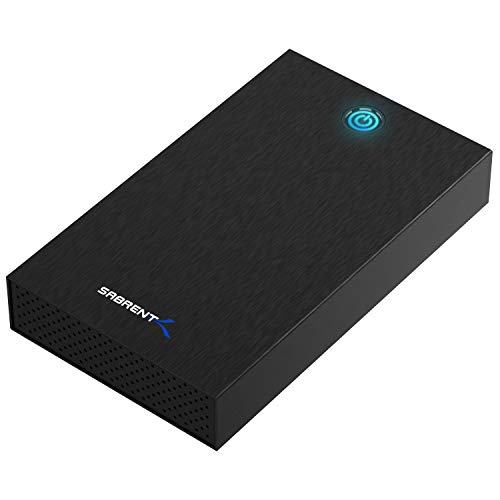
- Supports 2.5-inch and 3.5-inch SATA drives
- Includes 12V/2A external power adapter
- Aluminum shell with tool-free installation
Best For: Desktop SATA drives and mixed-size storage
Best USB-C Desktop Enclosure

- Supports SATA drives up to 24TB
- Includes detachable USB-A/USB-C cable
- Aluminum case with stand and sleep mode
Best For: High-capacity desktop drives with flexible host connectivity
Best Aluminum 2.5-Inch Enclosure – ORICO USB-C SATA Enclosure
For a compact usb c hard drive enclosure for a 2.5-inch SATA SSD or HDD, the ORICO DD25-C3 combines a 10Gbps USB-C connection with an aluminum shell and a versatile USB-C to USB-A/C cable. It is a practical choice for portable storage, backups, and console or smart-TV expansion.
Best For: Users who want a tool-free 2.5-inch SATA enclosure with broad device compatibility and included USB-C/USB-A connectivity.
Pros:
- Supports 2.5-inch SATA SSDs and HDDs up to 6TB in 7mm or 9.5mm thicknesses.
- 10Gbps USB 3.2 Gen 2 interface with UASP support.
- Aluminum housing, heat-dissipation vents, protection circuitry, and an 18-month warranty.
- Tool-free installation and a 10-minute automatic sleep mode.
Cons:
- Designed for 2.5-inch SATA drives only; it does not accommodate 3.5-inch, M.2, or NVMe drives.
- The drive is not included.
The ORICO is a well-rounded pick when portability, cooling, and cable flexibility matter. Its USB 3.2 Gen 2 interface is faster than the mechanical drive itself in many cases, while the built-in safeguards add reassurance for regular transfers.
Best Dual-Bay Dock – SABRENT USB-C Cloner Dock
The SABRENT EC-CH2B is a different kind of usb c hard drive enclosure: a dual-bay docking station for bare 2.5- and 3.5-inch SATA drives. It can mount two drives simultaneously over USB-C and clone one drive to another without a computer.
Best For: Users who need two-drive access, drive-to-drive cloning, or a convenient tool-free dock for bare SATA storage.
Pros:
- Supports two bare 2.5-inch or 3.5-inch SATA HDDs or SSDs at once.
- Offline 1-to-1 cloning works without connecting to a computer.
- Tool-free, hot-swappable bays with separate access LEDs.
- Includes a USB Type-C cable and power adapter.
Cons:
- Cloning runs up to 60MBps, and the target drive must be the same size as or larger than the source.
- Supports SATA only—not IDE/PATA, M.2, or NVMe drives.
- A USB-C port or separate USB-C-to-USB-A cable is required for the host computer.
This dock is the strongest option here for cloning and managing multiple bare SATA drives. Its 5Gbps USB 3.0 connection is suitable for general file work, but the dock’s main advantage is flexible two-bay access rather than maximum interface speed.
Best Simple 2.5-Inch Option – UGREEN Aluminum USB-C Enclosure
The UGREEN aluminum enclosure is a straightforward usb c hard drive enclosure for connecting one 2.5-inch SATA SSD or HDD to a computer or compatible device. It offers a USB 3.1 Gen 2 USB-C port, UASP support, tool-free installation, and no separate power supply.
Best For: Anyone seeking a compact, plug-and-play enclosure for upgrading, backing up, or transporting a single 2.5-inch SATA drive.
Pros:
- Supports 2.5-inch SATA I, II, and III drives up to 6TB.
- USB-C interface supports up to 10Gbps, with UASP and up to 6Gbps SATA transmission.
- Aluminum construction helps dissipate heat without a cooling fan.
- Works with Windows, Mac, Linux, game consoles, smart TVs, and routers.
Cons:
- Designed for 2.5-inch SATA drives only and does not support M.2 or NVMe storage.
- The included cable is USB-C to USB-C; USB-A-only devices require a separate adapter or cable.
- The drive is not included.
UGREEN keeps the setup simple while covering common operating systems and devices. It is a sensible choice for a single 2.5-inch SATA drive, especially when an aluminum body and bus-powered operation are more important than advanced docking features.
Best for 3.5-Inch Drives – SABRENT USB 3.0 SATA Dock
The SABRENT EC-DFLT is worth considering when you need a dock for larger 3.5-inch SATA drives, though it is not a native USB-C enclosure. It uses a USB 3.0 Type-A host connection, accepts both 2.5- and 3.5-inch bare SATA drives, and includes the power adapter required for 3.5-inch operation.
Best For: Users with bare 3.5-inch SATA HDDs who have a USB-A port or a compatible USB-C-to-USB-A adapter.
Pros:
- Accepts both 2.5-inch and 3.5-inch SATA I, II, and III HDDs and SSDs.
- Tool-free, hot-swappable lay-flat design with power and activity LEDs.
- Includes a 12V/2A adapter for stable 3.5-inch drive operation.
- Plug-and-play support for Windows 10/11, macOS, and Linux.
Cons:
- It has a USB Type-A host connection, not a USB-C port; an adapter is needed for USB-C-only computers.
- Does not support IDE/PATA, M.2 SATA, M.2 NVMe, SAS, or drives already inside USB enclosures.
- S.M.A.R.T. diagnostics are not passed through the USB bridge.
This is a useful alternative for desktop-sized SATA drives, but shoppers specifically seeking USB-C connectivity should choose an adapter or a different model. Its included power supply and open dock design make it practical for drive testing, swapping, and recovery work.
Best 10Gbps Pick – Cable Matters Aluminum 2.5-inch USB-C Enclosure
The Cable Matters enclosure is a strong choice among USB C hard drive enclosures when you need fast connectivity for a 2.5-inch SATA SSD or HDD. Its aluminum housing helps protect the drive and assist with heat dissipation, while the tool-free design makes installation and drive diagnosis straightforward.
Best For: Users upgrading, backing up, or troubleshooting 2.5-inch SATA drives with a compatible USB-C, Thunderbolt 3, Thunderbolt 4, or USB4 computer.
Pros:
- Supports data transfer rates up to 10Gbps and the SATA III drive limit of 6Gbps.
- Compatible with 2.5-inch SATA SSDs and HDDs up to 9.5mm thick.
- Includes USB-C and USB cables, with UASP, TRIM, and S.M.A.R.T. support on compatible systems.
Cons:
- Designed for one 2.5-inch drive rather than multiple drives or 3.5-inch disks.
- Actual speeds depend on the computer, drive, operating system, and cable.
Choose this model if 10Gbps USB-C performance and a sturdy aluminum enclosure matter more than multi-drive capacity. It is also a practical option for adding storage without opening a laptop.
Best Budget-Compatible Option – BENFEI Tool-Free 2.5-inch SATA Enclosure
The BENFEI enclosure offers a simple, flexible approach to USB C hard drive enclosures for 2.5-inch SATA drives. Its Type-C/Type-A connection design works with a range of computers and devices, while tool-free installation lets you install or swap a drive without a screwdriver.
Best For: Users who want an affordable 2.5-inch SATA enclosure with broad USB connection compatibility and support for drives up to 6TB.
Pros:
- Includes USB Type-C and Type-A connection options for convenient device compatibility.
- Tool-free, plug-and-play installation with hot-swappable operation.
- Supports 7mm and 9.5mm 2.5-inch SATA I/II/III SSDs and HDDs, with UASP support.
- Works with Windows, Linux, and MacOS 8.0 and above.
Cons:
- Transfer rates are listed up to 5Gbps, below the 10Gbps rating of faster USB-C enclosures.
- Supports one 2.5-inch drive and does not accommodate 3.5-inch HDDs.
This is a practical pick for moving files between computers, repurposing an older laptop drive, or creating a basic external drive. Its included connection options make it especially useful for mixed USB-C and USB-A setups.
Best High-Capacity Array – Yottamaster 5-Bay USB-C 3.5-inch Enclosure
The Yottamaster 5-bay enclosure is built for shoppers who need far more capacity than a single-drive USB C hard drive enclosure can provide. It accepts five 3.5-inch HDDs, offers up to 120TB of total capacity, and adds active cooling and protection features for demanding storage setups.
Best For: Video editors, photographers, archivists, and users building a high-capacity direct-attached storage setup for a PC, NAS, server, TV, or security system.
Pros:
- Five bays support up to 24TB per drive and 120TB total capacity.
- Tool-free magnetic top cover enables quick drive swaps without screws.
- 60mm fan and straight air duct are designed to improve cooling during heavy or continuous use.
- Supports UASP and TRIM, automatic sleep after 10 minutes of inactivity, and multiple protection safeguards.
Cons:
- The 3.5-inch, five-bay design is substantially larger than a portable single-drive enclosure.
- Listed USB 3.1 transfer speed is up to 5Gbps, not 10Gbps.
- Its capacity depends on purchasing and installing compatible drives separately.
Pick the Yottamaster when scalable storage and cooling are the priorities. It is overbuilt for occasional portable file transfers, but well suited to large media libraries, backups, and always-on storage workflows.
Best Compact Pick – ORICO 2.5-inch USB-C Enclosure
If you need a portable option among USB C hard drive enclosures, the ORICO 25PW1-C3 is built for 2.5-inch SATA SSDs and HDDs. Its tool-free design, included USB-C-to-USB-A cable, and UASP support make it a practical choice for storage expansion, backups, or accessing an older drive.
Best For: Laptop-sized 2.5-inch SATA drives, portable backups, and quick drive swaps.
Pros:
- Supports 2.5-inch 7mm and 9.5mm SATA I/II/III SSDs and HDDs.
- Tool-free installation and hot-swapping simplify drive changes.
- USB-C connection, UASP support, and an included USB-C-to-USB-A cable.
- Compact ABS body includes an EVA foam pad to reduce drive movement.
Cons:
- Designed for 2.5-inch drives only, not desktop-sized 3.5-inch drives.
- Plastic construction may be less heat-dissipating than an aluminum enclosure.
The ORICO stands out when portability and simple installation matter most. Confirm that your drive is a compatible 2.5-inch SATA model before buying.
Best Desktop-Drive Option – SABRENT USB 3.0 SATA Enclosure
The SABRENT EC-KSL3 is a versatile choice among USB C hard drive enclosures if you need to house either a 2.5-inch or 3.5-inch SATA drive. It uses a USB-A connection, includes a 12V/2A power adapter for desktop drives, and offers tool-free installation with UASP support.
Best For: Desktop and laptop SATA drives, especially users who need 3.5-inch-drive support.
Pros:
- Supports both 2.5-inch and 3.5-inch SATA HDDs and SSDs.
- Tool-free slide-and-click installation enables quick drive changes.
- Aluminum shell and ABS tray provide durability and shock absorption.
- Includes external power, LED status indicators, and Windows, macOS, and Linux support.
Cons:
- Uses USB-A, so USB-C-only computers require an adapter that is not included.
- Requires a wall outlet because it is not USB bus-powered.
- Not compatible with SAS, M.2, NVMe, or IDE/PATA drives.
The SABRENT is the more flexible pick for mixed-size SATA storage, but its USB-A interface and required AC adapter make it less convenient for a minimalist portable setup.
Best USB-C Desktop Enclosure – RSHTECH 3.5-inch SATA Case
The RSHTECH RSH-339STC combines desktop-drive capacity with flexible USB connectivity. This USB C hard drive enclosure supports 2.5-inch and 3.5-inch SATA drives up to 24TB, includes a detachable USB-A/USB-C cable, and adds an aluminum housing, vertical stand, and automatic sleep function.
Best For: High-capacity 3.5-inch SATA storage used with USB-C or USB-A computers and consoles.
Pros:
- Supports 2.5-inch and 3.5-inch SATA drives up to 24TB.
- Included 2-in-1 cable works with USB-A, USB-C, and Thunderbolt host ports.
- Aluminum housing, vents, and removable stand support desktop use and heat management.
- Offers UASP support, activity and power LEDs, and automatic sleep after inactivity.
Cons:
- The larger desktop enclosure is less portable than a 2.5-inch case.
- It supports one drive at a time.
For users who want direct USB-C compatibility without giving up 3.5-inch-drive support, the RSHTECH offers a well-equipped desktop format. Its stand and power controls also suit a permanent workstation setup.
How We Picked the Best USB C Hard Drive Enclosures
We selected models covering the most common storage setups, including 2.5-inch SATA SSDs and hard drives, 3.5-inch desktop drives, dual-bay docks, and multi-drive enclosures. Our comparison emphasizes connection type, advertised transfer capabilities, installation convenience, drive support, and the flexibility to use the enclosure with modern laptops and desktops.
Because USB performance depends on the drive, computer port, cable, and operating system, advertised speeds should be treated as maximum interface ratings rather than guaranteed real-world results. We also separated compact portable cases from powered docks designed for stationary use.
Quick Comparison
- Best for portable 2.5-inch drives: ORICO, UGREEN, Cable Matters, and BENFEI enclosures.
- Best for frequent drive access: SABRENT and RSHTECH docking-style models.
- Best for cloning or two drives: The SABRENT dual-bay docking station.
- Best for multiple 3.5-inch drives: The Yottamaster five-bay enclosure.
- Best for mixed-size desktop storage: A powered 2.5/3.5-inch dock or enclosure.
Key Buying Factors for USB-C Hard Drive Enclosures
Drive Size and Interface
Confirm whether you need a 2.5-inch SATA enclosure or support for a larger 3.5-inch desktop hard drive. A 2.5-inch case is typically compact and may be bus-powered, while 3.5-inch drives generally require an external power adapter. These products are intended for SATA drives, not M.2 NVMe SSDs, unless the listing specifically says otherwise.
USB Standard and Real-World Speed
USB 3.2 Gen 2 or 10Gbps models can offer faster transfers than USB 3.0 or 5Gbps designs, especially with a SATA SSD. However, your computer must have a matching USB-C port and the included cable must support the advertised standard. A faster enclosure cannot overcome a slower host port or hard drive.
Installation and Everyday Handling
Tool-free designs are convenient when swapping drives, while screw-secured cases may provide a more rigid fit. Look for UASP support, ventilation, a sturdy aluminum shell, and a cable that includes the connector your computer uses. For desktop drives, prioritize stable power, cooling, and a practical on/off arrangement.
Docking, Cloning, and Capacity
A single-drive enclosure is best for simple external storage. Choose a dock when you regularly access bare drives, and choose a dual-bay model if you need drive-to-drive cloning or simultaneous disk access. Multi-bay products are better suited to larger libraries, backups, and always-connected storage but occupy more space and usually require dedicated power.
Who Should Buy Which USB C Hard Drive Enclosures?
Choose a compact 2.5-inch enclosure if you are repurposing a laptop SATA SSD or HDD for travel, backups, or extra storage. A 10Gbps model is the better fit for SSD-heavy workflows and large file transfers. Pick a tool-free case if you change drives often and want quick installation.
For occasional access to both laptop and desktop drives, a powered 2.5/3.5-inch dock offers more flexibility. A dual-bay SABRENT dock makes sense for cloning or managing two drives, while the Yottamaster five-bay enclosure is the stronger choice for users building a larger, centralized SATA storage setup. Before buying, verify the drive type, available USB standard, operating-system compatibility, and whether the enclosure includes the required power supply and cable.