Choosing the right video switcher can make event production feel smooth instead of stressful. The best models help you move between cameras, screens, and media sources without missing a beat.
Whether you need a compact HDMI unit for small venues or a more capable SDI/HDMI switcher for larger productions, this roundup focuses on practical options for live events, streaming, and recording.
Best 10 Video Switcher for Events Picks for 2026
Flagship multi-camera pick
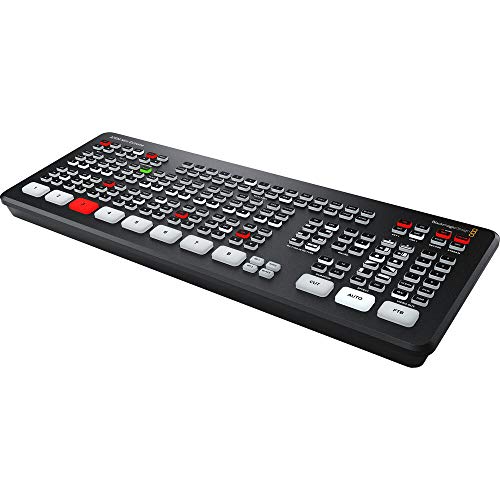
- 8 HDMI inputs with 10-bit HD switching
- Re-sync and format conversion on all inputs
- Built-in streaming, recording, and multiview
Best For: Larger event productions that need maximum HDMI input capacity
Portable solo-operator option
Roland V-1HD+ Compact Switcher

- Compact HDMI switcher for fast event setup
- 14-channel audio mixer with pro audio I/O
- Automatic switching and memory presets
Best For: Solo operators and small event teams
Streaming-focused compact pick

- 4 HDMI inputs with multiview support
- Built-in streaming and recording
- Lightweight live production switcher
Best For: Small events, training, and livestreams
Advanced event production pick

- Up to eight HDMI sources with seamless mixing
- Built-in multiview preview monitor
- Five-layer effects plus 18-channel audio mixer
Best For: Live events needing creative control and preview monitoring
Portable HDMI Live Switching

- 4 HDMI inputs with dual HDMI outputs for monitoring
- Streams to up to 3 platforms and supports USB/ETH workflows
- Records to SD card or USB SSD with audio control tools
Best For: HDMI-based event productions needing compact all-in-one switching
Portable All-in-One Production Studio
AVMATRIX Shark S6 Plus 17.3" Switcher

- Built-in 17.3-inch Full HD display for monitoring
- 6 SDI plus 2 HDMI inputs with RTMP streaming
- Dual XLR/TRS audio inputs with 48V phantom power
Best For: Mobile crews needing a self-contained SDI/HDMI event switcher
Hybrid SDI/HDMI Event Switching
Osee GoStream Duet SDI/HDMI Mixer

- 4 SDI and 4 HDMI inputs with USB-C and NDI HX source support
- Streams to up to 3 platforms via Ethernet or hotspot
- Includes Chroma Key, PIP, DSK, and multiple transitions
Best For: Mixed-source live events that need flexible SDI/HDMI switching
Portable HDMI Event Switcher
Mixer Plus Compact Video Switcher

- 4 HDMI inputs with zero-latency switching
- Built-in 4-inch multiview screen
- PTZ control and overlay tools
Best For: Portable event production with compact HDMI switching
Streaming-First Event Mixer

- SD card recording plus USB streaming
- Ethernet output to up to 3 platforms
- 4 HDMI inputs and 8 macro buttons
Best For: Churches, schools, and live events needing direct streaming
Pro AV Multi-Input Switcher
Tenveo 4K60FPS HDMI Video Switcher Mixer

- 4 HDMI and 4 SDI inputs with 5.5-inch screen
- USB recording plus UVC and Ethernet streaming
- PTZ and NDI|HX3 camera support
Best For: Large-scale events and pro AV productions with mixed inputs
Flagship multi-camera pick – Blackmagic ATEM Mini Extreme
If you need a video switcher for events that can handle a larger, fast-moving production, the Blackmagic Design ATEM Mini Extreme brings eight HDMI inputs, multiview, streaming, and recording into one compact unit. It is built for multi-camera live switching and includes re-sync plus format conversion on all eight HDMI inputs, which helps simplify event setups with mixed sources.
Best For: Larger event producers who want 8 HDMI inputs, multiview, and built-in streaming/recording in one box.
Pros:
- 8 HDMI inputs with 10-bit HD switching and embedded audio
- Re-sync and frame rate/format conversion on all 8 inputs
- Built-in streaming, recording, and multiview for live event workflows
- Compact live production switcher design for desktop-based control
Cons:
- HDMI-only input workflow may not suit mixed-connector productions
- More advanced than basic two- or four-camera event setups need
Overall, this is the most expandable option in the group for event teams that want room to grow. Its strength is combining high input count with the practical event tools needed to monitor, stream, and record from one switcher.
Portable solo-operator option – Roland V-1HD+ Compact Switcher
The Roland Ultimate Compact V-1HD+ is a practical video switcher for events when you want a portable, easy-to-learn setup with live switching and audio control in one unit. It combines HDMI switching with a 14-channel audio mixer, automatic video switching, and memory presets, making it useful for single-operator event workflows.
Best For: Solo operators who want a compact HDMI switcher with built-in audio mixing and fast setup.
Pros:
- Compact and portable for fast event setup
- Standalone 14-channel audio mixer with pro audio I/O
- Technology-assisted automatic video switching
- Four-layer effects and keying engine plus eight memory presets
Cons:
- Only 4 HDMI ports, so it suits smaller source counts
- Best fit for monitor-based control rather than larger routing needs
This is a strong choice if your event production values speed, portability, and simple operation over maximum input count. The built-in audio mixer and preset recall make it especially appealing for repeatable live shows and livestreams.
Streaming-focused compact pick – Blackmagic ATEM Mini Pro
If you need a reliable video switcher for events with straightforward multicamera needs, the Blackmagic Design ATEM Mini Pro offers four HDMI inputs, multiview, and built-in streaming and recording. It is designed for multicamera live streaming to the internet or broadcast-style applications, and its compact size makes it easy to bring into education, business, or esports event setups.
Best For: Small event teams that want easy multicamera switching with built-in streaming and recording.
Pros:
- 4 HDMI inputs with embedded audio
- Built-in streaming, recording, and multiview
- Includes a built-in 6-input, 2-channel audio mixer
- USB-C webcam output and external drive recording support
Cons:
- Only one HDMI program output, so routing is simpler than higher-end units
- Four inputs may be limiting for larger event productions
For small-to-mid-size event coverage, this switcher covers the essentials without adding unnecessary complexity. Its strength is the combination of live switching and direct streaming features in a lightweight package.
Advanced event production pick – Roland V-8HD 8-Input Switcher
The Roland V-8HD is a video switcher for events that need more source capacity and more creative control than a basic compact unit. It supports up to eight HDMI sources, adds a built-in multi-viewer preview monitor, and includes a five-layer effects and keying engine for more polished live productions.
Best For: Event producers who want eight HDMI inputs, advanced effects, and built-in preview monitoring.
Pros:
- Seamless mixing of up to eight HDMI sources
- Built-in multi-viewer preview monitor for source monitoring
- Five-layer effects and keying engine for graphics and compositing
- 18-channel digital audio mixer with effects and sync delay on every channel
Cons:
- More complex than simpler event switchers
- Does not include built-in streaming or recording features in the notes provided
This model makes sense when the event production needs are broader than simple switching, especially if you want layered visuals and detailed audio control. It stands out as the most feature-rich Roland option here for live events, presentations, and broadcasts.
Portable HDMI Live Switching – Osee GoStream Deck HDMI Pro
If you want a compact video switcher for events that keeps the workflow simple without sacrificing pro features, the Osee GoStream Deck is built for that middle ground. It gives you 4 HDMI inputs, dual HDMI outputs for multiview/monitoring, Ethernet streaming, USB output for OBS or vMix, and onboard recording/playback so you can handle small productions from one box.
Best For: Conferences, worship services, weddings, education events, podcasts, and smaller live productions that need HDMI-based switching with solid onboard control.
Pros:
- 4 HDMI inputs plus 2 HDMI outputs for multiview and monitoring
- Records to SD card or USB SSD while playing back MP4 files
- Streams to up to 3 platforms, with Ethernet or USB workflow options
- Includes audio controls, EQ, limiter, fader, and a headphone output
Cons:
- HDMI-focused setup may be limiting for SDI-heavy productions
- Built-in workflow is strong, but advanced control may still benefit from a PC or companion module
- Best suited to compact productions rather than large-scale multi-format rigs
Overall, the GoStream Deck stands out as a practical event switcher for teams that want a hands-on panel, built-in streaming, and useful overlay tools without moving up to a larger production system.
Portable All-in-One Production Studio – AVMATRIX Shark S6 Plus 17.3" Switcher
For teams that need a more complete video switcher for events, the AVMATRIX Shark S6 Plus combines switching, monitoring, streaming, recording, and PTZ control in one portable unit. Its built-in 17.3-inch Full HD display, SDI/HDMI inputs, and XLR audio support make it a strong fit for mobile productions that need more connectivity and live-event flexibility.
Best For: Mobile live production crews, field events, and multi-camera shows that need SDI/HDMI flexibility, built-in monitoring, and pro audio.
Pros:
- Built-in 17.3-inch FHD IPS display for switching and monitoring on the unit
- Supports up to 8 sources with 6 SDI and 2 HDMI inputs
- Includes RTMP streaming, internal recording, and USB-C UVC capture
- Pro audio section with dual XLR/TRS inputs and 48V phantom power
Cons:
- Larger, more studio-like design may be less convenient than smaller portable switchers
- Feature depth can be more than a simple two- or three-camera event setup needs
- Designed around a more advanced workflow, so it may take longer to learn
The Shark S6 Plus is best when you want a self-contained production surface with serious input flexibility and event-ready audio, especially for crews that regularly switch between camera, streaming, and recording duties.
Hybrid SDI/HDMI Event Switching – Osee GoStream Duet SDI/HDMI Mixer
Osee GoStream Duet Multiple Camera SDI and HDMI Live Stream Video Mixer Switcher
Check Price On AmazonIf your event workflow mixes SDI and HDMI sources, the Osee GoStream Duet is a flexible video switcher for events that can handle a broader range of gear. It supports 4 SDI inputs, 4 HDMI inputs, USB-C, NDI HX source input, and SD/SSD playback, plus landscape and portrait operation for both input and output workflows.
Best For: Event teams that need mixed SDI/HDMI connectivity, NDI HX support, and multi-platform streaming in a compact switcher.
Pros:
- 4 SDI inputs and 4 HDMI inputs for mixed-camera event setups
- Supports NDI HX source input plus USB-C and SD/SSD playback
- Streams to up to 3 platforms through Ethernet or smartphone hotspot
- Includes key effects like Chroma Key, PIP, DSK, and multiple transitions
Cons:
- Relies on external display/workflow compared with all-in-one units that include a built-in screen
- Some advanced features depend on firmware and software setup
- More connectivity can mean a more complex setup than HDMI-only switchers
The GoStream Duet is a smart choice when you need one switcher to bridge different camera and streaming sources without adding extra converters, especially in environments that may grow over time.
Portable HDMI Event Switcher – Mixer Plus Compact Video Switcher
If you need a video switcher for events that stays small without stripping out useful controls, the Mixer Plus is built around portability and fast HDMI switching. It combines 4 HDMI inputs with a built-in 4-inch multiview screen, so you can monitor sources, program, and preview from the unit itself instead of carrying extra gear. It also adds transition effects, scene presets, and broadcast-style tools that help keep event switching organized.
Best For: Small teams, mobile creators, and event setups that want an ultra-compact HDMI switcher with built-in monitoring.
Pros:
- 4 HDMI inputs with zero-latency switching
- Built-in 4-inch display with multiview monitoring
- 30 transition effects and 4 user-defined scene presets
- PTZ control plus chroma key, luma key, PIP, DSK, and logo overlay
Cons:
- Only 4 HDMI inputs, so larger productions may outgrow it
- Built for HDMI workflows rather than SDI-heavy setups
- Best fit is compact production, not a full-size control surface
Overall, this is a strong choice if your event workflow values portability, on-device monitoring, and straightforward multi-camera switching. The AUX output options and multiview display add flexibility, but the real appeal is how much it packs into a very small footprint.
Streaming-First Event Mixer – Osee GoStream Deck Pro
For buyers comparing a video switcher for events, the Osee GoStream Deck Pro stands out for its mix of live streaming, recording, and direct platform output. It can record to SD card while streaming over USB to software like OBS, Zoom, or Teams, and it also supports Ethernet streaming to up to 3 platforms without an external computer. That makes it a practical option when you want one box to handle more of the production workflow.
Best For: Churches, schools, and event teams that want built-in recording and computer-free streaming options.
Pros:
- Records to SD card while streaming over USB
- Built-in hardware encoder for Ethernet streaming to up to 3 platforms
- 4 HDMI inputs plus an extra USB camera input
- 8 Macro buttons for quick switching, overlays, and transitions
Cons:
- Focuses on HDMI and USB workflows rather than SDI inputs
- Best when you want streaming features, not just basic switching
- Compact control layout may be less hands-on than larger mixers
In practice, this model is appealing when event production needs both flexibility and backup recording. If you want a switcher that can feed software, local storage, and direct network streams, it offers a capable all-in-one approach.
Pro AV Multi-Input Switcher – Tenveo 4K60FPS HDMI Video Switcher Mixer
If you need a more full-featured video switcher for events, the Tenveo PC500 is aimed at larger live production workflows. It combines 4 HDMI inputs, 4 SDI inputs, USB connectivity, and NDI|HX3 support, with a built-in 5.5-inch screen for monitoring. The result is a switcher designed for multi-camera productions that need flexible routing, recording, and streaming options.
Best For: Large events, worship services, conferences, and studio productions that need HDMI, SDI, and network streaming support.
Pros:
- 4 HDMI inputs and 4 SDI inputs for flexible event setups
- Built-in 5.5-inch screen with customizable multi-view output
- USB recording plus UVC and Ethernet streaming options
- PTZ and NDI|HX3 support with camera auto-detection and presets
Cons:
- More advanced than a simple plug-and-play switcher
- Likely more hardware than needed for smaller events
- Feature set may require more setup and planning
This is the strongest fit when your event production needs both traditional AV connections and modern streaming workflows. It offers a wide feature set for teams that want one switcher to manage cameras, record backups, and push content to multiple outputs.
How We Picked the Best Video Switcher for Events
For a Video Switcher for Events, the most important factors are input flexibility, reliable switching, recording and streaming options, and ease of use under pressure. We prioritized products that support common event workflows, including multi-camera coverage, presentation feeds, live streaming, and on-site recording. Portability, screen visibility, and connector variety also mattered, since event crews often need to set up quickly and operate in changing environments.
Quick Comparison
In simple terms, compact HDMI switchers are best for smaller events, hybrid meetings, and creators who want fast operation with minimal setup. HDMI/SDI models offer more versatility for professional venues, longer cable runs, and mixed-source productions. Units with built-in displays can make monitoring easier, while models with streaming and recording tools reduce the need for extra gear.
Key Buying Factors for Video Switcher for Events
Inputs and Signal Types
Start by matching the switcher to your cameras and sources. HDMI is common and affordable, while SDI is often preferred for larger event spaces because it handles longer cable runs more reliably. If your setup may grow, choose a model with extra inputs and mixed-format support.
Output, Streaming, and Recording
Many event teams need more than basic switching. Look for clean program output, USB webcam output, RTMP streaming, or internal recording if you want a simpler workflow. These features can reduce the number of devices you need to bring and make live event management easier.
Control, Monitoring, and Speed
During live production, a clear interface matters. Tactile buttons, preview/program monitoring, and built-in screens can help operators react faster and avoid mistakes. If the switcher will be used by volunteers or small teams, straightforward controls are especially valuable.
Portability and Power
For mobile productions, size and power options can matter as much as features. A compact switcher may be ideal for travel, but larger units often provide better monitoring and connection density. Consider your typical venue size, transport needs, and setup time.
Who Should Buy Which Video Switcher for Events?
If you run small events, classes, worship services, or corporate streams, a compact HDMI switcher is often the easiest choice. If you work in larger venues, use longer camera runs, or need more robust connectivity, an SDI/HDMI model is usually the better fit. For teams that value all-in-one convenience, choose a switcher with built-in recording, streaming, and monitoring tools so your Video Switcher for Events can handle more of the production in one place.