Choosing the right switcher can make live streaming, teaching, events, and multicam production feel far more professional. The best video switchers with HDMI help you move between cameras smoothly, manage audio, and keep your workflow simple.
Below, we’ve focused on practical options for creators, educators, and production teams who want reliable switching, clear outputs, and features that match real-world use.
Best 10 Video Switchers with Hdmi Picks for 2026
Live Production Pick

- 4 HDMI inputs with multiview monitoring
- Built-in streaming and recording support
- Includes audio mixing and live transitions
Best For: Multicamera creators needing an all-in-one HDMI production switcher
Simple Input Switcher
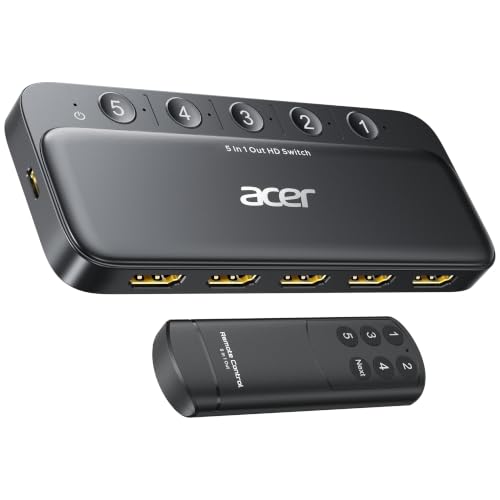
- Expands one display to five HDMI sources
- Supports 4K@60Hz, HDR, and HDCP 2.3
- Remote and button control for easy switching
Best For: Home or office users who need basic multi-device HDMI switching
Advanced Streaming Choice
CINETREAK Stream 1 HDMI Switcher

- 4 HDMI inputs plus AUX and dual outputs
- Dual RTMP streaming and PTZ control
- Recording, playback, and chroma/luma keying
Best For: Creators who want an advanced HDMI live streaming control center
Compact Live Mixer

- 4 HDMI inputs with 1080p support
- USB 3.0 output for streaming software
- Compact body with LCD monitoring
Best For: Solo creators and small setups needing compact HDMI live switching
4-Source Simple Switching
Anker 4-in-1 HDMI Switch for 4K@60Hz

- Four HDMI inputs to one display
- Remote plus one-click switching
- Supports 4K clarity with included power cable
Best For: Users who need a simple four-source HDMI switch for one screen
Pro Live Production Mixer
Tenveo 4K60 HDMI/SDI Live Streaming Switcher

- 4 HDMI and 4 SDI inputs
- USB, Ethernet, and NDI|HX3 streaming support
- Dual recording with PTZ camera control
Best For: Professional live streaming setups needing HDMI, SDI, and recording features
Compact Two-Source Switch
Anker 2-in-1 HDMI Monitor Switch

- Two HDMI sources to one display
- Manual button switching only
- Supports 4K@60Hz output
Best For: Simple two-device setups that only need one display
Flexible Cloud-Enabled Pick
RGBlink Mini V3 4K HDMI Switcher

- 4 HDMI inputs with dual HDMI outputs
- 2.1" touch screen with T-bar control
- Optional TAO Cloud features for PTZ and recording
Best For: Creators who want a compact switcher with upgradeable features
All-in-One Multiview Pick
CineTreak Mixer Plus HDMI Switcher

- Built-in 4.5-inch multiview display
- 4 HDMI inputs with 30 transition effects
- USB 3.0 UVC streaming without capture card
Best For: Users who want an integrated display and streaming tools in one unit
Portable Compact Pick
Mixer Plus 4 HDMI Live Streaming Switcher

- Built-in 4" multiview screen
- 4 HDMI inputs with zero-latency switching
- PTZ, chroma key, and customizable AUX output
Best For: Mobile creators and small teams needing a portable switcher
Live Production Pick – Blackmagic ATEM Mini Pro HDMI
If you want a compact video switcher with hdmi inputs for multicamera streaming, the ATEM Mini Pro is built for fast live production. It combines 4 HDMI inputs, multiview monitoring, built-in recording, and streaming support in a single unit, making it practical for education, business presentations, and esports broadcasts.
Best For: Multicamera creators who want HDMI switching, built-in streaming, and multiview in one box.
Pros:
- 4 HDMI inputs with 10-bit 4:2:2 YUV support
- Built-in 6-input, 2-channel audio mixer
- Includes multiview plus cut, mix, dip, wipe, and DVE transitions
- USB-C output can act as a webcam output and support recording
Cons:
- Limited to 4 HDMI inputs, so larger productions may need more expansion
- No mention of SDI inputs or outputs
- Best suited to live production rather than simple source switching
The ATEM Mini Pro stands out if you need a practical production switcher rather than a basic HDMI selector. Its mix of streaming, multiview, and live effects makes it a strong fit for users building a real multicamera workflow.
Simple Input Switcher – Acer 5-in-1 HDMI Switch 4K60
If your goal is to route several devices into one display, this video switcher with hdmi is a straightforward 5-in-1 solution. It expands one HDMI output to five inputs and is designed for TVs, gaming setups, and office conference rooms where you want easy source selection without constant cable swapping.
Best For: Users who need a simple HDMI input switch for TVs, consoles, projectors, or office displays.
Pros:
- Switches 5 HDMI sources to 1 display
- Supports 4K at 60Hz with HDR and HDCP 2.3
- Includes both remote control and physical buttons
- Compatible with game consoles, laptops, streaming sticks, TVs, and projectors
Cons:
- Automatic switching is not supported
- Power adapter and HDMI cables are not included
- Requires short cable runs to reach full 4K60 performance
This is a practical pick if you just need to manage multiple HDMI sources cleanly. It focuses on convenience and compatibility rather than production features, which makes it ideal for everyday switching in home or office setups.
Advanced Streaming Choice – CINETREAK Stream 1 HDMI Switcher
For creators looking for a more advanced video switcher with hdmi sources, the CINETREAK Stream 1 is built for live streaming workflows. It offers 4 HDMI inputs, AUX support, dual RTMP streaming, PTZ camera control, recording, playback, and both landscape and portrait livestreaming options.
Best For: Streamers and small production teams that need advanced control, dual streaming, and flexible live formats.
Pros:
- Up to 4 HDMI inputs plus an AUX channel
- Dual RTMPS streaming to two destinations
- Built-in PTZ control for up to 4 cameras via VISCA
- Supports recording, playback, chroma/luma keying, and PIP
Cons:
- More complex than a basic HDMI switch for casual users
- Some features depend on workflow setup and network use
- Portrait and dual-stream tools may be overkill for simple switching needs
The Stream 1 is aimed at users who need more than source selection. Its combination of streaming, PTZ control, and studio features makes it a capable hub for more demanding live production environments.
Compact Live Mixer – FEELWORLD LIVEPRO L1 V1
If you want a compact video switcher with hdmi inputs for small live productions, the FEELWORLD LIVEPRO L1 V1 keeps the workflow simple. It provides 4 HDMI inputs, 1080p support, USB 3.0 webcam-style output, and a small form factor that is easy to use for single-person streaming setups.
Best For: Solo streamers and compact production setups that need simple multi-camera HDMI switching.
Pros:
- 4 HDMI inputs with 1 HDMI output, all supporting 1080p
- USB 3.0 output works like a built-in webcam for streaming software
- Compact design with a 2-inch LCD display
- Remote operation available through LAN and XPOSE software
Cons:
- Limited to 1080p rather than higher-resolution input support
- Fewer advanced features than larger studio switchers
- Designed more for compact setups than expansive productions
The LIVEPRO L1 V1 is a good fit when you want a manageable switcher that still covers the essentials for live production. It balances multi-camera input, monitoring, and USB output in a small package that suits single-operator workflows.
4-Source Simple Switching – Anker 4-in-1 HDMI Switch for 4K@60Hz
If you want video switchers with hdmi for a TV, projector, or gaming setup, this Anker 4-in-1 model is built for straightforward source switching without extra complexity. It expands one HDMI display into four inputs, includes a remote plus one-click control, and supports 4K clarity for clean everyday viewing.
Best For: Households, gamers, or office users who need an easy way to switch between four HDMI sources on one screen.
Pros:
- 4-in-1 input design lets you connect up to four HDMI sources to one display.
- Remote control and one-click switching make changing devices quick and simple.
- Supports 4K ultra-high-definition output for sharp visuals.
- Includes a USB-A to USB-C power cable for stable signal performance.
Cons:
- Does not support HDMI CEC.
- HDMI cables are not included.
- Only switches between connected sources; it is not a multi-view mixer.
This is a practical pick if you mainly need reliable source switching and want an uncomplicated setup. The Anker design keeps the focus on convenience, while the 4K@60Hz support helps it fit modern displays and consoles well.
Pro Live Production Mixer – Tenveo 4K60 HDMI/SDI Live Streaming Switcher
For buyers comparing video switchers with hdmi for live streaming, the Tenveo PC500 is a more professional all-in-one mixer than a basic HDMI selector. It combines 4 HDMI inputs, 4 SDI inputs, recording, USB streaming, NDI|HX3 support, and PTZ camera control for multi-camera productions.
Best For: Churches, studios, events, classrooms, and creators who need a feature-rich live streaming switcher with HDMI and SDI.
Pros:
- Supports 4 HDMI inputs and 4 SDI inputs, with 2 HDMI inputs handling up to 4K60FPS.
- Streams over USB3.0, Ethernet, and supported IP protocols including SRT, RTMP, RTSP, and NDI|HX3.
- Includes dual recording options via SD card, USB disk, or HDD, plus H.264 encoding.
- Can manage PTZ cameras with auto-detection, presets, AI tracking, and cruise tracks.
Cons:
- Much more complex than a basic HDMI switch.
- Designed for production workflows, so it may be overkill for simple home use.
- 1080P60FPS is the stated output format, even though some inputs support 4K60FPS.
If you need a true production switcher rather than a simple source toggle, this Tenveo model offers a lot of flexibility. Its mix of HDMI, SDI, streaming, and recording tools makes it suited to serious live video workflows.
Compact Two-Source Switch – Anker 2-in-1 HDMI Monitor Switch
This Anker option is a compact choice in video switchers with hdmi if you only need to share one display between two devices. It supports one button manual switching, outputs up to 4K@60Hz, and is designed for laptops, desktops, consoles, projectors, and other compatible gear.
Best For: Anyone who wants a small, easy-to-use two-source HDMI switch for a single display.
Pros:
- Simple 2-in-1-out layout for switching between two HDMI sources.
- Manual button switching keeps operation straightforward.
- Supports 4K@60Hz for high-resolution viewing.
- Broad compatibility with laptops, desktops, game consoles, projectors, and VR headsets.
Cons:
- Automatic signal detection is not supported.
- Only one display at a time is supported.
- Does not support HDMI CEC.
This switch is best when you want a no-frills way to alternate between two devices without unplugging cables. It is compact and practical, but it stays focused on basic source switching rather than advanced features.
Flexible Cloud-Enabled Pick – RGBlink Mini V3 4K HDMI Switcher
If you want video switchers with hdmi for a compact live-production setup, the RGBlink Mini V3 gives you four HDMI inputs, dual HDMI outputs, and a 2.1″ touch screen in a small footprint. It also adds UVC webcam mode for quick use with streaming and conferencing software, while TAO Cloud unlocks optional advanced features when you need them.
Best For: Entry-level creators who want a compact HDMI switcher with upgradeable features and streaming-friendly output options.
Pros:
- 4 HDMI inputs with dual 1080P HDMI outputs for program and preview workflows
- 2.1″ touch screen plus professional T-bar control for hands-on switching
- UVC webcam mode for direct recognition in OBS and other platforms
- Optional TAO Cloud licensing for PTZ control, recording, chroma key, and logo overlay
Cons:
- Some advanced functions require paid TAO Cloud activation
- Stable UVC streaming with OBS on Mac or PC requires the included USB 3.0 cable
- A 35W+ USB-C power adapter is recommended for stable performance
This is a practical choice if you want a compact switcher that can start simple and expand later. The built-in screen and dual-output design make it easier to manage small productions without adding extra gear.
All-in-One Multiview Pick – CineTreak Mixer Plus HDMI Switcher
Among video switchers with hdmi, the CineTreak Mixer Plus stands out for its built-in 4.5-inch multiview display, which lets you monitor all four inputs, program, preview, and audio levels without a separate monitor. It is built for small productions that want switching, monitoring, and streaming tools in one compact unit.
Best For: Users who want an all-in-one HDMI switcher with an integrated display for live production and streaming.
Pros:
- Built-in 4.5-inch screen shows four inputs, program, preview, resolution, and audio levels
- 4-channel HDMI switching with 30 transition effects, including Mix and DIP
- PTZ control for up to four compatible cameras via VISCA over IP
- USB 3.0 UVC output sends HD video to OBS and other streaming software without a capture card
Cons:
- Only four HDMI inputs, so it is geared toward smaller setups
- PTZ features depend on compatible cameras
- Audio workflow is based on 3.5 mm inputs and headphone monitoring rather than more advanced routing
If you value visibility and control in one box, this model is a strong practical option. Its built-in multiview screen and UVC output simplify both monitoring and streaming for live events, churches, and studios.
Portable Compact Pick – Mixer Plus 4 HDMI Live Streaming Switcher
If portability matters in your search for video switchers with hdmi, the Mixer Plus Compact keeps the core features of a four-input live switcher while adding a built-in 4″ screen for multiview monitoring. It is designed for small productions, online classes, events, YouTube, OBS, and Zoom workflows where a simple, portable setup is more important than a large control surface.
Best For: Mobile creators and small teams that want a compact four-input HDMI switcher with built-in monitoring.
Pros:
- Ultra-compact design with a built-in 4″ display for real-time multiview
- 4 HDMI inputs with zero-latency switching and 30 transition effects
- PTZ camera control plus chroma key, luma key, PIP, DSK, and logo overlay
- Customizable AUX HDMI output for flexible signal routing
Cons:
- Smaller screen than the 4.5-inch version in the same family
- Feature set is aimed at compact productions rather than larger multi-operator rigs
- No standalone claims about built-in audio inputs or headphone monitoring in the supplied notes
This model makes sense if you want a travel-friendly HDMI switcher without giving up core production tools. The combination of built-in monitoring, switching effects, and customizable output keeps it versatile for everyday streaming tasks.
How We Picked the Best Video Switchers with Hdmi
We focused on Video Switchers with Hdmi that offer the best mix of input count, output quality, ease of use, and live-production features. Priority went to models that support common creator needs such as 4K HDMI input or output, streaming, recording, external display support, and portable operation. We also considered screen quality, control options, and whether a switcher is better suited to simple source switching or more advanced production.
Quick Comparison
If you need a basic switcher for a monitor, console, or simple camera setup, a compact 2-in-1-out or 4-in-1-out model is usually enough. If you’re producing live streams, classes, or events, look for a dedicated live switcher with multiple HDMI inputs, built-in monitoring, and streaming or recording tools. Hybrid units with SDI support can be a smarter fit for larger venues or longer cable runs.
Key Buying Factors for Video Switchers with Hdmi
Input Count and Source Type
Start by counting your current sources, then add one more if you expect to grow. For cameras, laptops, and consoles, HDMI-only models are often enough. For more complex rigs, a switcher with SDI plus HDMI gives you more flexibility.
Resolution and Frame Rate
Match the switcher to your workflow. Many Video Switchers with Hdmi support 4K at 60Hz on the input side, but live streaming often still runs at 1080p60. Make sure the output standard fits your display, capture device, or streaming platform.
Monitoring and Control
A built-in screen, touch interface, or remote control can save time during a live show. Preview monitoring is especially useful when switching between cameras, adding graphics, or managing a production alone.
Streaming, Recording, and Audio Features
Some switchers go beyond source switching and include USB output, recording, playback, chroma key, or direct streaming support. If you produce webinars or church services, integrated audio handling and live-stream functions can be as important as video quality.
Who Should Buy Which Video Switchers with Hdmi?
Creators and solo streamers usually do best with a compact HDMI switcher that is easy to transport and quick to set up. Teachers, presenters, and small teams should look for a balanced model with multiple inputs, a screen, and simple controls. For studios, events, and advanced productions, choose a feature-rich switcher with more inputs, stronger monitoring, and streaming or recording support.
In short, the best choice depends on how many sources you use, whether you need 4K compatibility, and how much control you want during a live production. Pick the simplest model that still gives you room to grow.