The best computer monitor for programmers makes code easier to read, supports comfortable long sessions, and gives you enough workspace for terminals, documentation, and development tools.
These 10 monitors cover practical setups ranging from sharp 4K displays and USB-C docking monitors to ultrawide screens and fast 144Hz models. Use the buying guide below to narrow the list by resolution, size, connectivity, and desk space.
Best 10 Computer Monitor for Programmers Picks for 2026
Best Color-Accurate Pick

- 27-inch QHD IPS workspace
- 65W USB-C charging and data
- Pivot stand and Delta E < 2 color accuracy
Best For: Coding plus creative work
Best 4K Detail on a Budget

- 27-inch 4K UHD IPS display
- Height, tilt, and pivot adjustments
- DisplayHDR 400 and 95% DCI-P3
Best For: Detailed coding and multimedia
Best USB-C Productivity Hub
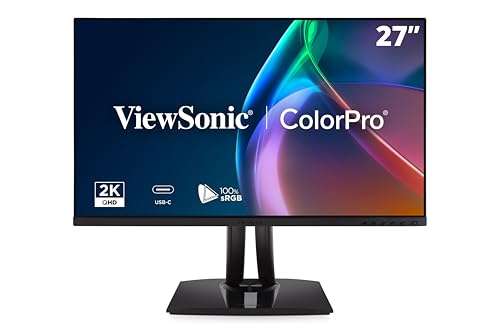
- 27-inch QHD display with 120Hz refresh
- 90W USB-C docking and charging
- Fully adjustable ergonomic stand
Best For: Laptop-based development desks
Best 4K USB-C Workstation Monitor

- 27-inch 4K UHD IPS display
- 90W USB-C power delivery
- Multiple ports and built-in speakers
Best For: Streamlined laptop workstations
Best Balanced QHD Pick

- 27-inch 2560x1440 IPS display
- 144Hz refresh with FreeSync
- Height, pivot, swivel, and tilt adjustments
Best For: Versatile coding, productivity, and entertainment
Best Large Budget Workspace

- Large 32-inch Full HD screen
- Three-sided borderless design
- Flicker Free and Eye Saver Mode
Best For: Large-screen coding and everyday productivity
Best USB-C Workstation Monitor

- 27-inch QHD IPS panel at 120Hz
- USB-C with up to 90W charging
- Height-adjustable stand with portrait pivot
Best For: USB-C laptop programming workstations
Ultrawide Multitasker
Samsung ViewFinity S50GC 34-Inch

- 34-inch Ultra-WQHD workspace
- PBP/PIP for two-source viewing
- 100Hz with eye-care features
Best For: Wide-screen coding and side-by-side multitasking
Balanced Desk Pick

- 27-inch QHD IPS display
- USB-C with 15W power delivery
- Six-section screen-splitting app
Best For: Compact coding desks and USB-C laptop setups
Premium Comfort Choice
Dell S3425DW 34-Inch Ultrawide

- 34-inch 3440 x 1440 VA display
- USB-C with up to 65W delivery
- 120Hz and ComfortView Plus
Best For: Long coding sessions and USB-C laptop workstations
Best Color-Accurate Pick – ASUS ProArt PA278CV
The ASUS ProArt PA278CV is a practical computer monitor for programmers who want a sharp 27-inch workspace, accurate color, and flexible positioning. Its QHD IPS panel provides useful room for code, documentation, and reference windows, while USB-C connectivity can simplify a laptop-based setup.
Best For: Programmers who also work with photo, video, or design projects and want a vertical coding option.
Pros:
- 27-inch QHD resolution offers a spacious, detailed workspace.
- USB-C supports data, display, and up to 65W laptop charging.
- Height adjustment, tilt, and 90-degree pivot support comfortable coding.
- Calman Verified Delta E < 2 and 100% sRGB suit color-sensitive work.
Cons:
- Its 75Hz refresh rate is more productivity-focused than gaming-focused.
- Only one HDMI port is listed.
Choose this model when accurate color and ergonomic flexibility matter as much as coding space. DisplayPort daisy-chaining also gives it potential for a multi-monitor workstation.
Best 4K Detail on a Budget – LG 27UP650K-W
The LG 27UP650K-W is a high-resolution computer monitor for programmers who want crisp text and plenty of desktop space in a 27-inch format. Its 4K IPS panel can make code, terminals, and side-by-side applications appear especially detailed, while the adjustable stand supports different working positions.
Best For: Programmers who prioritize 4K sharpness and use their monitor for both development and multimedia.
Pros:
- 4K UHD resolution provides a highly detailed coding workspace.
- IPS technology offers wide 178-degree viewing angles.
- Height, tilt, and pivot adjustments support ergonomic positioning.
- DisplayHDR 400 and up to 95% DCI-P3 coverage benefit visual media work.
Cons:
- 60Hz refresh rate is modest for fast-paced gaming.
- Connectivity is limited to HDMI and DisplayPort, with no listed USB-C input.
This LG is a strong fit if text clarity and 4K workspace density are your priorities. Its stand flexibility makes it easier to position for long coding sessions, including portrait-oriented work.
Best USB-C Productivity Hub – ViewSonic VP2756A-2K
The ViewSonic VP2756A-2K combines a responsive 120Hz refresh rate with a 27-inch QHD panel, making it a versatile computer monitor for programmers who switch between coding, browsing, and media. Its 90W USB-C docking capability can reduce cable clutter while keeping a compatible laptop powered.
Best For: Developers using laptops who want one-cable connectivity, smooth navigation, and a highly adjustable desk setup.
Pros:
- QHD resolution balances workspace area and image clarity.
- 120Hz refresh rate makes scrolling and general motion feel smoother.
- USB-C provides data, audio, video, and up to 90W charging.
- Fully adjustable stand includes tilt, swivel, rotation, and height adjustment.
Cons:
- It is less pixel-dense than a 4K monitor of the same size.
- The supplied notes list only one HDMI port.
This is an appealing all-rounder for a modern laptop development desk. The USB-C dock, daisy-chain support, and ergonomic stand are particularly useful for programmers building a flexible workstation.
Best 4K USB-C Workstation Monitor – LG 27UP850K-W
The LG 27UP850K-W is a well-equipped computer monitor for programmers who want 4K detail, USB-C laptop connectivity, and a broad selection of ports. Its 27-inch IPS display gives code and multitasking applications a sharp workspace, while the adjustable stand helps support comfortable positioning.
Best For: Programmers who want a 4K monitor with USB-C power delivery and built-in speakers for a streamlined workstation.
Pros:
- 4K UHD IPS resolution delivers sharp text and detailed application windows.
- USB-C supports data transfer and up to 90W power delivery.
- Two HDMI ports, DisplayPort, USB ports, and a headphone jack offer flexible connectivity.
- Height, tilt, and pivot adjustments support ergonomic use.
Cons:
- Its 60Hz refresh rate is not aimed at high-refresh gaming.
- The listed warranty is one year for parts and labor.
Compared with a basic 4K display, this LG adds useful workstation features for developers, including USB-C charging, multiple inputs, and built-in speakers. It is a sensible choice for a clean laptop-and-monitor setup.
Best Balanced QHD Pick – Dell 27 Plus QHD Monitor
If you want a capable computer monitor for programmers that also handles gaming and general entertainment, the Dell S2725DSM offers a strong balance of sharp QHD resolution, smooth motion, and ergonomic adjustment. Its 27-inch IPS panel provides 2560×1440 resolution, while the matte finish and eye-comfort features suit extended desktop sessions.
Best For: Programmers who want a versatile 27-inch QHD monitor with smooth refresh, built-in speakers, and a fully adjustable stand.
Pros:
- QHD resolution gives more workspace and detail than Full HD for code and multitasking.
- 144Hz refresh rate and AMD FreeSync support smooth scrolling, motion, and gaming.
- Height, tilt, pivot, and swivel adjustments make it easier to set a comfortable viewing position.
- Built-in dual 3W speakers and 4-star TÜV-certified eye-comfort features add convenience.
Cons:
- It provides only one HDMI port alongside DisplayPort.
- The 27-inch screen may feel limited for users who prefer an ultrawide or larger multi-window workspace.
The Dell is a well-rounded choice for coding, browsing, media, and gaming. Its QHD panel and adjustable stand are especially useful for long work sessions, while the high refresh rate adds a responsive feel beyond typical office monitors.
Best Large Budget Workspace – Samsung 32-inch Flat Monitor
The Samsung S32B304NWN is a practical computer monitor for programmers who prioritize a large screen and straightforward productivity features. Its 32-inch display provides generous physical space for code, documentation, and other windows, although its 1920×1080 resolution is less detailed than the QHD alternatives here.
Best For: Programmers seeking a large, simple Full HD display for office work, multitasking, and multimedia.
Pros:
- 32-inch screen offers plenty of room for code editors and reference material.
- Three-sided borderless design works well in a multi-monitor arrangement.
- Flicker Free and Eye Saver Mode are designed to make extended viewing more comfortable.
- AMD FreeSync and a 75Hz refresh rate support smoother everyday motion.
Cons:
- Full HD resolution is less sharp and provides less desktop workspace than QHD at this screen size.
- The 8ms response time and 75Hz refresh rate are more suited to everyday use than demanding gaming.
- Stand adjustability is not listed among the supplied features; wall mounting is supported.
This Samsung makes sense when screen size matters more than pixel density. It is a straightforward option for coding and general office use, particularly if you plan to build a clean multi-monitor setup or want a large display at a modest specification level.
Best USB-C Workstation Monitor – ViewSonic ColorPro VP2766-2K
The ViewSonic VP2766-2K is a strong computer monitor for programmers who use a USB-C laptop and want a cleaner desk setup. Its 27-inch QHD IPS panel combines 120Hz motion with 100% sRGB coverage, while USB-C provides video, data, and up to 90W of power through one cable.
Best For: Laptop-based programmers who want QHD clarity, USB-C charging, extensive connectivity, and an ergonomic stand.
Pros:
- QHD IPS resolution provides detailed workspace for code and multiple applications.
- USB-C supports video, data, and up to 90W power delivery for compatible laptops.
- 120Hz refresh rate, flicker-free technology, and low blue light features support comfortable daily use.
- Height, tilt, swivel, and 90-degree pivot adjustments support flexible positioning, including portrait mode.
Cons:
- Its color-focused features may be more than a programmer needs if visual accuracy is not important.
- The supplied specifications list one HDMI port, which may limit direct HDMI device connections.
- 5ms response time is suitable for general use but not positioned as the fastest gaming response.
The VP2766-2K stands out as the most workstation-oriented option in this group. Its USB-C hub and 90W charging can simplify laptop docking, while the portrait pivot and QHD resolution are useful for long code files and documentation.
Ultrawide Multitasker – Samsung ViewFinity S50GC 34-Inch
If you want a computer monitor for programmers that can keep multiple windows visible, the Samsung ViewFinity S50GC offers a spacious 34-inch Ultra-WQHD workspace. Its 21:9 format, 3440 x 1440 resolution, and PBP/PIP features are practical for comparing code, documentation, terminals, and project previews without constantly switching tabs.
Best For: Programmers who prioritize wide-screen multitasking and side-by-side workflows.
Pros:
- 34-inch 3440 x 1440 display provides generous horizontal workspace.
- PBP and PIP support lets you view content from two sources at once.
- 100Hz refresh rate, AMD FreeSync, and HDR10 support smooth motion and enhanced contrast.
- Ambient brightness adjustment, Eye Saver Mode, and Flicker Free technology support long work sessions.
Cons:
- Its 21:9 format may require window-layout adjustments compared with a standard 16:9 monitor.
- Connectivity is limited to two HDMI inputs and one DisplayPort input.
- The monitor does not list USB-C connectivity or built-in speakers.
The S50GC is a strong fit when screen width matters more than maximum pixel density or extensive connectivity. Its ultrawide layout and multitasking modes make it particularly useful for developers who regularly work across several visual resources.
Balanced Desk Pick – LG 27U630B-B QHD IPS Monitor
The LG 27U630B-B is a practical computer monitor for programmers who want sharp QHD text, wide IPS viewing angles, and a manageable 27-inch footprint. Its USB-C connection, adjustable stand, and screen-splitting Switch app make it well suited to organized home-office or business desks.
Best For: Developers seeking a compact QHD monitor with USB-C convenience and flexible multitasking tools.
Pros:
- 2560 x 1440 QHD resolution on a 27-inch IPS panel supports clear workspace detail.
- USB-C offers device connection and up to 15W power delivery.
- Height and tilt adjustment help improve desk ergonomics.
- Switch app can divide the display into up to six sections for multitasking.
Cons:
- Its 250 cd/m² brightness is more modest than some brighter displays.
- There is only one HDMI port listed.
- USB-C power delivery is limited to 15W, which may not replace a laptop charger.
This LG balances coding clarity, desk-friendly ergonomics, and useful software features without taking up ultrawide-monitor space. It is an especially sensible choice for programmers who connect a laptop by USB-C and want straightforward window organization.
Premium Comfort Choice – Dell S3425DW 34-Inch Ultrawide
For programmers who spend long hours at their desk, the Dell S3425DW combines a 34-inch 3440 x 1440 ultrawide panel with 120Hz performance, USB-C connectivity, and comfort-focused features. Its VA panel delivers a 3000:1 contrast ratio, while the single-cable USB-C connection can provide up to 65W of power.
Best For: Developers wanting an ultrawide productivity monitor with USB-C charging and strong comfort features.
Pros:
- 34-inch WQHD ultrawide resolution provides room for code, terminals, and reference material.
- USB-C supports up to 65W power delivery for a cleaner laptop setup.
- 120Hz refresh rate with FreeSync Premium supports smooth motion.
- 99% sRGB, 95% DCI-P3, built-in speakers, height adjustment, and ComfortView Plus add versatility.
Cons:
- At 20.7 pounds, it is substantially heavier than the Samsung ultrawide listed here.
- The VA panel’s 178-degree viewing angle is specified, but IPS-style viewing consistency is not provided.
- It has only two HDMI ports listed, despite offering broader USB connectivity.
The S3425DW is the most feature-rich option for a laptop-centered programming workstation. Its combination of ultrawide resolution, USB-C power delivery, adjustable ergonomics, and eye-comfort technology makes it well suited to demanding daily use.
How We Picked the Best Computer Monitor for Programmers
We focused on features that have a direct effect on programming workflows: text clarity, usable screen area, ergonomic flexibility, connectivity, and sustained comfort. The selection includes 27-inch QHD and 4K monitors, larger 32-inch models, ultrawide displays, and high-refresh options for developers who also game or work with animated interfaces.
USB-C models received extra consideration because a single cable can carry video, data, and laptop charging. We also looked for IPS or VA panels, useful refresh rates, eye-comfort features, and ports that support common desktop and laptop setups.
Quick Comparison
| Best For | Recommended Type | Why It Works |
|---|---|---|
| General coding | 27-inch QHD IPS | Sharp text with comfortable scaling and moderate desk requirements |
| Detailed work | 27-inch 4K | More pixels for crisp text, design tools, and high-density layouts |
| One-cable laptop setup | USB-C monitor with charging | Reduces cable clutter and simplifies switching between devices |
| Multitasking | 34-inch ultrawide | Places code, browser windows, and terminals side by side |
| Programming and gaming | 120Hz or 144Hz monitor | Smoother scrolling, cursor movement, and gameplay |
Key Buying Factors for a Computer Monitor for Programmers
Resolution and Text Sharpness
QHD at 2560 x 1440 is a strong default for a 27-inch display. It provides noticeably more workspace than Full HD without always requiring aggressive operating-system scaling. 4K is sharper and better suited to detailed text, design, and high-resolution laptops, though some users may prefer 125% or 150% scaling.
Screen Size and Layout
A 27-inch monitor fits most desks and works well for a single-screen coding setup. A 32-inch display gives larger windows but needs more viewing distance. Ultrawide monitors are useful when you frequently keep an editor, terminal, documentation, and preview visible at once.
Ports and USB-C Power
Check whether USB-C supports video input and how much power it delivers. Around 65W may suit many ultraportables, while 90W provides more flexibility for larger laptops. HDMI and DisplayPort are important for desktop compatibility, and a built-in hub can make peripherals easier to connect.
Comfort and Ergonomics
Look for height, tilt, swivel, and VESA-mount support. Flicker reduction, a low-blue-light mode, and a matte coating can help during long sessions, but correct brightness and room lighting matter just as much.
Refresh Rate and Panel Type
60Hz is adequate for coding, while 100Hz to 144Hz makes scrolling and general movement feel smoother. IPS panels typically offer consistent color and viewing angles; VA panels can provide stronger contrast, which is useful in darker rooms.
Who Should Buy Which Computer Monitor for Programmers?
- Choose a 27-inch QHD IPS model if you want the best balance of clarity, workspace, price, and desk compatibility.
- Choose a 4K monitor if crisp text, design work, photo editing, or high-density laptop output is a priority.
- Choose a USB-C model if you use a modern laptop and want charging, display output, and peripherals through one connection.
- Choose a 34-inch ultrawide if multitasking is more important than compact dimensions and you prefer one continuous desktop.
- Choose a 120Hz or 144Hz display if you also game, scroll through large projects frequently, or value especially smooth motion.
Before buying, confirm the monitor’s stand dimensions, USB-C charging wattage, operating-system scaling preferences, and the graphics outputs on your computer. Those details usually determine whether a promising display will feel convenient in daily development work.