Liene PixCut S1 Sticker Printer and Cutting Machine review: this is a smart pick for DIY crafters who want one machine to print and cut finished stickers.
It is especially appealing if you want phone skins, labels, journaling stickers, and gift-ready designs without a complicated setup.
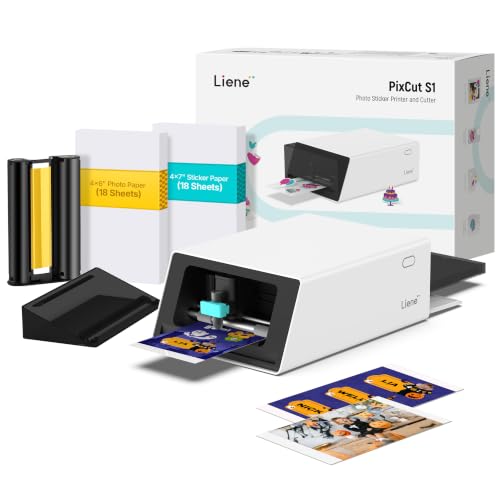
Liene PixCut S1 Review Summary
If you want an all-in-one creative machine, the Liene PixCut S1 Sticker Printer and Cutting Machine is built for convenience first. It combines printing and cutting in one compact workflow, which makes it a strong fit for hobbyists, small makers, and anyone who values fast sticker creation from a phone or tablet.
For the right buyer, it removes a lot of the friction that usually comes with crafting custom stickers and labels.
The biggest reason to consider the Liene PixCut S1 Sticker Printer and Cutting Machine is the way it streamlines the entire process.
Instead of printing on one device and trimming on another, you can create a design, let the app extract the image, and have the machine auto-cut the final shape.
That makes it much easier to turn photos, illustrations, or templates into polished, usable stickers.
Scorecard
| Category | Score | Why It Matters |
|---|---|---|
| Print Quality | 9.0 | Thermal dye-sublimation output at 300 dpi delivers vivid, true-to-life color with 16.7 million colors. |
| Cutting Precision | 9.0 | AI image extraction and auto-cutting help follow sticker edges closely for cleaner results. |
| All-in-One Workflow | 10.0 | Print and cut in one device reduces hassle and speeds up sticker production. |
| App Control and Ease of Use | 8.0 | Bluetooth and app-based editing simplify the process, though it depends on the mobile workflow. |
| Creative Flexibility | 9.0 | Supports stickers, labels, phone skins, badges, journaling, and other custom projects. |
| Durability | 9.0 | Four-layer printing with automatic lamination helps make output waterproof and scratch-resistant. |
| Speed and Practicality | 7.0 | Convenient for crafts, but not designed for high-volume or fast office production. |
Overall, the PixCut S1 is best viewed as a specialized maker tool, not a general printer.
If that matches your needs, it can be an excellent purchase; if you need bulk printing or office paperwork, look elsewhere.
Key Features and Specifications of Liene PixCut S1
The Liene PixCut S1 is designed around a simple goal: make sticker creation easier for everyday users.
Its feature set shows that clearly.
| Specification | Details |
|---|---|
| Brand | Liene |
| Model | DHP700 |
| Product Name | PixCut S1 |
| Connectivity | Bluetooth |
| Printing Technology | Thermal Dye Sublimation |
| Print Output | Color |
| Print Resolution | 300 dpi |
| Color Range | 16.7 million colors |
| Weight | 6.2 pounds |
| Color | White |
| Special Features | Custom badge maker, label maker, phone skin creator, photo printing, sticker making |
- All-in-one print-and-cut design for stickers, labels, and custom crafts.
- AI image extraction to help convert photos into cut-ready sticker shapes.
- AI-guided precision cutting for cleaner edges and better consistency.
- Bluetooth app control for phone- and tablet-friendly use.
- 40,000+ free images, fonts, and elements for easier design work.
- 2,000+ ready-to-use templates for phone skins, lens stickers, ID cards, labels, and more.
- No subscription requirement, which is an important value point for regular hobby use.
- Four-layer thermal dye-sublimation process with automatic lamination for added durability.
The technical story here is straightforward: the PixCut S1 is built to produce finished decorative and practical stickers with minimal manual steps.
That makes it much more approachable than a separate printer-plus-cutter setup for buyers who want speed and simplicity over pro-level control.
Liene PixCut S1 Pros and Cons
Every buyer comparing the Liene PixCut S1 Sticker Printer and Cutting Machine pros and cons should understand where it shines and where it is deliberately limited.
| Pros | Cons |
|---|---|
| Combines printing and cutting in one machine | More specialized than a general-purpose printer |
| Produces vivid, high-resolution color output | Listed print speed is modest |
| AI tools reduce design friction | Best suited to creative projects rather than high-volume production |
| Waterproof and scratch-resistant sticker output | Requires app-based workflow |
| Large template and asset library without a subscription | Not ideal for users who prefer manual controls |
| Bluetooth mobile-device support | Performance depends on the companion app and workflow |
The biggest pro is convenience. The biggest con is also clear: this is not a universal printer, so its value depends on how often you actually make stickers and labels.
How the Print-and-Cut Process Works
The Liene PixCut S1 Sticker Printer and Cutting Machine stands out because the workflow is intentionally simple.
You start in the app, pick a template or upload your own image, and then let the software handle key editing steps like alignment and edge extraction.
The machine then prints the design and cuts it into a finished sticker shape.
For buyers, that matters because sticker creation usually fails in the boring middle steps: bad crop lines, uneven trimming, and time-consuming cleanup.
The PixCut S1 is designed to reduce that friction with AI-assisted extraction and precision auto-cutting.
In practice, that should mean cleaner borders and less wasted material than hand-cutting.
The key decision factor is whether you value an appliance-like experience.
If you want a machine that behaves more like a guided craft tool than a blank-canvas design station, this setup is a major advantage.
Sticker Durability and Water Resistance
Durability is one of the best reasons to consider this model.
The PixCut S1 uses a four-layer thermal dye-sublimation process and automatically laminates the paper as part of the printing workflow.
That combination is intended to produce output that is waterproof and scratch-resistant.
For real-world use, that is especially useful for items that get handled often: water bottles, laptops, notebooks, lunch containers, storage bins, and phone accessories.
It is also a strong choice for makers selling small-batch stickers or custom gifts, because durable output tends to look more professional over time.
That said, durability is still tied to the correct media and the intended workflow.
This is not the kind of machine where you can treat any paper like a finished sticker sheet and expect the same results.
App Tools, Templates, and AI Features
The software experience is a major part of the product.
The Liene PixCut S1 Sticker Printer and Cutting Machine includes Bluetooth connectivity and app control across mobile, tablet, and desktop access, which should make it approachable for casual creators.
The library is also generous, with 40,000+ free images, fonts, and elements plus 2,000+ templates.
That library matters because many buyers do not want to build every design from scratch.
The template range covers common maker needs such as phone skins, lens stickers, ID cards, labels, name tags, journaling layouts, and badges.
For people who want quick results, that is a major time saver.
The AI Lab style transformations add another layer of fun for selfies and personal photos.
This is less about business productivity and more about creative personalization.
If you enjoy turning ordinary images into stylized stickers, the feature set makes the PixCut S1 feel more modern than a basic cutter.
One thing to keep in mind: app-driven products are only as good as the workflow they deliver.
If you dislike doing design work on a phone or relying on Bluetooth connections, this may feel less convenient than the specs suggest.
Best Uses for DIY, Labels, and Phone Skins
The best use cases for the Liene PixCut S1 Sticker Printer and Cutting Machine are easy to identify because the machine is clearly optimized for personalized output.
It is well suited to:
- DIY sticker sheets for journaling, scrapbooking, and planners
- Custom labels for household storage, craft supplies, and school items
- Phone skins and personalized device accents
- Photo stickers for gifts and memory projects
- Badges and name tags for events, clubs, and small community groups
- Small-batch maker projects that benefit from repeatable shapes
In other words, this is a strong match for makers who care about presentation.
It is not built to replace a laser printer, office label maker, or industrial cutter.
It is built to help creative users turn ideas into polished sticker products quickly.
What to Know About Print Speed and Workflow
Speed is the one area where expectations should stay realistic.
The listed maximum print speed is modest, and that is not surprising for a compact creative device.
The PixCut S1 is about finishing quality and convenience, not racing through large batches.
If you are making a few sheets for personal use, the workflow should feel acceptable.
If you plan to produce high volumes for resale or organize a large office, you may feel limited by the pace.
The same applies to anyone who needs instant labels in a busy environment; a dedicated label printer may be a better fit.
This is why the question is Liene PixCut S1 Sticker Printer and Cutting Machine worth it comes down to use case.
For hobby and maker workflows, yes, it has a strong value proposition.
For utility-first or bulk printing, the answer becomes much less compelling.
Comparable Alternatives to Consider
If you are still comparing options, these alternatives are worth looking at on Amazon:
- Cricut Maker 3 or other Cricut sticker and cutting machines, if you want a broader crafting ecosystem and more manual design flexibility.
- Canon color photo printers if you prefer high-quality prints and are comfortable using a separate cutter for finishing.
- HP color photo printers for general photo output with a separate cutting workflow.
- Brother label makers if your main goal is functional utility labeling rather than decorative stickers.
- Portable thermal label printers if you mainly need quick shipping or organization labels.
Compared with those options, the PixCut S1 stands out because it tries to do the creative part and the finishing part in one place.
That makes it the more elegant choice for sticker-focused makers, even if it is not the fastest or broadest printer overall.
Who Should Buy Liene PixCut S1?
The Liene PixCut S1 Sticker Printer and Cutting Machine is a good buy for people who want a creative machine with minimal friction.
It is especially attractive if you:
- Make stickers, labels, or journaling assets regularly
- Want an all-in-one print-and-cut system
- Prefer app-based design and quick template use
- Need durable, waterproof, scratch-resistant sticker output
- Want to create phone skins, badges, or personalized gifts
You should probably skip it if you:
- Need a general office printer
- Want high-speed bulk production
- Prefer manual design software and local control
- Only need simple shipping labels or occasional utility labeling
That split is important.
The PixCut S1 is not trying to be everything to everyone, and that focus is part of why it can be so appealing to the right buyer.
Is Liene PixCut S1 Worth It?
Yes, for the right buyer, the Liene PixCut S1 Sticker Printer and Cutting Machine is worth it. It delivers on its core promise: a simple, all-in-one way to make attractive, durable stickers and labels without juggling separate hardware.
The combination of 300 dpi color printing, AI-assisted cutting, Bluetooth app control, and a generous library of templates makes it especially strong for DIY crafters and personal gift makers.
The main drawbacks are also clear.
It is specialized, the speed is modest, and the experience depends on the app workflow.
That means it is not the best choice for office work, bulk production, or buyers who want a traditional printer with broader use.
Buy it if you want a dedicated sticker and label creator that makes the process easy. Skip it if you need a more general-purpose or faster machine.
For crafting, personalization, and repeatable small creative projects, the Liene PixCut S1 Sticker Printer and Cutting Machine is a genuinely practical buy.