Shopping for the Windows user in your life? The best picks are the ones that make everyday computing smoother, faster, and more comfortable.
This roundup of gift ideas for Windows users focuses on useful upgrades for home offices, gaming setups, and busy workstations.
17 Gift Ideas for Windows Users to Consider in 2026
Premium Productivity Upgrade
Logitech MX Master 3S Wireless Mouse

- Ideal for Windows users who work long hours and switch between apps.
- Quiet clicks and ultra-fast scrolling make daily work feel smoother.
- A premium gift for anyone who wants a higher-end productivity mouse.
Best For: Windows users who want a comfortable, high-end mouse for everyday work.
Portable Port Expansion

- A strong match for Windows laptop users who need more connections.
- Great for adding support for monitors, drives, and other accessories.
- A practical gift for work-from-anywhere setups and compact desks.
Best For: Windows laptop users who need extra ports for work and peripherals.
Single-Cable Desk Setup
Dell WD19S Docking Station 180W
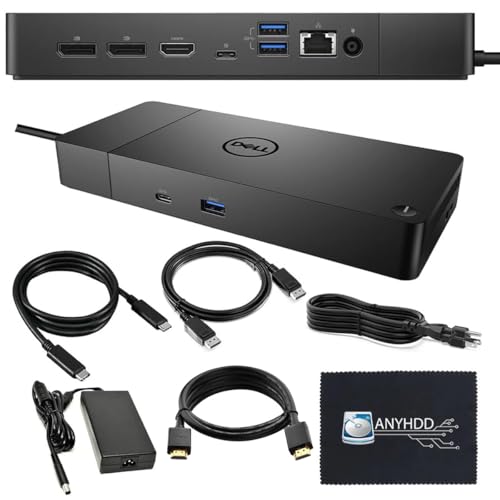
- A clear fit for Windows laptops and dual-monitor desk setups.
- Helps power users and remote workers simplify their workspace.
- Includes cables and accessories that make it feel gift-ready.
Best For: Remote workers and power users who want a cleaner Windows laptop desk setup.
Comfortable Everyday Control
Microsoft Bluetooth Ergonomic Mouse

- A thoughtful pick for Windows users who want a comfortable daily mouse.
- Ergonomic shape and thumb rest are made for longer sessions.
- Long battery life adds easy, low-maintenance convenience.
Best For: Windows users who want a comfortable mouse for everyday use.
Home Office Upgrade
Logitech MK850 Wireless Keyboard and Mouse Combo

- A reliable wireless keyboard-and-mouse set for Windows home office setups.
- A practical gift for replacing aging peripherals with one tidy combo.
- A strong match for Windows users who want everyday comfort and convenience.
Best For: Windows users setting up a home office or replacing old peripherals.
Typing Upgrade
Keychron K10 Wireless Mechanical Keyboard

- Full-size wireless mechanical keyboard for a nicer typing experience.
- Works well for Windows users who want a more comfortable desk setup.
- Hot-swappable design adds extra appeal for keyboard enthusiasts.
Best For: Windows users who want a full-size mechanical keyboard upgrade.
Portable File Backup
SanDisk 1TB Extreme Portable SSD

- Fast 1TB portable storage for photos, videos, games, and work files.
- A handy gift for Windows users who need storage that travels easily.
- Trusted, broadly appealing pick with strong buyer confidence.
Best For: Windows users who need portable storage for work, media, or gaming files.
Fast Everyday Storage

- Quick external SSD storage for school, work, and creative files.
- A solid gift for students, creators, and professionals on Windows PCs.
- Reliable 1TB drive with broad appeal for everyday backups and transfers.
Best For: Students, creators, and professionals using Windows PCs.
Reliable Backup Gift
Seagate One Touch 2TB Portable Hard Drive

- 2TB of plug-and-play storage for files and media
- Windows and macOS compatible for easy gifting
- A practical pick for affordable backup space
Best For: Windows users who need simple, affordable backup storage for files and media.
Shared-Space Security Pick
Kensington Combination Cable Laptop Lock

- Resettable 4-digit combo lock with 6-foot cable
- Designed for laptops with a standard T-bar slot
- Handy for commuters, students, and office workers
Best For: Windows laptop users who work in shared spaces and want extra security.
Desk Lighting Upgrade

- No-glare eye-care LED lighting for computer desks
- USB touch-control lamp with stepless dimming
- Fits flat and curved monitors without clutter
Best For: Windows users who spend time at a desk and want better lighting.
Desk Light Upgrade
BenQ ScreenBar LED Monitor Light Bar

- Auto-dimming and adjustable brightness help make a Windows desk setup feel brighter and cleaner.
- A space-saving monitor lamp that suits remote workers, students, and gamers.
- A direct match for the BenQ ScreenBar gift idea with broad desk appeal.
Best For: Remote workers, students, and gamers who want a cleaner, brighter desk setup.
Typing Comfort Gift
MEKASS Ergonomic Keyboard and Mouse Wrist Rest Set
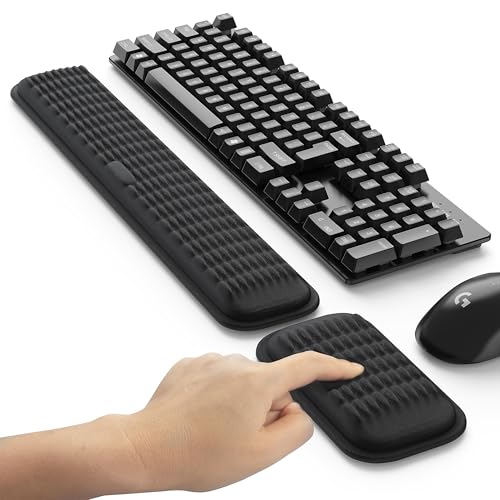
- Memory foam support for both keyboard and mouse comfort during long Windows sessions.
- Non-slip silicone base helps keep the set steady for office, home, or gaming use.
- A practical gift for people who type a lot and want less wrist strain at the desk.
Best For: Windows users who type a lot and want extra comfort at the desk.
High-End Docking Hub
Caldigit TS4 Thunderbolt 4 Dock

- A premium dock with 18 ports for advanced Windows setups with multiple peripherals.
- Supports fast charging and dual-display options for a powerful laptop workstation.
- A strong match for experienced users who want a cleaner, more connected desk.
Best For: Advanced Windows users with multiple peripherals and a high-end laptop setup.
Quiet Productivity Gift
Logitech MX Keys S Wireless Keyboard

- Quiet, polished typing setup for Windows users
- Low-profile keys, backlighting, and USB-C recharging
- Pairs with up to 3 devices for easy switching
Best For: Windows users who want a refined, productive keyboard for everyday typing.
Eye-Comfort Office Gift
Benicci Blue Light Blocking Glasses

- Helps ease digital eye strain during long PC sessions
- Works for laptop, monitor, phone, and TV use
- Comes with a case and giftable presentation
Best For: Office workers, students, and remote workers on Windows PCs.
Meeting-Ready Webcam Gift

- Clear 1080p video for calls, classes, and streaming
- Auto-light correction and built-in mic for easy use
- Privacy shutter and USB-A compatibility for Windows setups
Best For: Windows users who join video meetings, stream, or take online classes.
How to Choose the Right Gift for Windows Users
The best Gift Ideas for Windows Users depend on how they use their PC every day. A remote worker may appreciate a dock, webcam, or monitor light bar, while a gamer or creator might get more value from a fast SSD, precision mouse, or mechanical keyboard. Start by matching the gift to the recipient’s setup, not just to the brand name on the laptop.
Compatibility matters too. Check whether their device has USB-C, Thunderbolt, or older USB-A ports, and make sure any dock, hub, or display accessory fits their monitor and laptop configuration. If they already have a strong keyboard or mouse, focus on comfort, storage, lighting, or security instead.
Best Gift Types by Use Case
For productivity, docks, hubs, keyboards, and mice are the safest bets. For students and travelers, portable SSDs and rugged external drives are especially useful. For home offices, monitor light bars, webcams, wrist rests, and blue light blocking glasses can improve comfort during long sessions. If the recipient manages a laptop in shared spaces, a cable lock is a practical upgrade that adds peace of mind.
Budget Considerations
You can find excellent gifts at nearly every price point. Smaller accessories like a wrist rest, mouse, or monitor light bar make strong budget-friendly options. Mid-range gifts such as a wireless keyboard, webcam, or external SSD offer a bigger impact without going overboard. Premium docks and high-performance storage devices are ideal when you want a standout gift that feels substantial.
If you are shopping for a full set, consider pairing a lower-cost comfort item with a more functional accessory. For example, a mouse and wrist rest combination feels thoughtful, while a webcam plus light bar creates a polished remote-work upgrade.
Personalization Tips That Make the Gift Feel Thoughtful
Personalization does not have to mean engraving. The easiest way to make Gift Ideas for Windows Users feel tailored is to match their habits. Choose a quiet mouse for shared offices, a backlit keyboard for late-night work, or a portable SSD for someone who moves files between devices. Color also matters more than people think, especially for office gear that stays visible every day.
If you know their priorities, use those as your guide. Someone who values ergonomics may appreciate a wrist rest or ergonomic mouse. Someone who is always on video calls may benefit more from a webcam or eye-friendly lighting. Small details like cable management, compact footprints, and rechargeable batteries can make a gift feel more personal and more useful.
Last-Minute Buying Advice
If you are shopping close to a deadline, keep the purchase simple and practical. Choose widely compatible accessories, popular storage options, or accessories with straightforward setup so the recipient can use them right away. Docks, hubs, mice, and webcams are usually easy to gift because they fit into many different Windows setups.
When time is short, prioritize quick wins: comfort, convenience, and instant usability. Avoid overly specialized accessories unless you know the recipient’s exact port layout or workflow. The safest last-minute choice is a gift that solves a daily annoyance, adds a little more speed, or makes their desk more comfortable.
With the right pick, Gift Ideas for Windows Users can do more than look useful on paper. They can improve the way someone works, plays, and connects every single day.