If you are comparing an AI voice recorder for meetings, lectures, and call-heavy work, the Comulytic Note Pro is built around speed, portability, and automatic transcription.
This Comulytic Note Pro AI Voice Recorder review focuses on what the listing actually supports and where the device looks strongest.
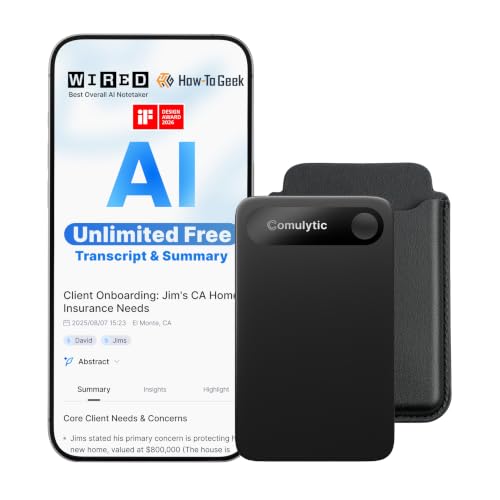
Comulytic Note Pro Review Summary
The Comulytic Note Pro makes sense for buyers who want a compact recorder that is more than a simple audio capture device.
Based on the listing, its real appeal is the combination of AI transcription, multilingual support, app-connected workflow, and a slim body that is easy to carry into meetings or classes.
It is especially relevant if you work across recurring meetings, client calls, or lectures and want recordings that can be turned into summaries, to-do lists, and searchable notes.
The feature set also points to users who care about privacy and a professional workflow, since the listing emphasizes encryption, cloud backup, and a vertical knowledge base for business terms.
Review Scorecard
| Category | Score | Why it matters |
|---|---|---|
| Transcription workflow | 9/10 | The listing emphasizes unlimited transcription and basic summaries, which is the main reason to buy a device like this. |
| Portability | 9/10 | The 1.2-inch-thin aluminum body is clearly aimed at easy everyday carry. |
| Battery endurance | 8/10 | Up to 45 hours of recording is strong for long workdays and repeated sessions. |
| Language support | 10/10 | Support for 113 languages is unusually broad and useful for mixed-language environments. |
| Storage and sync | 8/10 | 16GB onboard storage plus cloud backup and Wi-Fi sync give it a practical capture-to-cloud flow. |
| Audio capture flexibility | 8/10 | The triple-mic setup and AI adaptive recording are well suited to meetings and calls. |
| Privacy and business use | 8/10 | AES encryption and CCPA language make it feel more work-ready than a basic recorder. |
Overall, this is a business-first recorder with AI features layered on top, not a novelty gadget.
If your main goal is to keep clean notes from conversations without building a manual workflow from scratch, the Comulytic Note Pro looks like a credible fit.
Key Features and Specifications of Comulytic Note Pro
The listing positions the Comulytic Note Pro as an AI meeting recorder and note taker with app control and digital voice recording.
It is designed for meetings, calls, and lectures, so the use case is broad enough for office work, field conversations, and classroom capture.
Several details stand out immediately:
| Spec or feature | Listing detail |
|---|---|
| Transcription | Unlimited free transcription |
| Summaries | Basic summaries included |
| Language support | 113 languages |
| Body | Ultra-slim 1.2-inch-thin aluminum body |
| Display | 0.78-inch Gorilla Glass display |
| Battery | Up to 45 hours of continuous recording |
| Standby | Up to 107 days of standby |
| Charging | Full charge in about 90 minutes |
| Storage | 16GB onboard storage |
| Sync | Wi-Fi sync and cloud backup |
| Mic system | Triple-mic array with AI noise reduction |
| Recording range | Up to 5 meters |
| Security | AES encryption and CCPA protection language |
| Included items | Recorder, 3 magnetic accessories, OTG adapter, quick start guide |
The strongest hardware story here is not just the recorder itself, but the workflow around it.
The listing says the device can sync files through Wi-Fi while recording, and that is important for anyone who wants the recording to become usable notes quickly.
The included app access also matters because it suggests the recording is meant to move into transcription and summary rather than stay trapped in raw audio.
The business-focused vocabulary in the listing is also notable.
Terms such as vertical knowledge base, custom highlights, to-do lists, and contact insight hub suggest the product is aiming at professionals who need more than basic playback.
Pros and Cons of Comulytic Note Pro
Pros
- Strong focus on transcription and summaries rather than raw recording alone.
- Broad 113-language support makes it appealing for international teams and multilingual users.
- Slim aluminum build should be easy to carry daily.
- Long battery life and fast recharge suit frequent use.
- Wi-Fi sync, cloud backup, and 16GB storage create a flexible capture pipeline.
- Privacy language is better developed than on many generic recorders.
Cons
- The most compelling claims are software-driven, so the value depends on how well the app experience works in practice.
- Buyers who only want a simple offline recorder may be paying for AI features they will not use.
- The marketing language is broad, so some claims, like professional-term capture, are harder to evaluate from the listing alone.
- The device appears optimized for structured note-taking, which may be overkill for casual voice memos.
The basic tradeoff is simple: if you need smart notes, the feature stack looks useful; if you only need audio files, there are cheaper ways to do that.
Who Should Buy Comulytic Note Pro?
This product fits people who record the same kind of conversations repeatedly and want a cleaner path from audio to action items.
That includes managers, consultants, sales people, students, journalists, and anyone who leaves meetings with more spoken information than they can comfortably write down by hand.
It is also a strong match for buyers who work in multilingual settings or expect to review recordings in more than one language.
The 113-language claim is one of the listing’s most compelling differentiators, especially if you need transcription across diverse speakers.
You should probably skip it if you only need a basic recorder for occasional reminders or quick voice memos.
In that case, the AI transcription layer may not justify the added complexity.
It is also less compelling if you do not want to depend on an app-connected workflow.
If your buying question is really “is Comulytic Note Pro worth it”, the answer depends on whether you will use the transcription and summary features often enough to make them part of your workflow.
For regular meeting capture, the answer looks more favorable.
Comulytic Note Pro for Meetings and Notes
Recording Meetings Clearly
The triple-mic array, AI noise reduction, and claimed 5-meter capture range point to a recorder designed for room meetings rather than only close-up dictation.
That matters because meeting audio gets messy fast when people turn away, speak softly, or talk over each other.
Turning Audio Into Action
The listing’s summaries, to-do lists, custom highlights, and assistant-style features suggest the product is meant to shorten the gap between “recorded” and “usable.” For a buyer, that is the real value proposition: less time manually reviewing raw audio and more time acting on the output.
Storage and Mobility
The 16GB onboard storage, cloud backup, and ultra-slim design make the Note Pro feel built for people who move between rooms, sites, and schedules.
The long standby time also supports the idea that it can sit in a bag or desk drawer without constant attention.
Security and Professional Use
AES encryption and CCPA protection language are important because a recorder like this may capture private client calls, sensitive team conversations, or student material.
Even when the exact implementation details are not fully spelled out in the listing, the product is clearly being positioned as a more serious work device.
Alternatives to Comulytic Note Pro
If you want to compare before buying, these Amazon search links are the most relevant starting points:
Plaud Note is the most obvious AI-first comparison because it targets the same note-to-transcript workflow.
Sony and Olympus are better for buyers who want established recorder brands and a simpler, more traditional capture experience.
Generic AI meeting recorder searches are useful if you want to compare feature lists across multiple newer devices.
Is Comulytic Note Pro Worth It?
For the right buyer, yes.
The Comulytic Note Pro looks worth considering if you want a slim recorder that goes beyond audio capture and pushes hard on transcription, summaries, multilingual support, and app-based note workflows.
The strongest reasons to buy are the broad language support, long recording time, quick recharge, Wi-Fi sync, and business-oriented features.
The main reason to pass is if you do not need AI features often enough to justify them.
**Bottom line: buy it if you want a portable meeting recorder that is built around turning conversations into usable notes.
Skip it if all you need is a basic voice recorder.**