Live MIDI rigs need dependable connections, fast setup, and enough inputs and outputs for keyboards, controllers, pedals, and computers. The right interface can reduce cabling headaches while keeping your performance workflow responsive.
We selected 10 options across dedicated MIDI interfaces, USB MIDI controllers, audio interfaces with MIDI support, and performance-focused processors so you can match the hardware to your stage setup and budget.
Best 10 Midi Interfaces for Live Performances Picks for 2026
Best Dedicated MIDI Interface

- Standalone 3-in/3-out MIDI routing
- Supports clock, SysEx, MPE, and timecode
- USB-C and major OS compatibility
Best For: Complex live MIDI rigs needing flexible routing
Best Portable Pad Controller

- Eight RGB-backlit performance pads
- Eight assignable control knobs
- USB-powered and compact for travel
Best For: Laptop-based live triggering and DAW control
Best Audio-and-MIDI Hub

- MIDI I/O plus four inputs and four outputs
- Two mic preamps and two Hi-Z inputs
- 24-bit/192kHz audio with Auto Gain
Best For: Live rigs combining instruments, microphones, audio, and MIDI
Best Hands-On DAW Mixer

- Eight channel faders and one master fader
- Twenty-four knobs and sixteen control buttons
- Compact USB controller with Ableton mapping
Best For: Computer-based live mixing and DAW control
Versatile Two-Channel Pick
Focusrite Scarlett 2i2 4th Gen

- Two mic preamps and Hi-Z inputs
- 120dB dynamic range with Auto Gain
- Includes major recording software
Best For: Performers needing two-channel audio alongside a MIDI setup
Dedicated MIDI Cable Choice
ESI MIDIMATE eX USB MIDI Cable

- USB-to-MIDI cable with dual DIN connectors
- 2-meter reach for flexible positioning
- Plug-and-play Mac and PC compatibility
Best For: Connecting traditional MIDI hardware to a computer
Compact Soloist Option
Focusrite Scarlett Solo 4th Gen

- One mic preamp and one Hi-Z input
- Compact, lightweight USB audio interface
- Includes Air mode and recording software
Best For: Solo performers using one mic and one instrument
Best Plug-and-Play Cable
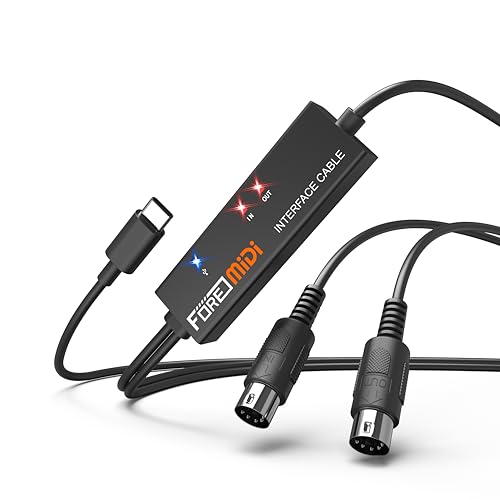
- One MIDI input and output with 16 channels
- Plug-and-play setup with LED status indicators
- Works with USB-C, iOS, Android, Windows, and macOS
Best For: Simple MIDI connections between 5-pin gear and USB-C devices
Best Hybrid Audio/MIDI Interface

- 5-pin MIDI input and output
- Audio inputs, balanced outputs, and headphone monitoring
- Includes software and a five-year warranty
Best For: Compact performance rigs combining MIDI and audio recording
Best for Guitar Performance Control
Valeton GP-200 Multi-Effects Processor
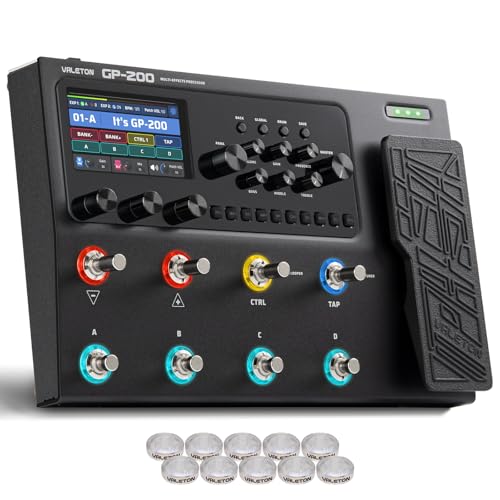
- MIDI input and expression-pedal connectivity
- Built-in effects, amp modeling, presets, and footswitches
- USB-C audio interface with OTG support
Best For: Guitarists needing integrated MIDI control and live effects
Best Dedicated MIDI Interface – CME U6MIDI Pro
For musicians comparing MIDI interfaces for live performances, the CME U6MIDI Pro stands out as a dedicated routing hub rather than an audio interface or controller. Its three MIDI inputs and three outputs, standalone operation, and configurable routing make it well suited to setups built around keyboards, synths, drum machines, and digital pianos.
Best For: Live rigs that need flexible MIDI routing, merging, splitting, filtering, and low-latency synchronization.
Pros:
- Three-in, three-out MIDI connectivity with standalone operation.
- Router, filter, merge, split, thru, and mapping functions can be configured with UxMIDI Tools.
- Supports MIDI notes, controllers, clock, SysEx, MIDI timecode, and MPE across major operating systems.
- Compact 3.49-ounce design with USB-C computer connectivity and stated low latency.
Cons:
- Provides MIDI connectivity only, with no audio inputs or outputs.
- Advanced routing configuration requires the software tool on a compatible computer or mobile device.
The U6MIDI Pro is the most purpose-built choice here for complex live MIDI systems. Choose it when dependable signal handling and routing control matter more than recording audio or hands-on mixing.
Best Portable Pad Controller – Akai LPD8
The Akai Professional LPD8 is a compact performance controller for triggering samples, loops, and virtual instruments. While it is not a traditional MIDI interface with DIN ports, its USB connection, RGB pads, assignable knobs, and lightweight design make it useful alongside a computer-based setup using MIDI interfaces for live performances.
Best For: Producers, DJs, and live performers who want portable pad triggering and hands-on DAW control.
Pros:
- Eight RGB-backlit MPC-style pads provide responsive sample and instrument triggering.
- Eight assignable Q-Link knobs offer tactile control over DAW and plug-in parameters.
- Four programmable presets support quick recall of custom mappings.
- USB-powered, plug-and-play operation works with Mac and PC without a separate AC adapter.
Cons:
- Uses USB rather than standard five-pin MIDI connections.
- Offers eight pads and eight knobs, so larger live control setups may require additional hardware.
The LPD8 makes sense when your live performance workflow is centered on a laptop and software instruments. It adds expressive triggering and compact control, but it should be viewed as a controller rather than a standalone MIDI routing interface.
Best Audio-and-MIDI Hub – Focusrite Scarlett 4i4
The Focusrite Scarlett 4i4 4th Gen combines MIDI I/O with a full USB audio interface, making it a practical centerpiece for live setups that include microphones, guitars, synths, or drum machines. It is a strong option for performers who need both MIDI interfaces for live performances and high-quality audio connections in one unit.
Best For: Live musicians who need MIDI I/O plus microphone, instrument, and line-level audio connectivity.
Pros:
- Includes MIDI input and output alongside four inputs and four outputs.
- Two mic preamps, two Hi-Z instrument inputs, and four line inputs accommodate varied live gear.
- Supports up to 24-bit/192kHz operation with a stated 120dB dynamic range.
- Auto Gain, Clip Safe, and Air mode add useful performance and recording tools.
Cons:
- It is larger and heavier than a dedicated MIDI-only interface.
- Its broader audio feature set may be unnecessary for rigs that only require MIDI routing.
The Scarlett 4i4 is the versatile pick for performers who want one interface to manage both audio and MIDI. Choose it over a dedicated MIDI box when microphones, instruments, or line-level devices are part of the live setup.
Best Hands-On DAW Mixer – Akai MIDImix
The Akai Professional MIDImix is a USB MIDI mixer controller designed for hands-on software mixing rather than MIDI hardware routing. For computer-based performers exploring MIDI interfaces for live performances, its faders, knobs, and channel buttons provide direct control over track levels, effects, and other mapped DAW functions.
Best For: Laptop performers and producers who want compact, tactile control over DAW mixes and effects.
Pros:
- Eight individual line faders plus a master fader provide direct mix control.
- Twenty-four knobs support EQ, sends, virtual instruments, and effect parameters.
- Sixteen buttons offer mute, solo, and record-arm functions across channels.
- Designed for compact USB operation with one-button mapping for Ableton Live.
Cons:
- Does not provide standard five-pin MIDI input or output ports.
- Its functionality depends on a connected computer and compatible DAW.
- It is a controller for mixing, not a standalone MIDI router or audio interface.
The MIDImix is a useful live control surface when your performance is managed inside a DAW. It offers more immediate mixing control than a basic MIDI interface, but it is not the right choice for connecting and routing standalone MIDI hardware.
Versatile Two-Channel Pick – Focusrite Scarlett 2i2 4th Gen
For performers who need both microphone and instrument connectivity, the Focusrite Scarlett 2i2 4th Gen is a flexible choice among MIDI interfaces for live performances. Its two mic preamps, Hi-Z inputs, USB connectivity, and compact design support a range of computer-based live setups, while Auto Gain and Clip Safe help simplify level management.
Best For: Singer-instrumentalists and performers who need two simultaneous audio inputs alongside their MIDI setup.
Pros:
- Two mic preamps and two Hi-Z instrument inputs provide useful input flexibility.
- 120dB dynamic range and 24-bit/192kHz support are suited to high-quality audio work.
- Auto Gain, Clip Safe, and Air modes can streamline live sound preparation.
- Includes Ableton Live Lite, Pro Tools Intro+, Cubase LE, and additional software.
Cons:
- It is an audio interface rather than a dedicated MIDI DIN interface.
- USB connection requires a compatible computer, tablet, or other supported device.
The 2i2 stands out when live performance involves vocals, guitar, or other audio sources as well as MIDI-controlled software. Choose it when two-channel audio flexibility matters more than a purpose-built MIDI connection.
Dedicated MIDI Cable Choice – ESI MIDIMATE eX USB MIDI Cable
The ESI MIDIMATE eX is the most direct fit here for musicians comparing MIDI interfaces for live performances. This 2-meter USB-to-MIDI cable connects MIDI DIN equipment to Mac or PC systems, offers plug-and-play operation, and is designed for setups involving keyboards, synthesizers, and other MIDI devices.
Best For: Performers connecting a MIDI keyboard, synthesizer, or other DIN MIDI gear directly to a computer.
Pros:
- Dedicated USB-to-MIDI connection with dual five-pin MIDI connectors.
- 2-meter cable provides extra reach for stage and studio positioning.
- Plug-and-play compatibility works with Mac and PC systems without requiring drivers.
- Optional Windows driver supports multi-device and multi-client operation.
Cons:
- It does not provide microphone, instrument, or headphone audio connections.
- The cable-based design may offer less routing flexibility than a multi-port MIDI interface.
For a straightforward connection between traditional MIDI hardware and computer software, the MIDIMATE eX is the purpose-built option in this group. Its long cable and broad DAW compatibility are useful for live rigs where reliable DIN-to-USB integration is the main requirement.
Compact Soloist Option – Focusrite Scarlett Solo 4th Gen
The Focusrite Scarlett Solo 4th Gen is a compact audio interface for performers who want a simple computer-based rig. While it is not a dedicated MIDI interface, its single mic preamp, Hi-Z instrument input, USB-C connectivity, and portable footprint can complement MIDI controllers and software used in live performances.
Best For: Solo performers who need one microphone input and one instrument input in a compact setup.
Pros:
- Combines one XLR mic preamp with one Hi-Z instrument input.
- 120dB dynamic range and 24-bit/192kHz support deliver capable audio specifications.
- Improved Air mode can add presence and harmonic drive to vocals and guitars.
- Includes Ableton Live Lite, Pro Tools Intro+, Cubase LE, and Hitmaker Expansion.
Cons:
- It lacks dedicated MIDI DIN input and output.
- Only one audio input is provided for microphones, limiting multi-source setups.
The Solo makes sense when portability and a minimal audio rig are priorities. It can work alongside MIDI gear in a computer-based performance system, but performers needing direct MIDI hardware connectivity should look to a dedicated MIDI interface instead.
Best Plug-and-Play Cable – FORE T1 USB-C MIDI Interface
The FORE T1 is a straightforward option for musicians seeking MIDI interfaces for live performances. Its built-in USB-C cable, 5-pin MIDI input and output, 16 MIDI channels, and bus-powered design make it practical for connecting a keyboard, synthesizer, drum machine, or other MIDI device to a computer or mobile device.
Best For: Performers who want a simple, compact MIDI connection between classic 5-pin gear and USB-C devices.
Pros:
- Provides one MIDI input and one MIDI output with 16 channels.
- Plug-and-play operation with built-in drivers and status LEDs.
- Compatible with iOS, Android, Windows, and macOS systems.
- Integrated 6.5-foot cable and USB bus power simplify setup.
Cons:
- USB A-C adapter is not included.
- It is designed for MIDI data transfer rather than audio recording.
The FORE T1 is a sensible choice when your live rig mainly needs dependable MIDI routing without extra configuration. Its single-in/single-out layout is less suited to larger, more complex setups, but it keeps basic connections quick and portable.
Best Hybrid Audio/MIDI Interface – Arturia MiniFuse 1
The Arturia MiniFuse 1 is a flexible choice for musicians who need MIDI interfaces for live performances plus audio connectivity. Along with 5-pin MIDI input and output, it offers microphone, instrument, line, headphone, and balanced output connections in a compact USB interface.
Best For: Solo performers and creators who need MIDI control alongside vocal, guitar, synth, or other audio inputs.
Pros:
- Includes dedicated 5-pin MIDI input and output connections.
- Supports microphone, instrument, and line recording with 48V phantom power.
- Provides balanced line outputs, headphone monitoring, and a USB Type-A hub.
- Includes creative software and a five-year warranty.
Cons:
- Its single-channel design may be limiting for larger live audio setups.
- It requires a computer connection and is not presented as a standalone MIDI host.
The MiniFuse 1 stands out when a performance setup needs more than MIDI alone. Its combination of MIDI I/O and audio connections makes it a practical all-purpose interface for compact rigs, though performers with many simultaneous sources may need a higher-channel-count option.
Best for Guitar Performance Control – Valeton GP-200 Multi-Effects Processor
The Valeton GP-200 is a guitar-focused performance processor that also includes MIDI functionality. For musicians comparing MIDI interfaces for live performances, it combines MIDI input, an expression-pedal connection, extensive effects, footswitch control, and USB-C audio features in one floor-based unit.
Best For: Guitarists who want MIDI control integrated with effects, amp modeling, footswitches, and live signal routing.
Pros:
- Includes MIDI input and an EXP2 jack for external control.
- Offers 240-plus effects, 140 amp and cabinet simulations, and 256 presets.
- Provides eight customizable LED footswitches and an adjustable signal chain.
- Supports USB-C audio, OTG connections, and stereo audio streaming.
Cons:
- Its MIDI connectivity is part of a guitar effects processor rather than a dedicated MIDI interface.
- The unit is relatively large and weighs about 2.97 kg.
- The listed warranty is a 30-day free-return period.
The GP-200 is a strong fit for performers who need MIDI-related control alongside guitar processing and hands-on foot operation. It is more specialized than a basic MIDI interface, so it makes the most sense when its effects, presets, looper, and footswitch features will be used onstage.
How We Picked the Best Midi Interfaces for Live Performances
We focused on connection reliability, practical I/O, portability, compatibility, and live usability. The lineup includes dedicated USB-to-MIDI adapters for straightforward instrument connections, audio interfaces with MIDI ports for recording and performance rigs, and controllers or processors that add hands-on control. We also considered bus-powered operation, USB-C compatibility, driver or plug-and-play convenience, and whether each product suits a simple solo setup or a more complex stage system.
Quick Comparison
| Best For | Look For | Typical Choice |
|---|---|---|
| Basic keyboard-to-computer control | Simple USB MIDI connection | Compact USB MIDI cable or adapter |
| Several hardware instruments | Multiple MIDI inputs and outputs | Dedicated multi-port MIDI interface |
| Live vocals, instruments, and MIDI | Audio inputs plus MIDI I/O | USB audio interface with MIDI ports |
| Hands-on software control | Pads, knobs, faders, or expression input | MIDI controller or effects processor |
Key Buying Factors for Midi Interfaces for Live Performances
MIDI Ports and Routing
Count the hardware devices you will connect at the same time. A single MIDI input and output may be enough for one keyboard, but multiple synthesizers, drum machines, or pedals can require several independent ports. Look for clear MIDI routing and, when needed, merge or filtering features that prevent unnecessary data from reaching every device.
Latency and Reliability
Low latency matters when playing software instruments or synchronizing sequencers. A stable USB connection, dependable drivers, and solid power delivery are more important on stage than a long feature list. Test the complete setup before performing, especially when using hubs, adapters, or multiple bus-powered devices.
Audio Requirements
If you also need microphone or instrument inputs, an audio interface with MIDI may be more practical than buying separate boxes. Check input count, headphone monitoring, outputs, phantom power, and direct-monitoring options. If you only need MIDI, a dedicated adapter is usually smaller and simpler.
Portability and Control
Compact hardware is easier to mount or carry, while pads, faders, knobs, expression inputs, and footswitch connections can make live control more immediate. Confirm that the interface works with your computer, tablet, operating system, and required USB connector before buying.
Who Should Buy Which Midi Interfaces for Live Performances?
Choose a compact USB MIDI cable or adapter if you connect one keyboard or controller and want the lowest-cost, least complicated solution. Pick a multi-port interface if your rig includes several hardware instruments or requires dependable MIDI routing between devices.
Choose an audio interface with MIDI when you perform with vocals, guitars, microphones, or software instruments and want one central unit for audio monitoring and MIDI control. A pad, mixer, or expression-oriented controller is best when tactile manipulation matters more than additional MIDI ports. For guitarists and electronic performers using effects, amp modeling, or pedal-based control, a processor with MIDI I/O can combine sound shaping and stage automation in one device.
Before purchasing, map every connection in your rig, including power, USB, MIDI, audio outputs, and foot controls. Leave a little capacity for future equipment, and prioritize dependable operation over unnecessary features.