Choosing your first MIDI controller can make music production much easier—or more frustrating. The right model should match your space, software, playing style, and budget without overwhelming you with unnecessary features.
We compare 10 beginner-friendly options, from compact 25-key keyboards with pads and knobs to larger 49-key controllers for learning with more room to play.
Best 10 Midi Controller for Beginners Picks for 2026
Feature-Rich Starter

- 25 velocity-sensitive mini keys with eight RGB MPC pads
- Color display, eight knobs, and hands-on DAW navigation
- Includes instruments, lessons, samples, and creative modes
Best For: Beginners wanting a compact, highly equipped production controller
Simple Workflow Pick

- 25 velocity-sensitive keys in a compact controller
- Eight pads and four faders for direct DAW control
- Includes software suite, USB cable, and five-year warranty
Best For: Beginners who prefer a simple, hands-on desktop workflow
Value Beat-Making Favorite

- 25 mini keys, eight MPC pads, and eight assignable knobs
- Pitch/modulation joystick and built-in arpeggiator
- Includes MPC Beats, instruments, sounds, and Splice access
Best For: Beginners focused on beat production and virtual instruments
Two-Handed Learning Choice

- 37 slim keys provide more room for two-handed playing
- Eight pads, faders, display, and DAW integration
- Includes arpeggiator, Chord mode, and transposition controls
Best For: Beginners who want a compact controller with expanded keyboard range
Best Full-Size Starter

- 49 full-size velocity-sensitive keys
- Pitch, modulation, transport, and sustain controls
- Includes DAW software and learning resources
Best For: Beginners learning expressive keyboard playing
Best Portable Learning Pick

- 25 keys, eight drum pads, and OLED display
- Smart scales, arpeggio, chords, and note repeat
- Includes 40 teaching courses and four DAW options
Best For: Mobile beginners exploring beats and melodies
Best for Ableton Beginners
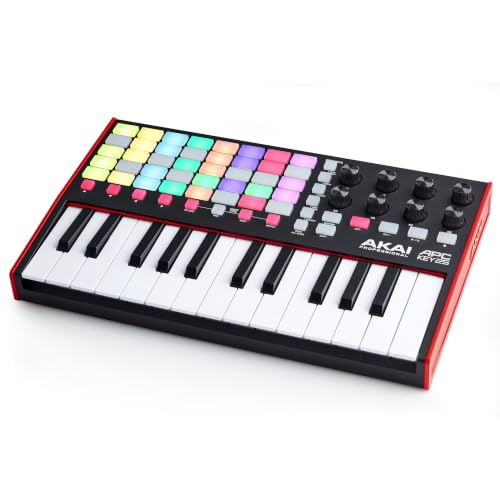
- 40 RGB clip-launching pads
- Eight assignable knobs and Ableton navigation buttons
- Includes Ableton Live Lite with pre-mapped integration
Best For: Beginners making loop-based music in Ableton Live
Compact Starter Pick

- 25 velocity-sensitive mini keys in a portable design
- Includes 40 teaching courses and production software
- USB compatibility with computers, mobile devices, and DAWs
Best For: Beginners who want a compact keyboard with guided lessons
Standalone Learning Pick

- Built-in speaker and over 100 internal sounds
- Eight pads, four knobs, display, arpeggiator, and note repeat
- Includes production software and Melodics lessons
Best For: Beginners wanting standalone practice and beat-making features
Wireless Feature Pick
DaierTek 25-Key MIDI Controller

- Bluetooth and USB MIDI with a rechargeable 2,000 mAh battery
- Adds smart chord, smart scale, pads, knobs, and touch controls
- Works with computers, mobile devices, and several major DAWs
Best For: Beginners seeking a portable wireless controller with creative controls
Feature-Rich Starter – Akai MPK Mini IV
The Akai Professional MPK Mini IV is a strong midi controller for beginners who want compact keys, beat pads, and plenty of guided creative tools. Its 25 velocity-sensitive mini keys, color display, knobs, and DAW integration provide hands-on control without requiring a large setup.
Best For: Beginners who want an all-in-one controller for beats, melodies, sound browsing, and portable music production.
Pros:
- Eight velocity- and pressure-sensitive MPC pads include RGB feedback.
- Color display, push-turn encoder, and eight assignable knobs support hands-on navigation.
- Chord, Scale, and enhanced arpeggiator modes can help spark ideas.
- Includes a large software suite, Melodics trial, and Splice access.
Cons:
- The 25 mini-key layout may feel limited for two-handed playing.
- Its many features may take some time for a complete beginner to learn.
With USB-C, full-size MIDI Out, and mobile-friendly plug-and-play operation, the MPK Mini IV is unusually versatile for its size. It is a particularly complete choice if you want your first controller to support both learning and more advanced production later.
Simple Workflow Pick – Arturia MiniLab 3
The Arturia MiniLab 3 is an approachable midi controller for beginners who want a straightforward way to play instruments and adjust a DAW. Its 25 velocity-sensitive keys, eight pads, and four faders offer useful physical control while keeping the setup compact.
Best For: New producers seeking an easy desktop controller for keyboard parts, drum pads, track muting, and basic mixing control.
Pros:
- Velocity-sensitive keys support more expressive playing.
- Eight pads and four faders provide direct control over drums and tracks.
- Designed to work with music production software, including Ableton Live.
- Includes a software suite, USB cable, and five-year manufacturer warranty.
Cons:
- The 25-key format offers less room for two-handed playing.
- The supplied notes do not list an arpeggiator, chord mode, or MIDI output.
MiniLab 3 focuses on accessible controls rather than an extensive feature list. That simplicity can be helpful when you are learning the basics and want to spend less time configuring hardware.
Value Beat-Making Favorite – Akai MPK Mini MK3
The Akai MPK Mini MK3 remains a capable midi controller for beginners who want to learn beat making and virtual instrument control. It combines 25 velocity-sensitive mini keys with MPC-style pads, assignable knobs, a pitch/modulation joystick, and an arpeggiator.
Best For: First-time producers building beats, triggering samples, and experimenting with software instruments in a home studio.
Pros:
- Eight backlit velocity-sensitive MPC pads include Note Repeat and Full Level.
- Eight 360-degree knobs can control plugins, effects, and synth parameters.
- Four-way joystick provides pitch and modulation control.
- Includes MPC Beats, virtual instruments, sound content, and two months of Splice.
Cons:
- The 25 mini keys are compact rather than suited to broad two-handed parts.
- Uses USB 2.0 Type-B rather than the newer USB-C connector.
- The supplied warranty is one year.
Its familiar pad layout and included software make the MPK Mini MK3 a practical entry point for beat-focused production. The editor also gives beginners a path to customizing mappings as their workflow develops.
Two-Handed Learning Choice – Arturia MiniLab 37
The Arturia MiniLab 37 is a midi controller for beginners who want more playing room than a typical 25-key model. Its 37 slim keys support two-handed parts while DAW-integrated pads, faders, a display, arpeggiator, and Chord mode keep production controls within reach.
Best For: Beginners learning keyboard parts who want a compact controller with enough range for two-handed playing.
Pros:
- 37-key slim keyboard provides expanded range without a full-size footprint.
- Eight pads in a 2×4 layout support finger drumming and clip launching.
- Includes DAW-integrated pads and faders plus a real-time mini display.
- Arpeggiator, Chord mode, and transposition support creative experimentation.
Cons:
- It is larger than a 25-key controller and may require more desk space.
- The supplied notes specify USB-C connectivity but do not list MIDI Out.
MiniLab 37 is a sensible step up for learners who expect to play more than short melodies. It preserves a portable form factor while offering a more comfortable key range and useful beginner-friendly creative features.
Best Full-Size Starter – M-Audio Keystation 49 MK3
If you want a traditional playing experience, the M-Audio Keystation 49 MK3 is a strong midi controller for beginners. Its 49 full-size velocity-sensitive keys provide more range than compact models, while plug-and-play USB connectivity keeps setup straightforward.
Best For: Beginners who want full-size keys for learning melodies, chords, and expressive playing.
Pros:
- 49 full-size velocity-sensitive keys offer a natural, responsive feel.
- Includes pitch and modulation wheels, octave buttons, transport controls, and a sustain-pedal input.
- Comes with multiple software tools, including MPC Beats, Ableton Live Lite, and virtual instruments.
Cons:
- Its larger 49-key design takes up more desk space than a mini controller.
- It requires a computer or compatible device and software to produce sound.
The Keystation 49 MK3 is a practical foundation for beginners who expect to grow beyond two-octave playing. It emphasizes keyboard feel and range while still offering useful controls for a home studio.
Best Portable Learning Pick – Donner DMK 25 Pro
The Donner DMK 25 Pro is a compact midi controller for beginners who want guided features and mobile-friendly connectivity. Its 25 keys, eight drum pads, OLED display, smart scales, and included teaching courses make it approachable for experimenting with beats and melodies.
Best For: Beginners who prioritize portability, guided learning, and creative performance tools.
Pros:
- Compact 25-key design includes eight drum pads and an OLED display.
- Smart Dynamic Scale Mode, arpeggio, note repeat, and chord functions support experimentation.
- Includes a USB-C adapter, four DAW software options, and 40 teaching courses.
Cons:
- It does not produce sound on its own and requires a phone or computer with DAW software.
- Some mobile connections may require a separately purchased adapter, depending on the device interface.
The DMK 25 Pro packs considerable guidance and performance functionality into a small format. It is especially appealing if you want to practice on the go, though players seeking a piano-like range may prefer a larger keyboard.
Best for Ableton Beginners – Akai APC Key 25 MK2
For beginners interested in clip-based music making, the Akai APC Key 25 MK2 combines a compact keyboard with hands-on Ableton Live control. Its 40 RGB pads, eight rotary knobs, and pre-mapped integration help new users launch clips, shape sounds, and organize sessions from the hardware.
Best For: Beginners using Ableton Live for loop-based production and live performance.
Pros:
- 40 RGB pads provide visual feedback for launching clips, loops, samples, and scenes.
- Eight assignable knobs and directional buttons support mixing and navigation.
- Includes Ableton Live Lite and is pre-mapped for direct Ableton Live integration.
Cons:
- The 25 mini keys provide less playing range than a 49-key controller.
- Its strongest integration is centered on Ableton Live rather than general-purpose keyboard control.
The APC Key 25 MK2 is a focused choice for learning Ableton’s session-based workflow. Choose it if launching clips and controlling software matters more to you than having a full-size keyboard.
Compact Starter Pick – Donner N-25 MIDI Keyboard
The Donner N-25 is a practical midi controller for beginners who want a compact keyboard for learning melodies, experimenting with arrangements, and controlling a DAW. Its 25 velocity-sensitive mini keys, straightforward controls, and included teaching courses make it approachable without taking much desk or backpack space.
Best For: Beginners seeking an affordable, portable MIDI keyboard with built-in learning resources.
Pros:
- Compact 25-key design with velocity-sensitive keys.
- Beginner-friendly features include an arpeggiator, sustain, octave controls, tap tempo, and programmable banks.
- Includes 40 keyboard-teaching courses and music-production software.
- Works with Mac, Windows, iOS, Android, and various DAWs through USB-MIDI.
Cons:
- Mini keys provide less playing room than full-size keys.
- USB connection is required for standard computer use; mobile devices may need an OTG adapter.
- It has only 25 keys, which may limit two-handed playing.
The N-25 keeps the learning curve manageable while offering useful creative controls. It is a strong fit if portability and guided learning matter more than a larger keybed or extensive hands-on controls.
Standalone Learning Pick – Akai MPK Mini Play MK3
The Akai MPK Mini Play MK3 is a versatile midi controller for beginners who want to practice and create without always connecting to a computer. Its built-in sounds and speaker complement the USB controller functions, while the pads, knobs, display, and included educational software provide room to grow.
Best For: Beginners and beat makers who want standalone sounds alongside computer-based production.
Pros:
- Built-in speaker and more than 100 internal drum and instrument sounds.
- Includes 25 velocity-sensitive keys, eight MPC pads, four encoder knobs, arpeggiator, and note repeat.
- Battery-powered operation supports portable use; USB power is also available.
- Includes MPC Beats, AIR Music Tech instruments, Melodics lessons, and a Splice offer.
Cons:
- Batteries are not included.
- The 25-key mini layout may feel limiting for extended two-handed parts.
- Its broader feature set may take longer for a complete beginner to learn.
Unlike a basic USB-only controller, the MPK Mini Play MK3 can produce sounds through its own speaker, making it useful away from a DAW. Choose it if standalone practice and beat-making flexibility are priorities.
Wireless Feature Pick – DaierTek 25-Key MIDI Controller
The DaierTek 25-key controller is a flexible midi controller for beginners who want wireless connectivity and modern performance aids. Smart chord and smart scale modes can help new players get started, while the pads, knobs, touch controls, and rechargeable battery add versatility for mobile production.
Best For: Beginners who want Bluetooth portability, guided playing features, and hands-on controls.
Pros:
- Supports Bluetooth and USB MIDI, with a built-in 2,000 mAh battery rated for about 16 hours.
- Includes 25 velocity-sensitive keys, eight RGB pads with aftertouch, eight assignable knobs, and a mini display.
- Smart chord, smart scale, and arpeggio functions can make early experimentation easier.
- Compatible with Windows, Mac, Android, iOS, and DAWs including Ableton Live, FL Studio, Cubase, and GarageBand.
Cons:
- It produces no sound by itself and requires music software or a DAW.
- Bluetooth setup varies by platform; Windows requires a MIDI driver, and Android connection must be made inside a compatible app.
- Its larger feature set may be more than a first-time user needs.
The DaierTek offers the most connectivity and control flexibility of these options, especially for mobile setups. It is appealing if you are comfortable using an app or DAW and want wireless operation rather than a strictly plug-in USB controller.
How We Picked the Best Midi Controller for Beginners
We focused on features that matter most when learning: responsive keys, useful controls, straightforward computer connectivity, portable designs, and compatibility with popular music software. We also considered different beginner goals, including learning piano, producing beats, controlling instruments, and creating music while traveling.
Because beginners do not all need the same setup, this list includes compact controllers, larger keyboards, performance-focused models, and options with built-in or expanded control features. Software bundles and ease of setup were also considered where relevant.
Quick Comparison
| Controller Type | Best For | Typical Advantage |
|---|---|---|
| 25-key mini controller | Limited desks and mobile setups | Portable and affordable |
| 37-key controller | Melodies and two-handed parts | More playing range without a large footprint |
| 49-key controller | Learning piano-style playing | More room for chords and bass lines |
| Pad-focused controller | Beat making and clip launching | Hands-on rhythm and performance control |
| Bluetooth-enabled controller | Wireless or flexible setups | Convenient connection options |
Key Buying Factors for a Midi Controller for Beginners
Key Size and Range
Mini keys save space but can feel less natural for traditional piano practice. A 25-key model works well for melodies, bass lines, and portable production. Choose 37 or 49 keys if you want to practice two-handed parts or avoid changing octaves as often.
Velocity and Playing Feel
Velocity-sensitive keys respond to how hard you play, making performances more expressive. This feature is especially useful for piano, strings, and other instruments that benefit from dynamics. Check whether the model has synth-action or semi-weighted keys based on your expectations.
Pads, Knobs, and Software Control
Drum pads are valuable for beat programming, while knobs and buttons can make mixing and instrument control faster. Beginners who mainly want to play notes may not need many controls, but producers often benefit from having them available.
Compatibility and Connectivity
Most USB MIDI controllers work with major digital audio workstations, but verify operating-system support and included cables. USB-C can simplify newer setups, while Bluetooth may be useful for wireless-compatible devices. Remember that a MIDI controller generally needs a computer, tablet, or sound module to produce audio.
Who Should Buy Which Midi Controller for Beginners?
Choose a compact 25-key controller if you have limited space, travel frequently, or want an affordable first step into music production. Models with pads and knobs are better for beat makers and users who want hands-on DAW control.
A 37-key controller is a strong middle ground for beginners who want more range without committing to a full-size keyboard. If learning piano technique or playing fuller arrangements is your priority, a 49-key model is usually the more comfortable choice.
Look for a pad-centered option if you plan to launch clips, trigger samples, or perform electronic music. Choose a portable or Bluetooth-capable model when flexibility matters more than traditional keyboard feel. Before buying, confirm the controller fits your desk, works with your preferred software, and includes the controls you will actually use.