Finding the right drum pad for a home studio depends on whether you need quiet practice, hands-on beat production, sample triggering, or a combination of all three. The best options balance responsive playing surfaces with useful connectivity, dependable construction, and a footprint that fits your workspace.
This roundup includes compact MIDI controllers, standalone sampling pads, multipads, and acoustic-style practice pads. Use the guide below to narrow the list by workflow, features, and budget before choosing your setup.
Best 10 Drum Pads for Home Studios Picks for 2026
Portable Beat Builder

- 16 velocity-sensitive MPC pads
- 48 assignments across three banks
- MPC Beats and Ableton Live Lite included
Best For: Portable DAW-based beat production
Sample-Ready Performance Pad

- Four velocity-sensitive performance pads
- SD-card sample expansion
- Built-in sounds and MIDI output
Best For: Compact sample and percussion setups
Color-Coded Control Hub

- 16 pads with 48 assignments
- Two faders and two knobs
- Includes Melodics and Cubase LE software
Best For: Hands-on DAW control with visual feedback
All-in-One Sampling Station

- Nine velocity-sensitive RGB pads
- Built-in sampler, looper, and effects
- 32GB storage with 700+ sounds
Best For: Advanced sampling and live-performance workflows
Best Portable MIDI Pad

- 16 velocity-sensitive RGB pads with aftertouch
- Wireless MIDI and USB-C for desktop or mobile setups
- Includes Cubase LE, WaveLab LE, and Melodics
Best For: Portable DAW-based beat making and home-studio production
Best Sound-Rich Multi Pad

- 1,061 drum, percussion, and effects sounds
- Sequencer, preset loops, and mute/layer functions
- Inputs for external pads, footswitch, and hi-hat controller
Best For: Expandable electronic percussion and onboard sound creation
Best Expandable Sample Pad

- Nine dual-zone velocity-sensitive pads
- 592-plus sounds, 30 kits, and custom sample support
- MIDI, USB, AUX, looper, and trigger expansion
Best For: Expandable drumming, custom kits, and hybrid studio setups
Best Overall
Evans RealFeel 12-Inch Practice Pad
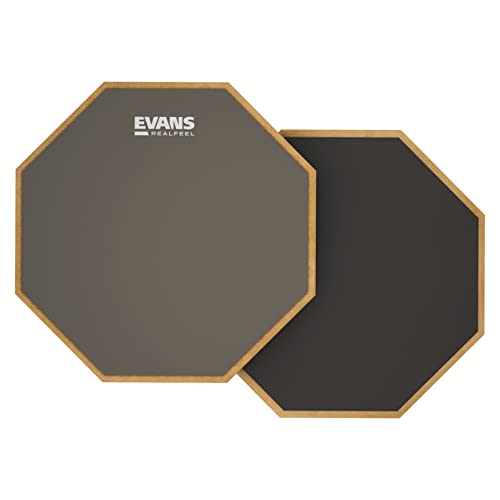
- Two playing surfaces
- Quiet and portable
- Made in the USA
Best For: Flexible home and travel practice
Best Complete Kit
GrowDaily 12-Inch Practice Pad Set

- Includes adjustable snare stand
- Three pairs of maple sticks
- Carrying and stick bags included
Best For: Beginners building a ready-to-use setup
Best for Snare Technique
Donner 12-Inch Quiet Practice Pad

- Detachable 800-ball snare simulator
- Quiet silicon playing surface
- Includes 40 rudiments and sticks
Best For: Quiet, structured snare technique practice
Portable Beat Builder – Akai MPD218
The Akai Professional MPD218 is a compact choice for producers looking for drum pads for home studios, especially when portability and hands-on beat programming matter. Its 16 velocity-sensitive MPC pads expand to 48 assignable pads through three banks, while USB connectivity keeps setup simple.
Best For: Beat makers who want expressive pads, note repeat, and compact USB control for a DAW or compatible iOS setup.
Pros:
- Sixteen thick, velocity-sensitive MPC-style pads with three banks for 48 assignments.
- Includes note repeat and full-level controls for expressive performances.
- Comes with MPC Beats, Ableton Live Lite, and Drum Synth 500.
- USB-powered design is portable and straightforward to connect.
Cons:
- Its control layout is focused on pads and knobs rather than built-in audio playback.
- iOS connectivity requires a Camera Connection Kit sold separately.
The MPD218 is a practical, focused controller for home-studio drum programming. Choose it when velocity-sensitive MPC pads and software-based production are more important than onboard sounds.
Sample-Ready Performance Pad – Alesis Sample Pad 4
The Alesis Sample Pad 4 takes a different approach to drum pads for home studios by combining four velocity-sensitive pads with onboard percussion sounds and SD-card sample support. It can also send MIDI to external sound modules or software, making it useful for both standalone-style playing and studio control.
Best For: Musicians who want a compact sample and percussion pad with SD-card expansion, MIDI output, and simple sound shaping.
Pros:
- Four velocity-sensitive pads support expressive triggering.
- Includes 25 built-in percussion and electronic drum sounds across eight kits.
- Standard SD/SDHC card support allows additional samples.
- Offers tuning, reverb, MIDI output, and a dual trigger input.
Cons:
- It has four pads, fewer than the 16-pad controllers in this roundup.
- The supplied notes do not indicate included DAW software.
The Sample Pad 4 suits a smaller, sound-focused setup. It is a strong fit if you want to add samples and percussion without relying entirely on a computer, while retaining MIDI control for studio integration.
Color-Coded Control Hub – Donner STARRYPAD
The Donner STARRYPAD is a flexible option for drum pads for home studios, pairing 16 backlit silicone pads with faders, knobs, multiple banks, and MIDI connectivity. It requires DAW software to produce sound, but its visual feedback and extra controls can make hands-on production more organized.
Best For: Home producers who want a compact USB MIDI controller with customizable lighting, additional mixer-style controls, and broad device compatibility.
Pros:
- Sixteen backlit pads expand to 48 assignments across three banks.
- Includes two faders, two knobs, three buttons, and shift-layer control.
- Offers adjustable velocity curves, tap tempo, and note repeat.
- Supports Mac, Windows, Android, and iOS, with MIDI in/out for external equipment.
Cons:
- It does not produce sound on its own and needs DAW software.
- The lighting editor changes pad colors but does not record or arrange music.
- Connecting to an iPhone or iPad requires an Apple Lightning-to-USB adapter.
The STARRYPAD offers more control variety than a basic pad-only controller. It is worth considering when visual organization, faders, knobs, and connectivity options are priorities in a compact studio workspace.
All-in-One Sampling Station – Alesis Strike Multipad
The Alesis Strike Multipad is the most comprehensive option here for drum pads for home studios, combining nine velocity-sensitive RGB pads with sampling, looping, effects, storage, and USB audio/MIDI. Its display and built-in content make it suited to producers who want a deeper production instrument rather than a simple trigger controller.
Best For: Producers and performers who need onboard samples, looping, effects, melodic sounds, and expanded audio/MIDI connectivity.
Pros:
- Nine velocity-sensitive RGB pads support one-shots, melodies, and loops.
- Includes a built-in looper, sampler, five effects processors, and USB sample loading.
- Provides 32GB of storage with over 6GB of included content and more than 700 sounds.
- Works as a 2-in/2-out USB audio and MIDI interface and includes Ableton Live Lite and MPC Beats.
Cons:
- Its larger feature set and roughly 14.2-by-13.8-inch footprint require more studio space.
- It is substantially more involved than a basic USB MIDI pad controller.
The Strike Multipad is a strong choice when sampling and performance features need to live in one unit. Its storage, looper, effects, and audio interface make it particularly capable for an expanding home studio.
Best Portable MIDI Pad – STARRYPAD PRO
For producers seeking drum pads for home studios, the Donner STARRYPAD PRO combines expressive pad control with portable MIDI connectivity. Its 16 velocity-sensitive RGB pads, wireless MIDI, USB-C, assignable knobs, and included software make it suited to beat making in a DAW rather than standalone audio playback.
Best For: Home-studio producers who want a compact, software-focused MIDI pad controller for beat making, practice, and mobile production.
Pros:
- 16 RGB velocity-sensitive pads with polyphonic aftertouch and three velocity curves
- Wireless MIDI and USB-C compatibility with computers, tablets, and smartphones
- Eight assignable knobs, DAW transport controls, and customizable lighting
- Includes Cubase LE, WaveLab LE, and Melodics software
Cons:
- Requires DAW software to generate sound and does not produce audio by itself
- Its compact controller layout may be less suitable for users seeking a standalone drum module
The STARRYPAD PRO is a flexible choice when hands-on DAW control and portability matter more than built-in sounds. Its rechargeable battery, rated for up to 10 hours, also supports sessions away from a fixed studio setup.
Best Sound-Rich Multi Pad – Yamaha DTX-MULTI 12
The Yamaha DTX Multi Pad is a substantial option for drum pads for home studios when a broad internal sound library and expandable triggering are priorities. It includes more than 1,000 drum, percussion, and effects sounds, plus keyboard sounds, sequencing features, and memory for user samples.
Best For: Drummers and producers who want a versatile electronic percussion pad with onboard sounds, loops, sample storage, and external trigger expansion.
Pros:
- Includes 1,061 drum, percussion, and effects sounds plus 216 keyboard sounds
- Supports mute/layer functions, a sequencer, and preset loops
- 64MB of Flash-ROM storage for user samples
- Trigger inputs support up to five external pads, with footswitch and hi-hat controller connections
Cons:
- Its listed 3,300-gram weight and larger dimensions make it less portable than compact MIDI controllers
- Its feature set may be more than needed for users seeking a simple DAW pad interface
With onboard sounds and multiple expansion connections, the DTX-MULTI 12 can function as more than a trigger surface. It is a strong fit for a studio that may grow to include external pads, pedals, and sample-based performance.
Best Expandable Sample Pad – LEKATO PD705
The LEKATO PD705 is designed for musicians who want drum pads for home studios with standalone sounds and recording flexibility. Its nine dual-zone velocity-sensitive pads, 592-plus sounds, MIDI connections, trigger inputs, looper, and sample-import support cover both electronic drumming and DAW-based production.
Best For: Beginners and experienced players who need an expandable sample pad for drums, backing tracks, custom kits, and MIDI control.
Pros:
- Nine dual-zone velocity-sensitive pads and up to 592 preset percussion sounds
- Includes 30 drum kits, a looper, AUX, USB MIDI, and five-pin MIDI I/O
- Two dual-zone trigger inputs allow expansion with pads or acoustic drum triggers
- Supports custom kits and sample importing through WaveManager software
Cons:
- At 3.17 kg, it is less lightweight than a basic MIDI pad controller
- Sample management and firmware features require additional software or storage workflow
- The included 9-pad layout provides fewer playing surfaces than 16-pad controllers
The PD705 stands out for its balance of internal sounds, custom sample support, and hardware expansion. It is particularly practical for producers who want a pad that can trigger software while also handling standalone kits and backing tracks.
Best Overall – Evans RealFeel 12-Inch Practice Pad
If you need dependable drum pads for home studios, the Evans RealFeel offers a portable, quiet surface with two distinct playing responses. Its 12-inch format works on a table, carpet, lap, or inside a standard snare basket.
Best For: Drummers who want flexible, low-noise practice at home or on the go.
Pros:
- Two-sided design provides realistic rebound on one side and a firmer workout surface on the other.
- Muted sound profile helps support quiet practice.
- Wear-resistant fabric finish and USA-made construction.
- Works on multiple surfaces and is easy to transport.
Cons:
- The 12-inch model is not mountable.
- It does not include a stand, sticks, or carrying accessories.
The Evans RealFeel is a straightforward, durable choice when consistent rebound and quiet portability matter more than a full accessory bundle.
Best Complete Kit – GrowDaily 12-Inch Practice Pad Set
For a home studio setup that is ready to use, the GrowDaily combines a 12-inch practice pad with a snare stand, sticks, stick bag, and dedicated carrying bag. Its rubber playing surface, poplar base, and shock-absorbing cotton are designed to provide a near-snare feel.
Best For: Beginners and drummers who want a height-adjustable, all-in-one practice station.
Pros:
- Includes a sturdy double-support tripod stand with adjustable height from 19.5 to 31.5 inches.
- Comes with three pairs of maple sticks and a stick bag.
- High-resilience rubber surface and shock-absorbing cotton aim to replicate a snare feel.
- Includes a dedicated carrying bag.
Cons:
- At 4.19 pounds, the pad is heavier than some portable practice pads.
- The larger kit takes more storage space than a pad alone.
This is a practical value pick for building a complete practice corner without sourcing a compatible stand, sticks, and storage separately.
Best for Snare Technique – Donner 12-Inch Quiet Practice Pad
The Donner is a useful option for drum pads for home studios when quiet practice and snare-oriented technique are priorities. Its detachable simulator uses 800 steel balls for a more immersive response, while the wood-and-silicon construction keeps the pad durable and portable.
Best For: Beginners and technique-focused players who want snare-style features without acoustic-drum volume.
Pros:
- Detachable snare simulator adds simulated snare sound.
- Quiet design is intended to reduce disturbance to family and neighbors.
- Standard-height rim and stick slot support modern snare techniques.
- Includes maple sticks and a printout of 40 standard rudiments.
Cons:
- Only one pair of sticks is included.
- The simulated snare feature may not suit players who prefer a completely plain practice surface.
With its rudiment guide, snare simulator, and quiet construction, the Donner makes a compelling choice for structured technique work in shared living spaces.
How We Picked the Best Drum Pads for Home Studios
We evaluated these drum pads by the needs of home-studio musicians rather than treating every model as the same type of instrument. Key considerations included pad response, playing feel, triggering flexibility, connectivity, portability, noise level, and how easily each option integrates with a computer, headphones, mixer, or existing electronic drum setup.
We also separated MIDI controllers from standalone or practice-focused products. A controller typically depends on music software, while a sampling pad or multipad may offer onboard sounds and more independent operation. Practice pads prioritize quiet, realistic rebound and simple setup.
Quick Comparison
| Best For | Look For | Typical Advantage |
|---|---|---|
| Beat production | MIDI, velocity sensitivity, software support | Easy DAW and virtual-instrument control |
| Sample triggering | Onboard memory, audio inputs, multiple outputs | More standalone flexibility |
| Hybrid setups | Assignable controls and broad connectivity | Hands-on control over sounds and effects |
| Quiet practice | Rubber or gum-rubber surface, stable stand | Low-noise technique work |
Key Buying Factors for Drum Pads for Home Studios
Pad Feel and Response
Velocity-sensitive pads provide more expressive dynamics, which matters for finger drumming, realistic sampled instruments, and performance recording. For technique practice, consider rebound and surface material first. A two-sided or gum-rubber pad can offer different playing feels, while a softer surface may reduce room noise.
Connectivity and Software
USB MIDI is useful when your main workflow is a computer and DAW. MIDI outputs can make a pad more compatible with hardware instruments, while audio inputs, outputs, and onboard storage are valuable for standalone sampling. Check whether the included software works with your operating system and preferred production environment.
Size, Noise, and Setup
Count the available pads and measure your desk or stand before buying. Compact controllers suit small workstations, but larger multipads may be more comfortable for two-handed playing. Practice pads are generally quieter than acoustic drums, although stick impact can still travel through a desk or floor; a stable stand and isolation surface help.
Controls and Expandability
Assignable knobs, faders, footswitch inputs, and external trigger connections can make a significant difference during live-style production. If you expect your setup to grow, prioritize standard connections and flexible mapping instead of choosing solely by pad count.
Who Should Buy Which Drum Pads for Home Studios?
Choose a USB MIDI pad controller if you already produce in a DAW and want fast access to drum instruments, samples, and clips. These are usually the most space-efficient choice for computer-based studios.
Choose a sampling pad or multipad if you want onboard sounds, external sample playback, or a more self-contained performance setup. These models are better suited to musicians who do not want every session to depend on a computer.
Choose a dedicated practice pad if your priority is rudiment work, timing, and quieter daily practice. Add a compatible stand when possible for more natural height and playing position.
For the best match, decide first whether the pad is primarily an instrument controller, a sound source, or a practice tool. Then compare response, connections, noise, and available space against the way you actually plan to use it.