Connecting a keyboard, synthesizer, or other five-pin MIDI device to a modern computer does not have to be complicated. The right USB MIDI interface can provide reliable note, controller, and timing data without adding unnecessary setup.
These 10 USB MIDI interfaces include straightforward cable adapters, compact host devices, USB-C options, and an audio interface with built-in MIDI connectivity. Use the guide below to match the connection type, features, and workflow to your setup.
Best 10 USB Midi Interfaces Picks for 2026
Best Advanced USB MIDI Cable

- Plug-and-play support across major operating systems
- Filtering, mapping, and routing via UxMIDI Tools
- Low-latency 1-in/1-out design with 16 channels
Best For: Advanced MIDI routing and dependable cross-platform use
Best Compact USB MIDI Interface

- One MIDI input and one MIDI output
- Low-latency FPT processing
- Bus-powered design with signal indicators
Best For: Simple computer-based MIDI connections in a compact format
Best Plug-and-Play USB MIDI Cable

- 1-in/1-out connection with 16 channels
- Built-in driver and LED status indicators
- Compatible with Windows, Mac, iOS, and Android
Best For: Recording and editing with standard five-pin MIDI instruments
Best Simple USB MIDI Cable
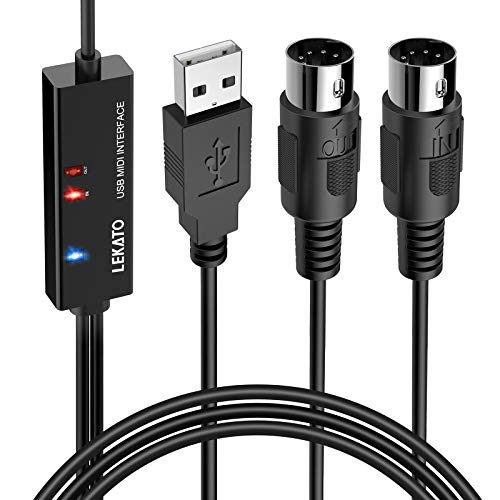
- 1-in/1-out MIDI with 16 channels
- Plug-and-play use on Windows and macOS
- LEDs show power and signal activity
Best For: Basic keyboard-to-computer recording and editing
Best Hybrid MIDI Router
CME H2MIDI Pro Compact USB Host MIDI Interface

- Standalone USB host connects modern gear to 5-pin MIDI hardware
- Expandable to eight USB MIDI devices with a hub
- Routing, filtering, mapping, and preset support
Best For: Hybrid MIDI rigs and computer-free performance setups
Best Simple MIDI Cable

- Basic 1-in/1-out MIDI-to-USB connection
- Works with compatible Windows and Mac computers
- USB Type-C adapter included for supported mobile setups
Best For: Connecting one MIDI keyboard or instrument to a computer
Best Audio and MIDI Combo
Arturia MiniFuse 2 USB Audio & MIDI Interface

- Combines 5-pin MIDI I/O with two audio inputs
- Includes phantom power, balanced outputs, and headphone monitoring
- Comes with recording and music-production software
Best For: Home studios recording audio while using MIDI instruments
Best Type-C Pick

- One MIDI in and one MIDI out
- Plug-and-play with LED indicators
- Supports Type-C, iOS, Android, Windows, and Mac
Best For: Type-C MIDI connections for computers and mobile devices
Best for Classic PC Setups

- Supports 16 channels in and out
- LED power and MIDI activity indicators
- Works with Windows and Mac OS
Best For: Recording and editing MIDI on a computer
Best Advanced USB MIDI Cable – CME U2MIDI Pro
The CME U2MIDI Pro is a flexible choice among usb midi interfaces for musicians who want plug-and-play connectivity plus advanced control. Its 1-in/1-out design supports 16 MIDI channels, major operating systems, and optional filtering, mapping, and routing through the included UxMIDI Tools software.
Best For: Producers and performers who need reliable MIDI transmission with advanced filtering, mapping, or routing options.
Pros:
- Works without drivers on macOS, iOS, Windows, Android, Linux, and ChromeOS.
- Supports MIDI notes, controllers, clock, SysEx, MTC, and MPE across 16 channels.
- Offers low-latency performance, LED indicators, and a 6.5-foot integrated cable.
- Includes UxMIDI Tools and lifetime updates.
Cons:
- Uses a USB-A connector, so newer devices may require an adapter.
- Its advanced features may be more than basic MIDI setups need.
With broad compatibility and unusually capable MIDI-processing tools, the U2MIDI Pro is a strong pick when a straightforward cable needs to handle more complex routing or filtering tasks.
Best Compact USB MIDI Interface – Roland UM-ONE-MK2
The Roland UM-ONE-MK2 is a compact option among usb midi interfaces for connecting one MIDI device to a computer or compatible iPad setup. It combines one MIDI input and one MIDI output with bus-powered operation, integrated cables, and visual indicators for monitoring signal flow.
Best For: Home producers and keyboard players who want a simple, compact interface from an established MIDI brand.
Pros:
- High-performance FPT processing is designed for low latency and tighter clock timing.
- Integrated USB and MIDI cables reduce the need for extra adapters or cable clutter.
- USB bus power eliminates the need for an external power supply.
- Data indicators show MIDI input and output activity.
Cons:
- Compatibility is listed for Mac, Windows, and iOS via an Apple iPad Camera Connection Kit.
- It provides a focused one-in/one-out configuration rather than advanced routing features.
The UM-ONE-MK2 keeps the setup compact and uncomplicated, making it a practical choice when reliable basic MIDI connectivity matters more than extensive configuration options.
Best Plug-and-Play USB MIDI Cable – FORE MIDI USB Interface
The FORE MIDI USB Interface is a practical budget-style choice among usb midi interfaces for recording and editing tracks from keyboards, synthesizers, drum machines, and other five-pin MIDI devices. Its built-in driver, LED status indicators, 6.5-foot cable, and USB bus power are designed for a straightforward setup.
Best For: Musicians connecting standard five-pin MIDI instruments to Windows, Mac, iOS, or Android devices.
Pros:
- Provides 1 MIDI input, 1 MIDI output, and 16 input/output channels.
- Plug-and-play operation with built-in driver support and LED status indicators.
- Works with Windows, macOS, iOS, and Android devices.
- Supports common music software including GarageBand, FL Studio, Cubase, and Sonar.
Cons:
- The USB A-C adapter needed for some USB-C devices is not included.
- Its USB Type-A connection may require an adapter with newer computers and phones.
- The supplied information does not describe advanced MIDI filtering or routing.
For users who want broad device and software compatibility without a complicated installation, the FORE interface offers the essential connections and status feedback needed for everyday MIDI work.
Best Simple USB MIDI Cable – LEKATO MIDI to USB Cable
The LEKATO MIDI to USB Cable is a straightforward option among usb midi interfaces for connecting a keyboard, piano, synthesizer, or other electronic instrument to a Windows or Mac computer. It offers 1-in/1-out MIDI, 16 channels, plug-and-play operation, and indicator lights to help track power and signal activity.
Best For: Keyboard players and home-studio users who need an uncomplicated MIDI connection for recording or editing.
Pros:
- Supports 1 MIDI input, 1 MIDI output, and up to 16 channels.
- Built-in driver enables plug-and-play use with Windows and macOS.
- LED indicators help distinguish power from MIDI signal activity.
- Soft bare-copper construction and interference-resistant design support stable transmission.
Cons:
- The listed operating-system support focuses on Windows and macOS.
- No advanced filtering, mapping, or routing features are specified.
- The supplied details do not mention iOS or Android compatibility.
The LEKATO is best suited to basic computer-to-instrument connections, offering the core MIDI functions and visual monitoring needed for a simple home recording setup.
Best Hybrid MIDI Router – CME H2MIDI Pro Compact USB Host MIDI Interface
The CME H2MIDI Pro is a flexible choice among USB MIDI interfaces for musicians combining modern USB gear with traditional 5-pin DIN hardware. It can operate standalone without a computer, or connect to Mac, Windows, iOS, Android, Linux, and ChromeOS systems for more advanced routing.
Best For: Hybrid setups involving USB MIDI controllers, keyboards, drum machines, synthesizers, and legacy DIN MIDI equipment.
Pros:
- Connects USB class-compliant MIDI devices directly to 5-pin DIN hardware without a computer.
- Supports up to eight USB MIDI devices through a standard USB hub.
- Offers routing, filtering, mapping, splitting, and up to four saved presets through HxMIDI Tools.
- Handles complex MIDI data, including clock, SysEx, MTC, and MPE.
Cons:
- It is a MIDI interface rather than an audio recording interface.
- Advanced configuration depends on HxMIDI Tools software.
With its compact size, broad operating-system support, and standalone USB-host mode, the H2MIDI Pro is especially well suited to performance rigs and expandable hybrid studios. Its 5-pin MIDI connection and USB-C computer connectivity make it a versatile routing hub rather than a simple cable adapter.
Best Simple MIDI Cable – NUOSIYA USB to MIDI Cable
The NUOSIYA USB to MIDI cable is a straightforward option for connecting a compatible keyboard or other MIDI instrument to a computer. As a basic USB MIDI interface, it provides one MIDI input and one MIDI output for recording and editing MIDI data on Windows or Mac systems.
Best For: Keyboard players and home users who need an affordable, direct connection between 5-pin MIDI equipment and a computer.
Pros:
- Provides 1-in and 1-out MIDI connectivity through a USB cable-style design.
- Supports common Windows versions and Mac OS X systems.
- Includes a USB Type-C adapter for connecting with compatible mobile devices or iPads.
- Its 4.5- to 6-foot length offers flexible placement between an instrument and computer.
Cons:
- It is limited to basic MIDI connections and does not provide audio inputs or outputs.
- Mobile-device compatibility may require an additional adapter and depends on the device.
- The notes caution that some older audio equipment may require separate adapters.
This cable keeps the setup simple for transferring MIDI signals to recording or music software. It is a practical pick when you only need basic 5-pin MIDI input and output rather than routing features, multiple ports, or audio recording hardware.
Best Audio and MIDI Combo – Arturia MiniFuse 2 USB Audio & MIDI Interface
The Arturia MiniFuse 2 combines USB MIDI connectivity with a full audio interface, making it a strong all-around option for home recording. In addition to 5-pin MIDI input and output, it provides microphone, instrument, and line connections, headphone monitoring, balanced outputs, and a USB hub.
Best For: Musicians who want USB MIDI interfaces alongside audio recording for vocals, guitars, synthesizers, or other instruments.
Pros:
- Includes 5-pin MIDI input and output for synths, controllers, and drum machines.
- Provides two combo microphone/instrument/line inputs with 48V phantom power.
- Offers balanced line outputs, a headphone output with volume control, and a USB Type-A hub.
- Includes creative software such as Ableton Live Lite, Analog Lab Intro, and Guitar Rig 6 LE.
Cons:
- It is larger and heavier than a simple MIDI cable or compact MIDI-only interface.
- Its focus on audio recording may be more functionality than MIDI-only users need.
- The supplied operating-system details list Windows and macOS rather than mobile platforms.
For a studio setup that needs both MIDI hardware integration and microphone or instrument recording, the MiniFuse 2 is more capable than a standalone MIDI adapter. Its two inputs, monitoring connections, included software, and five-year warranty make it a practical long-term foundation for beginner and home studios.
Best Type-C Pick – FORE MIDI USB Interface
If you need usb midi interfaces for connecting a keyboard, synthesizer, drum machine, or other five-pin MIDI device to a computer or mobile device, the FORE MIDI USB Interface offers a straightforward Type-C setup. It provides MIDI input and output, plug-and-play operation, and support for common music-production software.
Best For: Musicians who want a Type-C MIDI connection with broad device and software compatibility.
Pros:
- Provides one MIDI input and one MIDI output with 16 channels in and out.
- Plug-and-play design includes built-in drivers and intelligent LED status indicators.
- Supports iOS, Android, Windows, and Mac systems, with compatibility across several DAWs.
- USB bus-powered cable is 6.5 feet long and includes integrated cabling.
Cons:
- The USB A-C adapter needed for Type-A ports is not included.
- Designed for devices with a five-pin DIN MIDI port, so newer USB-only instruments may need another solution.
With its Type-C connector, long cable, and clear signal indicators, this is a practical choice for modern computer or mobile setups. Check your device ports before ordering, especially if you need the included connection to work with USB-A equipment.
Best Adapter Bundle – TNP MIDI to USB Cable
The TNP MIDI to USB Cable is one of the more flexible usb midi interfaces for a compact home studio. Its included USB-C adapter lets you connect five-pin MIDI instruments to USB-A computers as well as compatible smartphones and tablets, while LED indicators help show signal activity.
Best For: Home-studio users who need USB-A and USB-C connection options in one cable.
Pros:
- Includes a USB-C adapter for use with smartphones and tablets.
- Built-in processing chip is designed for fast transmission and low latency.
- LED indicators show signal receipt and output status.
- Plug-and-play design does not require separate driver installation under normal use.
Cons:
- The supplied notes do not identify specific operating-system versions or DAW compatibility.
- Its 72-inch cable may be shorter than some 6.5-foot alternatives.
The included adapter makes the TNP especially convenient when your setup moves between a computer and a mobile device. It is a sensible, simple cable-based option for connecting compatible MIDI instruments to a small music-production or performance rig.
Best for Classic PC Setups – TENINYU USB to MIDI Cable
For recording and editing performances on a Windows PC or Mac, the TENINYU USB to MIDI Cable provides MIDI input and output through a USB connection. This option among usb midi interfaces supports up to 16 channels in and out and includes LED indicators for power and data activity.
Best For: Computer-based recording, overdubbing, editing, mixing, and notation with five-pin MIDI instruments.
Pros:
- Supports up to 16 MIDI input channels and 16 MIDI output channels.
- Includes MIDI in and out leads plus power, input, and output indicator lights.
- Works with Windows XP through Windows 10 and Mac OS.
- Two-meter, 6.5-foot cable provides useful reach between an instrument and computer.
Cons:
- Some setups require both MIDI plugs to be connected.
- It does not support hot-swapping; the instructions call for turning off equipment and closing audio software first.
- iOS use requires an authentic Camera Connection Kit and may not work otherwise.
The TENINYU is geared toward a traditional computer-and-keyboard workflow rather than quick mobile switching. Its channel support and recording-focused features make it a good fit for users who plan to sequence, overdub, and edit MIDI on Windows or Mac.
How We Picked These USB Midi Interfaces
We focused on compatibility, connection design, practical setup, and the needs of different musicians. The selection includes simple USB-to-MIDI cables for occasional recording, models with separate MIDI input and output connections, USB-C-friendly choices, and more advanced hardware for routing or host-based setups.
We also considered whether each product fits common use cases such as connecting a keyboard to a computer, recording hardware synthesizers, editing patches, controlling software instruments, or expanding a home studio. A reliable interface should transmit MIDI data consistently, work with the intended operating system and ports, and avoid adding confusion to an otherwise simple signal path.
Quick Comparison
| Best For | What to Look For |
|---|---|
| Basic keyboard connection | Plug-and-play USB-to-MIDI cable with clearly labeled input and output |
| Computers with USB-C | Native USB-C connection or a dependable USB-C adapter |
| Hardware synth setups | Both MIDI In and MIDI Out, plus dependable data transmission |
| Compact studios | Small footprint, bus power, and minimal driver requirements |
| Recording and audio production | Combined audio and MIDI interface with the inputs your workflow requires |
Key Buying Factors for USB Midi Interfaces
Connection and Port Compatibility
Check both ends of the connection before buying. Traditional keyboards and synthesizers commonly use five-pin MIDI, while computers may use USB-A or USB-C. A cable with the wrong connector can require another adapter, and some USB-C adapters may not provide the most convenient fit for a permanent setup.
MIDI Direction and Labeling
MIDI In carries data from an instrument to the computer, while MIDI Out sends data toward an external instrument. Cable labels can be counterintuitive: the interface’s MIDI In usually connects to the keyboard’s MIDI Out. Confirm the signal direction before troubleshooting.
Compatibility and Power
Most modern USB MIDI devices are bus-powered, but compatibility can vary across Windows, macOS, tablets, and phones. Review the manufacturer’s operating-system information and check whether your device needs a driver, USB adapter, or powered hub.
Features Beyond Basic Transfer
Advanced models may offer filtering, MIDI mapping, USB host functionality, multiple ports, or deeper routing options. These features are useful when controlling several devices, but they add cost and complexity if you only need to record one keyboard.
Who Should Buy Which USB Midi Interfaces?
Choose a basic USB-to-MIDI cable if you want the simplest way to connect one keyboard or synthesizer to a computer. Pick a model with USB-C support if your laptop or tablet lacks USB-A ports. For hardware-focused setups, prioritize reliable two-way MIDI and clearly separated In and Out connections.
If you are building a more capable home studio, a compact host or mapping interface can offer better routing flexibility. Musicians who also need microphone or instrument recording may prefer a combined audio and MIDI interface rather than a dedicated cable. Before ordering, verify the ports on both devices, the required MIDI direction, operating-system support, and whether the included cable length suits your setup.