Multiport MIDI interfaces make it easier to connect several keyboards, controllers, synths, drum machines, and other MIDI hardware at once. The right model can simplify routing, reduce cable changes, and keep a growing studio manageable.
This roundup compares 10 options across USB connectivity, standalone MIDI distribution, port count, filtering, and host compatibility, so you can choose a practical fit for your setup and workflow.
Best 10 Multiport Midi Interfaces Picks for 2026
Flexible Studio Hub

- Eight adaptable MIDI ports
- Built-in three-port USB 3.0 hub
- Standalone routing and merging
Best For: Expandable computer and hardware MIDI setups
Compact MIDI Splitter

- One MIDI input to four outputs
- Multi-voltage hardware design
- Focused, simple signal distribution
Best For: Keyboard rigs needing four MIDI destinations
Eight-Port USB Connectivity

- Eight MIDI inputs and outputs
- 16 activity-monitoring LEDs
- USB class-compliant operation
Best For: Computer studios with multiple DIN MIDI devices
High-Count MIDI Distribution
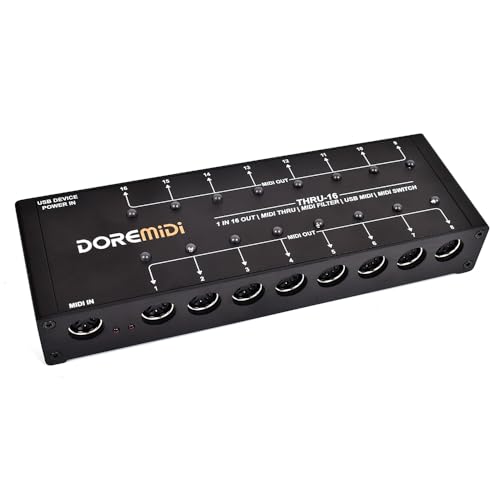
- One input feeds 16 outputs
- Editable filters per output
- Switches and indicators for each output
Best For: Large hardware rigs needing filtered MIDI distribution
Reliable 4-Port Expansion
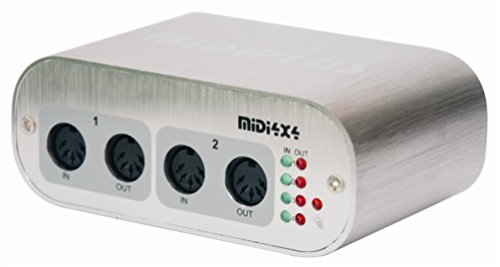
- Four MIDI inputs and four outputs
- USB-powered with no driver required
- Mac and Windows compatible
Best For: Desktop studios needing four MIDI ins and outs
Flexible Routing Choice

- 3-in/3-out standalone MIDI operation
- USB-C support across major operating systems
- Built-in routing, filtering, and mapping
Best For: Producers needing flexible MIDI routing across devices
Advanced Host Hub

- Hosts up to eight USB MIDI devices
- Standalone USB or 9V DC power
- Advanced routing with four presets
Best For: Complex studio, pedalboard, and standalone MIDI systems
Pedalboard Routing Pick

- 2-in-2-out MIDI with USB-C compatibility
- Standalone 5V USB or 9V DC power
- Routing, filtering, mapping, and SysEx support
Best For: Guitarists and compact pedalboard setups
USB Host Expansion Pick

- Standalone USB host for class-compliant MIDI gear
- Supports up to eight USB MIDI ports via hub
- Bridges USB devices and 5-pin DIN hardware
Best For: Hybrid USB and traditional MIDI rigs
Dedicated MIDI Splitter Pick

- One MIDI input feeds six outputs
- Standard 16-channel MIDI communication
- USB-powered plug-and-play operation
Best For: Distributing one controller or synth to six devices
Flexible Studio Hub – ESI M4U eX
The ESI M4U eX is a strong choice for multiport MIDI interfaces when you need eight adaptable ports, USB expansion, and flexible routing. Its class-compliant USB 3.0 connection supports plug-and-play use with Windows and macOS, while standalone operation helps it fit computer-based and hardware-focused setups.
Best For: Studios and live rigs requiring multiple MIDI connections, USB hub functionality, and standalone routing.
Pros:
- Eight configurable MIDI ports can operate as inputs or outputs.
- Built-in USB 3.0 hub adds three connectors for other devices.
- Standalone routing and merging support computer-free operation.
- Colored LEDs provide a clear view of the current configuration.
Cons:
- The optional Windows driver may be needed for complex multi-device or multi-client setups.
- Its extensive features may be more than needed for a simple MIDI split.
Choose this model if flexibility is more important than having a dedicated fixed input-to-output layout. The combination of eight ports, USB expansion, and standalone functionality makes it one of the more versatile options here.
Compact MIDI Splitter – MIDI Solutions Quadra Thru
The MIDI Solutions MultiVoltage Quadra Thru is a straightforward option among multiport MIDI interfaces for sending one MIDI source to four destinations. Its dedicated 1-in/4-out design keeps the setup focused on signal distribution and supports a wide range of MIDI-capable systems.
Best For: Keyboard-based rigs that need one MIDI signal distributed to four devices.
Pros:
- Simple 1-in/4-out MIDI splitter layout.
- Multi-voltage design supports flexible hardware integration.
- Compatible with MIDI-capable software across major operating systems.
- Compact 0.13 kg construction is easy to add to a rig.
Cons:
- It provides four outputs rather than a larger multiport matrix.
- It is a MIDI splitter, not a USB computer interface with recording or hub features.
This is the practical pick when your main requirement is reliable one-to-four MIDI distribution. Its limited feature set is also its advantage: there are fewer routing choices to manage.
Eight-Port USB Connectivity – Miditech MIDIface 8×8
The Miditech MIDIface 8×8 suits buyers comparing multiport MIDI interfaces for a computer-centered setup with many DIN connections. It provides eight MIDI input and output channels over USB, with 16 LEDs for monitoring MIDI activity and class-compliant operation for Mac and PC.
Best For: Computer-based studios that need eight MIDI inputs and eight MIDI outputs with visible activity monitoring.
Pros:
- Offers eight DIN MIDI inputs and eight DIN MIDI outputs.
- USB class-compliant design supports driverless operation on Mac and listed Windows versions.
- Sixteen LEDs show MIDI input and output activity.
- Supports up to 128 MIDI input and output channels as specified.
Cons:
- The supplied operating-system details specifically list older Windows versions and Mac OS X.
- It does not include the standalone routing and USB hub features found on some alternatives.
The MIDIface 8×8 is best when port count and at-a-glance activity monitoring matter more than extra connectivity features. Verify operating-system support for your current computer before buying.
High-Count MIDI Distribution – THRU-16 MIDI Splitter
The THRU-16 is a specialized choice among multiport MIDI interfaces, converting one standard MIDI input into 16 individually switchable outputs. Editable filters for each output make it useful when a simple thru box is not enough and different destinations need tailored MIDI data.
Best For: Large hardware MIDI rigs that need 16 outputs, per-channel filtering, and quick output control.
Pros:
- Converts one MIDI input into 16 MIDI outputs.
- Each output has editable MIDI filters.
- Individual switches and indicator lights allow quick output control.
- Supports notes, CC, PC, clock, time code, SysEx, and other standard MIDI commands.
Cons:
- Its one-input architecture is designed for distribution rather than multiple computer-facing MIDI ports.
- The supplied warranty description is only listed as “30,” so coverage details should be confirmed.
This model stands out for complex hardware installations where output-by-output filtering is valuable. For a basic four-device split, it may be more capability than necessary, but large setups can benefit from its control and scale.
Reliable 4-Port Expansion – Compact 4×4 MIDI Interface
This straightforward 4×4 unit is a practical choice when you need multiple MIDI connections in a compact, USB-powered setup. With four MIDI inputs, four outputs, 64 MIDI channels, low latency, and no driver installation required, it fits well into computer-based music rigs on Mac or Windows.
Best For: Home studios and musicians who need four independent MIDI inputs and outputs without an external power supply.
Pros:
- Provides 4 MIDI inputs and 4 MIDI outputs across 64 MIDI channels.
- USB-powered, so it does not require a separate power supply.
- Plug-and-play operation with Mac and Windows computers; no driver needed.
- Individual MIDI activity indicators make signal flow easy to monitor.
Cons:
- Uses a USB-B connection rather than USB-C.
- Computer compatibility is listed for Mac and Windows, not mobile operating systems.
- Offers routing features less extensively than the CME models in this roundup.
Choose this interface for a simple, affordable-feeling multiport MIDI setup focused on dependable physical connectivity. Its compact design and USB power make it especially convenient for desktop rigs.
Flexible Routing Choice – CME U6MIDI Pro 3×3
The CME U6MIDI Pro is one of the more flexible multiport MIDI interfaces for musicians who need both computer and standalone operation. Its 3-in/3-out design supports all MIDI channels and messages, while built-in routing, merging, splitting, and filtering can be configured through UxMIDI Tools.
Best For: Producers and performers using several MIDI devices across computers, tablets, or standalone hardware setups.
Pros:
- Works with macOS, iOS, Windows, Android, Linux, and Chrome OS through USB-C.
- Operates as a standalone 3-in/3-out MIDI router.
- Supports MIDI notes, controllers, clock, SysEx, MIDI timecode, and MPE.
- Includes configurable merge, split, thru, filter, and mapping functions.
Cons:
- Provides three inputs and three outputs, fewer physical ports than a 4×4 interface.
- Advanced routing setup requires the UxMIDI Tools software.
- It handles MIDI only and does not provide audio input.
For users who value routing control and broad device compatibility, the U6MIDI Pro offers more configuration flexibility than a basic port expander. Its standalone mode also makes it useful beyond a computer-centered workflow.
Advanced Host Hub – CME H4MIDI WC
The CME H4MIDI WC is designed for complex, portable MIDI systems that combine DIN MIDI hardware with USB MIDI instruments. It can host up to eight USB MIDI devices through a standard hub, provide four virtual MIDI inputs and outputs over USB-C, and run standalone from USB or 9V DC power.
Best For: Guitarists, producers, and performers building advanced pedalboard, studio, or computer-free MIDI setups.
Pros:
- Connects class-compliant USB MIDI instruments directly to MIDI hardware without a computer.
- Supports up to eight USB MIDI device ports through a standard USB hub.
- Offers MIDI thru, split, merge, mapping, and filtering via HxMIDI Tools.
- Provides USB or 9V DC standalone power and four saved preset configurations.
Cons:
- Some expanded capabilities, including WIDI Bluetooth MIDI, require the optional WIDI Core module.
- Its advanced feature set may be more than needed for a basic MIDI connection.
- DIN MIDI connectivity is listed as up to 2-in/2-out, despite the broader USB host expansion.
This is the strongest fit when USB host functionality and standalone control matter as much as port count. Its compact enclosure, preset management, and flexible power options make it particularly suitable for live or space-limited rigs.
Pedalboard Routing Pick – CME U4MIDI WC
The CME U4MIDI WC is a compact choice for musicians comparing multiport midi interfaces for pedalboards, keyboards, and mobile rigs. Its 2-in-2-out 5-pin MIDI connection supports major computer and mobile operating systems, while built-in routing tools add flexibility for more advanced setups.
Best For: Guitarists, pedalboard users, and musicians who need portable MIDI routing with optional standalone power.
Pros:
- 2-in-2-out MIDI I/O with zero-latency, jitter-free transmission.
- Works with macOS, Windows, iOS, Android, Linux, and Chrome OS through USB-C.
- Supports MIDI thru, split, merge, mapping, filtering, and unlimited SysEx transmission.
- Can run from 5V USB or 9V DC power without a computer.
Cons:
- Its two MIDI inputs and two outputs may be limiting for larger hardware setups.
- Optional Bluetooth MIDI requires WIDI Core hardware.
The U4MIDI WC stands out when size, pedalboard compatibility, and configurable MIDI processing matter more than a high port count. It is a practical, flexible interface for compact performance and production systems.
USB Host Expansion Pick – CME H2MIDI Pro
The CME H2MIDI Pro is designed for musicians who need multiport midi interfaces to bridge modern USB MIDI gear with traditional 5-pin DIN hardware. It works as a standalone USB host, supports expansion through a USB hub, and can also connect to a computer for hybrid setups.
Best For: Producers and performers combining USB keyboards, controllers, drum machines, and synthesizers with legacy MIDI equipment.
Pros:
- Connects USB class-compliant MIDI devices directly to 5-pin DIN hardware without a computer.
- USB-A host port can support up to eight USB MIDI device ports through a hub.
- USB-C computer connection provides 2-in-2-out virtual MIDI ports.
- Handles clock, SysEx, MTC, and MPE messages with a 32-bit processor.
Cons:
- Only one 5-pin MIDI input and one 5-pin MIDI output are provided.
- USB expansion requires a separate standard USB hub.
For a very small device, the H2MIDI Pro offers unusually broad USB host flexibility. It is especially compelling when a setup includes several USB MIDI devices but still needs reliable access to traditional DIN hardware.
Dedicated MIDI Splitter Pick – MIDI Thru-6 Box
The MIDI Thru-6 Box takes a straightforward approach to multiport midi interfaces: one standard 5-pin MIDI input feeds six MIDI outputs. It is intended for sending the same MIDI messages to several devices at once, making it useful for controllers, synthesizers, and performance systems that need simple signal distribution.
Best For: Musicians who need to distribute one MIDI source to as many as six receiving devices.
Pros:
- Provides one MIDI input and six MIDI Thru outputs.
- Passes standard 16-channel MIDI messages to connected devices.
- Designed for plug-and-play use with no batteries required.
- Powered by a 5V DC USB supply.
Cons:
- It distributes incoming messages rather than offering configurable routing, merging, or mapping.
- It does not provide multiple MIDI inputs.
- A 5V USB power source is required.
The MIDI Thru-6 Box is best viewed as a dedicated hardware splitter rather than a computer-oriented interface. Choose it when dependable one-to-six MIDI distribution is the main requirement and advanced routing features are unnecessary.
How We Picked These Multiport Midi Interfaces
We focused on the connection problems musicians and producers actually face: adding several MIDI devices, routing one source to multiple destinations, connecting USB-only controllers to traditional MIDI hardware, and expanding a studio without unnecessary complexity.
The selection includes conventional multi-input/multi-output interfaces, MIDI thru boxes, splitters, filtering devices, and USB host interfaces. We considered port capacity, standalone operation, class-compliant connectivity, routing flexibility, signal reliability, and the likely needs of both computer-based and hardware-focused setups. Because these products serve different roles, the highest port count is not automatically the best choice.
Quick Comparison
- Best for larger computer-based setups: ESI M4U eX and Miditech MIDIface 8×8.
- Best for simple MIDI distribution: MIDI Solutions Quadra Thru and the MIDI Thru 6 Box.
- Best for extensive hardware splitting: THRU-16.
- Best for compact USB host setups: CME H2MIDI Pro and H4MIDI WC.
- Best for smaller two- or three-port systems: CME U4MIDI WC and U6MIDI Pro.
Key Buying Factors for Multiport Midi Interfaces
Port Count and Direction
Check whether you need multiple independent MIDI inputs, outputs, or simply one input distributed to several outputs. A 1-in/6-out splitter is useful for duplicating a controller’s signal, but it does not replace a fully routable multi-I/O interface.
USB, Standalone, or USB Host Operation
Computer interfaces typically connect directly to a Mac or PC, while standalone thru boxes work without software. USB host models are useful when you want to connect USB MIDI gear to conventional 5-pin DIN hardware without relying on a computer. Confirm which devices each product can host before buying.
Routing, Filtering, and Timing
Basic splitters pass MIDI data to every output. More advanced units may offer channel filtering, switching, or editable routing. These features matter when several instruments must receive different channels or when unwanted clock, note, or control data needs to be blocked.
Compatibility and Power
Class-compliant interfaces are generally easier to use with modern computers, but verify operating-system support and power requirements for your exact setup. Also check whether cables, power supplies, and adapters are included.
Who Should Buy Which Multiport Midi Interfaces?
Choose a high-port-count interface such as the ESI or Miditech when your computer-based studio has several independent MIDI devices and you want centralized routing. Choose a dedicated splitter such as the Quadra Thru, MIDI Thru 6, or THRU-16 when one MIDI source must feed multiple hardware destinations reliably.
For compact rigs, the CME U4MIDI WC, U6MIDI Pro, or H2MIDI Pro can provide useful connectivity without occupying much space. The H4MIDI WC is a stronger fit when USB host flexibility is more important than maximum conventional port count.
Before ordering, draw a simple signal map of your setup. Count every MIDI source and destination, identify which connections are USB or 5-pin DIN, and decide whether you need independent routing or straightforward duplication. That quick check will usually narrow the field faster than comparing specifications alone.