Tablet teleprompters make it easier to speak naturally on camera while keeping your notes, scripts, and eye line in one place. For creators, teachers, marketers, and remote presenters, the right setup can save time and improve every take.
Below, we focus on the best options for clarity, portability, compatibility, and ease of use so you can choose a teleprompter that fits your workflow and your tablet.
Best 10 Tablet Teleprompters Picks for 2026
Editor Pick
14-Inch Tablet Teleprompter with App Control

- 75% transmittance glass keeps text readable
- Remote and app control for easy script handling
- Folds for transport with carry case included
Best For: DSLR recording, teaching, and vlogging
Most Versatile
Teleprompter for Phones, Tablets, and DSLR

- Supports tablets under 11 inches and DSLR cameras
- Includes multiple adapter rings and Bluetooth remote
- App handles scripts, formatting, and playback
Best For: Multi-device creators and live streamers
Budget-Friendly Pick
No-Assembly 12-Inch Tablet Teleprompter

- Installation-free design speeds up setup
- App and remote control handle scripts smoothly
- Foldable aluminum build with carry case
Best For: Budget tablet prompting for courses and tutorials
Compact Pick
Foldable Mini Teleprompter for Phones

- Folds in one second for easy travel
- Coated glass keeps prompts clear and readable
- App and remote control for hands-free use
Best For: Mobile creators, interviews, and live streaming
Studio-Ready Wide-Screen Option
Desview T12S 12.9" Metal Teleprompter
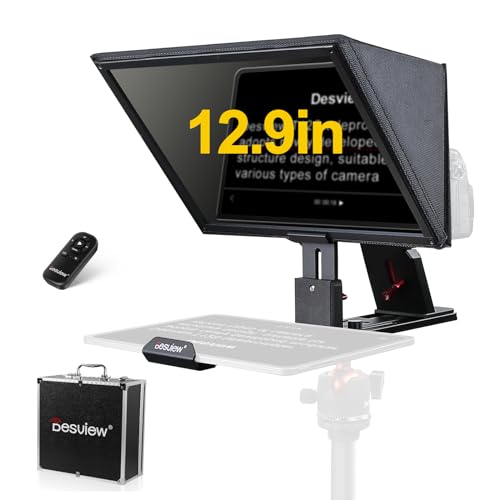
- Fits tablets up to 12.9 inches.
- Bluetooth remote and app control included.
- Metal body with carry case for travel.
Best For: Creators needing a larger teleprompter for studio or location shoots.
Compact Portable Pick
LENSGO 9.7” Foldable Teleprompter

- Works with tablets under 9.7 inches plus phones and cameras.
- Folds in one second for easy transport.
- App and remote support script control on the fly.
Best For: Mobile creators who need a compact, quick-setup teleprompter.
Large-Screen Professional Choice
Desview TP150 15-Inch Teleprompter

- Accommodates tablets and iPads up to 15 inches.
- Remote control and app support script editing.
- Aluminum alloy build with carry case included.
Best For: Presenters who want the largest reading area in this roundup.
Compact Camera Teleprompter
Desview T3 for Phones & Tablets up to 10"

- Supports smartphones and tablets up to 10 inches
- Includes 9 adapter rings for DSLR/mirrorless mounting
- Bluetooth remote and free app make prompting easier
Best For: Creators using smaller tablets with a camera rig
All-in-One Foldable Prompter
GVM 12" Collapsible Teleprompter Kit
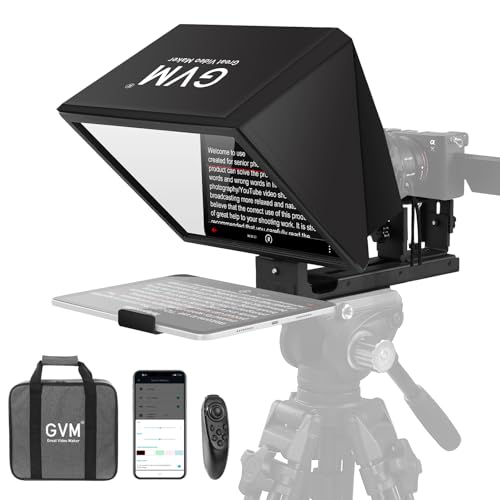
- Installation-free collapsible design saves setup time
- 12-inch optical glass supports clear prompting up to 15 ft
- Includes remote, app control, carry case, and tripod mounting
Best For: Travel-friendly prompting with fast setup
Large Tablet Pro Prompter
Desview P13 for 12.9" iPad Pro

- Supports large tablets up to 12.9 inches
- Foldable light shield reduces glare during recording
- Bluetooth remote and app support script control
Best For: Users needing a larger, portable iPad Pro teleprompter
Editor Pick – 14-Inch Tablet Teleprompter with App Control
If you need a tablet teleprompter for camera-based recording, the NEEWER X12 is built for practical studio use. It pairs a 14-inch aluminum alloy frame with coated beam splitter glass, so scripts stay readable while you keep your eyes toward the lens. It’s a solid pick for creators who want app and remote control, plus a setup that folds down for transport.
Best For: DSLR users, online teachers, and vloggers who want a sturdy tablet teleprompter with remote control.
Pros:
- 75% light transmittance beam splitter glass for clear script reflection
- Works with tablets up to 9.84" x 8.68" and compatible iPad models
- Includes RT-110 remote, app control, and a carrying case
- Aluminum alloy build is lightweight yet durable
Cons:
- Not compatible with wide-angle lenses
- Camera lens focal length must be more than 28mm
- Not compatible with iPad Pro 12"
Overall, the X12 is a dependable tablet teleprompter if you want a straightforward balance of visibility, portability, and smart control. Its limitations are mainly lens and tablet-size compatibility, so it’s best matched to supported camera setups.
Most Versatile – Teleprompter for Phones, Tablets, and DSLR
The Desview T5 is a flexible tablet teleprompter designed for creators who switch between phone, tablet, and DSLR workflows. It supports tablets under 11 inches, includes multiple adapter rings, and adds app-based script editing plus remote control. That makes it a practical all-in-one option for live streaming, vlogging, and video recording.
Best For: Creators who want one teleprompter that can handle mobile shooting and DSLR setups.
Pros:
- Compatible with smartphones, tablets under 11 inches, and DSLR cameras
- Includes 49-82mm adapter rings for broad lens support
- Desview app supports txt and docx scripts, plus font and display tweaks
- Bluetooth remote and real-time self-check features add convenience
Cons:
- Tablet support stops under 11 inches
- More complex than a basic one-device teleprompter
The T5 stands out for flexibility more than simplicity. If you want a tablet teleprompter that can move between devices and shooting styles, its accessories and software tools make it a strong option.
Budget-Friendly Pick – No-Assembly 12-Inch Tablet Teleprompter
The NEEWER BASICS X12B is a simple tablet teleprompter focused on the essentials: easy setup, readable glass, and app-controlled prompting. It uses an installation-free design and a foldable frame, which makes it a practical choice if you want a straightforward recording tool without extra complexity. It’s meant for tablet and DSLR use, not phone shooting.
Best For: Tablet-based presentations, online courses, and tutorial recording on a budget.
Pros:
- Installation-free design for faster setup
- 75% light transmittance beam splitter glass for clear prompting
- Includes RT113 remote plus NEEWER Teleprompter App support
- Foldable and lightweight with a carry case
Cons:
- Not for phone shooting
- Does not function as a monitor or support direct on-screen self viewing
If you want a no-fuss tablet teleprompter for instructional content, the X12B keeps the feature set focused. It’s a good fit when you care more about reliable prompting than extras.
Compact Pick – Foldable Mini Teleprompter for Phones
The LENSGO TC7S is a compact teleprompter built for mobile creators who need something fast to set up and easy to carry. It folds in one second and uses coated beam splitter glass to keep text clear while you stay focused on the camera. It also supports app control and a remote, making it useful for vlogs, interviews, live streams, and online teaching.
Best For: Smartphone users who want a small, portable teleprompter for travel and quick shoots.
Pros:
- One-second fold design makes it highly portable
- High-definition beam splitter glass improves script visibility
- Free app and remote control support pause, speed, and page turns
- Works with phones and flexible tablets below 8 inches
Cons:
- Smaller 7.9-inch size limits screen space
- Tablet support is limited to devices below 8 inches
The TC7S is best when portability matters more than screen size. For phone-first creators who need a quick tablet teleprompter alternative for mobile workflows, it’s an efficient, travel-friendly choice.
Studio-Ready Wide-Screen Option – Desview T12S 12.9" Metal Teleprompter
If you’re comparing tablet teleprompters for camera-based recording, the Desview T12S is built for creators who want a larger prompt window and a solid metal construction. It supports DSLR, mirrorless, and camcorder setups while accommodating iPads and tablets up to 12.9 inches, making it a practical fit for YouTube, live streaming, and podcast-style production.
Best For: Creators who want a large tablet teleprompter with a durable build and easy setup for studio or location work.
Pros:
- Supports cameras plus iPads and tablets up to 12.9 inches.
- Includes a Bluetooth remote and free Desview app for script control.
- Beam splitter glass is designed for zero ghosting and clear text readability.
- Tool-free assembly and a carry case help with travel and setup.
Cons:
- Bulkier and heavier than compact teleprompter options.
- Only listed as accommodating devices up to 12.9 inches.
- May be more than you need if you only record with a phone.
Overall, the T12S stands out as a dependable tablet teleprompter for users who want a bigger reading surface and a production-friendly build. Its combination of app control, sturdy materials, and included case makes it a strong pick for repeat use.
Compact Portable Pick – LENSGO 9.7” Foldable Teleprompter
The LENSGO TC7 is a compact choice among tablet teleprompters for users who want portability without giving up camera compatibility. It works with smartphones, tablets below 9.7 inches, and cameras, and its fold-in-one-second design makes it especially easy to pack for classes, interviews, and live broadcasts.
Best For: Mobile creators, teachers, and interview shooters who want a small, foldable teleprompter with app-based script control.
Pros:
- Fits phones, tablets below 9.7 inches, and camera setups.
- Free app lets you change scroll speed, pause, and adjust text settings.
- Foldable design is made for fast packing and portability.
- Includes multiple cold shoes for accessories like a mic or video light.
Cons:
- Tablet support is limited to devices below 9.7 inches.
- Best fit is for smaller, lighter production setups.
- Some app functions may require updates.
For users prioritizing convenience, the TC7 offers a practical mix of compact size and useful control features. It’s a sensible teleprompter for on-the-go recording where quick setup matters more than a large display area.
Large-Screen Professional Choice – Desview TP150 15-Inch Teleprompter
Among tablet teleprompters, the Desview TP150 is the biggest option in this roundup and is designed for users who want a generous reading area. It accommodates iPads or tablets up to 15 inches, includes remote control support through the Desview app, and uses beam splitter glass meant to keep the image clear during recording.
Best For: Presenters and video creators who want a large 15-inch teleprompter with remote-enabled script control.
Pros:
- Supports tablets and iPads up to 15 inches.
- Bluetooth remote and free app make it easy to adjust scripts.
- Beam splitter mirror is designed for clear viewing with no ghosting.
- Includes a carry case and aluminum alloy construction.
Cons:
- Large size may be more than casual users need.
- Heavier than smaller portable teleprompters.
- Better suited to larger rigs than minimal setups.
If you want maximum screen space for longer scripts, the TP150 is the most spacious tablet teleprompter here. Its size, build, and remote control support make it a strong fit for repeat professional use.
Compact Camera Teleprompter – Desview T3 for Phones & Tablets up to 10"
The Desview T3 is a practical choice for tablet teleprompters when you want a compact setup for camera-based recording. It supports smartphones and tablets up to 10 inches, mounts to DSLR and mirrorless cameras with included adapter rings, and is built for creators who need a simple prompting solution for YouTube, TikTok, and live streams.
Best For: Solo creators using smaller tablets or phones with DSLR/mirrorless cameras.
Pros:
- Supports phones and compact tablets up to 10 inches.
- Includes 9 adapter rings for common lens filter threads.
- 70/30 beam splitter glass is coated for high light transmittance and clear text readability.
- Bluetooth remote and free app support scrolling, play/pause, and speed control.
Cons:
- Not intended for 12.9-inch iPads.
- Wide-angle use requires attention to focal length to avoid showing the frame.
- Smaller format is less flexible than larger tablet teleprompters.
If you need a compact teleprompter that stays straightforward to mount and operate, the T3 covers the essentials well. It is best suited to creators who value portability and a tighter tablet size range over maximum screen space.
All-in-One Foldable Prompter – GVM 12" Collapsible Teleprompter Kit
The GVM 12″ teleprompter is built for buyers who want tablet teleprompters with a quick setup and a portable design. Its installation-free, collapsible construction makes it easy to mount on a tripod, while the 12-inch optical glass and app-controlled remote are aimed at clear prompting for presentations, video recording, and live streaming.
Best For: Creators who want a foldable, ready-to-use teleprompter for travel or frequent setup changes.
Pros:
- Installation-free collapsible design is ready to use out of the box.
- 12-inch optical glass offers clear reflection and a reported 15 ft reading range.
- Supports tablets and smartphones up to 8.6 inches, plus DSLR/mirrorless mounting.
- Includes Bluetooth remote, app control, carry case, and foldable portability.
Cons:
- Tablet compatibility is limited to devices up to 8.6 inches.
- Heavier than smaller portable teleprompters at 5.68 pounds.
- Less ideal if you need support for full-size iPads.
This GVM kit focuses on convenience more than maximum tablet size. If you want a travel-friendly prompting setup with minimal assembly, it is a strong practical option.
Large Tablet Pro Prompter – Desview P13 for 12.9" iPad Pro
The Desview P13 is designed for tablet teleprompters users who need support for a large 12.9-inch iPad Pro. It combines a foldable light shield, premium beam splitter glass, and a lightweight foldable body to create a more complete prompting setup for video recording, streaming, and professional solo production.
Best For: Creators who want a larger tablet teleprompter for polished on-camera delivery.
Pros:
- Supports tablets up to 12.9 inches, including iPad Pro.
- Foldable light shield helps block ambient glare in bright conditions.
- Premium beam splitter glass is built for high light transmission and low distortion.
- Includes Bluetooth remote, free app, TXT/DOCX import, and mirror/flip display support.
Cons:
- At 1.7 kg, it is portable but still larger than compact teleprompter models.
- Designed around a 1/4″ screw mount, so camera compatibility depends on your rig.
- Best suited to tablet-based workflows rather than very small devices.
For users who have outgrown smaller teleprompters, the P13 offers the screen space and features needed for smoother script reading. It is a strong fit when you want a more professional-looking workflow without giving up portability.
How We Picked These Tablet Teleprompters
We prioritized models that support common tablet sizes, offer stable mounting for cameras or smartphones, and use beam splitter glass that preserves readable text without overly reducing image quality. We also looked at build quality, setup simplicity, remote/app support, and whether the teleprompter is practical for solo creators or frequent travel.
Quick Comparison
In general, smaller Tablet Teleprompters are better for portability and desk setups, while larger 12-inch and 15-inch models are better for full-size iPads, bigger scripts, and more flexible camera positioning. Foldable designs and included cases are especially useful if you move between studios, classrooms, or client locations.
Key Buying Factors for Tablet Teleprompters
Tablet Size and Compatibility
Check the maximum supported tablet size first. Some teleprompters are designed for compact tablets or phones, while others accommodate larger iPad Pro models. A good fit matters more than raw display size, because an oversized tablet can create balance issues or block the camera path.
Glass Quality and Viewing Angle
Beam splitter glass should be clear enough to read comfortably while staying reflective enough for the camera lens. Wider viewing angles help if you shift positions often or need to keep eye contact during longer recordings.
Mounting and Stability
Look for a secure camera mount, a solid tablet cradle, and a frame that does not flex under load. If you use heavier lenses or larger tablets, aluminum alloy or metal construction usually offers better stability than lightweight plastic designs.
Remote Control and App Support
Many Tablet Teleprompters work best when paired with a remote or teleprompter app. That makes it easier to adjust scroll speed, pause, or restart scripts without leaving the camera frame.
Who Should Buy Which Tablet Teleprompters?
Choose a compact teleprompter if you mainly shoot at a desk, record short-form video, or need something easy to pack away. Choose a mid-size 12-inch model if you want the most balanced mix of readability, flexibility, and everyday usability. Choose a larger 15-inch unit if you regularly use a full-size tablet, record longer scripts, or want a more comfortable reading experience for professional presentations.
If you are a YouTuber, educator, trainer, or business presenter, the best Tablet Teleprompters are the ones that reduce friction in your workflow. Pick the model that matches your tablet, camera setup, and recording environment, and you will spend less time fighting gear and more time delivering a confident performance.