If you want a serious ZUMWALT P7 Laptop Screen Extender review from a buyer’s point of view, this one is built for productivity first.
The ZUMWALT P7 Laptop Screen Extender is aimed at people who need more screen space without hauling a full monitor setup.
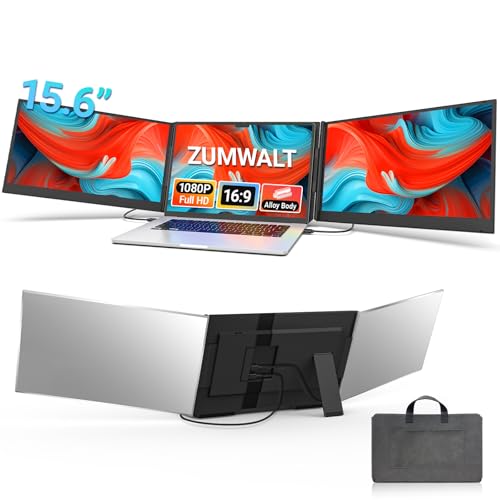
ZUMWALT P7 Review Summary
If your laptop is compatible, the ZUMWALT P7 Laptop Screen Extender is one of the most practical ways to create a true triple-screen workflow on the move. It is especially compelling for remote workers, coders, traders, students, and presenters who live in tabs, windows, and spreadsheets.
Instead of setting up separate external monitors, the P7 attaches two 15.6-inch IPS displays to your laptop and gives you a far more efficient workspace in a travel-friendly form factor.
What stands out most is the balance between real productivity gains and portable design choices.
The dual 1080p panels, aluminum shell, included carry bag, and plug-and-play approach make it feel like a serious workstation upgrade rather than a gimmicky accessory.
That said, this is not a universal buy: some MacBooks and laptops without full-feature USB-C support may need extra cables, external power, or driver installation.
Scorecard
| Category | Score | Why It Matters |
|---|---|---|
| Multitasking Boost | 9.0 | Adds dual attached displays to create a triple-screen workflow for spreadsheets, coding, and research. |
| Display Quality | 8.0 | Two 15.6-inch IPS panels with 1080p resolution, 280 nits brightness, and wide viewing angles deliver sharp everyday clarity. |
| Compatibility | 7.0 | Supports 13 to 17.3-inch laptops, but some Macs and USB-C setups need alternate cabling and power. |
| Portability | 8.0 | The aluminum shell, slim profile, and carry bag make it much easier to transport than separate monitors. |
| Setup Simplicity | 7.0 | Often plug-and-play, though some connection paths require drivers and extra steps. |
| Build Quality | 8.0 | The alloy shell and clip-free design suggest a durable, travel-ready build. |
Bottom line: if you need a portable multi-monitor solution and your laptop matches the connection requirements, the ZUMWALT P7 Laptop Screen Extender is a smart buy.
If you want the simplest possible setup regardless of device type, a single portable monitor may be easier.
Key Features and Specifications of ZUMWALT P7
The ZUMWALT P7 Laptop Screen Extender is designed around two attached 15.6-inch panels that sit beside your laptop screen and expand your workspace immediately.
For buyers comparing portable monitor accessories, the specifications matter because this is not just about adding screen count; it is about whether the panels are usable enough for real work.
| Spec | Details |
|---|---|
| Brand / Model | ZUMWALT P7 |
| Display size | Two 15.6-inch displays |
| Resolution | 1920 x 1080 FHD on each panel |
| Panel type | IPS LCD |
| Brightness | 280 cd/m² |
| Viewing angle | 178 degrees |
| Aspect ratio | 16:9 |
| Refresh rate | 60 Hz |
| Finish | Glossy |
| Shell material | Aluminum alloy |
| Weight | About 4 lbs |
| Compatibility | 13-inch to 17.3-inch laptops |
| Supported platforms | Mac, Windows, Chrome, Switch |
| Ports | 1 HDMI, 1 USB, 1 USB 3.0 |
| Included accessories | Cables, power adapter, carry bag |
These are strong, practical specs for a portable productivity display.
1080p on 15.6-inch panels is a sensible choice because it keeps text reasonably sharp without demanding too much from your laptop.
The IPS technology and 178-degree viewing angle also make it easier to look at side-by-side content without noticeable color or contrast dropoff.
The 280 nits brightness is respectable for indoor work, though not exceptional in bright sunlight or harsh office lighting.
The glossy finish helps images look crisp and vivid, but it also means reflections can become a factor.
That is an important tradeoff for anyone evaluating the ZUMWALT P7 Laptop Screen Extender as a travel monitor solution.
Pros and Cons of ZUMWALT P7
Looking at the ZUMWALT P7 Laptop Screen Extender pros and cons helps separate real value from marketing language.
This accessory solves a very specific problem: how to get more screen real estate from a laptop without turning your bag into a desktop replacement.
- Pros: Creates a genuine triple-screen workflow for productivity-heavy users.
- Pros: Two 15.6-inch IPS panels with 1080p resolution offer solid clarity.
- Pros: Slim aluminum build is more travel-friendly than carrying two separate monitors.
- Pros: Plug-and-play support reduces friction on compatible devices.
- Pros: Includes a carry bag, power adapter, and cables for a more complete bundle.
- Pros: Useful for work, study, presentations, coding, and entertainment.
- Cons: Not every laptop supports the simplest USB-C connection path.
- Cons: Some MacBooks and non-full-feature USB-C laptops need extra adapters or cabling.
- Cons: Alternate setups may require external power and driver installation.
- Cons: Glossy panels can reflect light in bright environments.
- Cons: Adds weight and bulk compared with using only the laptop.
The strongest advantage is productivity per inch of bag space. The biggest drawback is compatibility complexity, which matters a lot if you use a MacBook or a laptop with limited USB-C functionality.
Buyers should treat the connection setup as part of the purchase decision, not an afterthought.
Who Should Buy ZUMWALT P7?
The ZUMWALT P7 Laptop Screen Extender is best for people who want more screens, not more desk clutter.
It fits buyers who work in environments where portability matters but a single laptop screen feels too limiting.
- Remote workers who need one screen for communication and one for reference documents.
- Students who want lecture notes, research, and writing space open at the same time.
- Coders and developers who benefit from code, documentation, and preview windows side by side.
- Traders and analysts who want multiple charts, watchlists, and news feeds visible together.
- Presenters who need a screen-mirroring or extended-workspace setup on the go.
- Frequent travelers who do not want to carry a separate desktop-style monitor kit.
Who should skip it? If you mostly use your laptop in bright outdoor settings, if you want the simplest possible monitor add-on, or if your device lacks full-feature USB-C and you do not want to deal with alternate cabling, the ZUMWALT P7 may be more hassle than help.
How the Triple-Screen Setup Works
The main appeal of the ZUMWALT P7 Laptop Screen Extender is the way it transforms a standard laptop into a compact workstation.
The two displays are attached directly to the laptop, so your setup becomes a three-screen layout: the notebook screen in the center and two extra panels on either side.
That arrangement is ideal for workflows where constant app switching slows you down.
In practice, this design is especially helpful for tab-heavy tasks.
You can keep email or chat on one side, your main document in the center, and reference material on the other side.
Traders can keep charts and data visible simultaneously.
Coders can keep code on one panel and documentation or terminal windows on the other.
The real gain is not just convenience; it is reduced context switching.
The P7 also supports mirror and portrait-style use cases, which broadens its appeal beyond pure multitasking.
For presentations, mirror mode is useful when you want a simple audience-facing view.
For certain workflows, portrait-style orientation can help with long documents or source code.
That flexibility gives the device more value than a one-trick monitor accessory.
Compatibility and Cable Requirements
Compatibility is the most important buying factor for the ZUMWALT P7 Laptop Screen Extender. The product is designed for 13-inch to 17.3-inch laptops and supports Mac, Windows, Chrome, and Switch, but the ease of use depends heavily on what ports your laptop actually provides.
For the smoothest experience, the best-case scenario is a laptop with full-feature USB-C support.
In that setup, the unit can run with two USB-C to USB-C cables and a cleaner plug-and-play workflow.
That is the ideal path for buyers who want minimal cable clutter and the least setup friction.
However, some MacBooks and laptops that do not support full USB-C video and power passthrough may need the H5-T cable plus HDMI and USB-A connections.
In those cases, external power can also be required, and certain alternate connection methods may need driver installation.
That is not unusual for portable screen extenders, but it is a real consideration for buyers expecting universal simplicity.
Buyer tip: check your laptop’s port capabilities before buying.
If your machine is thin-and-light but limited on video output, the P7 can still work, but it may not feel as effortless as the simplest marketing promises suggest.
Image Quality for Work and Entertainment
The display hardware is one of the stronger selling points in this ZUMWALT P7 Laptop Screen Extender review.
Each panel uses a 15.6-inch IPS display with 1920 x 1080 resolution, which is a smart specification for productivity use.
Text looks clean enough for daily office work, browser-based research, spreadsheets, and coding without the pixel density issues you would get from a much larger low-resolution panel.
IPS panels are a big advantage here because side-mounted displays are often viewed at an angle.
The 178-degree viewing angle helps keep color and brightness more consistent when you glance from one screen to another.
That matters more than many buyers realize because a portable screen extender lives or dies by usability, not just spec sheets.
Brightness at 280 nits is adequate for indoor use and hotel rooms, though it is not a daylight specialist.
The glossy finish makes colors appear punchier, which is nice for streaming and media, but reflections can become annoying under bright ceiling lights or near windows.
If you work in controlled indoor lighting, this is less of a concern.
If you regularly work in bright spaces, it becomes a meaningful drawback.
For mixed productivity and entertainment use, the display package is well balanced. It is not trying to compete with premium creator monitors, but it is strong enough for office work, research, and casual video viewing.
Travel Use and Desk Setup Convenience
The ZUMWALT P7 Laptop Screen Extender is clearly designed for people who want a cleaner mobile workstation.
At about 4 lbs, it is not featherweight, but it is still much easier to travel with than a laptop plus two separate portable monitors, stands, and all the extra cabling that comes with them.
The aluminum alloy shell helps the unit feel more premium and durable than many plastic alternatives.
The no-top-baffle, clip-free design is also a practical choice because it reduces the fiddly parts that can make laptop-mounted accessories annoying to use.
The 90-degree widen kickstand adds stability and should help the setup feel more secure on a desk or table.
That said, this is still an add-on, not an invisible upgrade.
It will make your bag heavier and your laptop wider when deployed.
If you are extremely sensitive to travel weight, a single portable monitor may suit you better. But if your priority is work efficiency once you are set up, the P7 offers a better screen-to-carry burden ratio than a full desk monitor system.
Best Use Cases for Coding, Trading, and Office Work
Some accessories look good in photos and then disappoint in real workflows.
The ZUMWALT P7 Laptop Screen Extender is the opposite: its value becomes clearer the more screen-dependent your work is.
For coding, the biggest advantage is keeping code, docs, and output visible without constant alt-tabbing.
That can reduce mistakes and speed up debugging.
For trading, the benefit is obvious: more charts and data on screen at once, which is exactly what active traders want.
For office work, the P7 can turn one laptop into a miniature command center for email, spreadsheets, calendars, and video meetings.
It is also useful for students who juggle research, writing, and online classes.
The triple-screen layout helps separate tasks cleanly, which can improve focus.
If your day involves multiple apps more than one app at a time, the P7 has a strong practical edge.
Alternatives to Consider
If you are not sure the ZUMWALT P7 Laptop Screen Extender is the right fit, a few common alternatives may be worth comparing before you buy.
- Portable laptop screen extenders from other brands may offer similar dual-screen expansion with different mounting systems or brightness levels.
- Single portable monitors for laptops are simpler and lighter if you only need one extra screen.
- USB-C portable monitors are a strong choice for users who want easy one-cable portability.
- Travel monitors with stands work better if you want independent placement rather than attached side panels.
Compared with a single portable monitor, the P7 wins on multitasking depth. Compared with a more universal USB-C portable display, it asks for a little more compatibility checking.
That is the tradeoff.
Is ZUMWALT P7 Worth It?
Yes, the ZUMWALT P7 Laptop Screen Extender is worth it for the right buyer. If you want a portable triple-screen setup and your laptop supports the connection method cleanly, this is a highly useful productivity accessory that can genuinely improve how you work.
The strongest reasons to buy are the dual 15.6-inch IPS panels, the 1080p resolution, the travel-friendly aluminum design, and the way it turns a standard laptop into a much more capable mobile workstation.
The main reasons to hesitate are compatibility checks, possible extra cabling for certain Macs and non-full-feature USB-C laptops, and the glossy finish in bright rooms.
My verdict: if you value screen space more than absolute simplicity, the ZUMWALT P7 Laptop Screen Extender is a smart, productivity-first purchase.
If you want the easiest plug-and-play monitor accessory possible and you do not need triple-screen multitasking, a basic portable monitor may be the better fit.
For buyers who match the device requirements, this is a strong recommendation.