The KTC H15F9 Portable Monitor review starts with one simple question: do you need a light second screen that actually makes daily work easier?
For remote work, travel, and console use, this portable monitor is built to keep setup fast and the experience flexible.
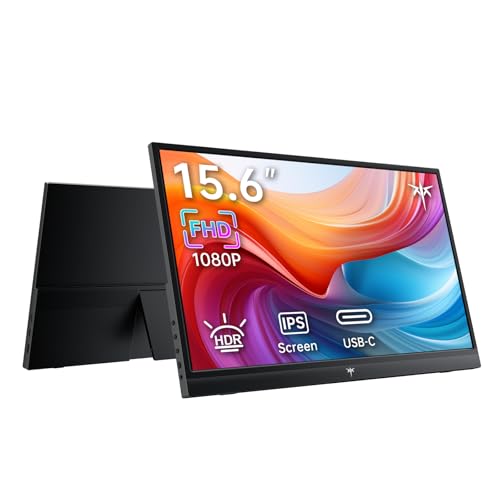
KTC H15F9 Review Summary
If you want a portable monitor that is easy to carry, easy to connect, and genuinely useful as a second screen, the KTC H15F9 Portable Monitor makes a strong case.
It is especially appealing for laptop users, mobile professionals, students, and casual gamers who want a no-fuss display that can move from home office to hotel desk to living room without drama.
What stands out most is the balance of 15.6-inch FHD 1080p IPS quality, two full-featured USB-C ports, and mini HDMI support.
That combination gives the KTC H15F9 broad device compatibility while keeping setup simple enough for quick plug-and-play use.
It is not trying to be a premium creator monitor or a high-end gaming panel; instead, it aims to be a practical portable monitor for everyday productivity and entertainment.
From a buyer’s perspective, that focus is smart.
The matte finish, 300 cd/m² brightness, 1000:1 contrast ratio, HDR support, and 16.7 million color output suggest a display that should look crisp for spreadsheets, documents, video calls, and streaming.
The 1.4 lb design also makes it easy to toss into a backpack, which is exactly what many portable monitor buyers want.
Bottom line: the KTC H15F9 Portable Monitor is best for people who value portability, broad connectivity, and quick setup over premium display tuning or advanced stand features.
If that sounds like your use case, it is a compelling buy.
Scorecard
| Category | Score | Why it matters |
|---|---|---|
| Display quality | 8.0/10 | 15.6-inch FHD 1080p IPS panel with HDR, 300 cd/m² brightness, 1000:1 contrast, and 16.7 million colors should deliver sharp text and solid color for work and entertainment. |
| Connectivity | 9.0/10 | Two full-featured USB-C ports plus a mini HDMI port make it flexible for modern laptops, phones, consoles, and mini PCs. |
| Device compatibility | 9.0/10 | Supports duplicate, extend, and second-screen modes and works with laptops, Mac devices, phones, Xbox, PS4/PS5, Switch, and other compatible devices. |
| Portability | 9.0/10 | The lightweight 1.4 lb design is easy to carry in a backpack, making it well suited for travel and mobile productivity. |
| Setup simplicity | 9.0/10 | Plug-and-play operation with no drivers required keeps setup straightforward, especially for quick desk or travel use. |
| Productivity usefulness | 8.0/10 | Second-screen support and a 16:9 15.6-inch format make it practical for spreadsheets, meetings, presentations, and extra workspace. |
| Support and ownership | 7.0/10 | 24/7 help adds reassurance, though long-term durability and calibration details are limited. |
The overall picture is clear: the KTC H15F9 Portable Monitor is a strong portable productivity pick with enough visual quality for entertainment and enough connectivity to fit into a modern mixed-device setup.
Key Features and Specifications of KTC H15F9
The KTC H15F9 is designed around simplicity and travel.
The most important specifications are not just about image quality; they are about whether the monitor can actually work across different devices without becoming a hassle.
| Brand | KTC |
| Model | H15F9 |
| Screen size | 15.6 inches |
| Resolution | FHD 1080p |
| Aspect ratio | 16:9 |
| Panel type | IPS |
| Screen surface | Matte |
| Brightness | 300 cd/m² |
| Contrast ratio | 1000:1 |
| Color support | 16.7 million colors |
| Ports | 2 x full-featured USB-C, 1 x mini HDMI |
| Weight | 1.4 lb |
| Included cable | HDMI to mini HDMI cable |
| Display modes | Duplicate, extend, second screen |
- 15.6-inch portable monitor size is ideal for laptop pairing and travel bags.
- IPS panel generally means better viewing angles than basic TN panels, which matters when you are sharing a screen in meetings or presentations.
- HDR support may help highlight separation and visual punch, especially in media playback, though expectations should stay realistic at this class of brightness.
- Two full-featured USB-C ports are a big convenience advantage for modern devices that support video over USB-C.
- Mini HDMI input expands compatibility with game consoles, mini PCs, and older laptops.
- Built-in speakers add convenience for casual use, even if serious audio buyers will still prefer headphones or external speakers.
In short, the spec sheet favors practical portability over flashy extras.
That is usually the right tradeoff in this category, especially for people who want a dependable second screen rather than a desktop replacement.
Pros and Cons of KTC H15F9
Every portable monitor has tradeoffs, and the KTC H15F9 Portable Monitor pros and cons are fairly straightforward.
Pros
- Easy plug-and-play setup with no drivers required.
- Broad compatibility across laptops, phones, tablets with video output support, and consoles.
- Lightweight 1.4 lb design makes it genuinely travel-friendly.
- IPS panel with HDR should look good for office work and casual entertainment.
- Very useful as a second screen for productivity and multitasking.
Cons
- No detailed battery information is provided, so this is not a self-powered solution.
- Built-in speaker quality is not described, which may limit audio expectations.
- Stand and durability details are limited, so buyers wanting premium build specifics may want more information.
- USB-C video support depends on the source device, so not every USB-C port will automatically work as a display output.
The biggest strength here is the convenience-to-value ratio.
The biggest weakness is that the product brief does not provide much information about long-term build quality or accessory extras.
That is not necessarily a dealbreaker, but it matters if you want a monitor for frequent rough travel.
Who Should Buy KTC H15F9?
The KTC H15F9 Portable Monitor is a good fit for buyers who need a flexible, lightweight screen that works in multiple scenarios.
If you spend time working from different locations, this monitor is the kind of accessory that can improve your day immediately.
- Remote workers who want a second display for email, spreadsheets, Slack, and document editing.
- Students and travelers who need extra screen real estate without carrying a bulky monitor.
- MacBook, Windows laptop, and mini PC users who want a portable productivity boost.
- Console gamers who want a quick external display for the Switch, PS4, or PS5 in a secondary space.
- Business users who need a simple screen for presentations or client meetings.
Who should skip it?
Buyers who want ultra-premium color calibration, integrated touch features, or a heavy-duty desk monitor with a full ergonomic stand may be better served by a different category entirely.
If you are buying specifically for professional creative work, you may want a more color-critical portable display.
How the KTC H15F9 Handles Travel and Remote Work
This is where the KTC H15F9 makes the most sense.
A portable monitor succeeds or fails based on whether it is easy to move, easy to place, and easy to connect, and this model checks those boxes well.
The 1.4 lb weight is especially important because it means the monitor can disappear into a backpack without becoming a burden.
For remote work, the value comes from the 16:9 layout and 15.6-inch size.
That shape feels natural next to a laptop and gives you enough room for side-by-side windows, meeting notes, or a live dashboard.
The result is less tab switching and more actual workflow efficiency.
For travel, the matte finish is another practical advantage.
Glossy portable screens can become annoying in bright rooms or near windows, so a matte surface is a smart design choice for hotels, shared offices, and classrooms.
If you regularly work in variable lighting, that detail matters more than flashy spec-sheet language.
Buyer takeaway: if your goal is to create an instant dual-screen setup anywhere you work, the KTC H15F9 is built for that use case.
USB-C and HDMI Connection Options Explained
Connectivity is one of the KTC H15F9’s strongest selling points.
The monitor includes two full-featured USB-C ports and one mini HDMI port, which gives it a useful range of setup options.
USB-C is the cleanest path when your source device supports video output over USB-C.
That can simplify cable management and, in some setups, reduce the number of adapters you need.
It is especially attractive for newer laptops and certain phones or tablets.
Mini HDMI keeps the monitor useful for devices that do not rely on USB-C display output, including many consoles and mini PCs.
The included HDMI to mini HDMI cable is a helpful start, especially for first-time buyers who do not want to hunt for the right accessory on day one.
Here is the practical reality: device compatibility depends on the source.
A USB-C port is not automatically a display output port, so buyers should confirm support before assuming plug-and-play will work through USB-C alone.
That said, the KTC H15F9 offers enough input flexibility that most common use cases should be covered.
Best Uses for Gaming, Meetings, and Second-Screen Productivity
The KTC H15F9 is not a specialized gaming monitor, but it can still work well for casual console gaming and general entertainment.
For Switch or console play, the 15.6-inch IPS panel should provide a clean, sharp image, and the 1080p resolution is a sensible match for this size.
It is the kind of setup that works well on a desk, in a dorm, or while traveling.
For meetings and presentations, the monitor’s strengths are more obvious.
The panel size is large enough to share content comfortably, and the portability makes it easy to bring into a conference room or a hybrid-work setup.
The second-screen support is especially valuable for presenters who want their notes separate from the audience-facing display.
For spreadsheet work, writing, coding, and research, the monitor’s main advantage is efficiency.
You do not need extreme refresh rates to benefit from more screen space.
You need a screen that is clear, light, and easy to use, and that is exactly where the KTC H15F9 aims to perform.
Best fit: productivity-first buyers who also want occasional entertainment.
Brightness, HDR, and IPS Picture Quality in Daily Use
On paper, the display spec is solid for a portable monitor in this class.
The FHD 1080p resolution is the sweet spot for a 15.6-inch screen because it keeps text sharp without forcing your connected device to work harder than necessary.
The IPS panel should help with consistent viewing angles, which is useful when the monitor is shared or positioned off-center.
The 300 cd/m² brightness level suggests the screen should be workable in normal indoor environments.
It is not a sunlight-beating outdoor display, but it should be fine for offices, hotel rooms, and homes.
The 1000:1 contrast ratio is standard for this segment and should provide acceptable separation between light and dark areas for everyday use.
HDR support is a nice addition, but buyers should treat it as an enhancement rather than a headline feature.
In portable monitor land, HDR is most useful when it complements a decent IPS image rather than replacing the need for thoughtful brightness and color behavior.
Still, the combination of HDR, 16.7 million colors, and a matte surface points to a display that should feel comfortable and functional in real life.
If your goal is accurate creative work, you may still want a calibrated monitor.
If your goal is a dependable portable screen for work and entertainment, the KTC H15F9’s image quality looks well judged.
What Comes in the Box and Setup Tips
The included HDMI to mini HDMI cable is useful because it reduces one of the most common pain points in the portable monitor category: buying a display and then discovering you still need a special cable to use it.
That said, a complete setup may still require your own USB-C cable or adapter depending on your source device and preferred connection method.
Setup is described as plug-and-play with no drivers required, and that is exactly what most buyers want from a portable monitor.
The best approach is to think about the source device first:
- Check whether your laptop or tablet supports video over USB-C.
- Use mini HDMI for consoles or devices with HDMI output.
- Confirm you have the right cable length for your desk or travel setup.
- Set your source device to duplicate, extend, or second-screen mode after connection.
Those steps sound basic, but they determine whether the monitor feels effortless or slightly annoying.
The KTC H15F9 is designed to stay on the easy side of that line.
Alternatives to Consider Before You Buy
If you are comparing portable monitor options, it helps to know what else is commonly bought on Amazon.
The KTC H15F9 sits in a crowded category, so choosing the right alternative depends on your priorities.
- Arzopa portable monitor — often a strong value choice if you want a broad selection of portable screen sizes and configurations.
- InnoView portable monitor — worth checking if you want a similar travel-friendly monitor for general productivity.
- ASUS ZenScreen portable monitor — a good premium-leaning option for buyers who value brand reputation and refinement.
- Lepow portable monitor — another widely searched category option for budget-conscious shoppers.
- Lenovo ThinkVision portable monitor — useful if you prefer a business-oriented portable display line.
Compared with these alternatives, the KTC H15F9’s appeal is its simple feature mix and flexible connectivity.
It does not try to outdo premium models on polish; it tries to be easy, useful, and portable.
Is KTC H15F9 Worth It?
So, is KTC H15F9 Portable Monitor worth it?
For most buyers who need a lightweight second screen, the answer is yes.
The KTC H15F9 offers the right mix of 15.6-inch FHD IPS clarity, broad USB-C and HDMI connectivity, and true travel-friendly portability to make it a practical everyday tool.
It is especially worth considering if you want a monitor that can move between remote work, meetings, school, and casual gaming without needing a complicated setup process.
The monitor’s strongest features are the ones that matter most in real use: easy connections, flexible device support, and a size that is comfortable without being bulky.
The main caveats are equally clear.
If you need detailed build-quality information, premium audio, or advanced display tuning, the product brief does not offer enough to make the KTC H15F9 the obvious choice.
But if your priority is a dependable portable monitor with practical everyday performance, it is a smart, buyer-friendly option.
Final verdict: the KTC H15F9 Portable Monitor is worth buying for productivity-focused users and mobile setups, and it stands out as a strong all-around portable display for the money-minded shopper who values simplicity.