If you want more screen space without carrying a full monitor, this Zerfis 14-inch Laptop Screen Extender review is for you.
It aims to turn a laptop into a cleaner, more productive mobile workstation.
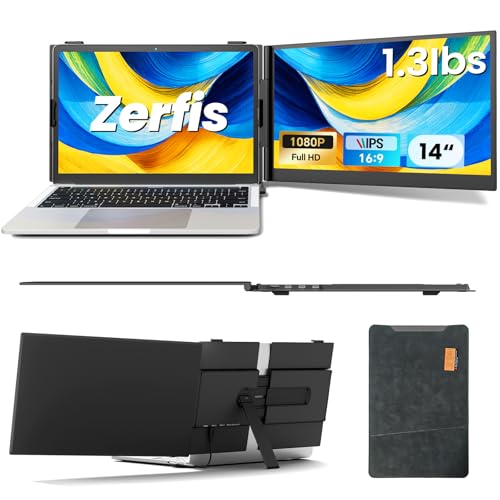
Zerfis Screen Extender Review Summary
If you need a compact second screen for travel, office hopping, or remote work, the Zerfis 14-inch Laptop Screen Extender makes a strong case.
It combines a sharp Full HD panel, flexible connectivity, and an unusually portable design, which is exactly what most buyers want from a laptop screen extender.
In practical terms, this is best for people who value workflow speed, portability, and simple multitasking over raw gaming performance or a huge display.
The removable-style portable monitor concept gives you a quick way to build a dual-screen or even triple-screen workflow without lugging around a separate desktop monitor.
Scorecard
| Category | Score | Buyer takeaway |
|---|---|---|
| Display quality | 8.0 | Sharp 1080p IPS image with good color coverage and solid brightness for productivity. |
| Portability | 9.0 | Ultra-thin 0.17-inch profile and 2.2 lb weight make it easy to carry. |
| Compatibility | 8.0 | Works with many 13- to 17-inch laptops plus phones and consoles, but port support matters. |
| Setup convenience | 7.0 | Mostly plug-and-play, though some setups require specific ports, power, or drivers. |
| Adjustability and ergonomics | 8.0 | Rotating screen, adjustable stand, and anti-slip hooks improve day-to-day comfort. |
| Build and durability | 8.0 | Aluminum casing and protective case add confidence for frequent travel. |
| Eye comfort | 8.0 | Anti-glare, low-blue-light, and wide viewing angles help during long sessions. |
Bottom line: the Zerfis Screen Extender is a smart buy for compatible laptops when your main goal is portable productivity.
If your ports line up, it offers an excellent balance of display quality, mobility, and desk-friendly flexibility.
Best for: remote workers, business travelers, students, hybrid office users, and multitaskers who want a portable screen extension with minimal bulk.
Key Features and Specifications of Zerfis Screen Extender
Here is the spec set that matters most when deciding whether the Zerfis 14-inch Laptop Screen Extender fits your setup.
| Spec | Details |
|---|---|
| Screen size | 14 inches |
| Resolution | 1920 x 1080 Full HD |
| Panel type | IPS LCD |
| Aspect ratio | 16:9 |
| Brightness | 300 nits |
| Color gamut | 100% sRGB |
| Contrast ratio | 1000:1 |
| Refresh rate | 60 Hz |
| Response time | 2 ms |
| Viewing angle | 178° to 180° wide viewing |
| Screen finish | Glossy with anti-glare treatment |
| Eye comfort | Low blue light |
| Build material | Aerospace-grade aluminum casing |
| Weight | 2.2 lb |
| Thickness | 0.17 in |
| Dimensions | 10.8 D x 15.7 W x 2.6 H in |
| Supported laptop size | 13 to 17 inches |
| Power and connection | Dual USB-C, USB-C + HDMI + external power, or H5 + HDMI + external power |
| Compatibility | Windows, Mac, Android, Chrome, smartphones, and gaming consoles |
| Display modes | Extended, mirrored, duplicate, portrait, and landscape |
| Special features | Quantum HDR enhancement, 180° rotating screen, adjustable stand, anti-slip hooks |
| Warranty | 12 months |
The spec sheet is strong for a portable productivity accessory.
The 1080p IPS display is the right baseline for text, spreadsheets, browser windows, and video calls, while the 300-nit brightness is enough for indoor use and many hotel or office environments.
The big selling point is not just the panel itself, but the whole package: the aluminum body, included leather protective case, and adjustable stand make the Zerfis Screen Extender feel designed for real travel use rather than occasional desk use.
Pros and Cons of Zerfis Screen Extender
Every buyer should weigh the Zerfis 14-inch Laptop Screen Extender pros and cons carefully before ordering.
It is a practical product, but it is not universally plug-and-play for every laptop.
- Very thin and lightweight, making it easy to pack alongside a laptop
- Sharp Full HD IPS panel with wide viewing angles
- Excellent for multitasking and productivity workflows
- Flexible display modes for mirrored or extended use
- Adjustable stand and rotating screen improve ergonomics
- Aluminum construction and protective case support frequent travel
- Works with laptops, phones, and some gaming consoles
- Eye-friendly features such as low blue light and anti-glare support
- Some setups require dual full-function USB-C ports or a specific cable combination
- Driver installation may be needed in certain configurations
- Not every laptop USB-C port will support video output
- Glossy screen can be less comfortable in very bright rooms
- Compatibility requires attention; this is not a universal one-cable solution for every device
Verdict on pros and cons: the positives are compelling if you have the right laptop, but the potential setup friction is the main drawback.
This is a product for informed buyers, not impulse buyers.
Who Should Buy Zerfis Screen Extender?
The Zerfis Screen Extender is a solid fit for people who want a compact productivity upgrade and already know their laptop ports can handle it.
It is especially appealing if you often work in different places and need a setup that moves fast from bag to desk.
- Remote workers who need email, Slack, calendars, and docs on separate screens
- Business travelers who want a portable dual-screen setup in hotels or coworking spaces
- Students balancing research, notes, and coursework
- Hybrid employees moving between home and office
- Creators and analysts who benefit from extra desktop space for timelines, dashboards, or reference material
Who should skip it?
Buyers who use older laptops, laptops with limited USB-C capability, or machines that cannot output video through the necessary ports.
If you are unsure about port support, confirm compatibility before buying.
How the Triple-Screen Setup Changes Workflow
A portable screen extender sounds like a niche add-on until you actually use one for a full day.
The Zerfis 14-inch Laptop Screen Extender changes the way you organize tasks by keeping active work visible at once instead of forcing constant tab switching.
For example, you can keep your inbox on one screen, a spreadsheet on the second, and your main document or browser on the laptop.
That kind of setup reduces friction, saves time, and helps you stay focused.
If you often compare documents, monitor dashboards, or manage video calls while working, the workflow benefit is immediate.
The portable triple-screen style is especially useful because it is not trying to replace a desktop monitor.
Instead, it gives you mobile screen real estate when and where you need it.
That is a meaningful advantage for frequent travelers and people who split time between multiple work locations.
The downside is that your laptop has to be the right kind of host device.
If the connection is unstable or the ports are not fully compatible, the workflow advantage can disappear quickly.
That is why the buying decision should begin with compatibility, not features.
Ports, Cable Options, and Device Compatibility
Connectivity is one of the most important factors in any Zerfis 14-inch Laptop Screen Extender review.
The screen extender supports multiple connection paths, including dual USB-C, USB-C plus HDMI plus external power, and H5 plus HDMI plus external power.
That flexibility is a major plus because it broadens compatibility across Windows, Mac, Android, and Chrome devices.
It also means the screen extender can work with smartphones and gaming consoles, which adds versatility beyond laptop use.
Still, buyers should understand the catch: USB-C ports are not all equal.
Some are data-only, some carry power, and some support video output.
For best results, the laptop should have the required full-function USB-C ports or the appropriate HDMI/power combination.
In real-world terms, this means the Zerfis Screen Extender is ideal for users with modern laptops from mainstream brands, but it may be frustrating for owners of older machines or budget systems with limited port functionality.
If you want a safer compatibility route, you may also want to look at portable USB-C monitors from brands like ASUS portable monitor, AOC portable monitor, or broader portable USB-C monitor options.
Important buying tip: before you order, check your laptop model and its port specs carefully.
That step matters more here than with a standard monitor.
Picture Quality for Work, Travel, and Presentations
On paper, the display credentials are strong for a portable screen.
The 1920 x 1080 IPS LCD panel gives you enough sharpness for text-heavy work, while 100% sRGB coverage helps color look more consistent than on many budget portable screens.
The 300-nit brightness is respectable for indoor use, though it is not a high-brightness outdoor panel.
In a coffee shop, hotel room, or office, it should be usable as long as you are not fighting harsh sunlight.
The anti-glare and low-blue-light features are also welcome for long editing sessions and extended reading.
The addition of Quantum HDR picture enhancement sounds more marketing-driven than transformative, but it may still help perceived depth in videos and presentation content.
The key point is that this is not just a utility screen; it is built to look good enough for meetings, slides, and everyday entertainment.
For gaming, the 60 Hz refresh rate and 2 ms response time are fine for casual use, but serious gamers should not expect esports-level motion performance.
This product is much better as a productivity companion than as a gaming-first display.
Stand Stability, Rotation, and Desk Ergonomics
Ergonomics are where the Zerfis design starts to separate itself from simpler portable monitors.
The reinforced adjustable stand, anti-slip hooks, and 180-degree rotating screen make it easier to position the panel for solo work, side-by-side collaboration, or even a quick presentation.
That matters because a bad portable monitor can become annoying very quickly if it wobbles, slides, or forces a poor neck angle.
Here, the design choices suggest Zerfis understood the realities of mobile work.
The stand should help the extender stay aligned with the laptop without feeling like an afterthought.
The 0.17-inch thin profile and 2.2-pound weight also improve the everyday experience.
You are not getting a featherweight accessory, but for a 14-inch screen with an aluminum body, the portability is excellent.
The only ergonomic caution is the glossy screen finish.
Glossy panels can look punchy, but they may reflect lights or windows in bright rooms.
If you frequently work under overhead lighting or near direct daylight, that is worth considering.
Alternatives to Consider Before Buying
If the Zerfis model seems close but not quite right, there are a few alternative directions worth comparing.
The best substitute depends on whether you care most about size, portability, matte finish, or gaming speed.
- ASUS portable monitors — a strong option if you want a mainstream brand with lots of compatibility-oriented choices.
- AOC portable monitors — good for buyers comparing value-driven portable display options.
- Portable USB-C monitors — useful if you want a simpler one-screen external monitor rather than a laptop-attached extender.
- 15.6-inch portable monitors — better if screen size matters more than ultra-compact travel weight.
- Higher-refresh portable monitors — better for casual gaming or smoother motion.
Compared with these alternatives, the Zerfis stands out because it feels more like a mobile productivity station than a generic portable screen.
Its stand, rotation, and laptop-attachment style are all tuned for that specific use case.
Build Quality and Everyday Usability
The aerospace-grade aluminum casing is a meaningful design choice because it should hold up better than flimsy plastic during commuting and frequent setup changes.
Combined with the included protective case, the product is clearly built for repeated travel rather than desk-only use.
Usability is also helped by the plug-and-play approach and bundled cables.
That said, “plug-and-play” should be read as a best-case scenario, not a guarantee for every system.
In some configurations, you may still need drivers or an external power adapter.
From a buyer’s perspective, that means the Zerfis Screen Extender is best viewed as a well-designed travel accessory with setup requirements.
If your laptop supports it cleanly, the experience should be smooth and practical.
If it does not, no amount of design quality will fully fix the compatibility problem.
Final Verdict on Value and Use Case
The strongest argument for the Zerfis 14-inch Laptop Screen Extender is simple: it gives you extra workspace in a format that is genuinely travel-friendly.
It is thin, relatively light, visually capable, and flexible enough to support a variety of productivity setups.
The biggest trade-off is also simple: you have to confirm compatibility.
If your laptop has the right ports and supports the required video output, this screen extender can be an excellent productivity upgrade.
If not, it becomes a frustrating purchase.
For the right buyer, the value is clear.
The Zerfis offers a practical blend of display quality, portability, and ergonomic flexibility that makes mobile multitasking easier and faster.
Is Zerfis Screen Extender Worth It?
Yes, the Zerfis Screen Extender is worth it for compatible laptops and productivity-focused buyers. It is especially appealing if you travel often, work remotely, or want a cleaner way to manage multiple windows without carrying a bulky monitor.
If you are asking is Zerfis 14-inch Laptop Screen Extender worth it, the answer depends on your ports and your workflow.
For modern users who need portable screen space, it is a smart purchase.
For anyone with uncertain connectivity or bright-light working conditions, it deserves a closer check before buying.
My advice: buy it if you want a portable dual-screen boost and your laptop supports the required connections.
Skip it if you need a universal monitor with zero setup hassle.
For the right setup, this is a strong, practical, and travel-ready productivity accessory.