KODAK Dock Plus 4×6 Photo Printer review buyers usually want one thing: easy, good-looking prints from a phone without hassle.
This dock-and-print model is built for that exact job.
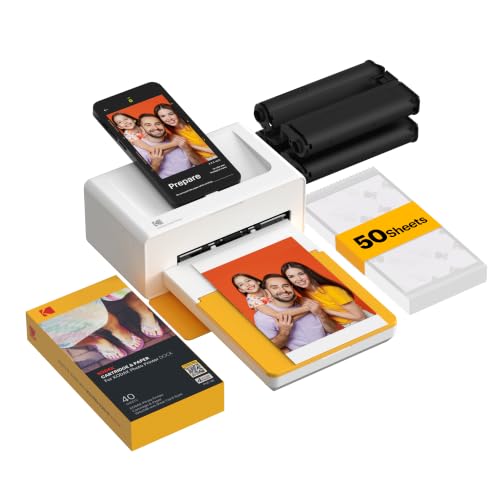
KODAK Dock Plus Review Summary
If you want a simple home photo printer for quick 4×6 prints, the KODAK Dock Plus 4×6 Photo Printer is one of the most practical options in its class.
It is especially appealing for families, scrapbookers, and casual photo lovers who value durable prints, easy smartphone setup, and a low-friction printing workflow more than speed or format flexibility.
The big advantage is its combination of a built-in docking station and KODAK’s 4PASS dye sublimation process.
That means you can place a compatible phone on the printer, stay connected more reliably, and produce color prints with a protective top layer that helps resist fingerprints, water, and fading.
For buyers asking is KODAK Dock Plus 4×6 Photo Printer worth it, the answer depends on your expectations: it is absolutely worth considering if you want a desk-friendly photo printer focused on albums, frames, and keepsakes, but less compelling if you need fast batch printing or larger photo sizes.
Bottom line: the KODAK Dock Plus 4×6 Photo Printer is a strong buy for home users who want dependable, glossy 4×6 prints with minimal setup.
Quick Scorecard
| Category | Score | What it means |
|---|---|---|
| Print quality | 9.0/10 | 4PASS dye sublimation creates smooth, detailed prints with a protective finish. |
| Ease of use | 9.0/10 | Bluetooth pairing, app controls, and the dock keep setup simple. |
| Docking convenience | 8.0/10 | Phone docking improves stability and charges the device while printing. |
| App editing features | 8.0/10 | The KODAK app supports editing, cropping, and customization. |
| Home printing suitability | 8.0/10 | Well suited to albums, frames, events, and memory-making. |
| Speed | 6.0/10 | Fine for personal use, but not designed for high-volume output. |
| Portability | 5.0/10 | Compact enough for a desk, but better as a plug-in home printer. |
The KODAK Dock Plus 4×6 Photo Printer review verdict is straightforward: it delivers where it matters most for casual home photo printing.
You are paying for convenience, quality, and durability, not multifunction office features.
Key Features and Specifications of KODAK Dock Plus
The KODAK Dock Plus is built around a very focused use case: printing 4×6 color photos from a smartphone or tablet.
That specialization is actually a strength, because it keeps the product easy to understand and easy to use.
| Specification | Details |
|---|---|
| Brand | KODAK |
| Model | Dock Plus |
| Printer type | 4PASS dye sublimation |
| Output | Color |
| Print size | 4×6 inches |
| Connectivity | Bluetooth, wireless |
| Compatible devices | Smartphones, tablets |
| Controller type | Android, iOS |
| Control method | App |
| Print media | Glossy photo paper |
| Special features | Borderless printing, docking |
| Resolution | 300 x 300 |
| Approximate print time | About 55 seconds per print |
| Item weight | 1366 grams |
| Dimensions | 4.5" D x 8.5" W x 2" H |
| Ink colors | Yellow, Magenta, Cyan, Black |
| Tray count | 1 |
| Maximum copies per run | 1 |
| Functions | Print only |
| Warranty | Limited warranty |
- 4PASS dye sublimation printing with layered color application and a clear protective lamination layer
- Borderless 4×6 output designed for album pages, frames, and keepsakes
- Integrated docking station for compatible phones
- Phone charging while printing for added convenience
- App-based editing for cropping and customization before print
- Designed for iPhone and Android users who want wireless photo printing
- Desktop-friendly footprint for a home photo station
From a buyer’s perspective, these specs tell a clear story: the KODAK Dock Plus 4×6 Photo Printer is not trying to be a do-everything device.
It is a focused photo printer that aims to make smartphone printing easier, safer, and more repeatable.
Pros and Cons of KODAK Dock Plus
When shoppers compare the KODAK Dock Plus 4×6 Photo Printer pros and cons, the pattern is easy to see.
It excels at ease of use and print durability, but it is not built for versatility or speed.
| Pros | Cons |
|---|---|
| Simple smartphone setup with Bluetooth and app control | Only 4×6 prints, so format flexibility is limited |
| Docking station adds convenience and charging during printing | Slower print pace than many non-photo printers |
| Durable, protected prints with resistance to fingerprints, water, and fading | Best for home use near a power outlet |
| App editing tools make cropping and customization easy | Not ideal for office documents or general-purpose printing |
| Compact desktop design fits well on a table or shelf | Print-only functionality limits overall utility |
Best strengths: ease of use, durable output, and a low-learning-curve printing experience.
Main drawback: if you want broader photo sizes or faster output, this is not the right tool.
How the Docking Design Works
The docking design is one of the most meaningful product choices here.
Instead of relying only on wireless transfer, the KODAK Dock Plus lets you place a compatible phone directly on the printer.
That helps with connection stability and gives the system a more appliance-like feel than a typical compact wireless printer.
For many buyers, this design makes the whole experience feel less fragile.
Wireless photo printers sometimes lose their appeal when pairing is inconsistent or when you need to fuss with settings before every print.
Here, the dock gives the KODAK Dock Plus 4×6 Photo Printer a more direct workflow: open the app, choose your photo, dock the phone, and print.
Another practical benefit is charging during printing.
If you are using the printer for event photos, family gatherings, or an evening of scrapbooking, that small convenience matters.
It keeps the phone ready without adding extra cable clutter.
That said, the dock is still a convenience feature, not a transformative one.
If your main priority is full portability, a pocket-size printer from a line like HP Sprocket may be easier to carry.
But if your goal is a stable desktop photo-printing station, the dock is a thoughtful design choice.
Print Quality and Protective Finish
This is where the KODAK Dock Plus 4×6 Photo Printer earns its strongest buyer appeal.
The 4PASS dye sublimation process prints color in layers and finishes with a clear protective coating.
In practice, that usually means smoother gradients, vivid color, and prints that feel more durable than many casual inkjet outputs.
KODAK says the prints are resistant to fingerprints, water, and fading, and that is an important distinction for anyone making physical keepsakes.
Photos that go into frames, albums, or memory boxes need to survive handling.
A protective finish matters more than many shoppers realize until they start passing pictures around at family gatherings.
The listed 300 x 300 resolution is not especially high on paper, but resolution alone does not tell the full story for photo printing.
Dye sublimation often looks cleaner than the spec sheet suggests because the color application is consistent and the finish is uniform.
For 4×6 prints, the result is generally more than good enough for casual display and gifting.
Where this printer will not satisfy everyone is in absolute speed and size ambition.
It is designed to do one format well.
If you need larger prints, wall-art options, or instant batch output, a more flexible photo ecosystem may suit you better.
App Editing and Mobile Printing Experience
The app experience is a major part of the value proposition.
Since the printer is built around smartphone use, the KODAK Photo Printer app is not just an accessory; it is the control center.
For casual users, that is a plus.
The app supports editing, cropping, and customization before printing, which is exactly what most people need when turning camera-roll images into physical photos.
This matters because phone pictures are not always framed perfectly.
A good app lets you correct composition, trim edges, and fine-tune the image before the printer commits it to paper.
The wireless process also lowers the learning curve.
Buyers looking for a low-stress home photo printer for iPhone and Android will appreciate that the system does not demand a technical setup routine.
This is especially helpful for families and older buyers who want a simple, guided workflow rather than a complicated software stack.
Still, app-based printing always introduces some dependence on software quality.
If you dislike using apps for hardware control, or if you want a traditional printer with deeper menu options, the KODAK Dock Plus may feel limited.
But for its target audience, the app is a sensible tradeoff.
Best Uses for 4×6 Photo Printing
The KODAK Dock Plus 4×6 Photo Printer is best understood as a memory-making tool.
It is ideal for people who print photos to preserve moments, not to manage office output.
- Family albums with consistent 4×6 sizing
- Framed prints for desks, shelves, and walls
- Scrapbooking and journaling projects
- Event photos from birthdays, holidays, and reunions
- Everyday keepsakes from phone camera rolls
The printer’s borderless output and glossy paper support make it a natural fit for these jobs.
It is not trying to serve as a document printer, and that focus actually improves the buying decision: if you only want photo prints, you are less likely to pay for features you will never use.
For buyers comparing the KODAK Dock Plus 4×6 Photo Printer review results against generic all-in-one printers, the key difference is emotional utility.
This model is built for tangible memories, not administrative tasks.
What Comes in the Box
Exact bundle contents can vary by listing, but buyers should expect the essentials needed to start printing with a phone-based workflow.
At a minimum, the value proposition centers on the printer itself and the components required to use the 4PASS system.
- KODAK Dock Plus photo printer
- Docking support for compatible smartphones
- Power connection for desktop use
- Access to the KODAK Photo Printer app
- 4×6 glossy photo printing setup
Because this is a print-only device, buyers should pay attention to the consumables and operating model.
The real experience depends on photo paper, the app, and the simplified mobile workflow.
If you want a printer that can also scan, copy, or handle office documents, this is not the right category.
Alternatives to Consider
The KODAK Dock Plus 4×6 Photo Printer competes in a category with several well-known Amazon-friendly alternatives.
The right choice depends on whether you want portability, a different print style, or more brand ecosystem depth.
- Canon SELPHY compact photo printer — a strong option if you want a more established compact photo-printing lineup with broad support and home-friendly output.
- HP Sprocket portable photo printer — better if portability and casual on-the-go printing matter more than desktop stability.
- Canon Ivy-style smartphone photo printer — worth checking if you want small-format prints and a lightweight mobile-first approach.
- Fujifilm Instax Link smartphone printer — a good alternative for buyers who like the instant-print look and a more playful photo style.
Compared with these alternatives, the KODAK Dock Plus feels more like a home station for standard 4×6 memories than a travel accessory.
That distinction matters a lot when deciding whether it fits your lifestyle.
Who Should Buy KODAK Dock Plus?
The KODAK Dock Plus is a smart purchase for buyers who know exactly what they want from a photo printer.
If you want quick, attractive, and durable 4×6 prints from a phone, this is a very sensible choice.
Buy it if you are:
- a parent or family user who wants to print phone photos regularly
- a scrapbooker or journaling fan who needs consistent 4×6 prints
- someone building albums or framed photo displays
- a casual photographer who values simplicity over technical control
- an iPhone or Android user who wants an easy dock-and-print workflow
Skip it if you are:
- looking for a general document printer
- needing larger photo sizes or flexible formats
- printing in high volume
- wanting maximum portability for travel
- expecting office-style speed or multifunction features
The buyer fit is narrow, but that is not a weakness.
In fact, narrow focus often leads to better product decisions because the machine is optimized for one job.
Design, Usability, and Everyday Experience
In everyday use, the KODAK Dock Plus 4×6 Photo Printer feels like a practical desk appliance rather than a gadget.
Its compact footprint, at roughly 4.5 inches deep, 8.5 inches wide, and 2 inches tall, makes it easy to place on a shelf or table without taking over the room.
The weight is enough to keep it planted during printing, which is useful for a docking-based device.
That stability gives the printer a more premium and dependable feel than some ultra-light portable models.
For home users, that is usually a positive tradeoff.
Usability is where the product earns trust.
The controls are mostly app-driven, the setup is straightforward, and the workflow is built for quick success.
Buyers who do not want to troubleshoot printer drivers, USB connections, or complicated menus will appreciate how much friction has been removed.
Practical drawback: the same simplicity that makes it easy to use also makes it less flexible.
If your needs grow beyond 4×6 prints, you may eventually outgrow it.
Final Buying Advice
If your goal is to print cherished phone photos with minimal effort, the KODAK Dock Plus 4×6 Photo Printer is an easy recommendation.
It combines simple docking, wireless smartphone printing, and durable 4PASS photo output in a compact design that makes sense for homes and creative hobbyists.
For the right buyer, this is one of the most convenient ways to turn digital photos into physical keepsakes.
It is not the fastest printer, and it is not the most versatile, but it is highly focused and well executed.
If that sounds like your use case, it belongs on your shortlist.
Recommendation: choose the KODAK Dock Plus if you want a dependable 4×6 photo printer for albums, frames, and family memories.
If you want portability or broader format support, compare it with a Canon SELPHY, HP Sprocket, or Fujifilm Instax Link before you buy.
Is KODAK Dock Plus Worth It?
Yes, KODAK Dock Plus is worth it for buyers who want a simple, home-oriented 4×6 photo printer with strong print quality and easy smartphone operation.
The dock makes the experience smoother, the app keeps editing approachable, and the 4PASS process adds a durable finish that is genuinely useful for keepsakes.
It is not worth it if you need a general printer, high-speed output, or multiple photo formats.
But if your needs are clear and narrow, that is exactly why this model makes sense: it does one job well and makes the process enjoyable.
Final verdict: the KODAK Dock Plus 4×6 Photo Printer is a smart, buyer-friendly choice for anyone who wants reliable, attractive photo prints from a phone without a complicated setup.