If you are comparing a compact wireless mic for creator video work, the Insta360 Mic Pro Transmitter review mostly comes down to versatility.
It combines a customizable E-Ink display, multiple pickup options, and onboard backup recording in one small transmitter.
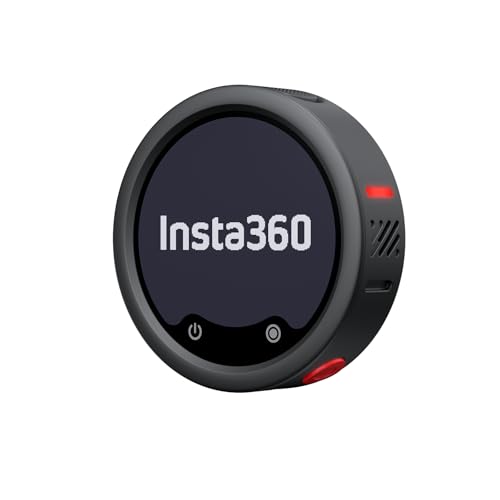
Insta360 Mic Pro Transmitter Review Summary
The Insta360 Mic Pro Transmitter makes sense for creators who want a mini lavalier-style wireless mic that does more than just send audio to a phone.
Its feature set leans into fast workflows, flexible capture, and extra insurance through internal recording, which makes it a strong fit for solo creators, mobile shooters, and anyone building a simple one-person audio rig.
What stands out most is that the product is not trying to win on a single gimmick.
The customizable E-Ink display gives it a personal, camera-ready touch.
The 3-mic array and directional pickup modes give you more ways to approach capture depending on the scene.
The AI noise canceling and auto gain control help it stay practical for everyday recording.
And the 32-bit float internal recording matters because it adds a backup path if the wireless chain is not ideal.
At the same time, this is still a transmitter-first product, so buyers should judge it by workflow fit rather than raw studio ambition.
If you want a tiny wireless mic that is designed around fast setup, phone and camera use, and fewer audio mistakes, this one is easy to understand.
Review Scorecard
| Category | Score | Buyer Assessment |
|---|---|---|
| Wireless workflow | 9/10 | Direct Bluetooth connection and camera support make setup feel streamlined. |
| Audio flexibility | 9/10 | Three built-in mics and multiple directional modes broaden the capture options. |
| Reliability features | 9/10 | 32-bit float internal recording adds a valuable backup path. |
| Noise handling | 8/10 | AI noise canceling should help in imperfect recording environments. |
| Ease of use | 8/10 | Auto gain control reduces guesswork for changing voices and scenes. |
| Creator appeal | 9/10 | The customizable E-Ink display and compact format suit visible on-camera use. |
| Battery confidence | 8/10 | Up to 10 hours is a practical ceiling for day-to-day shooting. |
Key Features and Specifications of Mic Pro Transmitter
The Insta360 Mic Pro Transmitter is built as a compact wireless audio tool with a strong feature density for its size.
The listing highlights a customizable E-Ink display that can show user-uploaded images, logos, or graphics through the Insta360 app, which is unusual and gives the transmitter a more polished creator-facing identity.
The audio side is equally feature-packed.
It includes a 3-mic array designed to capture a broader sound field, and the product supports three directional pickup modes.
That combination suggests the mic is intended to adapt to different speaking setups rather than forcing one fixed capture pattern.
Other useful listing facts:
- AI noise canceling powered by an NPU chip
- Auto gain control with two gain modes
- 32-bit float internal recording with onboard memory
- Up to 10 hours of battery life
- Bluetooth connection to phones and Insta360 cameras without a receiver
- Direct transmitter-to-camera audio with Insta360 X5, Insta360 Ace Pro 2, and GO Ultra
- 2 TX + 4 RX capability for multi-device pairing scenarios
For buyers comparing specs, the internal recording and direct camera support are the most important parts.
They indicate that Insta360 is treating this transmitter as a hybrid tool: wireless first, but not dependent on wireless alone.
Pros and Cons of Mic Pro Transmitter
Pros
- The customizable E-Ink display adds real creator-facing utility and makes the transmitter feel distinctive.
- Three built-in microphones and multiple pickup modes give you more flexibility than a barebones clip-on transmitter.
- AI noise canceling and auto gain control should reduce friction in common recording situations.
- 32-bit float internal recording is a major safety net for creators who want backup audio.
- Up to 10 hours of battery life is practical for a full work session or a long day of intermittent shooting.
- Bluetooth connection without a receiver can simplify mobile workflows.
Cons
- The feature list is dense enough that casual users may not need everything it offers.
- It is still a transmitter-oriented product, so buyers who want a fuller multi-mic kit may need additional pieces.
- Some of the strongest benefits depend on pairing with specific Insta360 devices or using the companion app.
- The distinctive display and advanced recording options may be overkill if you only need a basic spoken-word mic.
Who Should Buy Mic Pro Transmitter?
Buy the Insta360 Mic Pro Transmitter if you are a creator who values speed, flexibility, and a backup plan.
It fits people recording on a phone, shooting with compatible Insta360 cameras, or moving between setups where direct transmitter-to-camera audio and Bluetooth convenience matter.
It is also a sensible pick if you care about a more polished on-camera presence.
The customizable E-Ink display is not just cosmetic; it makes the unit feel more personalized, which is useful when your gear is part of your workflow or often visible in behind-the-scenes shots.
This product should also appeal to solo shooters who do not want to babysit audio levels.
The combination of auto gain control, AI noise canceling, and internal recording points to a design that tries to prevent avoidable mistakes.
You should probably skip it if you want the simplest possible mic with almost no features to learn.
It is also not the best fit if you are shopping strictly for a traditional studio microphone or if you do not plan to use the compatible phone or camera ecosystem.
Audio Workflow Details for Mic Pro Transmitter
Customizable E-Ink Display
The display is one of the clearest differentiators here.
Because you can upload images, logos, or graphics through the app, the transmitter does more than show status information.
It becomes a small branded object, which matters for creators who care about presentation.
Pickup and Noise Control
The 3-mic array and directional pickup modes suggest a design aimed at flexibility rather than a single fixed recording position.
Add AI noise canceling on top, and the product looks better suited to real-world, imperfect environments than a basic clip-on transmitter.
Backup Recording and Gain Management
The 32-bit float internal recording is the feature that elevates this from a convenience accessory to a more serious creator tool.
If wireless transmission is interrupted or the source level is less predictable, onboard recording provides another route to usable audio.
The two gain modes and auto gain control reinforce that practical focus.
Battery and Connectivity
The stated 10-hour battery life should cover most creator sessions without constant charging.
Bluetooth support and direct camera connection are especially useful if you want to move quickly between phone-based and camera-based recording setups.
Alternatives to Mic Pro Transmitter
If you want a different wireless audio path, these are credible alternatives worth comparing:
The DJI Mic 2 is the most obvious comparison if you are shopping for a polished compact wireless system with broad creator appeal.
Rode Wireless GO II is a familiar choice for buyers who prioritize a proven wireless ecosystem.
Hollyland Lark M2 is worth looking at if you want a smaller, lightweight wireless option.
Saramonic Blink 500 is a sensible budget-conscious line to compare against if you are sorting by practicality rather than brand prestige.
Is Mic Pro Transmitter Worth It?
Yes, the Insta360 Mic Pro Transmitter is worth it if you want a compact wireless mic that combines visible creator polish with genuinely useful recording safeguards.
Its strongest case is the mix of E-Ink customization, flexible pickup, noise handling, and internal 32-bit float backup recording.
If you only need a basic wireless mic, this may be more feature-rich than necessary.
But if you care about dependable creator audio and a cleaner workflow, the product offers enough distinct advantages to justify serious consideration.