Choosing the right wireless setup can make a home studio feel far more efficient, whether you are monitoring a camera feed, switching angles, or reducing cable clutter.
This roundup of the best video transmitters for home studios in 2026 focuses on latency, range, compatibility, and real-world flexibility for creators who need dependable performance.
Best 10 Video Transmitters for Home Studios Picks for 2026
Pro Monitoring Pick
Hollyland Pyro H Wireless HDMI Video Transmission System

- 4K/30 HDMI transmission with dual-band 2.4GHz/5GHz
- Up to 1,300ft range and 60ms latency
- Supports up to 4 receivers plus UVC live streaming
Best For: home studios needing advanced monitoring and multi-receiver support
Easy Plug-and-Play Choice
Lemorele Wireless HDMI Transmitter and Receiver

- Plug-and-play setup with aluminum alloy housing
- 1080p/60Hz transmission over 5GHz up to 656ft
- TuTuPlay app adds phone or tablet monitoring
Best For: simple home-studio wireless monitoring and quick setup
Live Streaming Workhorse
Vrriis Wireless Video Transmitter and Receiver

- 0.05s latency and up to 1,500ft line-of-sight range
- 20 channels with LCD signal/interference feedback
- UVC out supports OBS live streaming without capture gear
Best For: home-studio creators who stream and need manual signal control
Budget Multi-Source Option
Wireless HDMI Transmitter and Receiver 4k Kit
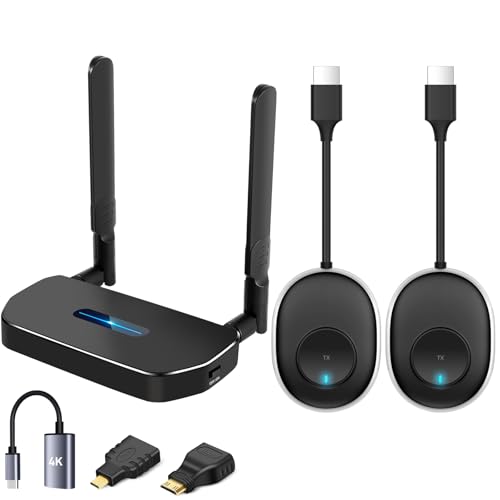
- Two transmitters and one receiver for source switching
- Dual-band 5.8GHz/2.4GHz wireless operation
- Plug-and-play with up to 164ft open-field range
Best For: basic home studios that want simple switching between two sources
Pro 4K SDI/HDMI Pick
Hollyland Mars 4K Wireless Transmitter Receiver

- 4K HDMI plus 3G-SDI connectivity
- Up to 450 ft LOS and 66 ms latency
- App monitoring and multi-screen support
Best For: Creators needing a flexible 4K wireless link for a home studio
All-in-One Multi-Viewer Choice
Wireless HDMI Transmitter Receiver with 7" Monitor

- Built-in 7-inch receiver display
- Up to 5 receivers from one transmitter
- 1080p60 with HDMI loop out
Best For: Compact home studios that want easy built-in monitoring
Low-Latency 1080p Pick
Synco Xvision Wireless Video Transmission System

- 1080p60 with 40 ms latency
- 300 m stable HDMI transmission
- 2W low-power, fanless design
Best For: Users wanting quiet, low-latency wireless monitoring in a home studio
Pro-Grade 4K Monitoring
Accsoon CineView SE 4K Wireless System

- 4K HDMI transmission with 1080p SDI/HDMI support
- Up to five monitoring destinations including app viewing
- Select Sony and Canon camera-control support
Best For: Home studios and creators who want pro-level wireless monitoring
Quiet Long-Range HDMI Link
SYNCO XVision 1080P Wireless System

- Fanless 2W design for silent shooting
- 1080p 60fps transmission with claimed 984 ft range
- Receiver supports multiple monitoring endpoints
Best For: Creators who want a quiet, lightweight wireless HDMI setup
Flexible Multi-Display HDMI Extender
Vrriis 1080P Wireless HDMI Kit

- 1080p wireless HDMI with plug-and-play setup
- Loop out plus dual HDMI output for monitoring flexibility
- IR control and multiple power options
Best For: Home studios that need simple wireless HDMI with extra display options
Pro Monitoring Pick – Hollyland Pyro H Wireless HDMI Video Transmission System
For video transmitters for home studios, the Hollyland Pyro H is a strong choice if you want room to grow into multi-camera monitoring and live streaming. It brings 4K/30 input-output support, dual-band 2.4GHz/5GHz operation, smart channel scan, and up to 1,300ft of range, making it a practical fit for studio setups where reliable wireless preview matters.
Best For: Home studios that need higher-end wireless monitoring, multi-receiver support, and UVC streaming.
Pros:
- Supports up to 4K UHD transmission over HDMI with 2.4GHz and 5GHz dual-band operation
- Up to 1,300ft line-of-sight range and 60ms latency for real-time direction and feedback
- Can transmit to up to 4 receivers for broader crew or monitor coverage
- UVC support enables plug-and-play live streaming to a computer
Cons:
- Best range is line-of-sight, so obstacles can reduce performance
- 4K support is listed up to 4K/30fps rather than higher frame rates
- More features than a basic home-studio user may need
This is the most studio-oriented option in the group, especially if you care about flexible monitoring and live workflow integration. Its mix of long range, smart channel management, and receiver expansion makes it a solid upgrade path for more serious home production.
Easy Plug-and-Play Choice – Lemorele Wireless HDMI Transmitter and Receiver
If you want video transmitters for home studios that are simple to set up, the Lemorele wireless HDMI kit keeps the process straightforward. It uses a plug-and-play design, aluminum alloy housing, 5GHz transmission, and up to 656ft line-of-sight range, while also adding a phone-monitoring option through the TuTuPlay app.
Best For: Home studios that want easy setup, solid 1080p wireless video, and phone/tablet preview.
Pros:
- Plug-and-play design with no drivers or software required
- 5GHz transmission supports up to 1080p 60Hz with up to 656ft line-of-sight range
- TuTuPlay app lets an iOS or Android device act as a monitoring screen
- Can stream to up to 4 receivers simultaneously
Cons:
- Limited to 1080p rather than 4K
- Phone/tablet monitoring is for preview and not a transmitter source
- Range still depends on line-of-sight conditions
For a home studio focused on quick setup and reliable full-HD monitoring, this Lemorele kit hits a good balance. The app-based preview feature is especially handy if you want a portable second screen without adding extra hardware.
Live Streaming Workhorse – Vrriis Wireless Video Transmitter and Receiver
For video transmitters for home studios that lean into streaming and monitoring flexibility, the Vrriis system adds useful control features. It offers 0.05s latency, up to 1,500ft line-of-sight range, 20 adjustable channels, UVC out for live streaming, and a loop out for local monitoring.
Best For: Home studios that need live-streaming output, manual channel control, and flexible power options.
Pros:
- Very low 0.05s latency with up to 1,500ft line-of-sight range
- 20 adjustable channels with LCD signal and interference readout
- UVC out works with OBS for live streaming without a capture device
- Supports NP-F batteries and 5V USB-C power options
Cons:
- 1080p only, so it is not a 4K solution
- Open-field range drops when walls or other obstacles are present
- Longer receiver chains reduce transmission distance as more RX units are added
This is a strong fit when your home studio workflow includes streaming to a computer and you want more hands-on control over signal conditions. The combination of low latency, channel selection, and UVC output makes it especially practical for content creators.
Budget Multi-Source Option – Wireless HDMI Transmitter and Receiver 4k Kit
If you are shopping for video transmitters for home studios and want an inexpensive way to switch between sources, this kit is built around convenience. It includes two transmitters and one receiver, supports plug-and-play operation, works over 5.8GHz and 2.4GHz, and is rated for up to 164ft in open-field use with about 0.1-second latency.
Best For: Home studios that need a simple multi-source wireless setup for two computers or devices.
Pros:
- Includes 2 transmitters and 1 receiver for easy source switching
- Dual-band 5.8GHz/2.4GHz design aims for more stable transmission
- Plug-and-play setup with no app, Bluetooth, or Wi-Fi pairing required
- Rated for up to 164ft/50m in open-field conditions
Cons:
- Distance can drop sharply through walls or between floors
- Product description emphasizes 1080p and 720p rather than true high-end 4K use
- More of a general wireless display tool than a pro studio system
This kit makes sense if your home studio needs an easy way to alternate between sources without a complicated install. It is especially appealing for basic production, meetings, or casual content workflows where simplicity matters more than premium specs.
Pro 4K SDI/HDMI Pick – Hollyland Mars 4K Wireless Transmitter Receiver
If you want video transmitters for home studios that can also handle more serious production setups, the Hollyland Mars 4K is built around 4K HDMI and 3G-SDI transmission with support for broadcast-style frame rates. It suits creators who need a flexible wireless link for cameras, switchers, monitors, or app-based viewing without giving up professional input and output options.
Best For: Home studio creators who want 4K wireless transmission with HDMI, SDI, and app monitoring options.
Pros:
- Supports up to 4K 30fps via HDMI and FHD/HD via HDMI/SDI.
- Offers 3G-SDI output with decimal-point rate support like 23.98/29.97/59.94 FPS.
- Can reach up to 450 ft line-of-sight with 66 ms latency in ideal conditions.
- Allows app monitoring on iOS and Android, plus multiple monitor configurations.
Cons:
- Best performance is stated for interference-free laboratory conditions.
- QC/PD protocol and 5V/2A charging are not supported.
- More feature-rich than a basic plug-and-play home studio transmitter.
Overall, this is the most production-ready option in the group if your home studio setup needs SDI, 4K support, and flexible monitoring. Its strength is versatility, though that also makes it a better fit for users who will actually use the extra broadcast-style features.
All-in-One Multi-Viewer Choice – Wireless HDMI Transmitter Receiver with 7" Monitor
For video transmitters for home studios where monitoring convenience matters as much as range, this wireless HDMI kit stands out because the receiver includes a built-in 7-inch screen. It is designed to simplify small studio workflows with multi-receiver support, local loop out, and straightforward HDMI monitoring.
Best For: Home studios that want a built-in monitoring screen and the ability to send video to multiple receivers.
Pros:
- Receiver includes a built-in 7-inch HD monitor for instant viewing.
- Supports up to 1080p at 60Hz with claimed 1312 ft line-of-sight range.
- Can broadcast from one transmitter to up to five receivers.
- Includes HDMI loop out and IR remote control for practical on-set use.
Cons:
- Focused on 1080p rather than 4K transmission.
- Smartphone and tablet compatibility requires a Type-C to HDMI cable.
- Built-in screen adds convenience, but also makes the receiver less minimal.
This is a strong pick if you want an all-in-one wireless HDMI solution that reduces the need for extra monitors. Its mix of a built-in screen, loop out, and multi-receiver workflow makes it especially useful for compact home studio setups.
Low-Latency 1080p Pick – Synco Xvision Wireless Video Transmission System
If you are comparing video transmitters for home studios and want a straightforward 1080p wireless link, the Synco Xvision focuses on low latency, stable transmission, and simple operation. It is aimed at creators who value quick feedback, app-based monitoring tools, and quiet operation more than higher-resolution formats.
Best For: Home studio users who want low-latency 1080p transmission with app monitoring tools.
Pros:
- Delivers 1080p at 60fps with claimed 300 m stable transmission.
- Uses 40 ms latency for real-time monitoring and response.
- Low-power design draws only 2W and does not require fan cooling.
- Synco Link app adds tools like zebra stripes, mirror, inverse colors, screenshot, and playback.
Cons:
- Limited to 1080p rather than 4K.
- Range is listed in meters rather than the longer LOS numbers some buyers may expect.
- Best suited to users who can work within the app ecosystem.
This model makes sense if your home studio needs reliable 1080p monitoring with low delay and a quiet footprint. It is less ambitious than the 4K option, but the app features and low-power design make it practical for everyday shooting and review.
Pro-Grade 4K Monitoring – Accsoon CineView SE 4K Wireless System
If you need video transmitters for home studios that can also handle serious production work, the Accsoon CineView SE 4K is built around 4K HDMI transmission, 1080p SDI/HDMI support, and low-latency wireless monitoring. It’s a practical choice when you want clean image delivery, mobile monitoring support, and camera-control features in a single system.
Best For: Filmmakers, content creators, and home studios that want professional 4K wireless monitoring with camera control.
Pros:
- Supports 4K HDMI input/output up to 30p and 1080p via SDI/HDMI.
- Long claimed range up to 1312 ft in clear line-of-sight conditions.
- Can send to up to five monitoring destinations, including compatible app-based devices.
- Includes camera control support for select Sony and Canon cameras.
Cons:
- USB-C video output is for mobile monitoring only, not UVC capture or webcam use.
- Range and latency depend on ideal interference-free conditions.
- Some features require compatible receivers, devices, or specific cables.
For a home studio that needs more than a basic HDMI link, this model stands out for its mix of 4K support, app monitoring, and control tools. It’s more specialized than simpler transmitters, but that extra capability can matter if your workflow is growing.
Quiet Long-Range HDMI Link – SYNCO XVision 1080P Wireless System
Among video transmitters for home studios, the SYNCO XVision is a straightforward 1080p wireless HDMI option with a focus on quiet operation and easy setup. Its fanless design, low power draw, and long claimed transmission range make it useful when you want a clean monitoring setup without extra noise or clutter.
Best For: Solo creators and small studio teams who want a quiet, lightweight 1080p wireless HDMI system.
Pros:
- Fanless 2W design helps keep operation silent during recording.
- Claims 40ms latency for responsive monitoring.
- Supports 1080p 60fps transmission up to 984 ft in ideal conditions.
- Receiver supports multiple real-time monitoring endpoints.
Cons:
- Limited to 1080p rather than 4K.
- NP-F battery is not included.
- Best range claims assume favorable, interference-free conditions.
This is a practical pick if your home studio values quiet gear, simple pairing, and dependable Full HD monitoring over higher resolution. It’s especially appealing for creators who want a lightweight system that is easy to move between setups.
Flexible Multi-Display HDMI Extender – Vrriis 1080P Wireless HDMI Kit
If you’re shopping video transmitters for home studios and want a simple HDMI extender with extra display flexibility, the Vrriis system is built around 1080p wireless transmission, loop out, and dual HDMI output. It’s designed for plug-and-play use, with IR remote support and several power options for different studio or living-room setups.
Best For: Home studios, streaming rooms, and mixed-use setups that need easy wireless HDMI with local and dual-screen monitoring.
Pros:
- Claims up to 1300 ft range in open-field, interference-free conditions.
- Supports 1080p up to 60Hz with plug-and-play setup.
- Includes transmitter loop out and dual HDMI output on the receiver.
- Offers IR remote control and multiple power supply options.
Cons:
- Real-world range can drop with walls, metal, brick, or glass.
- Limited to Full HD 1080p instead of 4K.
- Best for HDMI sources, so it’s less specialized than pro camera-focused systems.
This model makes sense when you want an uncomplicated wireless HDMI bridge with convenient monitoring options. It’s less advanced than higher-end studio transmitters, but the extra output flexibility can be useful in compact home production spaces.
How We Picked the Best Video Transmitters for Home Studios
We prioritized options that balance low latency, stable transmission, and practical connectivity for common home-studio workflows. That means looking closely at HDMI and SDI support, receiver expansion, 1080p or 4K capability, range claims, and features like loop-out, UVC output, and camera control.
We also favored systems that fit different budgets and room sizes, from compact desk setups to larger rooms where signal reliability matters more than raw specs.
Quick Comparison
If you want the simplest choice, look for a model with straightforward HDMI support and low delay. If you need more advanced flexibility, consider systems that add SDI, multiple receivers, or dual-band transmission. For live production, UVC output and monitoring tools can be especially useful. For color-accurate or multi-device setups, compatibility and signal stability often matter more than maximum range.
Key Buying Factors for Video Transmitters for Home Studios
Latency
Lower latency helps keep monitoring responsive, especially when you are framing shots, switching cameras, or syncing live content. For most home studios, sub-100ms performance is a strong starting point.
Range and Signal Stability
Do not buy by distance alone. Real walls, lighting gear, and interference can reduce performance. Dual-band or stronger wireless systems usually hold up better in busy home environments.
Connections and Compatibility
HDMI covers most creator setups, while SDI can be helpful for longer cable runs and more robust gear. Loop-out can let you feed a local monitor while transmitting wirelessly, and UVC support may simplify direct connection to a computer.
Resolution and Frame Rate
Choose based on your output needs. 1080p60 is enough for many live and studio workflows, while 4K30 may appeal to editors, hybrid shooters, or creators who want extra detail for capture and review.
Who Should Buy Which Video Transmitters for Home Studios?
If you are a streamer or solo creator, a simple HDMI transmitter with low latency and easy setup is usually the best fit. If you run interviews, multi-camera shoots, or more advanced home productions, a model with SDI support, multiple receivers, or camera control can save time.
If your priority is dependable monitoring on a tighter budget, a basic 1080p system may be all you need. If you want the most future-proof choice for Video Transmitters for Home Studios, look for a dual-band 4K-capable system with strong range, low delay, and flexible receiver support.