If you present on camera or in front of a live audience, the right teleprompter can make your delivery smoother, more confident, and easier to rehearse.
We focused on teleprompters for standing presentations that balance readability, stability, and fast setup for real-world use.
Best 10 Teleprompters for Standing Presentations Picks for 2026
Built-In Screen Pick
Elgato Prompter with Built-In Display

- Built-in 9-inch screen removes the need for a tablet or phone
- Supports many camera types and shooting setups
- Works well for Zoom, Teams, streaming, and scripts
Best For: All-in-one teleprompter setup with a built-in display
Fold-and-Go Choice
NEEWER X14 III 14" Foldable Teleprompter

- Assembly-free foldable design with carry case
- 14-inch beamsplitter offers a larger reading area
- Remote and app control simplify live adjustments
Best For: Portable full-size prompting for speeches and presentations
Compact Budget Pick
Little Prompter Mini Teleprompter

- Tiny 6 x 6 x 6 inch footprint with under-1-pound weight
- Works with DSLR, webcam, and laptop cameras
- Uses a smart device app for script display
Best For: Portable, simple prompting setups with minimal bulk
Monitor-Included Option
NEEWER X11 2-in-1 Teleprompter

- Built-in 9-inch LCD monitor for mirrored scripts
- Works with Windows, macOS, phones, and tablets
- 11-inch glass reduces ghosting for clearer reading
Best For: Users who want a teleprompter plus built-in display
Portable All-Rounder
Desview T5 for Phones, Tablets, and DSLR

- Works with smartphones, tablets under 11 inches, and DSLR cameras.
- Includes 49mm to 82mm adapter rings and a Bluetooth remote.
- Free app supports txt and docx scripts with mirror and timer controls.
Best For: Presenters who want one teleprompter for mobile, tablet, and DSLR use.
Compact Teaching Pick
NEEWER X12 for Tablet and Camera

- Beam splitter glass is rated for 75% light transmittance.
- Remote and app let you pause, speed, and turn pages.
- Aluminum alloy body collapses for easier storage and travel.
Best For: Teaching, live streaming, and presenter setups that need a portable tablet teleprompter.
Large-Screen Presenter
20-Inch Teleprompter for Camera and Tablet

- Large 20-inch optical glass gives a wide script reflection area.
- Height, vertical angle, and horizontal rotation are adjustable.
- Wireless remote handles scrolling, pausing, and speed changes.
Best For: Larger presentation setups, online courses, and studio-style recordings.
Budget-Friendly No-Assembly Pick
NEEWER Basics X12B 12" Teleprompter for Tablet DSLR Camera

- Installation-free all-in-one design
- Remote and app control for scripts
- Foldable with carry case for storage
Best For: Presenters and creators who want an affordable, portable teleprompter
Easy-Setup Collapsible Option
GVM 12" Teleprompter with App Remote Control
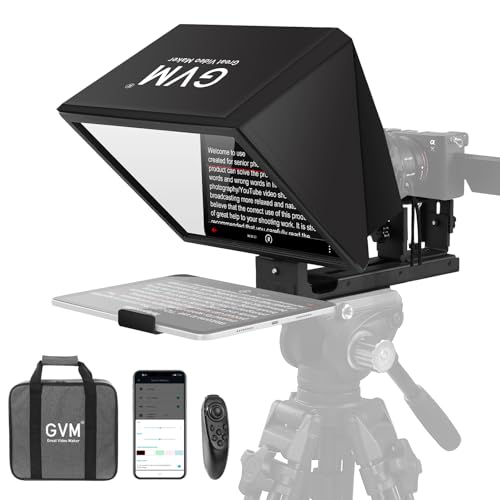
- No-assembly collapsible design
- Clear reading range up to 15 ft
- Remote, app, and carry bag included
Best For: Speakers who need a portable, tripod-ready teleprompter
Portable Large-Tablet Choice
Desview P13 Teleprompter for Camera and 12.9" iPad

- Supports tablets up to 12.9 inches
- Foldable light shield reduces glare
- 1.7 kg build with padded storage bag
Best For: Large-tablet users who want a portable teleprompter for polished presentations
Built-In Screen Pick – Elgato Prompter with Built-In Display
If you want teleprompters for standing presentations that keep your setup compact, the Elgato Prompter is built around a 9-inch integrated display instead of relying on a tablet or phone. That makes it a strong choice for presenters who want a cleaner desk or podium setup, plus an easy way to keep eye contact during Zoom, Teams, streaming, or script reading.
Best For: Presenters who want an all-in-one teleprompter with a built-in screen and minimal setup.
Pros:
- Built-in 9-inch display means no extra tablet or smartphone is required
- Supports cameras, webcams, smartphones, laptops, and personal computers
- Works with Camera Hub and Stream Deck for more control and customization
- Designed for professional eye contact in presentations and video calls
Cons:
- Mac and Android use requires separate DisplayLink software downloads
- Uses a proprietary desktop-controlled workflow rather than a simple mobile-app-only setup
Overall, this is a polished option if you value convenience, flexibility, and a built-in screen over a more basic teleprompter design. It suits presenters who want a streamlined setup for standing talks, meetings, and content recording.
Fold-and-Go Choice – NEEWER X14 III 14" Foldable Teleprompter
The NEEWER Teleprompter X14 III is a practical pick for teleprompters for standing presentations when you need a larger reading area and fast setup. Its foldable, assembly-free design makes it easier to move between venues, while the included remote and app control help you adjust script speed without breaking your flow.
Best For: Speakers who want a full-size teleprompter that sets up quickly and travels easily.
Pros:
- Assembly-free foldable design is quick to set up and store in the carry case
- 14-inch beamsplitter with 71% light transmission supports clear script reading
- Included Bluetooth remote and app let you adjust speed, font size, and playback
- Compatible with many phones and tablets, including larger iPad and Galaxy models
Cons:
- Heavier than compact teleprompter options at 5.2 pounds
- Requires a separate phone or tablet for script display
This model makes sense if readability and portability matter more than a tiny footprint. It is especially appealing for presenters, instructors, and anyone who needs one teleprompter for multiple speaking locations.
Compact Budget Pick – Little Prompter Mini Teleprompter
The Little Prompter is a compact option for teleprompters for standing presentations when you want something lightweight and easy to carry. At just 6 x 6 x 6 inches and under a pound, it is designed for quick setups with DSLRs, webcams, or built-in laptop cameras, using a smart device and teleprompter app for the script.
Best For: Users who need a small, portable teleprompter for simple presentation or recording setups.
Pros:
- Very compact and lightweight, making it easy to transport and store
- Works with DSLR cameras, webcams, and built-in laptop cameras
- Includes high-quality 70/30 beamsplitter glass for prompting
- Suitable for instructors, business professionals, journalists, and churches
Cons:
- Requires a separate smart device and teleprompter app for scripts
- Smaller 6-inch size offers less screen area than larger models
This is a sensible pick if portability is your top priority and you do not need a large prompting surface. It is best for straightforward presentations where a compact form factor matters more than advanced features.
Monitor-Included Option – NEEWER X11 2-in-1 Teleprompter
The NEEWER X11 is a useful choice for teleprompters for standing presentations if you want a built-in monitor instead of relying on a separate tablet. Its 11-inch beamsplitter and included 9-inch LCD screen make it easy to mirror text from a phone, tablet, or computer, which can simplify setup for live streams, video conferences, and speaking sessions.
Best For: Presenters who want a teleprompter with an included display for mirrored scripts and eye contact.
Pros:
- Built-in 9-inch LCD monitor means no tablet or phone is needed for prompting
- Supports screen mirroring from phones, tablets, Windows, and macOS systems
- 11-inch multi-coated glass reduces ghosting and stays readable up to 2.5 m
- Adjustable holder and quick-release plate support camera mounting flexibility
Cons:
- Some connection methods require driver installation
- Voice sync is not supported
If you want a more integrated workflow than a standard tablet-based teleprompter, this model stands out. It is especially practical for presenters who also need a second display or a screen-mirroring setup alongside the prompting function.
Portable All-Rounder – Desview T5 for Phones, Tablets, and DSLR
If you need teleprompters for standing presentations that can also pull double duty for video, the Desview T5 is built around flexible device support. It works with smartphones, tablets under 11 inches, and DSLR cameras, while the coated glass and light-seal foam help keep the script readable and the image clean.
Best For: Presenters who want one teleprompter for mobile, tablet, and DSLR use.
Pros:
- Supports smartphones, tablets under 11 inches, and DSLR cameras.
- Includes multiple adapter rings from 49mm to 82mm for broad lens compatibility.
- Bluetooth remote and free app support txt and docx script control.
- Adjustable front panel and shooting modes make alignment easier.
Cons:
- Tablet size is limited to under 11 inches.
- Setup includes several parts, so it may take a little longer than simpler units.
Overall, the T5 is a practical pick if you want a versatile teleprompter that can move between presentations, live streaming, and recording setups without forcing you into one device type.
Compact Teaching Pick – NEEWER X12 for Tablet and Camera
The NEEWER X12 is a solid option for teleprompters for standing presentations when you want a compact setup with app-based control. Its beam splitter glass is designed for clear reading at up to 10 feet, and the included remote makes it easy to pause, speed up, or turn pages without breaking flow.
Best For: Teaching, live streaming, and presenter setups that need a portable tablet teleprompter.
Pros:
- Beam splitter glass offers 75% light transmittance and readable text up to 10 feet away.
- Includes remote control and app support for scrolling and page turns.
- Fits smartphones and tablets up to 9.84 x 8.68 inches.
- Aluminum alloy build and collapsing design help with storage and transport.
Cons:
- Not compatible with wide angle lenses.
- Camera lens focal length needs to be more than 28mm.
- Not compatible with iPad Pro 12-inch models.
For presenters who value portability and simple remote control, the X12 covers the essentials well, but lens and tablet-size limits are important to check before buying.
Large-Screen Presenter – 20-Inch Teleprompter for Camera and Tablet
For teleprompters for standing presentations where readability matters most, this 20-inch model gives you a large optical glass area and broad adjustment range. It is aimed at creators using cameras and tablets, with a remote to control scrolling and script speed during presentations or recording.
Best For: Larger presentation setups, online courses, and studio-style recordings.
Pros:
- 20-inch optical glass provides a wide script reflection area.
- Height, vertical angle, and horizontal rotation are all adjustable.
- Supports DSLR, mirrorless, and DV camcorders.
- Includes a wireless remote for scrolling, pausing, and speed adjustment.
Cons:
- At 10.48 pounds, it is heavier than smaller portable teleprompters.
- Large footprint may be less convenient for tight spaces.
- Designed for tablet script display, so it is not a standalone display solution.
This is the most presentation-focused option in the group, especially if you want more reading space and adjustability than a compact teleprompter can offer.
Budget-Friendly No-Assembly Pick – NEEWER Basics X12B 12" Teleprompter for Tablet DSLR Camera
If you want teleprompters for standing presentations that keep setup simple, the NEEWER Basics X12B is built around an installation-free design and an all-in-one collapsible frame. It’s designed for tablets and cameras, with remote and app control for adjusting script speed, font size, and playback without disrupting your delivery.
Best For: Presenters, course creators, and tutorial makers who want an affordable, portable teleprompter with no assembly.
Pros:
- Installation-free design saves time before a presentation or recording session.
- Includes remote and app control for play/pause, scrolling speed, and font-size changes.
- 12″ beam splitter glass is rated for clear reading up to 10 ft.
- Foldable body and carry case make storage and transport easier.
Cons:
- Not for phone shooting.
- Does not function as a monitor or offer direct on-screen self viewing.
For standing presentations, this model is a practical pick if you value a lightweight, no-fuss build over extra features. The 12-inch display and adjustable hood should suit many script-reading setups, especially when portability matters.
Easy-Setup Collapsible Option – GVM 12" Teleprompter with App Remote Control
For teleprompters for standing presentations, the GVM 12″ model focuses on fast setup and flexible device support. Its installation-free, collapsible design works with tablets, smartphones, and cameras, while the included app remote lets you control scrolling hands-free during delivery.
Best For: Speakers and video presenters who need a portable teleprompter that’s quick to mount and easy to carry.
Pros:
- Installation-free design makes it straightforward to mount on a tripod.
- 12-inch optical glass supports clear reading up to 15 ft.
- Works with tablets, smartphones, DSLR cameras, and mirrorless cameras.
- Includes remote control, app support, and a carry bag.
Cons:
- Tablet support is limited to devices up to 8.6 inches.
- Bulkier than ultra-compact prompting setups when packed.
This is a strong all-rounder for presenters who move between recording, streaming, and live speaking. Its longer reading range and broad compatibility make it especially useful when you want one setup for multiple presentation styles.
Portable Large-Tablet Choice – Desview P13 Teleprompter for Camera and 12.9" iPad
If you’re comparing teleprompters for standing presentations, the Desview P13 stands out for supporting larger tablets up to 12.9 inches. It’s built for smooth prompting with a foldable light shield, premium beam splitter glass, and Bluetooth remote control, making it a solid fit for polished solo speaking.
Best For: Presenters and creators using a large iPad who want a portable teleprompter with glare protection.
Pros:
- Supports tablets up to 12.9 inches, including iPad Pro.
- Foldable side light shield helps block ambient glare.
- Weighs 1.7 kg and includes a padded storage bag.
- Bluetooth remote and app support help control scripts hands-free.
Cons:
- Tablet focus is centered on large devices rather than phones.
- Requires compatible camera mounting setup with 1/4″ screw support.
The P13 is a good fit if your presentation workflow already revolves around a large tablet and you want a more professional prompting view. Its portability and glare control make it especially appealing for bright rooms, travel, or frequent setup changes.
How We Picked the Best Teleprompters for Standing Presentations
For this roundup, we prioritized models that support comfortable eye-line placement, clear beam-splitter glass, and setups that stay stable when you are standing and moving naturally. We also looked at screen compatibility, remote/app control, portability, and whether the design is practical for solo presenters, creators, and small teams.
Because Teleprompters for Standing Presentations need to work in more than one environment, we gave extra weight to systems that are easy to assemble, adjust quickly, and pair well with tablets, phones, laptops, or dedicated monitors.
Quick Comparison: What Matters Most
Before choosing, compare three basics: display size, camera compatibility, and control method. Larger glass and screens generally improve readability at longer speaking distances, while compact models are easier to transport and set up in tight spaces. Remote control or app control can help you pace scripts without breaking eye contact.
Key Buying Factors for Teleprompters for Standing Presentations
Screen Size and Reading Distance
A larger reflective surface is usually easier to read from a standing position, especially if you will be several feet from the camera or podium. Smaller units can still work well for tighter framing, but they may require cleaner script formatting and shorter lines.
Device Compatibility
Check whether the teleprompter supports your preferred source device: tablet, smartphone, laptop, or built-in monitor. If you already own an iPad or want to use a phone for scripts, make sure the mounting system and app workflow fit your setup.
Stability and Stand Use
For standing presentations, stability matters more than it does on a desk. Look for rigid frames, secure camera mounts, and enough adjustability to position the glass at a natural eye line without wobble.
Setup Speed and Portability
If you move between rooms, studios, or event spaces, a foldable or tool-free design can save time. Portable teleprompters are especially useful for solo presenters who need to assemble gear quickly and break it down just as fast.
Remote Control and Script Management
App control and included remotes make it easier to scroll at a natural pace, pause for emphasis, and adjust speed on the fly. That is a big advantage when using Teleprompters for Standing Presentations in live or semi-live settings.
Who Should Buy Which Teleprompters for Standing Presentations?
If you want the simplest premium experience, choose a model with integrated display support and straightforward operation. If you need maximum flexibility, look for a teleprompter that works with tablets and cameras and offers easy screen mirroring or remote control. If portability is your top concern, a compact foldable unit is likely the best fit. Larger 14-inch and 20-inch systems are better for presenters who need more readable text at a distance or expect to use the teleprompter in a larger room.
In short, the best choice depends on how often you present, how far you stand from the camera, and whether you value speed, portability, or a more polished studio-style setup.