Looking for a smoother on-camera delivery without sounding scripted? The best teleprompters for livestreaming help you stay natural, keep eye contact, and cut down on retakes.
In this roundup, we focus on models that fit real livestream workflows, from compact mobile setups to larger rigs for cameras, tablets, and studio-style productions.
Best 10 Teleprompters for Livestreaming Picks for 2026
Built-In Screen Pick
Elgato Prompter with Built-In Display

- Built-in screen removes the need for a tablet or phone
- Shows scripts, Twitch chat, or app windows while filming
- Desktop control and Stream Deck support simplify livestreaming
Best For: Streamers who want a streamlined, all-in-one teleprompter
Tablet-Friendly Value Pick
NEEWER X12 14-Inch Teleprompter

- Uses your tablet or phone as the script display
- Remote and app control make live reading easier
- Portable aluminum design includes a carrying case
Best For: Livestreamers who already own a compatible tablet or phone
Ultra-Compact Choice
Little Prompter Compact Teleprompter

- Tiny 6-inch cube design is highly portable
- Works with DSLR, webcam, and laptop cameras
- Uses a smart device and app for script display
Best For: Solo presenters who need a lightweight, minimal teleprompter
Budget Basics Pick
NEEWER BASICS X12B 12-Inch Teleprompter

- No-assembly design keeps setup fast
- 12-inch HD glass works with tablet-based scripts
- Remote and app control cover scrolling and font changes
Best For: Budget buyers who want a simple tablet teleprompter
Studio-Ready Dual-Use Prompter
NEEWER X11 11" 2-in-1 Monitor Prompter

- Built-in 9-inch LCD mirror display
- 11-inch coated glass reduces ghosting
- Works with Windows and macOS
Best For: streamers who want an all-in-one monitor-based prompting setup
Versatile App-Controlled Prompter
Desview T5 Smartphone & Tablet Teleprompter

- Works with phones, tablets, and DSLR cameras
- Bluetooth remote and free app included
- Adapter rings cover 49-82 mm lenses
Best For: creators who need flexible control across multiple devices
Compact Desktop Streaming Prompter
AMBITFUL 7.5" Mini Teleprompter

- Compact 7.5-inch tabletop design
- Includes tripod and lens adapter rings
- Cold shoe supports mics and lights
Best For: desktop streamers and creators who need a small, portable rig
Compact Creator Pick

- 70/30 beam-splitter glass
- Works with phones and cameras
- 2-minute quick-release setup
Best For: Solo livestreamers and presenters who need a portable teleprompter
Mobile Walk-and-Talk Choice
LENSGO TC12P 14.5-Inch Teleprompter
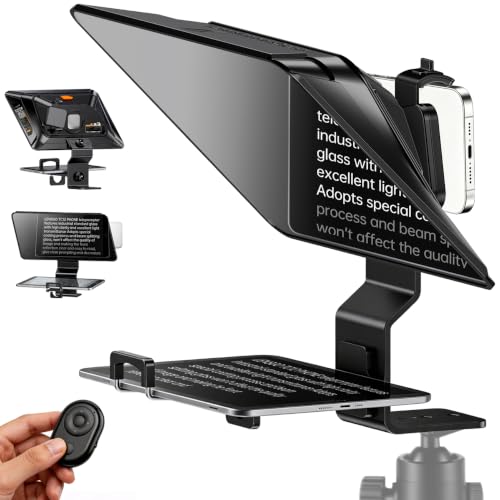
- 14.5-inch HD beam-splitter glass
- Walk-and-talk friendly design
- Bluetooth remote plus TCQI app
Best For: On-the-go creators filming livestreams, vlogs, and video calls
Pro Studio Upgrade
13" Teleprompter for Camera & Tablet

- Works with cameras and tablets
- Adjustable height and viewing angle
- Remote control with app support
Best For: Studio setups, online teaching, and professional livestreaming
Built-In Screen Pick – Elgato Prompter with Built-In Display
If you want teleprompters for livestreaming that keep setup simple, the Elgato Prompter stands out because it uses a built-in display instead of requiring a separate tablet or phone. That makes it a clean option for creators who want to read scripts or Twitch chat while keeping eye contact with viewers on camera. It also works across streaming and video-conferencing use cases, with desktop-based control and Stream Deck support.
Best For: Streamers and presenters who want an all-in-one teleprompter with a built-in screen and minimal setup.
Pros:
- Built-in 9-inch display means no extra tablet or smartphone is required
- Can show scripts, Twitch chat, or app windows while you look into the camera
- Supports many camera types and wide lenses, with Camera Hub customization
- Easy desktop setup and Stream Deck compatibility for streaming workflows
Cons:
- Mac and Android use requires DisplayLink software downloads
- Higher-end design may be more than basic script-only users need
The Elgato Prompter is best when you want a polished, desktop-controlled teleprompter that fits directly into a live content setup. Its biggest advantage is convenience: fewer devices to juggle and a more professional on-camera look.
Tablet-Friendly Value Pick – NEEWER X12 14-Inch Teleprompter
The NEEWER X12 is a practical choice for teleprompters for livestreaming if you already plan to use an iPad or smartphone as the script display. Its beam splitter glass is designed for clear reading up to 10 feet away, and the included remote plus app control make it easy to pause, speed up, or flip pages while you stay on camera. The aluminum alloy build and carrying case also make it a solid portable option.
Best For: Creators who want a tablet-based teleprompter with remote control and portable setup.
Pros:
- Supports tablets and phones up to 9.84″ x 8.68″ for flexible script loading
- Included RT-110 remote and app allow page turns and speed control
- Aluminum alloy construction is lightweight and durable
- Collapsible design and carrying case make transport easier
Cons:
- Not compatible with wide-angle lenses
- Camera lens focal length needs to be more than 28mm
- Does not support iPad Pro 12-inch models
This model fits well if you want dependable teleprompting without moving to a built-in screen system. Just be sure your camera lens and tablet size match the compatibility limits before buying.
Ultra-Compact Choice – Little Prompter Compact Teleprompter
The Little Prompter is aimed at creators who need a very compact teleprompter for livestreaming or recorded presentations. At just 6 inches cubed and under a pound, it is easy to move between setups, and it works with DSLRs, webcams, and built-in laptop cameras. Since it relies on a smart device and teleprompter app for the script, it keeps the hardware minimal while still supporting a face-to-camera delivery style.
Best For: Users who want the smallest, lightest teleprompter setup for simple video work.
Pros:
- Very compact 6″ x 6″ x 6″ footprint
- Weighs less than a pound for easy portability
- Works with DSLR, webcam, and built-in laptop cameras
- Includes 70/30 BeamSplitter glass for script reflection
Cons:
- Requires a separate smart device and teleprompter app
- No built-in screen or advanced control features listed
If space and portability matter more than extras, this is an easy teleprompter to live with. It is especially appealing for solo presenters who want a simple camera-facing script aid without a large rig.
Budget Basics Pick – NEEWER BASICS X12B 12-Inch Teleprompter
The NEEWER BASICS X12B is a straightforward option for teleprompters for livestreaming when you want the essentials without extra complexity. It uses a 12-inch HD display area with beam splitter glass, supports app and remote control, and folds flat for storage and travel. NEEWER also notes that it is a practical, no-assembly design for presentations, online courses, and tutorial recording.
Best For: Budget-minded creators who want an easy-to-use tablet teleprompter with remote control.
Pros:
- No-assembly design makes setup quick and simple
- 12-inch reflective display with 75% light transmittance
- App and remote control support play/pause, speed, pages, and font size
- Folds flat and includes a carry case for portability
Cons:
- Not for phone shooting
- Does not function as a monitor or allow direct self-viewing during recording
- Requires a compatible tablet and camera setup
This is a sensible pick if you want a clean teleprompter setup without paying for premium extras. Its strength is simplicity: easy storage, easy control, and enough flexibility for common streaming and recording tasks.
Studio-Ready Dual-Use Prompter – NEEWER X11 11" 2-in-1 Monitor Prompter
If you need teleprompters for livestreaming that can handle both camera work and screen mirroring, the NEEWER X11 stands out with its built-in 9-inch LCD monitor and 11-inch beam splitter glass. It is designed for live streaming, video conferencing, webcam use, and camera setups, while keeping scripts readable without needing a separate tablet or phone on the rig.
Best For: Creators who want an all-in-one teleprompter with built-in monitor support for fast live-stream setup.
Pros:
- Built-in 9-inch LCD monitor supports screen mirroring, so you do not need a separate tablet or phone for prompts.
- 11-inch multi-coated beam splitter glass is designed to reduce ghosting and keep text readable up to 2.5 m.
- Supports Windows and macOS as an external display, plus USB-C computer connection for simpler setup.
- Adjustable Arca-type holder and quick-release plate add flexibility for camera positioning.
Cons:
- Voice sync is not supported.
- Some connection methods require a driver or specific USB-C/USB 3 Type A setup.
- Bluetooth or app-based workflow is not the main focus here compared with standalone app teleprompters.
The X11 makes sense if you value built-in display convenience and a more self-contained streaming rig. It is a practical pick when you want to keep your prompting workflow simple and avoid juggling extra devices.
Versatile App-Controlled Prompter – Desview T5 Smartphone & Tablet Teleprompter
The Desview T5 is a flexible option among teleprompters for livestreaming if you switch between smartphone, tablet, and DSLR setups. Its coated glass, included adapter rings, and free app make it a practical all-in-one tool for live streaming, vlogging, and video creation.
Best For: Shooters who want app control, broad device compatibility, and a teleprompter that adapts to different recording styles.
Pros:
- Compatible with smartphones, tablets under 11 inches, and DSLR cameras.
- Includes 49-82 mm adapter rings plus a Bluetooth remote for hands-free control.
- Free iOS/Android app supports txt and docx files, font adjustments, mirror/rotate options, and countdown timer.
- Flexible horizontal and vertical shooting modes help with different content formats.
Cons:
- Tablet support is limited to devices under 11 inches.
- The many controls and app features may be more than some users need for very simple setups.
- Best results depend on matching the included rings and holders to your device.
The T5 is a strong choice if you want one teleprompter that can follow you from mobile shoots to DSLR recording. Its app and remote support make it especially useful when hands-free operation matters.
Compact Desktop Streaming Prompter – AMBITFUL 7.5" Mini Teleprompter
If you want a smaller option in teleprompters for livestreaming, the AMBITFUL Mini Teleprompter is built for tabletop use with a desktop tripod and support for smartphones and DSLR cameras. Its compact 7.5-inch design makes it a straightforward pick for live streaming, interviews, online conferences, and short videos.
Best For: Creators who want a compact, portable teleprompter for desktop streaming and quick shoots.
Pros:
- Compact 7.5-inch size is easier to manage on a desk or small production setup.
- Includes a tabletop tripod, phone holder, phone expansion plate, and eight lens adapter rings.
- Supports smartphones and DSLR cameras, with a built-in 1/4 screw hole for added mounting options.
- Integrated cold shoe lets you attach accessories like microphones or lights.
Cons:
- Phone clip width range is limited to 2.2 to 3.2 inches.
- Designed around wide-angle lenses with a focal length of 35 mm or more.
- Smaller size means less screen area than larger teleprompter models.
This model is a smart fit for users who prioritize portability and a simple tabletop workflow. It covers the basics well for streaming and recording without taking up much space.
Compact Creator Pick – 9.3" Teleprompter for Phone
If you want teleprompters for livestreaming that are easy to move and quick to set up, this 9.3-inch model keeps things simple. It uses 70/30 beam-splitter glass for readable prompts, works with smartphones and cameras, and is sized for solo creators who need a fast, flexible workflow.
Best For: Solo creators, livestreamers, and presenters who want a lightweight teleprompter for phone or camera setups.
Pros:
- 70/30 beam-splitter glass helps keep text clear while preserving camera visibility
- Works with smartphones, DSLR cameras, and mirrorless cameras
- Quick-release design can be ready in about 2 minutes
- Includes Stream Prompt app support and a Bluetooth remote
Cons:
- Smaller 9.3-inch size may feel limited for larger scripts
- Best suited to simpler, compact recording setups
This is a practical pick if portability and fast setup matter more than screen size. The app and remote make it easier to manage scripts without breaking eye contact, which is especially useful for livestreaming and solo recording.
Mobile Walk-and-Talk Choice – LENSGO TC12P 14.5-Inch Teleprompter
For teleprompters for livestreaming on the move, the LENSGO TC12P is built around mobile shooting and quick assembly. Its 14.5-inch HD beam-splitter glass gives you a larger prompt area, while the adjustable phone/tablet holder and vertical-or-horizontal shooting support make it useful for walk-and-talk videos, Zoom calls, and short-form content.
Best For: Creators who film on the go and want a larger teleprompter screen for phone, tablet, or live video work.
Pros:
- Designed for walk-and-talk recording with quick assembly and disassembly
- 14.5-inch HD glass offers a larger readable prompt area
- Supports iPhone, Android, iPad, and tablets up to 7.3 inches in landscape
- Includes Bluetooth remote and free TCQI app support
Cons:
- Larger size may be less convenient than ultra-compact models
- Tablet fit is limited to devices up to 7.3 inches measured horizontally
The TC12P stands out if you want more screen space without giving up mobile flexibility. Its anti-glare coating, light-seal foam, and remote/app control make it a solid option for creators who need natural delivery while filming away from a fixed studio.
Pro Studio Upgrade – 13" Teleprompter for Camera & Tablet
If you need teleprompters for livestreaming in a more polished camera setup, this 13-inch model is built for cameras plus tablet-based scripting. It uses HD beam-splitter glass, offers adjustable height and a 50° to 90° viewing angle, and is aimed at video recording, live streaming, online teaching, interviews, and presentations.
Best For: Studio-style livestreamers, teachers, and presenters who want a camera teleprompter with tablet support.
Pros:
- Compatible with DSLR cameras, mirrorless cameras, and camcorders
- Supports tablets as script display devices
- Adjustable height and 50° to 90° viewing angle help match different setups
- Includes wireless remote control and app support for iOS and Android tablets
Cons:
- At 7.43 pounds, it is heavier than compact phone-focused options
- More suited to planned setups than quick grab-and-go use
This model makes sense when stability, flexibility, and a more professional framing setup matter. The aluminum alloy frame and larger format are good signs for users who expect to keep a teleprompter in a studio, classroom, or office environment.
How We Picked These Teleprompters for Livestreaming
We prioritized readability, setup speed, compatibility, and how well each unit fits common live-production use cases. For livestreaming, the most useful teleprompters are the ones that let you stay close to the lens, support your preferred device, and remain stable during long sessions.
We also looked for practical features such as app control, remote support, wide device compatibility, and beam-splitter glass quality. Since livestreams often involve limited space and fast changes, portability and ease of mounting matter too.
Quick Comparison
If you want the shortest path to the right choice, think in terms of workflow. Built-in screen teleprompters are ideal for a dedicated desk or studio. Tablet-based models usually offer the best balance of flexibility and value. Smaller teleprompters suit mobile creators, while larger models are better for full-size cameras and wider reading comfort.
Key Buying Factors for Teleprompters for Livestreaming
Device Compatibility
Check whether the teleprompter supports your setup: smartphone, tablet, DSLR, mirrorless camera, webcam, or a built-in display. Some Teleprompters for Livestreaming are optimized for one device type, while others support multiple formats with adapter rings or adjustable trays.
Screen Size and Readability
Larger mirrors and display areas can make text easier to read at a natural pace, especially for longer scripts. Smaller units are easier to transport, but may require tighter script formatting and closer positioning.
Glass Quality and Brightness
Beam-splitter glass affects how clearly you can see the script while keeping the camera view unobstructed. Look for glass that balances reflection and transparency well, particularly if you livestream in bright rooms or use strong key lighting.
Control Options
App-based scrolling, Bluetooth remotes, and mirror modes can make live prompting far more manageable. For livestreaming, responsive controls are important because you may need to adjust speed quickly without interrupting the broadcast.
Mounting and Stability
A secure frame, dependable tripod support, and solid camera mounting reduce shake and keep framing consistent. This is especially important if you move between desk, tripod, and run-and-gun setups.
Who Should Buy Which Teleprompters for Livestreaming?
If you want a polished, all-in-one desk setup, choose a teleprompter with a built-in screen or a larger tablet-friendly model. If you stream from multiple locations or travel often, a compact teleprompter is easier to pack and reset quickly. Creators using DSLRs or mirrorless cameras should lean toward models with strong camera support and wider beam-splitter glass. For beginners, the best choice is usually the simplest model that fits your device and gives you reliable remote control.
Ultimately, the right teleprompter depends on your content style, camera distance, and how often you need to set up and tear down. Match the teleprompter to your workflow, not the other way around.