If you record videos, teach on camera, or deliver scripted presentations from a laptop, the right teleprompter can make your delivery sound polished and natural.
This roundup of the best teleprompters for laptops in 2026 focuses on ease of setup, visibility, compatibility, and real-world value for creators and professionals.
Best 10 Teleprompters for Laptops Picks for 2026
Proaim Professional Speech Teleprompter
Proaim teleprompter for laptops and monitors up to 17"

- Supports devices up to 17 inches
- 60/40 beam splitter glass
- Telescopic conference stand included
Best For: Professional presentations, broadcasts, and studio work
Compact Personal Teleprompter
Little Prompter for built-in laptop cameras

- 6" x 6" x 6" folded size
- Weighs less than a pound
- Works with laptops, webcams, and DSLRs
Best For: Portable laptop video, teaching, and solo creators
Portable Teleprompter Kit
Glide Gear TMP 750 for travel-friendly laptop use
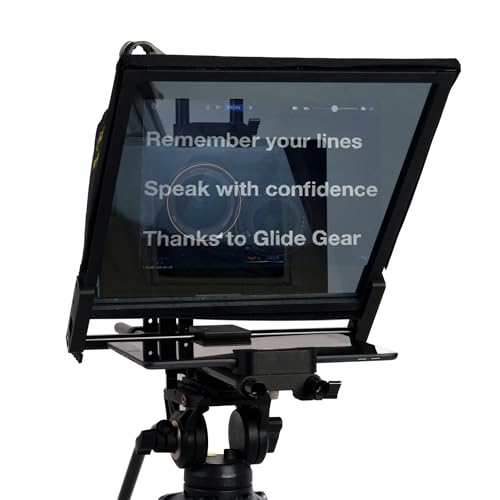
- Supports some foldable laptops
- 17-inch glass and 70/30 split
- Includes hard case and hood
Best For: Traveling creators and field video production
Built-In Screen Prompter
Elgato Prompter with built-in screen for laptops

- No tablet or phone needed
- Drag-and-drop display for scripts and chat
- Works with PC or Mac desktop setups
Best For: Streaming, video calls, and desktop teleprompting
Studio-Ready Metal Pick
Desview T12S 12.9" Metal Teleprompter
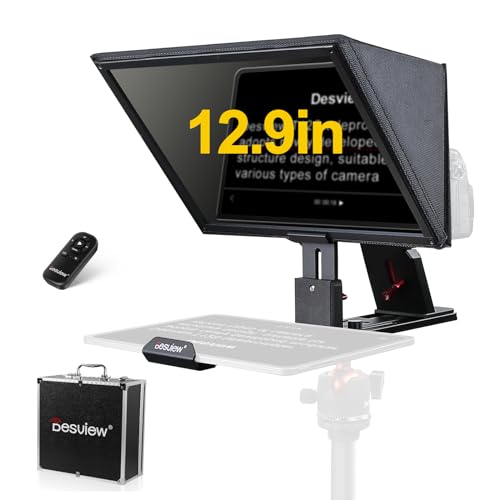
- Supports cameras plus tablets up to 12.9 inches.
- Bluetooth remote and app simplify script control.
- Metal build and carry case help with transport.
Best For: creators who want a durable, travel-ready teleprompter for camera and tablet workflows
Flexible Small-Rig Choice
Desview T5 Teleprompter for Smartphone & Tablet

- Works with smartphones, tablets under 11 inches, and DSLR cameras.
- Bluetooth remote and app support hands-free script control.
- Coated glass and light seals help reduce glare.
Best For: streamers and creators who need a compact, flexible teleprompter for mobile and camera use
Built-In Screen Option
NEEWER X11 2 in 1 Teleprompter 11"

- Built-in LCD monitor supports mirrored prompts without a tablet.
- Works with Windows and macOS as a second display.
- Multi-coated glass helps reduce ghosting.
Best For: users who want an integrated teleprompter with a built-in monitor for laptop and streaming setups
Quick-Deploy Pick
GVM 12" installation-free collapsible teleprompter
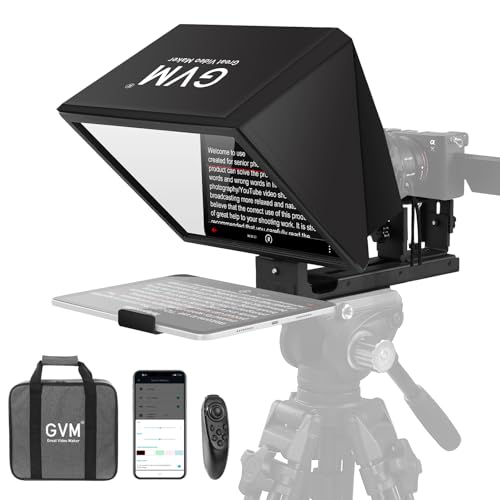
- No-assembly collapsible design
- 12-inch optical glass with anti-reflective coating
- Remote and app control for scrolling
Best For: Creators who need a portable, easy-to-set-up prompting kit
Large-Screen Studio Choice
Desview P15 15-inch professional teleprompter

- 15-inch display for comfortable reading
- Bluetooth remote and app-based script control
- Supports TXT/DOCX import with alignment tools
Best For: Creators who want a bigger, studio-ready prompting setup
Travel-Friendly Option
Desview P13 portable 12.9-inch teleprompter

- Supports tablets up to 12.9 inches
- 1.7 kg foldable body with storage bag
- Bluetooth remote plus app script import
Best For: Solo creators and mobile shoots that need easy transport
Proaim Professional Speech Teleprompter – Proaim teleprompter for laptops and monitors up to 17"
If you’re comparing teleprompters for laptops for presentations, broadcasts, or studio work, this Proaim model is built for larger setups and more polished delivery. It supports devices up to 17 inches and uses 60/40 beam splitter glass to keep script text clear while preserving natural eye contact.
Best For: Presenters, production teams, and venues that need a full-size teleprompter for laptops or monitors.
Pros:
- Supports tablets, laptops, and monitors up to 17 inches
- 60/40 beam splitter glass helps maintain eye contact
- Telescopic conference stand included for height adjustment
- Suited to conferences, studios, training, and live streaming
Cons:
- Large and heavy compared with compact personal models
- Better suited to professional or semi-permanent setups
This is the right pick if you want a more traditional pro teleprompter setup with flexibility for laptop-sized displays and a stand included. It makes the most sense when presentation quality matters more than portability.
Compact Personal Teleprompter – Little Prompter for built-in laptop cameras
For buyers looking at teleprompters for laptops, the Little Prompter focuses on portability and quick setup. It’s a compact, under-a-pound solution designed to work with DSLR cameras, webcams, and built-in laptop cameras, making it practical for solo creators and everyday video communication.
Best For: Instructors, business users, journalists, and smaller organizations that want a tiny teleprompter for laptop-based video.
Pros:
- Very compact 6″ x 6″ x 6″ folded size
- Weighs less than a pound for easy transport
- Works with DSLR, webcam, and built-in laptop cameras
- Uses 70/30 BeamSplitter glass and a teleprompter app
Cons:
- Requires a smart device and teleprompter app
- Smaller design is less suited to larger production rigs
This is a strong choice if portability is your top priority and you want a simple way to improve delivery on camera. It is especially appealing for laptop users who need a lightweight tool instead of a studio-sized setup.
Portable Teleprompter Kit – Glide Gear TMP 750 for travel-friendly laptop use
If you want teleprompters for laptops that are built for travel and fast setup, the Glide Gear TMP 750 is a flexible option. It supports tablets and some foldable laptops, includes 17-inch glass, and comes with a hard case, making it a practical fit for mobile creators who still want a professional workflow.
Best For: On-the-go video creators who want a durable teleprompter for laptops, tablets, or smartphone-based setups.
Pros:
- Supports tablets and some foldable laptops
- Includes 11″ x 12″ 70/30 beam-splitting glass
- Collapsible design with protective hood and hard case
- 15mm rail compatible for camera rig integration
Cons:
- Requires a teleprompter app with mirror text support
- Some laptops may not be compatible, since support is limited to certain foldable models
This model stands out for portability and protection rather than minimal footprint. It is a good fit when you need a teleprompter you can pack, move, and reuse across different filming locations.
Built-In Screen Prompter – Elgato Prompter with built-in screen for laptops
For people shopping teleprompters for laptops, the Elgato Prompter takes a different approach by using a built-in display instead of requiring a separate tablet or phone. You can drag and drop any window or app onto the screen, which makes it useful for scripts, chat, and video calls on a laptop or desktop setup.
Best For: Streamers, remote workers, and creators who want a built-in-screen teleprompter for laptop-based use.
Pros:
- Built-in display removes the need for a separate mobile device
- Works for scripts, Twitch chat, Zoom, and Teams calls
- Supports a wide range of cameras and lenses
- Desktop-controlled setup with PC or Mac
Cons:
- Mac and Android users need DisplayLink software
- More of a dedicated desktop accessory than a travel teleprompter
This is the most modern option in the group and is especially appealing if you want a cleaner desktop workflow. It is less about portability and more about convenience, customization, and integrated use with a laptop or computer.
Studio-Ready Metal Pick – Desview T12S 12.9" Metal Teleprompter
If you’re comparing teleprompters for laptops and also want a setup that works with cameras and tablets, the Desview T12S is built for flexible studio use. It supports DSLR, mirrorless cameras, and camcorders while also accommodating iPads and tablets up to 12.9 inches, so it fits well into content workflows where you may switch devices between takes.
Best For: Creators who want a durable teleprompter for camera-based recording, tablet prompting, and travel-ready production.
Pros:
- Supports DSLR, mirrorless cameras, camcorders, and tablets up to 12.9 inches.
- Bluetooth remote and free app let you edit scripts and adjust scrolling speed.
- Beam splitter glass is designed for zero ghosting with anti-reflective coating.
- Metal body and included aluminum carry case suit mobile shoots and studio use.
Cons:
- Screen support is aimed at tablets, not a dedicated laptop display setup.
- At 3 kg, it is less compact than lightweight travel options.
Overall, the T12S is a strong pick if you want a sturdier teleprompter with polished optics and broad device compatibility. It leans toward professional production rather than the simplest laptop-only workflow.
Flexible Small-Rig Choice – Desview T5 Teleprompter for Smartphone & Tablet
For buyers shopping teleprompters for laptops in a broader content setup, the Desview T5 is a compact all-in-one option that focuses on phones, tablets, and DSLR cameras. Its app-based controls, Bluetooth remote, and adjustable shooting modes make it practical for creators who want quick setup and hands-free script control.
Best For: Streamers and creators who need a compact teleprompter for mobile, tablet, or DSLR use with easy script control.
Pros:
- Works with smartphones, tablets under 11 inches, and DSLR cameras.
- Includes Bluetooth remote plus a free app for script editing and speed control.
- Horizontal and vertical shooting modes add flexibility for mobile workflows.
- Coated glass, foam seals, and quick-open panel help improve clarity and setup speed.
Cons:
- Tablet support is limited to devices under 11 inches.
- It does not include a built-in monitor for laptop-style prompting.
The T5 is a practical pick if you value portability and fast setup over advanced monitor-based prompting. It is especially appealing for creators who want one teleprompter that can handle multiple small-device recording scenarios.
Built-In Screen Option – NEEWER X11 2 in 1 Teleprompter 11"
If you’re looking at teleprompters for laptops and want a more self-contained setup, the NEEWER X11 stands out because it includes a built-in LCD monitor. That makes it useful for streaming, video conferencing, and computer-based prompting when you want to mirror content without relying on a separate tablet or phone.
Best For: Users who want an integrated teleprompter with a built-in monitor for computer, webcam, and live-stream workflows.
Pros:
- Built-in 9-inch LCD monitor supports screen mirroring and plug-and-play use.
- Compatible with Windows and macOS as a second computer or laptop display.
- 11-inch beam splitter glass is multi-coated to reduce ghosting.
- Adjustable holder and included cable set support a flexible setup.
Cons:
- Voice sync is not supported.
- First HDMI setup may require a driver, and some connections need specific ports.
The X11 is a smart choice if you want one product that handles prompting and display duties in a single unit. It is less about ultra-simple portability and more about a streamlined desktop-style workflow.
Quick-Deploy Pick – GVM 12" installation-free collapsible teleprompter
If you’re comparing teleprompters for laptops and want a setup that is fast to deploy, this GVM model is built around convenience. Its installation-free, collapsible design makes it easy to mount on a tripod, while the 12-inch optical glass is aimed at clear script visibility for recording, live streaming, and presentations.
Best For: Creators who want a portable, no-assembly teleprompter for quick video sessions.
Pros:
- Installation-free, all-in-one collapsible design simplifies setup and teardown.
- 12-inch optical glass with anti-reflective coating supports clear reading and HD recording.
- Works with smartphones, tablets up to 8.6 inches, and DSLR/mirrorless cameras.
- Includes wireless remote control and app-based scrolling adjustments.
Cons:
- Tablet support tops out at 8.6 inches, so larger iPads won’t fit.
- More compact than some pro studio units, so it may feel limited for larger rigs.
This is a strong pick if portability and speed matter more than a bigger prompting surface. The included carry bag and fold-down design make it easy to travel with, but device-size limits are worth checking before you buy.
Large-Screen Studio Choice – Desview P15 15-inch professional teleprompter
For buyers comparing teleprompters for laptops alongside larger production setups, the Desview P15 offers a bigger 15-inch prompting surface and script controls that suit more polished recording workflows. It supports adjustable playback speed, font size, text color, and file import through the Desview app, making it practical for creators who want hands-free script delivery.
Best For: YouTubers, live streamers, and video creators who want a larger professional prompting setup.
Pros:
- 15-inch pro teleprompter provides a larger reading area.
- Bluetooth remote supports play/pause, speed changes, and page navigation.
- App supports TXT and DOCX import plus text alignment options.
- Foldable sunshade and storage bag improve portability and glare control.
Cons:
- Designed for 10-12 inch tablets, so it is not meant for very large tablet displays.
- At 7.8 lbs, it is less compact than smaller travel-first options.
- Non-waterproof construction means it needs normal care in use and storage.
The P15 stands out when a larger teleprompter matters more than absolute portability. Its combination of app features, remote control, and studio-friendly design makes it a solid fit for frequent recording.
Travel-Friendly Option – Desview P13 portable 12.9-inch teleprompter
If you’re shopping teleprompters for laptops and need something compact enough to move between shoots, the Desview P13 is built for portability without giving up pro features. It supports tablets up to 12.9 inches, includes a foldable light shield, and uses beam splitter glass designed for clear script viewing in bright environments.
Best For: Solo creators and field videographers who want a lightweight, travel-friendly prompting setup.
Pros:
- Supports large tablets up to 12.9 inches, including iPad Pro.
- Lightweight 1.7 kg foldable design with padded storage bag.
- Foldable side light shield helps reduce ambient glare.
- Bluetooth remote and free app support TXT/DOCX import and mirror/flip display.
Cons:
- It is built around tablet and camera use, not a standalone laptop display solution.
- Best tablet fit is a 12.9-inch device, so larger screens won’t work.
- Smaller than a full studio teleprompter, so it may feel less expansive for some users.
The P13 is a practical middle ground for creators who value mobility and solid prompting control. Its foldable body and included bag make it easier to carry than bulkier studio models.
How We Picked the Best Teleprompters for Laptops
We prioritized Teleprompters for Laptops that balance readability, build quality, setup speed, and compatibility with common recording workflows. Strong picks needed practical mounting options, usable glass quality, and enough flexibility to work with laptops or laptop-connected playback setups.
We also looked for models that suit different use cases, from lightweight portable units to larger pro teleprompter rigs, so you can match the hardware to your space and production style.
Quick Comparison
The main differences usually come down to screen size, portability, and how the text is displayed. Compact teleprompters are easier to move and store, while larger models offer a bigger reflection area and better visibility at longer distances. Built-in screen designs can simplify the workflow, but they may be less flexible than mirror-based systems that rely on a connected laptop, tablet, or phone.
Key Buying Factors for Teleprompters for Laptops
Display Size and Viewing Distance
Choose a teleprompter size that matches your camera position and reading distance. Smaller setups work well for desk recording and webcam use, while larger glass panels are better for standing presentations or wider studio framing.
Compatibility and Input Method
Some teleprompters are best with a laptop running teleprompter software, while others are designed around tablets, phones, or built-in screens. If you want the most direct laptop workflow, check whether the system supports screen mirroring, mirrored text output, or a mounting arrangement that leaves your laptop easy to control.
Setup Speed and Portability
If you move between rooms or record on location, folding designs, carry cases, and tool-free assembly matter more than premium features. A faster setup usually means you’ll use the teleprompter more often.
Glass Quality and Text Legibility
Beam splitter glass should reflect text clearly without making the camera image look muddy. Good coatings help preserve brightness and contrast, which is especially important in bright rooms or when using a smaller laptop display.
Who Should Buy Which Teleprompters for Laptops?
Creators who want maximum flexibility should look for a teleprompter that works smoothly with laptops, tablets, and phones. Educators, business presenters, and solo video creators often benefit from compact models that are easy to set up at a desk. If you shoot longer-form content or want a more studio-ready feel, a larger pro unit is usually worth the extra size and cost.
In short, the best Teleprompters for Laptops are the ones that fit your recording space, your text workflow, and how often you need to travel with the gear.