The best MIDI controllers make music production faster by putting keys, pads, knobs, faders, and transport controls within easy reach. The right choice depends on your software, workspace, playing style, and need for portability.
This roundup compares 10 standout options, including compact keyboards, expressive pad controllers, and dedicated control surfaces for hands-on workflow improvements.
Best 10 Midi Controllers Picks for 2026
Versatile Beat-Making Pick

- 25 velocity-sensitive mini keys and eight MPC pads
- Color display, assignable knobs, and DAW controls
- Arpeggiator, chord, and scale modes included
Best For: Beat makers and mobile producers wanting extensive control in a compact keyboard
Workflow-Friendly Keyboard

- 25 velocity-sensitive slim keys with synth action
- RGB pads, encoders, faders, and display
- Includes a useful starter software suite
Best For: Beginners and home producers wanting keys plus hands-on mixing controls
Hybrid Setup Control Surface

- 16 endless encoders, eight buttons, and OLED feedback
- Five-pin MIDI I/O supports external hardware
- Seven Custom Modes and broad DAW integration
Best For: Hybrid producers and performers who need dedicated parameter control
Ultra-Portable Starter Keyboard

- Responsive 25-key slim keybed
- USB-C, USB-powered, and lightweight
- Includes 500 presets and Ableton Live Lite
Best For: Mobile music makers and beginners wanting a simple compact keyboard
Best Hybrid MIDI Controller
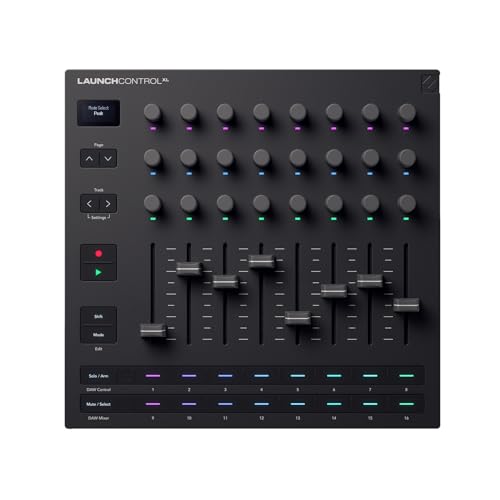
- Eight faders, 24 encoders, and 16 assignable buttons
- 5-pin MIDI I/O supports external hardware control
- OLED feedback and 15 Custom Modes for flexible workflows
Best For: Hybrid studios and hands-on DAW parameter control
Best Keyboard MIDI Controller

- 49 full-size velocity-sensitive keys
- Pitch/modulation wheels and transport controls
- Includes DAW, instrument, and lesson software
Best For: Composing and expressive keyboard performance
Best Ableton MIDI Controller

- 5x8 RGB clip-launch grid for Ableton Live
- Nine faders, eight knobs, and device controls
- Assignable crossfader for live mixing
Best For: Ableton Live performance and clip-based production
Best for Ableton Clip Launching
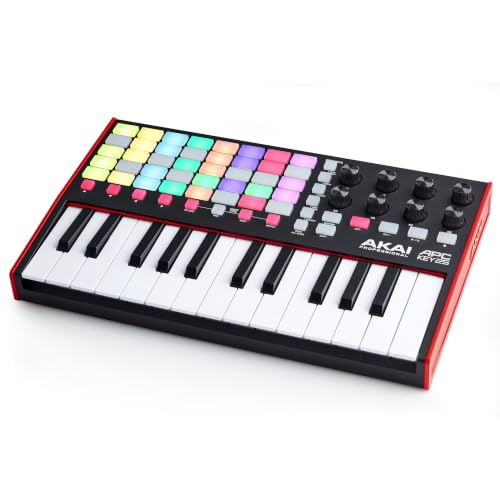
- 40 RGB pads for clip and scene launching
- 25 velocity-sensitive mini keys
- Eight assignable knobs with Ableton integration
Best For: Ableton Live performers and producers needing keys plus clip control
Best Compact Mixer Controller

- Eight channel faders plus a master fader
- 24 assignable knobs for detailed control
- 16 buttons for mute, solo, and record arm
Best For: Home-studio mixing and portable DAW control
Best Portable Keyboard

- 25 velocity-sensitive mini keys
- Built-in arpeggiator and octave controls
- Eight programmable preset slots
Best For: Portable songwriting, beat-making, and general DAW control
Versatile Beat-Making Pick – Akai MPK Mini IV
The Akai MPK Mini IV is one of the most feature-packed compact midi controllers for producers who want keys, pads, hands-on controls, and performance tools in a portable format. Its 25 velocity-sensitive mini keys, MPC pads, display, USB-C connection, and full-size MIDI Out suit both studio production and mobile setups.
Best For: Beat makers, traveling producers, beginners, and creators who want an all-in-one compact controller.
Pros:
- Combines 25 velocity-sensitive keys with eight pressure-sensitive MPC pads.
- Includes eight assignable 360-degree knobs, a color screen, and a push/turn encoder.
- Offers arpeggiator, chord, and scale modes plus pre-mapped DAW integration.
- Includes a substantial software bundle, Melodics trial, and Splice access.
Cons:
- Mini keys may be less suitable for players who prefer a full-size keybed.
- The large feature set may take time for beginners to learn.
The MPK Mini IV is a strong choice when versatility matters more than minimalism. It provides enough control for beat production, melodic parts, and live jamming while remaining lightweight and easy to connect to Mac, PC, or mobile setups.
Workflow-Friendly Keyboard – Arturia MiniLab 3
The Arturia MiniLab 3 is a practical choice among midi controllers for users who want a compact keyboard with pads, faders, encoders, and software included. Its 25 velocity-sensitive slim keys and streamlined controls are designed for hands-on instrument, track, and drum management.
Best For: Home producers and beginners seeking an approachable keyboard controller with a broad control layout.
Pros:
- Provides 25 velocity-sensitive keys with synth action.
- Includes two banks of eight RGB-backlit velocity- and pressure-sensitive pads.
- Offers eight rotary encoders, four faders, a display, and a clickable browsing knob.
- Includes Ableton Live Lite, Analog Lab Intro, and UVI Model D.
Cons:
- Its compact keys are not a substitute for a full-size piano-style keybed.
- The supplied details list USB connectivity but do not indicate USB-C.
MiniLab 3 balances playing and mixing controls without becoming bulky. It is especially appealing if you want a compact, white controller that can handle keys, drums, software browsing, and basic track control from one surface.
Hybrid Setup Control Surface – Novation Launch Control 3
The Novation Launch Control 3 takes a different approach to midi controllers, focusing on parameter control rather than piano keys. Its encoders, assignable buttons, OLED display, Custom Modes, and five-pin MIDI connections make it suited to DAW workflows, hardware synths, effects, and hybrid rigs.
Best For: Producers and performers controlling DAWs, synthesizers, grooveboxes, and hybrid hardware/software setups.
Pros:
- Provides 16 endless encoders, eight customizable buttons, and an OLED display.
- Supports deep integration with Ableton Live, Logic Pro, FL Studio, Cubase, Bitwig, and more.
- Includes MIDI In, MIDI Out, and Out2/Thru for external hardware control.
- Stores up to seven Custom Modes for different workflows.
Cons:
- It has no keyboard, so it is not designed for melodic note entry by itself.
- Its control-focused layout may be less suitable for users seeking drum pads or piano keys.
Launch Control 3 is a focused option for shaping mixes, plugins, and hardware parameters with immediate feedback. Choose it when dedicated controls and flexible MIDI routing are more important than an integrated keyboard.
Ultra-Portable Starter Keyboard – Arturia MicroLab Mk3
The Arturia MicroLab Mk3 is a lightweight option for musicians who want simple, portable midi controllers for quick music-making. Its upgraded 25-key slim keybed, two touch strips, USB-C connection, and included software keep the setup compact while still providing a responsive playing experience.
Best For: Mobile producers, compact studio owners, and beginners who prioritize simplicity and portability.
Pros:
- Uses an upgraded slim keybed designed for responsive playing.
- Compact, lightweight, USB-powered design works well for mobile setups.
- Includes two touch strips for expressive control.
- Comes with 500 Analog Lab Intro presets and Ableton Live Lite.
Cons:
- Its simpler control layout offers fewer knobs, pads, and faders than larger controllers.
- The 25-key slim format may not suit players needing a full-size keyboard.
MicroLab Mk3 is a sensible pick when low-friction setup and portability come first. It gives beginners and traveling musicians a straightforward way to play software instruments without taking up much desk or bag space.
Best Hybrid MIDI Controller – Novation Launch Control XL 3
The Novation Launch Control XL 3 is a strong choice among midi controllers for producers who want hands-on mixing and parameter control across software and hardware. Its combination of faders, encoders, assignable buttons, OLED feedback, and 5-pin MIDI connectivity suits flexible studio and hybrid workflows.
Best For: Hybrid setups, DAW mixing, and controlling external synths and effects.
Pros:
- Offers eight faders, 24 endless encoders, and 16 customizable buttons.
- Supports Ableton Live, Logic Pro, FL Studio, Cubase, HUI, and other major DAWs.
- Includes MIDI In, Out, and Out2/Thru ports for computer-free hardware control.
- Stores up to 15 Custom Modes and includes an OLED display for feedback.
Cons:
- Its extensive controls may be more than beginners need.
- Designed primarily for parameter control rather than keyboard performance.
Choose this model if you want one control surface for DAW parameters, external gear, and custom mappings. The included Live Lite, Cubase LE, and additional software add value for a new or expanding setup.
Best Keyboard MIDI Controller – M-AUDIO Keystation 49 MK3
The M-AUDIO Keystation 49 MK3 is a practical keyboard-focused option among midi controllers, offering 49 full-size velocity-sensitive keys in a compact design. It adds essential software controls, pitch and modulation wheels, and broad Mac, Windows, and iOS compatibility.
Best For: Players who want a straightforward 49-key controller for composing, recording, and expressive performance.
Pros:
- Provides 49 full-size velocity-sensitive keys for nuanced playing.
- Includes pitch and modulation wheels, octave buttons, transport controls, and a volume fader.
- Connects by plug-and-play USB without requiring drivers or a power supply.
- Includes MPC Beats, Ableton Live Lite, AIR instruments, and lesson access.
Cons:
- Offers fewer hands-on controls than pad- or mixer-oriented MIDI controllers.
- Its USB connection and compact feature set may not suit larger hardware rigs.
This is a sensible fit when the keyboard is the center of your workflow. The 49-key layout balances playing range and desk space, while the bundled software helps you start creating immediately.
Best Ableton MIDI Controller – Akai Professional APC40 MKII
The Akai Professional APC40 MKII is a performance-oriented choice among midi controllers, built for hands-on Ableton Live control. Its RGB clip-launch grid, mixer faders, knobs, device controls, and crossfader make it useful for launching clips, mixing, and live electronic performance.
Best For: Ableton Live users who want clip launching, mixer control, and performance-focused workflow management.
Pros:
- Provides a 5×8 RGB clip-launch matrix with visual clip-status feedback.
- Includes nine channel faders, eight control knobs, and eight device controls.
- Offers 1:1 integration with Ableton Live and an assignable A/B crossfader.
- USB-powered plug-and-play operation works with Mac and PC.
Cons:
- Its deepest integration is focused on Ableton Live.
- Does not provide a piano-style keyboard for melodic playing.
If Ableton Live is central to your production or performance setup, the APC40 MKII provides a clear, tactile layout for clips, effects, and mixer duties. It is less versatile for keyboard-led workflows but highly practical for live arrangement control.
Best for Ableton Clip Launching – Akai APC Key 25 MK2
The Akai Professional APC Key 25 MK2 is one of the more versatile MIDI controllers for Ableton Live users who want keys, clip launching, and hands-on parameter control in a compact footprint. Its 40-pad RGB matrix, velocity-sensitive mini keys, and Ableton mapping make it suited to both live performance and studio production.
Best For: Ableton Live producers and performers who need keyboard input, clip launching, and mixer or device control in one portable controller.
Pros:
- 40 RGB pads provide visual feedback for launching clips and scenes.
- Velocity-sensitive keys support chords, basslines, leads, and software instruments.
- Eight assignable rotary knobs offer control over volume, pan, effects, and Ableton macros.
- USB-powered plug-and-play operation works with Mac and PC.
Cons:
- The 25 mini keys cover only two octaves without using the octave buttons.
- Its deepest integration is focused on Ableton Live.
The APC Key 25 MK2 is a strong all-in-one choice when clip triggering matters as much as playing notes. Choose it over a simpler keyboard when you want a more performance-oriented Ableton workflow.
Best Compact Mixer Controller – Akai MIDImix
The Akai Professional MIDImix is a practical MIDI controller for producers who prefer physical faders, knobs, and channel buttons over a keyboard. Its compact mixer layout gives you direct control of DAW levels, effects, and track functions while remaining easy to carry between setups.
Best For: Home studios and music producers who want hands-on DAW mixing in a small, portable controller.
Pros:
- Eight individual line faders and one master fader provide direct level control.
- Twenty-four assignable knobs handle EQ, sends, instruments, and effects.
- Sixteen buttons support mute, solo, and record-arm functions across channels.
- Single-button mapping and included Ableton Live Lite simplify setup.
Cons:
- It does not include piano keys for playing melodies or basslines.
- The controller is designed primarily for mixing and DAW parameter control.
The MIDImix makes sense when your priority is tactile mixing rather than note entry. Its fader-and-knob layout offers a straightforward way to make software mixing feel more immediate.
Best Portable Keyboard – Akai LPK25 MK2
The Akai Professional LPK25 MK2 is a lightweight MIDI controller for musicians who want a small keyboard for songwriting, beat-making, or mobile production. Its 25 velocity-sensitive mini keys, octave controls, arpeggiator, and broad DAW compatibility provide useful creative features without taking much space.
Best For: Producers, songwriters, and performers who need an easy-to-carry keyboard controller for Mac or PC.
Pros:
- Velocity-sensitive mini keys provide more expressive performance than basic non-sensitive keys.
- Built-in arpeggiator, clock, sustain button, and octave controls expand performance options.
- Eight programmable preset slots allow quick recall of custom mappings.
- USB power and compatibility with major DAWs make setup simple.
Cons:
- The compact 25-key design uses mini keys rather than full-size keys.
- It focuses on keyboard control and does not provide a dedicated pad matrix or mixer faders.
The LPK25 MK2 is a sensible pick for portable music-making and straightforward note input. It offers more creative control than a bare keyboard while keeping the footprint and setup requirements minimal.
How We Picked the Best Midi Controllers
We focused on practical differences that matter during recording, beat-making, live performance, and software control. The selection covers several controller types and sizes, from compact 25-key keyboards to 49-key models, pad grids, mixer-style interfaces, and portable knob-based surfaces.
We also considered control layout, portability, connectivity, workflow flexibility, and how easily each model can complement a digital audio workstation (DAW). Because no single controller suits every musician, the goal is to match each product’s strengths with specific use cases rather than rank them by features alone.
Quick Comparison
| Controller type | Best suited for | Main advantage |
|---|---|---|
| 25-key keyboard | Mobile production and melodies | Compact size with playable keys |
| 49-key keyboard | Piano-style playing | More range and fewer octave shifts |
| Pad controller | Clip launching and beat production | Hands-on rhythmic control |
| Control surface | Mixing and parameter control | Knobs, faders, and immediate access |
Key Buying Factors for Midi Controllers
Keyboard Size and Playing Style
Choose 25 keys for portability and simple bass lines, chords, and lead parts. A 49-key controller is better if you play two-handed parts or want a wider range without constantly changing octaves. If you do not need keys, a pad or control surface can leave more room for launching clips, mixing, or manipulating effects.
Controls and Software Workflow
Look for the controls you use most. Pads suit finger drumming and clip launching, while knobs and faders are useful for mixing, synthesizer parameters, and effects. DAW integration can reduce setup time, but confirm compatibility with your preferred software before buying.
Size, Power, and Connections
Measure your desk or performance space, especially for models with numerous faders or pads. USB connectivity is standard for computer-based setups, while USB-C may offer a more current connection. Check whether the controller requires external power and whether its ports fit your existing cables.
Portability and Build
A lightweight mini controller is convenient for travel, but a larger unit may provide more comfortable controls and improved playing space. Consider how often you will move it and whether the controls need to withstand rehearsals, performances, or frequent daily use.
Who Should Buy Which Midi Controllers?
Choose a compact keyboard if you produce in small spaces, travel frequently, or mainly need keys for melodies, chords, and software instruments. Choose a 49-key model if natural playing range matters more than portability.
Choose a pad controller for beat-making, clip launching, and performance-oriented workflows. Choose a mixer-style or knob-and-fader surface if your priority is adjusting levels, effects, and software parameters without relying on a mouse.
Before buying, identify the tasks you perform most often, then select the controller that places those controls closest to your hands. That approach usually delivers a more useful upgrade than simply choosing the model with the highest control count.