The right dynamic microphone can make streams, podcasts, and gaming chats sound clearer while reducing room noise, keyboard clicks, and unwanted background distractions.
We compared 10 strong USB, XLR, and hybrid options across sound quality, connectivity, controls, setup, and value to help you choose a mic that fits your studio and streaming workflow.
Best 10 Dynamic Microphone for Streaming Picks for 2026
Best Hybrid Setup

- USB/XLR connectivity
- Tap-to-mute and headphone monitoring
- Cardioid pickup with optional RGB
Best For: Beginner streamers planning an eventual XLR upgrade
Best for Vocal Isolation
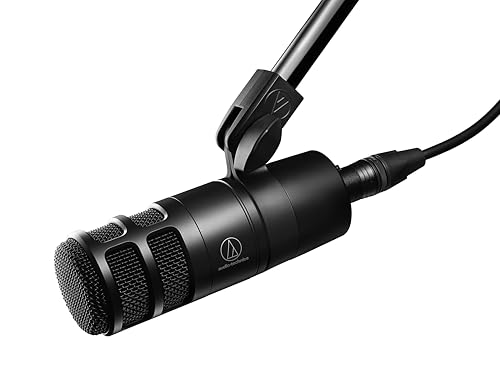
- Hypercardioid directional pattern
- Integrated shock mount
- Multistage pop filtering
Best For: Podcasters and streamers recording in less-controlled rooms
Best Professional Classic
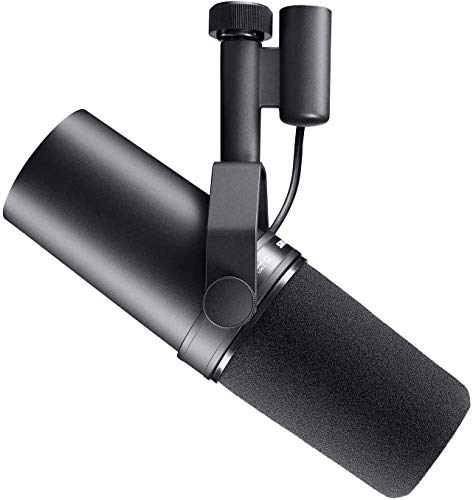
- Warm, balanced broadcast vocals
- Cardioid pickup with shock isolation
- Rugged, shielded XLR design
Best For: Experienced streamers building a professional audio chain
Best Broadcast Value

- Speech-focused dynamic capsule
- Internal pop filter and shock mount
- Durable all-metal XLR body
Best For: XLR-based streamers and podcasters
Best Wireless Flexibility
MAONO PD100W Wireless Dynamic Microphone

- 2.4G wireless and USB wired modes
- Three noise-reduction levels with cardioid pickup
- Touch mute, monitoring, controls, and RGB
Best For: Wireless gaming and streaming setups
Best XLR Upgrade
Elgato Wave DX Dynamic Microphone

- Speech-optimized capsule with warm, detailed sound
- Cardioid pattern and room-noise rejection
- Swivel mount with multiple thread adapters
Best For: XLR streaming and broadcast-style setups
Best Starter Value
Samson Q2U USB/XLR Dynamic Microphone

- USB-C and XLR connectivity
- Includes stand, windscreen, and both cables
- Suitable for recording and podcasting
Best For: Beginners and upgradable desktop setups
Studio Voice Choice

- XLR-only dynamic microphone
- Voice-isolating cardioid design
- Rugged all-metal construction
Best For: Streamers with an audio interface or mixer
RGB Gaming Kit

- USB and XLR connectivity
- Boom arm included
- RGB, mute, and headphone controls
Best For: Gamers and streamers building a flexible starter setup
Controlled Streaming Setup

- USB and XLR dynamic microphone
- Boom arm, shock mount, and windscreen included
- USB mute, gain, and monitoring controls
Best For: Streamers wanting an accessory-rich USB/XLR kit
Best Hybrid Setup – FIFINE AmpliGame AM8
The FIFINE AmpliGame AM8 is a practical dynamic microphone for streaming when you want both plug-and-play USB convenience and an upgrade path to XLR. Its cardioid pickup pattern, tap-to-mute control, headphone monitoring, gain control, and optional RGB lighting make it well suited to gaming and beginner content creation.
Best For: Beginner streamers who want USB simplicity today and XLR flexibility later.
Pros:
- USB and XLR connectivity supports different recording setups.
- Tap-to-mute, headphone monitoring, and gain controls are convenient for live use.
- Cardioid pickup helps reject unwanted off-axis noise.
- RGB lighting and multiple mounting threads add desk-setup flexibility.
Cons:
- XLR cable is not included.
- RGB and the function controls work only through USB.
- It is intended for close recording, with a suggested range of 2 to 6 inches.
The AM8 stands out as an adaptable all-in-one option. Choose it if onboard controls and future XLR compatibility matter more than a strictly professional studio workflow.
Best for Vocal Isolation – Audio-Technica AT2040
The Audio-Technica AT2040 is a focused dynamic microphone for streaming and podcasting, using a hypercardioid pattern to reduce sound pickup from the sides and rear. Its large diaphragm, multistage foam windscreen, and integrated shock mount target clean, controlled speech in a home recording setup.
Best For: Streamers and podcasters who prioritize vocal focus and built-in handling-noise protection.
Pros:
- Hypercardioid pickup helps limit side and rear noise.
- Multistage foam mesh windscreen provides internal pop filtering.
- Integrated shock mount helps reduce vibration and stand noise.
- Includes a pivoting stand mount, thread adapter, and protective pouch.
Cons:
- It uses XLR connectivity, so an audio interface or mixer is needed.
- It lacks the direct USB controls found on some streaming microphones.
- The directional pattern requires more careful positioning than a less focused design.
The AT2040 is a sensible choice for creators working around room noise or desk vibration. Its included protection features reduce the need for immediate accessory upgrades.
Best Professional Classic – Shure SM7B
The Shure SM7B is a professional dynamic microphone for streaming, podcasting, voiceover, and vocal recording. It combines a cardioid pattern, built-in pop filtering, air-suspension shock isolation, electromagnetic shielding, and a rugged metal body for a polished, controlled broadcast setup.
Best For: Experienced creators who want warm, balanced vocals and full control through an XLR interface or mixer.
Pros:
- Cardioid pickup and air suspension help keep attention on the voice.
- Built-in pop filtering and included windscreens reduce plosives and breath noise.
- Rugged construction and electromagnetic shielding support dependable studio use.
- Wide-range response suits podcasting, streaming, voiceover, and singing.
Cons:
- XLR connectivity requires an audio interface or mixer.
- At least 60 dB of gain is recommended for its characteristic tone, which may require suitable equipment.
- It does not provide onboard USB controls or lighting.
The SM7B remains a strong premium option for a carefully built vocal chain. It makes the most sense when you already have, or plan to add, an interface capable of supplying the recommended gain.
Best Broadcast Value – RØDE PodMic
The RØDE PodMic is a straightforward dynamic microphone for streaming that focuses on broadcast-style speech, room-noise rejection, and durable construction. Its internal pop filter and shock mounting help control plosives and desk thumps without requiring extra accessories.
Best For: Streamers and podcasters who want a dedicated XLR broadcast mic with built-in protection.
Pros:
- Broadcast-tuned dynamic capsule is designed for speech.
- Cardioid pickup helps reject room noise in untreated spaces.
- Internal pop filtering and shock mounting reduce common recording distractions.
- All-metal construction and an integrated swing mount support long-term desk use.
Cons:
- It requires an XLR interface, mixer, or RØDECaster.
- It is not a USB microphone for direct computer connection.
- Its speech-focused design is less oriented toward onboard streaming features.
The PodMic is a practical broadcast-first choice for creators who already use an XLR setup. Its built-in pop and shock protection keep the installation simple while maintaining a focused feature set.
Best Wireless Flexibility – MAONO PD100W Wireless Dynamic Microphone
If you want a dynamic microphone for streaming without adding another cable to your desk, the MAONO PD100W combines 2.4G wireless and USB connectivity. Its cardioid dynamic capsule, adjustable noise reduction, touch mute, headphone monitoring, and RGB lighting make it suited to gaming, live streaming, meetings, and everyday voice input.
Best For: Streamers and gamers who want wireless convenience, flexible connections, and customizable desktop lighting.
Pros:
- Supports both 2.4G wireless and USB wired operation.
- Cardioid pickup, pop filtering, and three noise-cancellation levels help keep speech clear.
- Includes touch mute, real-time headphone monitoring, gain and volume controls, and customizable RGB.
- Offers a stated wireless range of up to 50 meters and a 1500 mAh battery.
Cons:
- Not compatible with Xbox consoles.
- iPhone use requires a separate Lightning receiver from Maono.
- Wireless battery operation requires charging.
The PD100W is the most flexible option here for a clean, cable-light streaming setup. Choose it if wireless range, onboard controls, and lighting matter more to you than using a traditional XLR workflow.
Best XLR Upgrade – Elgato Wave DX Dynamic Microphone
The Elgato Wave DX is a practical dynamic microphone for streaming when you already use, or plan to add, an XLR interface. Its speech-optimized capsule is designed for detailed, warm sound, while the cardioid pattern and room-noise rejection help focus the recording on your voice.
Best For: Streamers and creators building an XLR-based setup with a broadcast-oriented sound and flexible mic positioning.
Pros:
- Speech-optimized dynamic capsule delivers a warm, natural character.
- Works with any XLR preamp or audio interface without requiring a signal booster.
- Cardioid pickup and room-noise rejection help reduce unwanted background sound.
- Swivel mount includes 5/8-inch, 3/8-inch, and 1/4-inch mounting compatibility.
Cons:
- Uses XLR connectivity rather than direct USB connection.
- Requires a separate XLR interface or preamp for computer use.
- Does not include wireless operation or onboard RGB controls.
The Wave DX is a strong fit for creators who want a straightforward, broadcast-ready XLR microphone. It is less plug-and-play than a USB model, but it offers a solid path for expanding an audio interface-based streaming system.
Best Starter Value – Samson Q2U USB/XLR Dynamic Microphone
The Samson Q2U is a versatile dynamic microphone for streaming and podcasting because it supports both USB-C and XLR connections. It can plug directly into a computer now, while the included XLR cable provides an easy route to an interface later. The package also includes a desktop stand and essential accessories.
Best For: Beginners, podcasters, and streamers who want an affordable microphone that can grow with their setup.
Pros:
- Offers both USB-C and XLR connectivity for flexible setup options.
- Includes a tripod desktop stand, extension, mic clip, windscreen, USB-C cable, and XLR cable.
- Unidirectional dynamic design is suitable for computer recording and podcasting.
- Metal enclosure and a two-year warranty are included in the supplied specifications.
Cons:
- The supplied notes do not list onboard headphone monitoring, mute, or gain controls.
- Its USB-C connection is wired, with no wireless mode.
- The included tripod stand is intended for desktop use rather than a boom-arm setup.
The Q2U is a sensible starting point if you want a complete, adaptable kit without committing immediately to an audio interface. Its dual connectivity makes it useful for both direct computer recording and future XLR upgrades.
Studio Voice Choice – Shure MV7X
The Shure MV7X is a focused choice if you want a dynamic microphone for streaming with a traditional studio setup. Its XLR-only connection, cardioid pattern, integrated shock mount, and all-metal construction suit creators who already use an audio interface or mixer.
Best For: Streamers, podcasters, and vocal creators with an XLR interface or mixer.
Pros:
- Voice-isolating cardioid design helps reduce room noise and background distractions.
- All-metal construction and adjustable yoke support long-term, flexible positioning.
- Broadcast-inspired design is suited to spoken word, streaming, podcasting, and vocals.
Cons:
- XLR-only connectivity requires a compatible audio interface or mixer.
- Does not include a boom arm or stand in the listed package.
The MV7X is a strong fit for a more established streaming workstation, especially when customizable signal control and focused vocal capture matter more than plug-and-play USB convenience.
RGB Gaming Kit – FIFINE AmpliGame AM8T
The FIFINE AmpliGame AM8T is a versatile dynamic microphone for streaming that works through either USB or XLR. It arrives with a boom arm, while features such as RGB lighting, a mute button, gain control, and headphone monitoring target gaming and creator setups.
Best For: Gamers and streamers who want USB convenience, XLR upgrade flexibility, and included mounting hardware.
Pros:
- USB plug-and-play connectivity works with PCs without additional drivers.
- XLR output supports mixers and audio interfaces for a more adaptable setup.
- Includes a boom arm, mute button, gain knob, headphone jack, and headphone volume control.
- Customizable RGB lighting adds a gaming-focused visual element.
Cons:
- An XLR cable is not included.
- The desk clamp is intended for desktops under 2 inches thick.
- The plastic and metal construction may feel less premium than an all-metal studio microphone.
With its included arm and dual connectivity, the AM8T is a practical starting kit for streamers who want to get running over USB now while retaining an XLR path for future equipment upgrades.
Controlled Streaming Setup – FIFINE AmpliTank K688CT
The FIFINE AmpliTank K688CT combines USB and XLR connectivity in a dynamic microphone for streaming, podcasting, and gaming. Its included boom arm, shock mount, windscreen, tap-to-mute control, gain knob, and headphone monitoring make it a well-equipped desk setup.
Best For: Streamers and podcasters who want an included arm with convenient USB controls and an XLR upgrade route.
Pros:
- USB and XLR connections provide plug-and-play or interface-based flexibility.
- Included boom arm, shock mount, and windscreen help manage placement, vibrations, and plosives.
- USB mode provides tap-to-mute, gain, headphone monitoring, and volume controls.
- Cardioid pickup and stated 120 dB SPL handling support focused voice and loud sources.
Cons:
- Microphone controls are unavailable when using the XLR connection.
- The C-clamp fits desks under 2 inches thick.
- Recommended recording distance is relatively close, within 2 to 6 inches.
The K688CT is especially convenient for creators who want hands-on USB controls today but may move to an audio interface later. Its supplied accessories also reduce the need to purchase a separate arm and basic noise-management hardware.
How We Picked the Best Dynamic Microphone for Streaming
We focused on microphones designed for close-range speech, prioritizing clear vocal reproduction, effective background-noise rejection, and practical controls for live use. We also considered connection type, monitoring options, included accessories, mounting requirements, and upgrade potential.
USB models are generally easier to set up, while XLR microphones can offer more flexibility when paired with an audio interface or mixer. Hybrid USB/XLR designs appear throughout this list because they work well for beginners who may expand their setup later.
Quick Comparison
| Type | Best For | Main Advantage |
|---|---|---|
| USB | Simple streaming setups | Plug-and-play convenience |
| XLR | Dedicated studios | Flexible signal-chain upgrades |
| USB/XLR | Beginners and growing creators | Two connection options |
| Wireless | Flexible gaming setups | Less cable clutter |
Key Buying Factors for a Dynamic Microphone for Streaming
Connection and Compatibility
Choose USB if you want to connect directly to a computer with minimal equipment. XLR requires an interface, mixer, or compatible control system, but it gives you more control over gain, processing, and future upgrades. A USB/XLR microphone offers the most flexibility.
Pickup Pattern and Room Noise
Cardioid and hypercardioid dynamic microphones focus on sound in front of the capsule and can help limit noise from behind or beside you. They still work best when positioned close to your mouth and aimed correctly.
Monitoring and Controls
A headphone jack, direct monitoring, mute button, gain control, and onboard mix controls can make live troubleshooting easier. These features are especially useful for streamers who need to adjust levels without opening software.
Mounting and Placement
Check whether the microphone includes a stand, shock mount, windscreen, or boom-arm adapter. Dynamic microphones usually perform best within a few inches of your mouth, so a stable boom arm or desk stand is important.
Who Should Buy Which Dynamic Microphone for Streaming?
Choose a USB model if you want the fastest setup for gaming, video calls, or casual streaming. Choose an XLR model if you already own an interface or want studio-style control. Choose a USB/XLR microphone if you are starting small but expect to improve your audio chain later. Choose a wireless option if mobility and a cleaner desk matter more than maximum connection flexibility.
Whichever model you select, prioritize proper placement, consistent mouth-to-mic distance, and sensible input gain. Those setup choices often affect streaming quality as much as the microphone itself.