Choosing a document camera with 4K output can make lessons, demos, and meetings look sharper and more professional. The best models balance image clarity, lighting, portability, and simple connectivity.
Below, we focus on ten standout options for classrooms, remote teaching, and office use, so you can pick the right camera for your space, devices, and workflow.
Best 10 Document Camera with 4K Output Picks for 2026
Professional Classroom Pick
INSWAN INS-2 UHD 4K 13MP Document Camera

- 4K output from a 13MP SONY sensor
- A3 capture area for large documents and art
- Documate software adds OCR, annotation, and recording
Best For: Educators and art instructors needing big-format, detailed capture
Value Live-Demo Choice
IPEVO V4K 8MP USB Document Camera

- 8MP ultra high-definition live capture
- Fast autofocus for frequent material changes
- Works with Mac, Windows, and Chromebook
Best For: Teachers and presenters needing a simple, dependable live-demo camera
Most Portable 4K Pick
INSWAN INS-Flip 4 Foldable 4K Document Camera

- 4K capture from a 13MP SONY sensor
- Ultra-light foldable design at 0.67 lbs
- Doubles as a document camera and webcam
Best For: Mobile educators and presenters who need maximum portability
Smart Teaching Option
OKIOCAM S-4K 8MP USB Document Camera

- 8MP Sony Exmor R sensor for UHD capture
- OKIOPoint AI pointer supports interactive lessons
- Portable design with annotation and recording software
Best For: Teachers wanting smart presentation tools in a compact camera
Desktop 4K scanner pick
VIISAN VS13AM 4K Desktop Document Scanner

- 4K output for papers, receipts, books, and small objects
- OCR-friendly setup for digitizing notes and printed pages
- USB overhead camera designed for desk and workstation use
Best For: Users who want overhead capture and scanning in one setup
Teacher-friendly visualiser
Kitchbai Foldable 4K USB Document Camera

- 2448P capture with manual brightness and image invert controls
- Foldable design with multi-joint support for easy positioning
- Dual microphones and wide OS compatibility for live teaching
Best For: Teachers and presenters who need a portable demo camera
Premium classroom pick
ELMO TT-12G 4K Interactive Document Camera
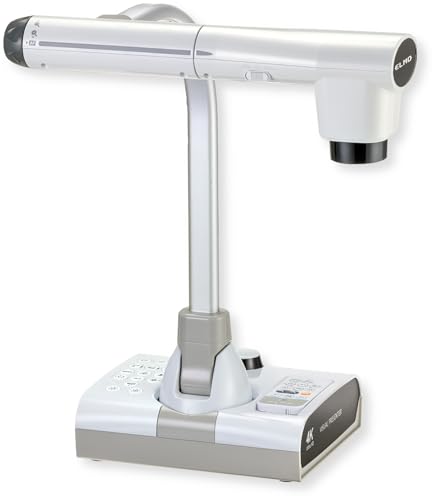
- 4K Ultra HD imaging with a 12MP sensor
- 192x total zoom for close detail in lessons and demos
- HDMI, USB, and VGA outputs for broad compatibility
Best For: Classrooms and training rooms needing advanced presentation tools
Compact A3 Visualizer for Classrooms
THUSTAR 8MP 4K USB Document Camera

- 8MP capture with up to 2448P output
- Foldable body with A3-size coverage
- 3-level LED lighting and dual microphones
Best For: Teachers and presenters who need a portable classroom visualiser
AI-Tracking Teaching Camera
OKIOCAM S2-4K 8MP Document Camera

- 8MP Sony sensor captures up to 3264 x 2448
- OKIOPoint AI-tracking with teaching software tools
- Works with Windows, Mac, Chromebook, iPad, and displays
Best For: Teachers and hybrid presenters who want AI tracking and low-light clarity
True 4K Classroom Presenter
OKIOCAM S2 Pro 13MP USB Document Camera

- True 4K capture up to 3840 x 2160
- 13MP sensor with 4K at 30 fps
- OKIOPoint smart pointer plus LED light and mic
Best For: Users who want true 4K imaging and classroom-ready presentation tools
Professional Classroom Pick – INSWAN INS-2 UHD 4K 13MP Document Camera
If you want a document camera with 4K output for teaching, demos, or artwork display, the INSWAN INS-2 is built for bigger visuals and cleaner detail. Its 13MP sensor captures 3840 x 2160 video at 30 fps, while the A3-sized capture area and flexible multi-joint arm make it easier to show full pages, large prints, and hands-on demonstrations.
Best For: Educators and art instructors who need large-format capture, annotation tools, and reliable classroom compatibility.
Pros:
- 4K Ultra HD output with a 13MP SONY sensor for sharp live display
- A3 capture area and multi-joint arm suit large documents and artwork
- Built-in LED, anti-glare sheet, autofocus, and brightness control improve presentation clarity
- Documate software adds zoom, annotation, recording, OCR, and whiteboard tools
Cons:
- Larger and heavier than portable foldable models
- Designed more for desk or classroom use than travel
- iPad support requires USB-C and iPadOS 17+
Overall, this is a strong fit if your priority is presentation quality over portability. It covers the practical teaching features most classrooms need and adds enough imaging flexibility for detailed work.
Value Live-Demo Choice – IPEVO V4K 8MP USB Document Camera
The IPEVO V4K is a practical document camera with 4K output support for live demos, remote teaching, and everyday classroom use. Its 8MP sensor delivers ultra high-definition images up to 3264 x 2448, and the fast-focusing design helps keep demonstrations moving smoothly when you switch materials often.
Best For: Teachers and presenters who want a lightweight USB document camera for live streaming and daily demos.
Pros:
- 8MP sensor captures sharp ultra high-definition live images
- Up to 30 fps at Full HD for smoother streaming
- Fast focusing helps reduce interruptions during material changes
- Compatible with Mac, Windows, and Chromebook
Cons:
- Maximum resolution is below true 4K capture
- No zoom feature
- Best streaming/recording performance may depend on system specs
If you need a dependable, easy-to-use camera for teaching and conferencing, this model keeps setup simple. It is a good choice when you care more about steady performance and portability than top-end resolution.
Most Portable 4K Pick – INSWAN INS-Flip 4 Foldable 4K Document Camera
If you want a document camera with 4K output that is easy to carry, the INSWAN INS-Flip 4 stands out for its foldable, ultra-light design. It captures 3840 x 2160 video at 30 fps with a 13MP SONY sensor, but its biggest advantage is how little desk space it takes up when you need a compact teaching or meeting setup.
Best For: Mobile educators, remote presenters, and anyone who needs a compact 2-in-1 document camera and webcam.
Pros:
- 4K output with a 13MP SONY sensor and 30 fps streaming
- Very portable at 0.67 lbs and folds into a pencil-case-sized body
- Works as both a document camera and a webcam
- Supports larger documents, macro shots, and flexible angle adjustment
Cons:
- Smaller footprint may be less stable than heavier desk models in some setups
- Less suited to permanent classroom installs than larger fixed-arm cameras
- The included specs note inconsistent max height wording in the product details
For users who move between rooms, home, and office, this is the easiest 4K option to pack and deploy. It balances image quality with real-world portability better than most full-size document cameras.
Smart Teaching Option – OKIOCAM S-4K 8MP USB Document Camera
The OKIOCAM S-4K is a compact document camera with 4K output support aimed at teachers who want useful software features as much as image capture. Its 8MP Sony Exmor R sensor produces ultra high-definition live images, and the included OKIOPoint AI pointer adds a hands-on way to guide attention during lessons and demos.
Best For: Teachers who want a portable document camera with smart presentation tools and strong classroom software.
Pros:
- 8MP Sony Exmor R sensor with ultra high-definition capture
- OKIOPoint AI smart pointer adds guided, interactive teaching
- Portable design supports letter-size materials in landscape orientation
- Software includes annotation, zoom, rotation, recording, snapshots, and timelapse tools
Cons:
- Maximum resolution is 3264 x 2448, not native 4K output
- Best suited to letter-size materials rather than larger formats
- Smaller portable body may not offer the same reach as larger arm-style models
This model makes sense if your priority is engagement and classroom workflow rather than the highest possible resolution. It offers a good mix of portability and teaching features for daily lesson use.
Desktop 4K scanner pick – VIISAN VS13AM 4K Desktop Document Scanner
If you want a document camera with 4K output for everyday desk work, the VIISAN VS13AM is built to handle papers, receipts, books, cards, and small objects in a single overhead setup. It is aimed at people who need clear close-up viewing plus practical document-scanning support, rather than a presentation-only camera.
Best For: Office, home office, and tabletop users who need both overhead display and document digitizing.
Pros:
- 4K video capture helps show documents and small details clearly.
- OCR-focused workflow is useful for digitizing notes, receipts, and printed pages.
- Macro close-up viewing works well for handwritten notes, stamps, crafts, and small items.
- USB connectivity keeps it simple for desk and workstation use.
Cons:
- It is not water resistant, so it is strictly for indoor desk use.
- The feature set is centered on document work, not advanced classroom display tools.
This is a practical pick if your priority is clear overhead capture and scanning efficiency in one device. It fits best when you want one camera for reviewing, sharing, and organizing paperwork.
Teacher-friendly visualiser – Kitchbai Foldable 4K USB Document Camera
This document camera with 4K output is built for teachers, presenters, and remote demos that need a sharp image and easy setup. The Kitchbai visualiser supports A3-size capture, brightness adjustment, image invert controls, and a foldable design that makes it easier to move between classrooms and workspaces.
Best For: Teaching, live demonstrations, and hybrid meetings where image control matters.
Pros:
- 8MP sensor with 2448P output delivers high-definition live image and video capture.
- Manual image reversal and brightness control help in mixed lighting and presentation setups.
- Foldable, multi-joint design is easier to store and carry.
- Dual microphones and broad OS compatibility support online teaching and conferencing.
Cons:
- It uses manual zoom rather than an advanced optical zoom system.
- Its 4K wording is supported by the product positioning, but the listed video capture resolution is 2448P.
If you need a flexible classroom or meeting visualiser, this model focuses on usable controls more than luxury extras. It is a strong fit for demos where image brightness, orientation, and portability are important.
Premium classroom pick – ELMO TT-12G 4K Interactive Document Camera
The ELMO TT-12G is a document camera with 4K output built for classroom presentation, distance learning, and detailed demonstrations. Its 12MP sensor, flexible arm, and strong zoom range make it a more advanced option when you need to show larger materials, capture fine details, and connect to modern or legacy systems.
Best For: Classrooms, lecture spaces, and training rooms that need premium presentation flexibility.
Pros:
- 4K Ultra HD imaging gives sharp, clear presentation output.
- 192x total zoom helps reveal fine details during lessons or demos.
- HDMI, USB, and VGA outputs offer broad device compatibility.
- Flexible multi-angle arm and wide capture area support larger documents and objects.
Cons:
- It is larger and heavier than compact desk document cameras.
- Its feature set is more classroom-focused than portable or home-office oriented.
This is the strongest premium-style option in the group for teaching and formal presentations. If you need deep zoom, flexible connectivity, and large capture coverage, it stands out clearly.
Compact A3 Visualizer for Classrooms – THUSTAR 8MP 4K USB Document Camera
If you want a document camera with 4k output for lessons, demos, or remote teaching, this THUSTAR model is built around practical classroom use. It delivers 8MP capture, 30fps output, adjustable image inversion, and a foldable body that makes it easier to set up, store, and carry between rooms.
Best For: Teachers and presenters who need a portable A3-size visualiser with easy brightness control.
Pros:
- 8MP capture with up to 2448P output and 30fps video
- Manual image brightness controls plus 3-level LED lighting
- Foldable design with multi-joint support and A3-size coverage
- Built-in dual microphones and broad compatibility with Windows, macOS, and Chrome OS
Cons:
- Uses USB connection, so it is better suited to desk-based setups than mobile use
- Maximum coverage is A3-size, which may be limiting for larger materials
- Focus behavior is designed to avoid constant refocusing, which may not suit every workflow
This is a solid all-around pick if you want simple plug-and-play operation and adjustable lighting in a foldable classroom camera. It is especially useful when you need to show documents and small objects clearly without a complicated setup.
AI-Tracking Teaching Camera – OKIOCAM S2-4K 8MP Document Camera
For buyers comparing a document camera with 4k output for teaching and conferencing, the OKIOCAM S2-4K stands out for its mix of image quality and classroom-friendly software features. It captures up to 3264 x 2448 pixels at 30 fps, works in low light without extra LEDs, and adds OKIOPoint AI-tracking to keep presentations more interactive.
Best For: Teachers and hybrid presenters who want AI tracking, strong low-light performance, and cross-platform support.
Pros:
- 8MP Sony Exmor R sensor with up to 3264 x 2448 capture
- Low-light performance is strong enough to avoid needing supplemental LED lights
- OKIOPoint AI-tracking and software tools like annotation, recording, and PIP
- Works with Windows, Mac, Chromebook, iOS, and interactive displays
Cons:
- Maximum captured area is near-Ledger size, so it is not the widest option here
- Many of the standout features depend on OKIOCAM Live software
- Designed primarily for teaching and presentations rather than casual home use
This model is a strong fit if you want a polished presentation tool rather than just a basic camera. The AI pointer tracking and low-light sensor make it especially useful in classrooms, meeting rooms, and interactive learning setups.
True 4K Classroom Presenter – OKIOCAM S2 Pro 13MP USB Document Camera
If your priority is a document camera with 4k output, the OKIOCAM S2 Pro is the most outright 4K-focused option in this group. It uses a 13MP sensor for true 4K resolutions up to 3840 x 2160, adds a built-in LED light and microphone, and includes OKIOPoint smart tracking for more interactive demos.
Best For: Users who want true 4K imaging, strong software tools, and a classroom-ready build.
Pros:
- True 4K capture up to 3840 x 2160 with a 13MP sensor
- 4K at 30 fps for detailed, lag-free presentation video
- OKIOPoint smart pointer support through OKIOCAM Live software
- Integrated LED light, built-in mic, and broad Windows/Mac/Chromebook compatibility
Cons:
- Maximum viewing area is smaller than some classroom-focused competitors
- Several advanced presentation features rely on the companion software
- Best suited to desk setups since it uses USB and is not water resistant
For buyers who care most about actual 4K resolution, this is the clearest match. It balances sharp image quality with classroom-friendly extras, making it a good option for teaching, web conferencing, and live demonstrations.
How We Picked the Best Document Camera with 4K Output
We focused on image quality, usability, and real-world flexibility. For a Document Camera with 4K Output, that means looking beyond resolution alone and checking sensor quality, autofocus behavior, built-in lighting, microphone usefulness, and compatibility with Windows, macOS, Chromebook, and common conferencing tools.
We also weighed practical factors like foldability, arm design, A3 or near-ledger coverage, USB or HDMI options, and extras such as OCR, AI pointer tools, and image inversion for teaching or live presenting.
Quick Comparison
The best choices in this roundup generally fall into three groups: compact USB models for teachers and remote presenters, feature-rich classroom cameras with smart tracking or OCR, and premium interactive units for more demanding AV setups. If portability matters most, look for lightweight foldable designs. If you present books, worksheets, or lab materials often, prioritize larger capture areas and strong overhead stability. If you need plug-and-play sharing, a simple USB connection may be enough.
Key Buying Factors for a Document Camera with 4K Output
Resolution and Sensor Quality
True 4K output is helpful, but the sensor size and processing matter just as much. A well-tuned 8MP or 12MP camera can still produce excellent overhead images if sharpening and exposure are handled well. Look for clean text rendering and accurate color in mixed lighting.
Lighting, Focus, and Viewing Area
Built-in LEDs help a lot with books, receipts, and small objects. Autofocus should recover quickly when you move pages or hands into frame. Also check whether the camera supports A3 or near-ledger capture if you need to cover larger documents.
Connectivity and Compatibility
Most buyers should favor USB for simplicity, but HDMI or VGA can be valuable in classrooms and conference rooms. Confirm compatibility with your operating system and your preferred platform, especially if you switch between a laptop, interactive display, or webcam software.
Smart Tools and Workflow Features
OCR, image inversion, freeze frames, and smart pointer functions can save time during lessons and demos. These features are not essential for everyone, but they can make a big difference if you annotate, scan, or present documents frequently.
Who Should Buy Which Document Camera with 4K Output?
Teachers and trainers should look for easy setup, bright LEDs, and broad software compatibility. Remote workers and presenters may prefer lightweight foldable models that also double as webcams. Buyers who need the most versatile classroom solution should consider cameras with larger capture areas, multi-angle arms, and HDMI or USB options. If your priority is the simplest possible workflow, choose a straightforward USB model with reliable focus and clear text output.
In short, the best Document Camera with 4K Output is the one that matches your space, your devices, and how often you present overhead materials.