The best computer monitors balance image quality, refresh rate, screen size, comfort, and connectivity without paying for features you will not use. This lineup includes practical 24-inch displays, versatile 27-inch models, and an expansive 34-inch ultrawide.
Use the guide below to match your priorities—office productivity, casual gaming, media, or limited desk space—with the right specifications and screen format.
Best 10 Computer Monitors Picks for 2026
Best Overall
Dell SE2726H 27-Inch FHD 144Hz IPS Monitor
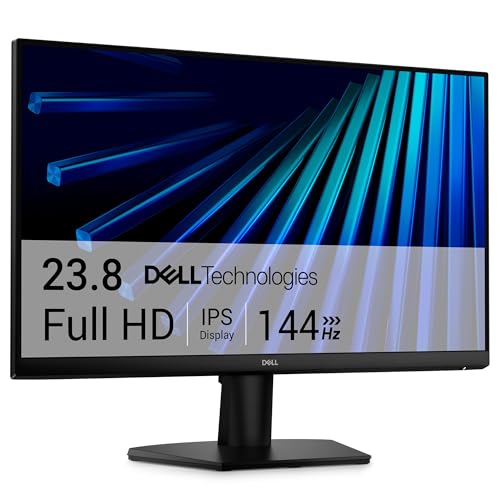
- 144Hz refresh rate with 1ms MPRT
- IPS panel with 178° viewing angles
- TÜV 3-star eye-comfort certification
Best For: Smooth everyday work, gaming, and streaming
Best Curved Option
Samsung S36GD 27-Inch Curved FHD Monitor

- Immersive 1800R curved screen
- 100Hz refresh rate for smoother motion
- Eye-comfort technology reduces blue light and flicker
Best For: Curved-screen gaming and multimedia
Best Ultrawide
Dell S3425DW 34-Inch WQHD USB-C Monitor

- 34-inch 3440 x 1440 ultrawide display
- 120Hz refresh rate with FreeSync Premium
- USB-C connectivity with up to 65W power delivery
Best For: Multitasking, creative work, and laptop desks
Best Budget Features
Amazon Basics 27-Inch 120Hz IPS Monitor
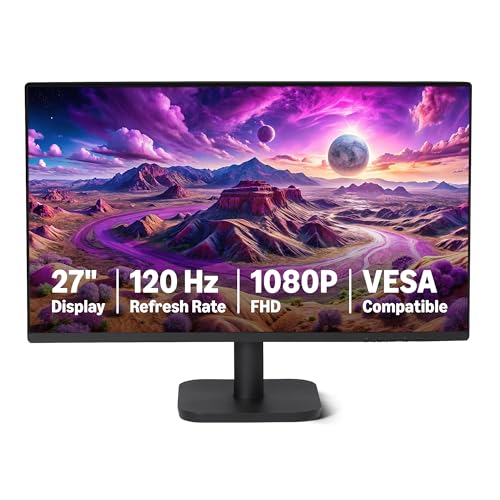
- 27-inch Full HD IPS panel with 99% sRGB
- 120Hz refresh rate with Adaptive Sync
- HDMI, DisplayPort, audio-out, and built-in speakers
Best For: Home offices and general-purpose desktop setups
Balanced Performance Pick

- 144Hz and 1ms MPRT for smooth motion
- Built-in dual 3W speakers
- Height, pivot, swivel, and tilt adjustments
Best For: Mixed work, streaming, and casual gaming setups
Everyday Value Pick

- VA panel with 3000:1 contrast
- 100Hz refresh rate with Adaptive-Sync
- Frameless design and EasyRead mode
Best For: Office work, documents, and general desktop use
Fast IPS Pick
- IPS panel with wide 178-degree viewing angles
- 144Hz, 1ms MPRT, and FreeSync
- Two HDMI ports and thin bezels
Best For: Work and casual gaming with consistent viewing angles
Immersive Budget Pick
Sceptre 24-inch Curved Gaming Monitor

- 1800R curved Full HD VA display
- 75Hz refresh rate with Adaptive Sync
- Two HDMI ports and built-in speakers
Best For: Budget-conscious gamers and compact desktop setups
Smooth Large-Screen Value

- 27-inch Full HD IPS panel
- 120Hz refresh with Adaptive-Sync
- Three-year parts-and-labor warranty
Best For: Mixed office, desktop, and casual gaming use
Connectivity-Focused Pick

- 100Hz Full HD display with 1ms response
- DisplayPort plus two HDMI ports
- Built-in speakers and Blue Light Shift
Best For: Mixed work and gaming setups needing flexible connectivity
Best Overall – Dell SE2726H 27-Inch FHD 144Hz IPS Monitor
For shoppers comparing computer monitors, the Dell SE2726H combines a sharp 27-inch Full HD IPS display with a fast 144Hz refresh rate and 1ms MPRT response time. Its wide viewing angles, matte finish, dual HDMI connectivity, and eye-comfort certification make it a versatile choice for work, gaming, and streaming.
Best For: Users who want fluid performance and comfortable all-day viewing in a general-purpose monitor.
Pros:
- 144Hz refresh rate and 1ms MPRT support smooth motion.
- IPS technology provides consistent color and 178-degree viewing angles.
- TÜV Rheinland 3-star eye-comfort certification helps reduce harmful blue light.
- Two HDMI ports and AMD FreeSync add practical flexibility.
Cons:
- Full HD resolution is less detailed than higher-resolution alternatives.
- The stand offers tilt adjustment but no listed height adjustment.
The SE2726H is a well-rounded computer monitor for everyday productivity and entertainment, especially if smooth motion and eye comfort matter more than extra resolution.
Best Curved Option – Samsung S36GD 27-Inch Curved FHD Monitor
The Samsung S36GD brings a curved 27-inch Full HD screen to the computer monitors category, creating a more immersive viewing experience for work, gaming, and video. Its 100Hz refresh rate, high 3,000:1 contrast ratio, and eye-comfort features make it a practical multimedia display.
Best For: Buyers who prefer a curved screen for immersive gaming, entertainment, and general desktop use.
Pros:
- 1800R curvature creates a wider, more engaging field of view.
- 100Hz refresh rate helps reduce motion blur and lag.
- 3,000:1 contrast ratio supports deeper-looking dark scenes.
- Blue-light reduction and flicker-free technology support longer sessions.
Cons:
- It has one HDMI port, which may limit connected devices.
- The 4ms response time is slower than some gaming-focused alternatives.
Choose the S36GD if immersion and contrast are priorities. Its curved design and gaming-oriented image controls add appeal, while the Full HD resolution keeps it suited to mainstream setups.
Best Ultrawide – Dell S3425DW 34-Inch WQHD USB-C Monitor
Among computer monitors for multitasking, the Dell S3425DW stands out with a spacious 34-inch ultrawide WQHD display, 21:9 aspect ratio, and 120Hz refresh rate. Its VA panel delivers a 3,000:1 contrast ratio, while USB-C connectivity with up to 65W power delivery helps simplify a compatible laptop setup.
Best For: Productivity users, creators, and laptop owners who want expansive workspace and streamlined connectivity.
Pros:
- 3440 x 1440 resolution provides generous ultrawide workspace.
- 99% sRGB and 95% DCI-P3 coverage support vivid color.
- USB-C can deliver up to 65W of power through one cable.
- Includes built-in speakers, height adjustment, tilt adjustment, and four USB ports.
Cons:
- Its 34-inch size and 20.7-pound weight require substantial desk space.
- Ultrawide displays may be more monitor than basic office tasks require.
The S3425DW is the strongest choice here for a single-screen workstation. It pairs a broad, detailed canvas with strong color coverage, adaptive sync, and useful laptop-friendly connectivity.
Best Budget Features – Amazon Basics 27-Inch 120Hz IPS Monitor
The Amazon Basics 27E40 offers a useful mix of features for shoppers seeking practical computer monitors for home or office use. Its 27-inch IPS panel provides Full HD resolution and 99% sRGB coverage, while 120Hz motion, Adaptive Sync, narrow bezels, and multiple connection options broaden its appeal.
Best For: Home-office and general-use buyers who want a feature-rich 27-inch display with flexible connectivity.
Pros:
- IPS panel offers 178-degree viewing angles and 99% sRGB coverage.
- 120Hz refresh rate with Adaptive Sync helps reduce motion blur.
- HDMI, DisplayPort, and 3.5mm audio-out support varied setups.
- Built-in speakers and a four-sided narrow bezel add convenience.
Cons:
- The 14ms response time is less suited to demanding competitive gaming.
- Only one HDMI port is listed.
- Reaching 120Hz requires compatible hardware, cable, and system settings.
The 27E40 is a sensible everyday computer monitor when connectivity, viewing comfort, and built-in audio matter. Its Full HD IPS panel keeps the experience straightforward, while the 120Hz mode adds smoothness when properly configured.
Balanced Performance Pick – Dell 24 Plus S2425HSM
For shoppers comparing computer monitors for work, streaming, and casual gaming, the Dell S2425HSM combines a 23.8-inch Full HD screen with a 144Hz refresh rate, 1ms MPRT, and AMD FreeSync. Its built-in speakers and versatile stand also make it a practical all-in-one desktop display.
Best For: Users who want smooth motion, integrated audio, and extensive ergonomic adjustment in one 24-inch monitor.
Pros:
- 144Hz refresh rate, 1ms MPRT, and AMD FreeSync support smooth viewing and gaming.
- Built-in dual 3W speakers provide convenient desktop audio.
- Height, tilt, pivot, and swivel adjustments support a more comfortable setup.
- TÜV-certified eye-comfort features, flicker-free operation, and an anti-glare screen help with extended use.
Cons:
- Full HD resolution is less spacious than higher-resolution displays.
- The monitor offers HDMI connectivity rather than a broader selection of modern ports.
The S2425HSM stands out when convenience matters as much as display speed. It is a particularly versatile choice for a home office or gaming desk where speakers and full stand adjustability can reduce the need for extra accessories.
Everyday Value Pick – Philips 24-inch 241V8LB
The Philips 241V8LB is a straightforward choice among computer monitors for office work, media, and general desktop use. Its VA panel delivers Full HD detail with a 3000:1 contrast ratio, while the 100Hz refresh rate offers smoother motion than a standard 60Hz display.
Best For: Office users and home shoppers seeking strong contrast, a slim-bezel design, and basic adaptive-sync support at a practical size.
Pros:
- VA technology and a 3000:1 contrast ratio produce deeper blacks and brighter whites.
- 100Hz refresh rate and Adaptive-Sync support smoother everyday viewing.
- 178-degree viewing angles help maintain consistent color from offset positions.
- Frameless three-sided styling supports multi-monitor arrangements, and EasyRead mode is useful for documents.
Cons:
- Connectivity is limited to one HDMI port and VGA.
- The 4ms response time is not as fast on paper as the 1ms options in this roundup.
- The glossy finish may reflect more ambient light than a matte screen.
Choose this Philips when contrast and everyday usability matter more than advanced gaming features. Its VESA compatibility, lightweight design, and document-friendly EasyRead mode make it a sensible fit for a basic office or home workstation.
Fast IPS Pick – Dell SE2426H
The Dell SE2426H is a useful option for buyers comparing computer monitors that balance fast motion with IPS viewing consistency. Its 23.8-inch Full HD panel pairs a 144Hz refresh rate and 1ms MPRT with AMD FreeSync, while two HDMI ports simplify connections to compatible devices.
Best For: Desktop users and casual gamers who prioritize IPS viewing angles, smooth motion, and a thin-bezel design.
Pros:
- IPS technology delivers consistent color and viewing performance across a 178-degree viewing angle.
- 144Hz refresh rate, 1ms MPRT, and FreeSync support fluid motion.
- Two HDMI ports provide convenient connectivity for compatible sources.
- TÜV Rheinland 3-star eye-comfort certification and an anti-glare screen support longer viewing sessions.
Cons:
- The stand provides tilt adjustment only.
- Full HD resolution and a listed 72% color gamut may be limiting for higher-end creative work.
The SE2426H is the better fit for shoppers who want IPS consistency without giving up a high refresh rate. It keeps the feature set focused, making it a practical work-and-gaming monitor when advanced stand movement is not essential.
Immersive Budget Pick – Sceptre 24-inch Curved Gaming Monitor
For shoppers comparing computer monitors on a budget, the Sceptre C248W-1920RN combines a compact 24-inch Full HD display with an 1800R curve. Its 75Hz refresh rate, Adaptive Sync, and multiple input options make it a practical choice for everyday gaming and desktop use.
Best For: Budget-conscious gamers and users who want a compact curved display.
Pros:
- 1800R curved VA display creates a more immersive viewing experience.
- 75Hz refresh rate and Adaptive Sync support smoother gameplay.
- Two HDMI ports, VGA connectivity, built-in speakers, and VESA mounting support add flexibility.
- 98% sRGB coverage and a 3000:1 contrast ratio support vivid images.
Cons:
- Full HD resolution is less detailed than higher-resolution monitors.
- 24-inch screen size may feel limiting for multitasking.
- Its 1-year manufacturer warranty is shorter than some competing options.
This Sceptre is a sensible entry-level option when a curved screen, basic gaming features, and versatile connectivity matter more than premium resolution or advanced ergonomics.
Smooth Large-Screen Value – Acer 27-inch FHD IPS Monitor
The Acer KB272 G0bi is one of the more versatile computer monitors for work, streaming, and gaming. Its 27-inch Full HD IPS panel provides a spacious workspace, while 120Hz refresh and Adaptive-Sync support help keep motion smooth.
Best For: Desktop users and casual gamers who want a large IPS screen with a high refresh rate.
Pros:
- 27-inch Full HD IPS display offers wide viewing angles and detailed images.
- 120Hz refresh rate and 1ms VRB response time support smooth motion.
- Adaptive-Sync is FreeSync compatible for tear-reduced gaming and video playback.
- Three-year parts-and-labor warranty provides strong coverage.
Cons:
- It has only one HDMI port.
- Full HD resolution on a 27-inch screen is less sharp than a higher-resolution panel.
- Stand adjustment is limited to tilt.
Choose this Acer when screen size, IPS viewing angles, and 120Hz performance are priorities. It is a well-rounded choice for mixed personal, office, and gaming use without moving beyond Full HD.
Connectivity-Focused Pick – Sceptre 27-inch Prime Monitor
The Sceptre E275W-FW100T stands out among computer monitors for its broad connectivity and practical desk features. This 27-inch Full HD display includes DisplayPort, two HDMI ports, 100Hz refresh, built-in speakers, and eye-comfort controls for work or gaming.
Best For: Users who need flexible connections, a larger screen, and integrated audio.
Pros:
- DisplayPort and two HDMI ports support a variety of computers and devices.
- 100Hz refresh rate and 1ms response time help keep fast-moving content clear.
- 100% sRGB coverage supports natural-looking color for everyday work and creative tasks.
- Built-in speakers, Blue Light Shift, and VESA mounting add convenience.
Cons:
- Full HD resolution may appear less crisp on a 27-inch display than higher-resolution alternatives.
- The flat panel lacks the immersive curve offered by some gaming monitors.
- Its warranty is limited to one year.
This model is a strong practical pick for a mixed workstation, especially if you value multiple video inputs and built-in audio. Its 100Hz refresh rate also gives everyday gaming a smoother feel than a standard 60Hz display.
How We Picked These Computer Monitors
We focused on models that offer useful everyday specifications at different price and size points. The selection includes Full HD IPS and VA panels, refresh rates from 100Hz to 144Hz, curved and flat designs, VESA compatibility, built-in speakers on select models, and an ultrawide WQHD option. We also considered practical features such as adaptive sync, ergonomic adjustment, eye-comfort modes, and modern video inputs.
Specifications can vary by configuration or retailer, so confirm the listed inputs, stand adjustments, warranty, and included cables before ordering.
Quick Comparison
| Best For | Recommended Type | What to Look For |
|---|---|---|
| Everyday office work | 24- or 27-inch IPS | FHD resolution, comfortable stand, 100Hz or higher |
| Gaming on a budget | 24- or 27-inch high-refresh display | 120Hz–144Hz, 1ms response claim, adaptive sync |
| Multitasking | 34-inch ultrawide | WQHD resolution, VA contrast, height adjustment |
| Small desks | 23.8- or 24-inch monitor | Compact stand, VESA support, HDMI connectivity |
Key Buying Factors for Computer Monitors
Screen Size and Resolution
Full HD is suitable for 24-inch screens and remains usable at 27 inches when affordability matters. A 27-inch 1440p monitor produces sharper text and more workspace, while a 34-inch WQHD ultrawide is better for side-by-side windows and immersive games.
Panel Type
IPS panels generally provide consistent colors and wide viewing angles, making them a strong choice for work and mixed use. VA panels typically deliver deeper contrast, which benefits movies and darker games, although motion performance and viewing-angle behavior vary by model.
Refresh Rate and Sync
A 100Hz or 120Hz display feels noticeably smoother than a basic 60Hz monitor. Gamers should prioritize 144Hz models with AMD FreeSync or another compatible adaptive-sync feature, while also checking whether their computer can produce the desired frame rates.
Ergonomics and Connectivity
Height, tilt, swivel, and pivot adjustments can improve comfort during long sessions. HDMI is essential for most computers and consoles; DisplayPort is especially useful for desktop gaming. VESA support adds flexibility for monitor arms and wall mounts.
Who Should Buy Which Computer Monitors?
For Work, School, and General Use
Choose a 24- or 27-inch IPS monitor with at least 100Hz, flicker reduction, and a comfortable viewing stand. These models offer a practical balance of readable text, smooth scrolling, and moderate desk space.
For Casual or Competitive Gaming
Favor a 144Hz display with adaptive sync and a claimed 1ms response time. A 24-inch screen suits smaller desks and competitive play; a 27-inch model feels more immersive but makes Full HD pixels easier to notice.
For Multitaskers and Media Fans
The 34-inch ultrawide is the best fit for users who regularly keep multiple windows open or want a wider gaming and movie view. Make sure your desk can accommodate its width and that your graphics hardware can drive the higher WQHD workload.
For Flexible Setups
Look for VESA mounting, multiple video inputs, and built-in speakers if you want a cleaner desk or a simple secondary display. If color-critical photo or video work is your priority, consider a higher-resolution, factory-calibrated monitor beyond this Full HD-focused selection.