Choosing an audio interface with Dante means looking beyond preamp count and USB connectivity. Dante networking can simplify routing, expand systems, and connect recording, live-sound, broadcast, and installed-audio equipment over standard infrastructure.
This roundup compares 10 options, from compact Dante adapters and USB interfaces to high-channel-count PCIe systems, so you can match the connection type, channel capacity, and workflow to your setup.
Best 10 Audio Interface with Dante Picks for 2026
Reference-Quality Dante Interface

- Dante networking with 24-bit/96kHz converters
- Compatible with Windows, macOS, and major DAWs
- Lightweight build with a 2-year warranty
Best For: Compact recording, live-sound, and measurement setups
High-Channel Dante Routing

- 128-in/128-out Dante and MADI routing
- Supports up to 24-bit/192kHz
- USB 3.0, headphone output, and TotalMix FX
Best For: Large Windows-based Dante and MADI systems
Plug-In-Ready Dante Rack

- 16-in/16-out Dante and USB interface
- Includes VST Rack Pro and 30+ plug-ins
- Two line outputs and two mic inputs
Best For: Dante users needing bundled live or studio plug-in processing
Analog Expansion for Dante
Audinate Dante AVIO 2-Channel Adapter
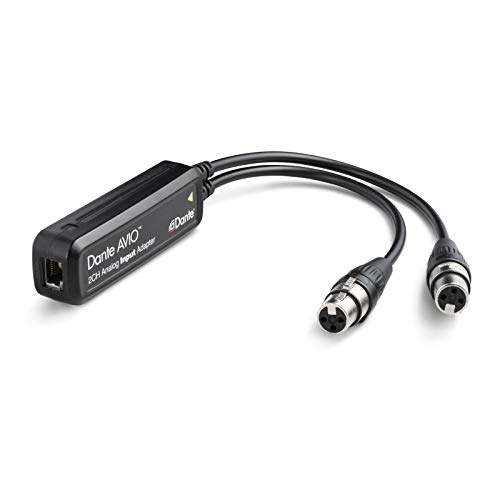
- Adds two analog input channels to Dante
- Connects via RJ45
- Supports mixers, instruments, processors, and receivers
Best For: Connecting existing analog gear to a Dante network
Best Dante Headphone Interface

- Monitor-quality conversion for Dante networks
- Drives high-impedance headphones
- PoE or included power supply
Best For: Dante monitoring and on-stage headphone use
Best Simple Dante Analog Output
Dante AVIO Analog Output Adapter

- Two-channel Dante analog output
- Connects to amplifiers or speakers
- Compact 7.04-ounce design
Best For: Adding two analog outputs to a Dante system
Best Dante XLR Encoder

- Two-channel XLR-to-Dante conversion
- Up to 96kHz/24-bit audio
- Five selectable input sensitivities
Best For: Networking two analog XLR sources
Simple Dante Bridge

- Bidirectional 2x2 USB-C and Dante audio
- 24-bit/48 kHz operation
- PoE or USB powered; no extra drivers
Best For: Connecting a Windows or Mac computer to a Dante network
High-Capacity Dante PCIe
RedNet PCIeNX 128-Channel Interface

- 128x128 channels at 24-bit/192 kHz
- Dual Ethernet for switched or redundant operation
- AES67 and SMPTE ST 2110 support
Best For: Large professional studio, broadcast, and immersive audio systems
High-Resolution USB Dante
ToVi 2-Channel USB-C Transceiver

- Bidirectional USB-C and Dante conversion
- 24-bit/96 kHz audio support
- PoE or USB-C powered; Windows, macOS, and Linux compatible
Best For: Portable and installed two-channel AV, studio, or conferencing setups
Reference-Quality Dante Interface – ESI planet 22c
The ESI planet 22c is a compact audio interface with Dante for recording, live sound, and audio measurement. Its Dante network connection, 24-bit/96kHz converters, and compatibility with major DAWs make it a practical choice for Windows or macOS setups.
Best For: Home studios, live-sound rigs, and audio measurement systems needing a compact Dante interface.
Pros:
- Dante IP audio networking with 24-bit/96kHz converters
- Works with Windows, macOS, and major DAWs
- Lightweight 0.5 kg design
- Includes a 2-year warranty with US- and Germany-based support
Cons:
- Four-channel specification may be limiting for larger Dante systems
- Maximum sample rate is 96kHz rather than 192kHz
The planet 22c suits buyers who want core Dante connectivity in a lightweight interface without moving to a larger, higher-channel system.
High-Channel Dante Routing – RME Digiface Dante
The RME Digiface Dante is an audio interface with Dante designed for high-channel computer-based routing. It combines 128-in/128-out Dante and MADI connectivity with USB 3.0, TotalMix FX support, headphone output, and operation up to 24-bit/192kHz.
Best For: Windows users managing large Dante and MADI channel counts from a computer.
Pros:
- Provides 128 inputs and 128 outputs for Dante/MADI workflows
- Supports up to 24-bit/192kHz operation
- Includes USB 3.0 connectivity and headphone output
- Works with RME TotalMix FX
Cons:
- Supplied operating-system detail lists Windows only
- Its 2.6-pound design may be less convenient than a smaller interface
- One-year manufacturer warranty is shorter than some alternatives
Choose the Digiface Dante when channel capacity and Dante/MADI routing matter more than minimal size or broad operating-system documentation.
Plug-In-Ready Dante Rack – Yamaha RUio16-D
The Yamaha RUio16-D is a 16-in/16-out audio interface with Dante and USB connectivity for macOS and Windows. It adds VST Rack Pro with more than 30 plug-ins, plus two line-level outputs and two mic inputs for practical live or studio processing.
Best For: Users who want Dante I/O alongside computer connectivity and bundled plug-in processing.
Pros:
- Offers 16×16-channel Dante and USB operation
- Includes VST Rack Pro software with more than 30 plug-ins
- Provides two line-level outputs and two mic inputs
- Supports macOS and Windows
Cons:
- Maximum sample rate is 96kHz
- The supplied specifications do not describe a headphone output
- At 3.6 pounds, it is heavier than the ESI option
The RUio16-D is a strong fit for Dante setups that benefit from integrated VST Rack Pro processing and a moderate 16-channel I/O count.
Analog Expansion for Dante – Audinate Dante AVIO 2-Channel Adapter
The Audinate Dante AVIO 2-Channel Analog Input Adapter is a focused audio interface with Dante for bringing two channels of analog audio onto a Dante network. Its RJ45 connection suits mixers, consoles, processors, DI boxes, keyboards, compressors, wireless microphone receivers, and other non-networked audio devices.
Best For: Adding two analog input channels to a Dante system from existing mixers, instruments, or outboard gear.
Pros:
- Converts two analog input channels to Dante
- Works with a broad range of analog audio equipment
- Uses an RJ45 network connection
- Compact 2 x 4 x 8-inch form factor
Cons:
- Provides inputs only, rather than a full multi-channel interface
- The supplied notes do not specify sample rate, converter resolution, or software compatibility
- Power-plug details list no plug, so the installation requires attention to the power arrangement
The AVIO is best viewed as a simple Dante expansion adapter, not a replacement for a full computer recording interface with extensive I/O.
Best Dante Headphone Interface – RedNet AM2
The Focusrite RedNet AM2 is a practical audio interface with Dante for monitoring network audio through headphones or line-level outputs. It combines headphone amplification, independent level controls, and PoE support in a compact unit.
Best For: Dante-network monitoring, on-stage headphone use, and systems requiring both headphone and line outputs.
Pros:
- Monitor-quality digital conversion for Dante networks
- Powerful headphone output suitable for high-impedance headphones
- Independent headphone and line output level controls
- Supports PoE or the included power supply
Cons:
- Its listed audio input and XLR connectivity may not suit every installation
- Best suited to monitoring and output duties rather than general-purpose recording
The RedNet AM2 is a focused choice when reliable Dante monitoring is the priority. Its mute switch and dual output-level controls add useful control for stage and installed applications.
Best Simple Dante Analog Output – Dante AVIO Analog Output Adapter
The Audinate Dante AVIO is a straightforward audio interface with Dante for adding two analog output channels to a Dante system. It is designed to connect Dante network audio with amplifiers or speakers.
Best For: Sending two Dante channels to analog amplifiers, powered speakers, or other compatible audio equipment.
Pros:
- Provides two analog output channels
- Designed for amplifier and speaker connections
- Compact 7.04-ounce form factor
Cons:
- Output-only design does not provide analog inputs
- No power plug is included according to the supplied details
The Dante AVIO makes sense for simple installations that need a two-channel analog endpoint. Choose it when output expansion is more important than headphone amplification or recording inputs.
Best Dante XLR Encoder – ToVi Dante XLR Audio Encoder
The ToVi Dante XLR Audio Encoder is an audio interface with Dante that converts two balanced or unbalanced XLR sources into network audio. Its selectable input sensitivity and support for up to 96kHz/24-bit make it adaptable for professional AV, broadcast, conference, and live sound setups.
Best For: Bringing two XLR microphones, mixers, amplifiers, or other analog sources onto a Dante network.
Pros:
- Converts two XLR inputs to Dante audio streams
- Supports PCM audio up to 96kHz/24-bit
- Offers five selectable input-sensitivity levels
- Can use PoE or USB-C power
Cons:
- It is an input encoder, not a general-purpose analog output interface
- Requires suitable Dante-enabled or AES67-compatible network equipment
With flexible gain selection and dual power options, the ToVi encoder is a versatile way to network analog XLR sources. It is especially compelling where source compatibility and installation flexibility matter.
Simple Dante Bridge – USB-C 2×2 Adapter
The Audinate Dante AVIO USB-C 2×2 is a straightforward audio interface with Dante for connecting a Mac or Windows computer to a Dante network. It provides two inputs and two outputs at 24-bit/48 kHz, with USB-C connectivity and no additional drivers or software required.
Best For: Computer-based Dante setups, conferencing, and compact two-channel recording or playback systems.
Pros:
- Provides bidirectional 2×2 audio over USB-C and Dante.
- Works with Windows and macOS without additional drivers or software.
- Can be powered by PoE or USB and uses a rugged ABS enclosure.
- Supports Dante audio over IP and AES67 RTP.
Cons:
- Limited to 24-bit/48 kHz operation.
- Offers only two input and two output channels.
This is a practical choice when you need a compact, low-complexity way to add a computer to an existing Dante network. Its channel count and sample rate are best suited to modest systems rather than high-channel studio or broadcast workflows.
High-Capacity Dante PCIe – RedNet PCIeNX 128-Channel Interface
The Focusrite RedNet PCIeNX is a high-channel-count audio interface with Dante designed for demanding computer-based systems. It supports 128×128 channels at 24-bit/192 kHz, ultra-low round-trip latency, dual Ethernet connections, and compatibility with Windows and Mac computers.
Best For: Professional studios, broadcast facilities, immersive audio systems, and large Dante installations requiring extensive I/O.
Pros:
- Handles 128×128 Dante channels at up to 24-bit/192 kHz.
- Dual RJ-45 connections support switched and redundant modes.
- Supports AES67 and SMPTE ST 2110 compliance with the required DDM setup.
- Works with Windows, Intel-based Macs, and Apple Silicon Macs.
Cons:
- The optional expansion to 256×256 channels requires a paid upgrade.
- Its PCIe-based design is more specialized than a compact USB adapter.
- Advanced SMPTE ST 2110 functionality requires DDM.
For large-scale Dante workflows, the RedNet PCIeNX offers substantially more capacity and higher sample-rate support than two-channel adapters. Its dual-network connectivity and professional standards support make it a strong fit for infrastructure-heavy installations, provided your computer and network setup support PCIe audio.
High-Resolution USB Dante – ToVi 2-Channel USB-C Transceiver
The ToVi Dante USB-C Audio Transceiver is a compact audio interface with Dante that converts two-channel USB audio to Dante and sends Dante audio back to USB-C. It supports up to 24-bit/96 kHz operation, USB Audio Class 1.0 and 2.0, and plug-and-play use with Windows, macOS, and Linux.
Best For: Laptops, conferencing systems, live sound rigs, studios, and AV installations needing a portable two-channel USB-to-Dante connection.
Pros:
- Provides bidirectional two-channel USB-C to Dante conversion.
- Supports higher-resolution 24-bit/96 kHz USB and Dante audio.
- Works with Windows, macOS, and Linux without additional drivers or software.
- Accepts PoE or USB-C power and supports a single CAT6 connection up to 100 meters.
Cons:
- Limited to two audio channels.
- Requires a Dante network connection for networked audio operation.
The ToVi is a flexible alternative for users who want plug-and-play computer integration and 96 kHz support in a compact enclosure. It is especially useful for mobile or installed systems, though its two-channel design is not intended for large multichannel Dante deployments.
How We Picked the Best Audio Interface with Dante Options
We evaluated these products by looking at their intended workflows, Dante channel capacity, physical connections, computer compatibility, power requirements, and practical installation needs. The selection covers several categories rather than treating every Dante device as a conventional studio interface.
Some models are complete computer-facing interfaces, while others are Dante endpoints, adapters, headphone amplifiers, or expansion tools. That distinction matters: a compact adapter may be ideal for adding one analog source to a network, but it will not replace a multichannel recording interface.
Quick Comparison
| Type | Best For | What to Check |
|---|---|---|
| Dante-to-USB interface | Computer recording and playback | USB connector, channel count, driver support |
| Analog Dante adapter | Adding microphones, line sources, or outputs | Input/output direction, PoE, gain control |
| Headphone and line interface | Monitoring over a Dante network | Headphone output, analog line outputs, latency |
| PCIe Dante interface | Large studio, broadcast, and live rigs | Computer slot, channel capacity, network design |
| Dante mixer or bridge | Routing multiple digital and analog sources | Clocking, software control, format support |
Key Buying Factors for an Audio Interface with Dante
Connection Type and Workflow
First decide how audio will enter and leave the system. USB-C models are convenient for laptops and desktop computers, while PCIe solutions suit fixed workstations requiring very high channel counts. Analog Dante adapters are better for integrating microphones, mixers, amplifiers, and other line-level equipment.
Channel Count and Format
Check both the advertised maximum and the channel count available at your intended sample rate. A two-channel adapter can be sufficient for a stereo source, whereas recording a full band or broadcast mix may require dozens or hundreds of channels. Confirm whether the device supports the sample rate and bit depth your production requires.
Power, Networking, and Clocking
Many compact Dante products use Power over Ethernet, which can reduce cable clutter but requires a compatible PoE switch or injector. Also verify that your network hardware is suitable for real-time audio and that the interface can participate correctly in Dante clocking and device discovery.
Monitoring and Latency
If performers or engineers will monitor through the network, look for the right headphone or line outputs and review the available routing controls. Dante can provide flexible distribution, but network configuration, buffer settings, and conversion stages still affect latency.
Who Should Buy Which Audio Interface with Dante?
Choose a compact analog or USB-C Dante adapter if you need to add one or two sources to an existing network with minimal hardware. A dedicated Dante headphone or line-output unit makes more sense for remote monitoring, cue mixes, and distributed listening positions.
For laptop-based recording, select a Dante-to-USB interface with the required driver and channel support. Larger production rooms, broadcast facilities, and live systems should consider a high-channel-count interface or PCIe solution, provided the computer and network infrastructure can support it.
Before buying, map every source, destination, and monitoring point in your system. The best Audio Interface with Dante is the one that matches that signal flow without forcing unnecessary converters, adapters, or network upgrades.