The right projector mount can improve image alignment, free up table space, and create a cleaner home theater or presentation setup. Adjustable models are especially useful when ceiling height, projector size, or throw angle varies.
We compared 10 adjustable projector mounts across installation style, adjustment range, compatibility, weight capacity, and everyday usability to help you choose a secure fit for your space.
Best 10 Adjustable Projector Mounts Picks for 2026
Best Low-Profile Pick
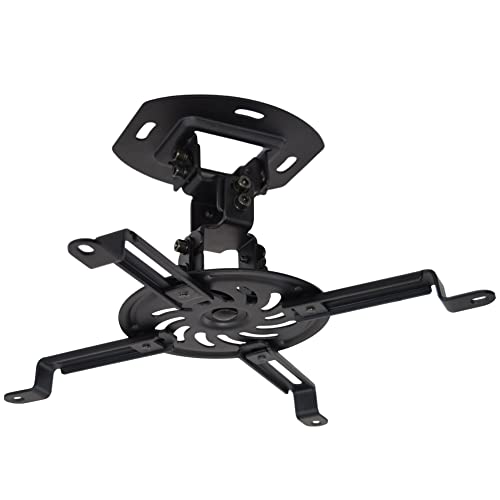
- Supports up to 30 pounds
- 15° tilt, swivel, and 360° rotation
- Low-profile 6-inch ceiling distance
Best For: Flat ceilings and compact installations
Best Installation Flexibility

- Supports up to 44 pounds
- Ceiling or wall installation
- Telescoping height from 5.3 to 26 inches
Best For: Wall and ceiling mounting on suitable surfaces
Best Extended Drop

- Extends 15 to 23 inches
- Supports up to 30 pounds
- 360° rotation with tilt and swivel
Best For: Rooms needing additional ceiling clearance
Best Full-Motion Range
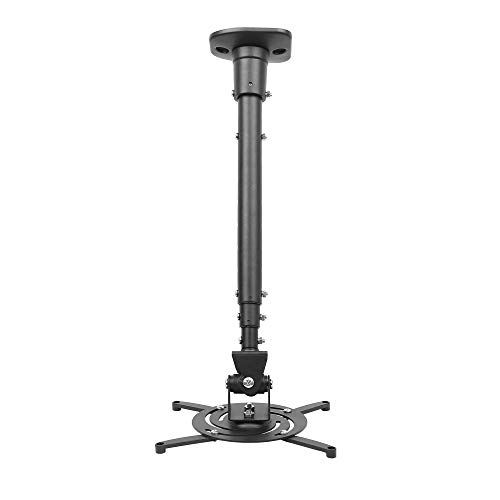
- Extends up to 43.6 inches
- 25° tilt and 90° swivel
- Supports up to 30 pounds
Best For: Flat ceilings requiring a long drop and wide adjustment
Best Lightweight Ceiling Mount
Aurzen Adjustable Projector Mount

- 360° rotation and 90° tilt
- 9–15-inch telescoping pole
- Supports up to 5.5 pounds on ceilings
Best For: Lightweight projectors with a centered 1/4-inch thread
Best Heavy-Duty Multi-Position Mount
Tonalee Wall or Ceiling Projector Bracket

- Three installation configurations
- ±30° tilt and swivel adjustment
- Long ceiling and wall height ranges
Best For: Larger projectors mounted to solid walls or ceilings
Best Tray-Style Mount
PUTORSEN Adjustable Projector Shelf

- 22-pound metal tray capacity
- 14.17–21.65-inch adjustable arm
- Integrated hidden cable routing
Best For: Projectors needing a broad ceiling or wall-mounted shelf
Best Compact Adjustability
suptek PR05MINI Projector Mount

- Supports ceiling, sloped-ceiling, and wall installation
- Adjusts from 13.38 to 21.25 inches with 90° tilt and 360° swivel
- Fits single-hole projectors up to 30 pounds
Best For: Single-hole projectors needing flexible placement
Best for Mini Projectors
2-Be-Best Extendable Projector Mount

- Extends from 14 to 24 inches
- Offers 360° horizontal and 90° vertical adjustment
- Can mount to a ceiling, wall, desk, or floor
Best For: Lightweight single-hole mini and medium projectors
Best Heavy-Duty Coverage
JOY worker Universal Projector Mount

- Supports projectors up to 33 pounds
- Adjusts from 5.5 to 25.2 inches
- Works with flat or sloped ceilings and walls
Best For: Heavier projectors needing broad installation flexibility
Best Low-Profile Pick – Compact VIVO Ceiling Mount
If you want adjustable projector mounts for a home theater or office without a long drop pole, the VIVO MOUNT-VP01B is a practical low-profile option. It supports projectors up to 30 pounds and keeps the unit about 6 inches from the ceiling.
Best For: Flat-ceiling installations where a compact, adjustable mount is preferred.
Pros:
- Supports projectors weighing up to 30 pounds.
- Offers 15-degree tilt, 15-degree swivel, and 360-degree rotation.
- Low-profile design sits approximately 6 inches from the ceiling.
- Quick-release hooks and included hardware simplify installation.
Cons:
- Projector mounting-hole spacing must be 12.5 inches or less.
- Mini projectors require removing the extension arms.
This is a straightforward choice when you need broad adjustment and sturdy steel construction but do not need height extension. Check your projector’s mounting-hole spacing before ordering.
Best Installation Flexibility – WALI 3-in-1 Projector Mount
Among adjustable projector mounts, the WALI PM-003-W stands out for its choice of ceiling or wall installation. Its telescoping arm also accommodates several mounting heights, making it useful for concrete, brick, or suitable wood-supported installations.
Best For: Buyers who want one mount that can be installed on a wall or ceiling.
Pros:
- Supports projectors up to 44 pounds.
- Works with flush-ceiling, telescoping-arm ceiling, and wall installations.
- Ceiling pole adjusts from 5.3 to 26 inches.
- Includes mounting hardware and an installation manual.
Cons:
- Not designed for vaulted ceilings or regular drywall.
- Mounting-hole spacing must be between 9 and 12.6 inches.
- Swivel adjustment is limited to 8 degrees.
The WALI is the most versatile option here for placement style and projector weight. Confirm the ceiling or wall structure and mounting-hole measurements before installation.
Best Extended Drop – VIVO Adjustable Ceiling Mount
The VIVO MOUNT-VP02W is one of the more adaptable adjustable projector mounts for rooms that need extra clearance from the ceiling. Its telescoping design positions the projector 15 to 23 inches below the ceiling while retaining broad angle adjustment.
Best For: Home theaters, classrooms, and conference rooms requiring an extended ceiling drop.
Pros:
- Adjusts from 15 to 23 inches from the ceiling.
- Supports projectors weighing up to 30 pounds.
- Provides 15-degree tilt, 15-degree swivel, and 360-degree rotation.
- Quick-release hooks help with attachment and removal.
Cons:
- Not compatible with several listed Epson, Mitsubishi, and LG projector models.
- Projector mounting-hole spacing must be 5.25 to 12.5 inches with the arms.
- Its extended design is less compact than a low-profile mount.
This mount makes sense when ceiling height or room layout calls for a longer drop. Carefully compare your projector model and mounting-hole pattern with the stated compatibility limits.
Best Full-Motion Range – DYNAVISTA Extendable Mount
For buyers who prioritize positioning range, this DYNAVISTA mount offers adjustable projector mounting with a long extendable arm and wide motion. It supports up to 30 pounds and can be used with mounting patterns up to 12.1 inches apart on a flat ceiling.
Best For: Flat-ceiling setups that need a long drop and extensive viewing-angle adjustment.
Pros:
- Extends from 23 to 43.6 inches, or uses an 8.9-inch configuration without the arm.
- Tilts 25 degrees up or down and swivels 90 degrees left or right.
- Provides 360-degree rotation.
- Pre-assembled design includes hardware and instructions.
Cons:
- Specified for flat-ceiling installation.
- Projector mounting-hole spacing must be 12.1 inches or less.
- The long arm may require careful tightening to prevent shaking.
The DYNAVISTA is a strong fit when a projector must hang well below the ceiling or be aimed across a wide range of angles. Tighten the specified screws during setup to help keep the extended mount stable.
Best Lightweight Ceiling Mount – Aurzen Adjustable Projector Mount
For shoppers comparing adjustable projector mounts, the Aurzen ceiling mount offers broad brand compatibility, useful rotation and tilt, and a telescoping 9-to-15-inch pole. It is designed for projectors with a centered 1/4-inch thread and weighing up to 5.5 pounds.
Best For: Lightweight home theater or office projectors installed on solid wood, brick, or concrete ceilings.
Pros:
- Provides 360-degree rotation and 90-degree vertical tilt.
- Telescoping pole adjusts from 9 to 15 inches.
- Compatible with many Aurzen, TMY, HAPPRUN, Yaber, Epson, and other projectors with the required centered thread.
- Includes the mounting base, telescoping pole, screw kit, anchors, and manual.
Cons:
- Not compatible with the Aurzen D1 MAX.
- Does not support off-center holes, M6/M8 fittings, or non-threaded projectors.
- Wall installation is limited to 1 kilogram, compared with 2.5 kilograms for ceiling installation.
This is a compact, flexible choice when your projector meets the centered 1/4-inch-thread requirement and stays within the weight limit. Confirm the mounting surface and projector specifications before buying.
Best Heavy-Duty Multi-Position Mount – Tonalee Wall or Ceiling Projector Bracket
Among adjustable projector mounts, this Tonalee bracket stands out for its three installation configurations: flush ceiling, telescoping ceiling, or wall mounting. Its steel construction and long adjustment range suit larger home or office projector setups, provided the mounting surface and projector hole pattern are compatible.
Best For: Larger projectors that need wall or ceiling placement and adjustable positioning.
Pros:
- Supports flush ceiling, telescoping ceiling, and wall installation.
- Offers plus-or-minus 30-degree tilt and swivel adjustment.
- Adjusts from 16.9 to 25.6 inches from the ceiling or 13.8 to 22.5 inches from the wall.
- High-grade steel construction is listed for projectors up to 40 pounds on ceilings and 20 pounds on walls.
Cons:
- Requires a hard, solid wall or ceiling; it is not intended for regular drywall or vaulted ceilings.
- Projectors need three or four mounting holes with 3 mm or 4 mm diameters.
- Not compatible with mini projectors.
This mount offers the most installation flexibility of the three options, but its fit depends heavily on both the projector’s mounting holes and the structural surface. Verify those requirements before installation.
Best Tray-Style Mount – PUTORSEN Adjustable Projector Shelf
For buyers who prefer a shelf rather than a screw-mounted projector bracket, this PUTORSEN tray-style option provides a 13.77-by-8.66-inch metal platform and adjustable ceiling height. It also includes hidden cable routing and can hold a projector, camera, laptop, or similar device.
Best For: Projector setups that need a broad support tray, concealed cable management, and up to 22 pounds of capacity.
Pros:
- Metal tray supports up to 22 pounds.
- Arm adjusts from 14.17 to 21.65 inches from the ceiling.
- Integrated cord hider helps create a cleaner installation.
- Can also support a video camera, laptop, or other electronic device.
Cons:
- Its tray-based design may occupy more space than a compact direct-mount bracket.
- Installation still requires screwing the mount to the ceiling or wall.
- The supplied notes do not specify projector tilt or swivel adjustment.
This is a practical choice when your projector fits comfortably on a shelf and cable appearance matters. Its generous weight rating and adjustable arm add flexibility, though buyers seeking fine angle adjustment may prefer a ball-head or articulated mount.
Best Compact Adjustability – suptek PR05MINI Projector Mount
The suptek PR05MINI is one of the more flexible adjustable projector mounts for small or medium projectors with a single mounting hole. Its telescoping design supports ceiling, sloped-ceiling, or wall installation while providing substantial tilt, swivel, and height adjustment.
Best For: Single-hole projectors weighing up to 30 pounds that need an adjustable 13.38- to 21.25-inch mounting height.
Pros:
- Supports ceiling, sloped-ceiling, and wall installation.
- Offers 90-degree tilt, 360-degree pan/swivel, and adjustable height.
- Uses steel and aluminum construction and supports up to 30 pounds.
- Includes thread adapters for 1/4-inch, M4, and M6 compatibility.
Cons:
- Designed only for single-hole installation.
- Not suitable for three-hole or four-hole projector mounting patterns.
- It is not water resistant.
Choose this suptek mount if you want broad positioning control and a relatively high weight capacity in a compact design. Confirm your projector uses a compatible single mounting hole before buying.
Best for Mini Projectors – 2-Be-Best Extendable Projector Mount
The 2-Be-Best mount is a versatile option among adjustable projector mounts, with a 14- to 24-inch extension range and the ability to work on a ceiling, wall, desk, or floor. Its single-hole compatibility and included adapters make it useful for many mini and medium projectors.
Best For: Mini or medium single-hole projectors weighing up to about 8 pounds that need ceiling, wall, desk, or floor placement.
Pros:
- Extends from 14 to 24 inches for flexible positioning.
- Provides 360-degree horizontal and 90-degree vertical adjustment.
- Works as a ceiling mount, wall mount, or screw-mounted desk/floor stand.
- Includes adapters for several additional thread sizes.
Cons:
- Its listed maximum weight capacity is 8 pounds in the product details.
- Designed for projectors with one mounting hole.
- It is not water resistant.
This mount stands out for installation flexibility and easy angle adjustment, especially in smaller home-theater setups. Check both the projector’s mounting-hole pattern and weight before installation.
Best Heavy-Duty Coverage – JOY worker Universal Projector Mount
The JOY worker universal mount is a strong choice among adjustable projector mounts for users who need broad compatibility and multiple installation options. Its telescoping arm adjusts from 5.5 to 25.2 inches, while the mount supports flat or sloped ceilings and wall installation.
Best For: Larger projectors weighing up to 33 pounds with rear mounting holes spaced 12.5 inches or less apart.
Pros:
- Supports flush-ceiling, telescoping-arm ceiling, and wall installation.
- Adjusts from 5.5 to 25.2 inches for low-profile or extended placement.
- Supports up to 33 pounds with heavy-duty steel construction.
- Offers 30-degree tilt, 30-degree swivel, and 360-degree rotation.
Cons:
- Compatibility depends on mounting holes spaced 12.5 inches or less apart.
- The listed tilt and swivel range is lower than some mounts with 90-degree adjustment.
- Its steel construction weighs about 4.5 pounds.
The JOY worker is a practical pick when load capacity and installation versatility matter more than an especially lightweight design. Verify your projector’s mounting-hole spacing and total weight before installation.
How We Picked the Best Adjustable Projector Mounts
We focused on mounts that offer practical adjustment rather than simply supporting a projector. The comparison considers ceiling and wall installation options, height or extension range, tilt and swivel movement, mounting-arm flexibility, weight support, and compatibility with common LCD, DLP, and mini projectors.
We also looked for useful differences between fixed, low-profile, full-motion, shelf-style, and extended designs. Installation details matter, so buyers should still confirm the included hardware, mounting pattern, surface type, and projector weight before ordering.
Quick Comparison
| Mount type | Best for | Important advantage |
|---|---|---|
| Fixed or low-profile | Simple ceiling installations | Compact, stable positioning |
| Height-adjustable | High or vaulted ceilings | More flexibility for image placement |
| Full-motion | Frequent alignment changes | Adjustable tilt, swivel, and rotation |
| Wall or ceiling | Rooms without suitable ceiling access | More installation options |
| Shelf-style or no-hole | Renters and light projectors | Less invasive installation |
| Mini-projector mount | Compact projectors and cameras | Small footprint and adapter support |
Key Buying Factors for Adjustable Projector Mounts
Compatibility and Weight Capacity
Check the projector’s mounting-hole pattern, thread size, and total weight. Universal arms are convenient, but they must reach the mounting points without blocking vents, controls, or cable ports. Leave a safety margin below the mount’s maximum load, especially for installations above seating areas.
Adjustment Range
Decide whether you need only tilt correction or a broader range of movement. Extension length helps with tall ceilings and image placement, while swivel and rotation are useful when the projector must point toward a screen that is not directly centered.
Installation Surface and Hardware
Ceiling mounts should attach to solid framing or an appropriate structural anchor, not just drywall. Wall-compatible designs can solve difficult layouts, while no-hole or shelf-style options may suit renters but generally require extra attention to stability and load limits.
Ventilation and Cable Access
A secure mount should not cover the projector’s air intakes or exhaust. Before installation, check clearance around the chassis and make sure HDMI, power, and audio cables can connect without sharp bends or excessive strain.
Who Should Buy Which Adjustable Projector Mounts?
Choose a fixed or low-profile model for a straightforward home theater where the projector position is already known. A height-adjustable or extended mount is better for high ceilings, office rooms, and setups that need precise screen alignment.
Full-motion Adjustable Projector Mounts are the most versatile choice when you regularly change projection angles or share equipment between rooms. Mini-projector owners should prioritize lightweight designs with suitable thread adapters. Renters or anyone avoiding permanent ceiling holes may prefer a wall or shelf-style option, provided the installation surface and projector weight are appropriate.