Choosing soundbars for desktop setups is a smart way to upgrade PC audio without crowding your desk. The best models deliver fuller sound, simple connectivity, and a footprint that works well with monitors and small workspaces.
In this roundup, we focus on practical picks for gaming, streaming, work, and everyday use so you can match the right soundbar to your setup and budget.
Best 10 Soundbars for Desktop Setups Picks for 2026
RGB Desktop Pick
Redragon GS560 Compact Soundbar

- 16-inch compact bar for monitor setups
- USB powered with 3.5mm input
- RGB modes sync with music
Best For: Desktop users who want simple plug-and-play audio with RGB effects
Premium Compact Choice

- USB-C powers audio and setup
- Bluetooth 5.0 adds wireless flexibility
- 14-zone Chroma RGB with app control
Best For: PC setups that want compact premium styling and versatile connections
Budget Bluetooth Option

- Bluetooth 5.0 plus 3.5mm AUX input
- USB powered for easy desktop setup
- Slim 16.4-inch profile fits under monitors
Best For: Budget-minded users who want simple connectivity and a compact footprint
Gaming Soundstage Pick

- Up to 24W peak power
- USB-C, AUX-in, and Bluetooth 5.4
- Multiple RGB lighting presets
Best For: Gamers wanting a compact soundbar with strong features and flexible inputs
Compact Bass-Boost Desktop Soundbar
Nylavee SK100 Compact Desktop Soundbar

- 4-driver soundbar with bass diaphragms
- Bluetooth 5.0 and 3.5mm AUX support
- USB powered with simple one-knob control
Best For: Desktop setups that need compact, bass-forward sound
RGB Gaming Desktop Soundbar
Redragon GS515 NEO RGB Desktop Soundbar

- Dual 50mm drivers with up to 10W output
- Bluetooth 5.3 and wired connectivity
- Six preset RGB lighting modes
Best For: Gaming desks that need compact audio with RGB lighting
Simple USB-AUX Desk Soundbar
LENRUE G11 Wired Desktop Soundbar

- USB and 3.5mm AUX plug-and-play setup
- Compact under-monitor footprint
- Touch lights with top volume knob
Best For: Budget desks that want a simple wired soundbar
Rechargeable All-in-One Desk Audio
Bluedee 16.5" Rechargeable Soundbar

- Bluetooth 5.3, AUX, USB, and TF playback
- Up to 13 hours of cordless use
- Compact 16.5-inch monitor-friendly design
Best For: Home office or dorm desk setups that need flexible wireless and wired playback
Clamp-On Space Saver
XKX USB Clip-On Monitor Speaker

- Clip-on mount saves desk space
- USB and USB-C compatibility for many devices
- Adaptive channel switching keeps stereo orientation correct
Best For: Compact workspaces where monitor-mount convenience matters most
USB-C Desktop Style With RGB
ICOREBEI USB-C Bluetooth Soundbar
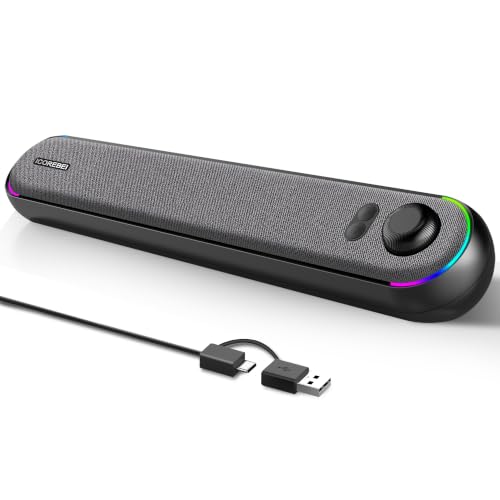
- USB-C audio and power on compatible devices
- Bluetooth 5.3 for wireless playback
- Three RGB lighting modes for desk styling
Best For: Modern home office or gaming desks that want USB-C simplicity and RGB accents
RGB Desktop Pick – Redragon GS560 Compact Soundbar
If you want soundbars for desktop setups that add both audio and visual flair, the Redragon GS560 is a simple, compact choice. Its 16-inch footprint is easy to fit under a monitor, and the USB power plus 3.5mm connection keeps setup straightforward for PC, laptop, TV, or phone use.
Best For: Gamers and desktop users who want an affordable RGB soundbar with easy plug-and-play setup.
Pros:
- Compact 16-inch design fits neatly under a monitor.
- USB-powered with 3.5mm audio for broad device compatibility.
- RGB lighting includes four backlit modes and music-reactive effects.
- Touch controls and a volume knob make adjustment easy.
Cons:
- No Bluetooth connectivity listed.
- 4-watt maximum output may be modest for larger rooms.
This is a practical desktop soundbar if you value a tidy footprint and a light show as much as everyday audio. It keeps the feature set focused on easy connection and visual style rather than extra complexity.
Premium Compact Choice – Razer Leviathan V2 X
Among soundbars for desktop setups, the Razer Leviathan V2 X stands out for packing USB-C power and audio into a very compact monitor-friendly body. It adds Bluetooth 5.0 for quick switching to mobile devices, making it a flexible option if you use one speaker across work and entertainment.
Best For: PC users who want a compact soundbar with RGB customization and both wired and wireless connection options.
Pros:
- Very compact form factor fits cleanly beneath a monitor.
- USB-C carries both power and audio for a simple setup.
- Bluetooth 5.0 supports wireless use with a low-latency connection.
- Razer Chroma RGB offers 14 lighting zones and app-based control.
Cons:
- Maximum output is listed at 5 watts.
- Requires a corded power source.
This model makes the most sense if you want a clean desktop layout with more connectivity flexibility than a basic USB soundbar. Its software support and RGB system also make it especially appealing for gaming-oriented setups.
Budget Bluetooth Option – Bluedee Desktop Soundbar
If you’re comparing soundbars for desktop setups on a budget, the Bluedee computer soundbar covers the basics well. It combines Bluetooth 5.0 with a 3.5mm jack, USB power, and a slim 16.4-inch profile that is made to sit neatly below a monitor.
Best For: Desktop buyers who want a slim, easy-to-place soundbar with Bluetooth and AUX support.
Pros:
- Bluetooth 5.0 and 3.5mm input support two connection styles.
- USB-powered design keeps setup simple and cable-light.
- Compact 16.4-inch body is sized for monitor placement.
- Light strips add a subtle desktop accent.
Cons:
- No waterproof rating, which is typical but worth noting.
- Sound focus is on everyday desktop use rather than advanced tuning features.
It is a sensible pick if you want a tidy all-purpose computer soundbar with wireless convenience. The design stays straightforward, which makes it easier to integrate into a clean desk setup.
Gaming Soundstage Pick – Creative Sound Blaster GS3
The Creative Sound Blaster GS3 is a compact choice for soundbars for desktop setups when you want more output and flexible input options. Its USB-C, AUX-in, and Bluetooth 5.4 support make it easy to move between PC, wireless audio, and wired sources, while the RGB presets add a gaming-friendly finish.
Best For: Gamers and desktop users who want flexible connectivity, RGB lighting, and stronger output from a compact soundbar.
Pros:
- Up to 24W peak power for a more capable desktop audio setup.
- Superwide technology is designed for a more immersive soundstage.
- USB-C, AUX-in, and Bluetooth 5.4 provide multiple connection paths.
- RGB presets include several lighting modes for gaming setups.
Cons:
- Requires a corded power source.
- Product dimensions suggest it is compact, but still worth checking space under smaller monitors.
This soundbar is a strong match if you want a desktop unit that feels more feature-rich than a basic entry model. It balances compact size, modern connectivity, and extra lighting without moving into a full speaker system.
Compact Bass-Boost Desktop Soundbar – Nylavee SK100 Compact Desktop Soundbar
If you want soundbars for desktop setups that add fuller sound without taking over your desk, the Nylavee SK100 is built for that role. It combines Bluetooth 5.0 and 3.5mm AUX support with a USB-powered, one-knob design, so it stays simple to use while offering richer bass and clearer highs than many basic monitor speakers.
Best For: Desktop users who want a compact, easy-to-run soundbar with stronger bass and both wired and wireless connection options.
Pros:
- 4 speaker units and 2 bass diaphragms for fuller stereo sound
- Bluetooth 5.0 plus 3.5mm AUX for flexible setup options
- USB powered with one-knob control for easy daily use
- Compact tabletop design that fits desktop, bedroom, or office setups
Cons:
- Maximum output is modest at 5 watts
- No built-in battery, so it must stay connected to power
- Not waterproof, so it is strictly for indoor use
The SK100 is a practical pick if you want a desktop soundbar that focuses on convenience and fuller-than-basic audio. Its compact footprint and dual connection modes make it easy to slot into a work or gaming desk without adding clutter.
RGB Gaming Desktop Soundbar – Redragon GS515 NEO RGB Desktop Soundbar
For soundbars for desktop setups where style matters as much as space savings, the Redragon GS515 NEO stands out with RGB lighting and a compact under-monitor design. Its dual 50mm drivers deliver 2.0 stereo sound up to 10W, while Bluetooth 5.3 and wired connectivity make it easy to use with everyday desktop audio sources.
Best For: Gamers and desktop users who want a small soundbar with RGB effects and straightforward stereo audio.
Pros:
- Dual 50mm drivers provide up to 10W output
- BT 5.3 plus wired support for flexible playback
- Compact shape fits neatly under a monitor
- Six RGB lighting modes add visual flair
Cons:
- Only 2.0 stereo, so it is not a surround system
- Bluetooth range is limited to 10 meters
- Best suited to desktop use rather than larger-room listening
The GS515 NEO is a good fit if you want your desk audio to look as lively as it sounds. It keeps the footprint small, adds convenient controls, and gives you a bit of gaming atmosphere without requiring a complicated setup.
Simple USB-AUX Desk Soundbar – LENRUE G11 Wired Desktop Soundbar
If you need soundbars for desktop setups that are easy to install and keep the desk tidy, the LENRUE G11 is a straightforward option. It uses USB and 3.5mm AUX power/audio, includes a USB-C adapter, and focuses on clear, noiseless stereo sound with a compact body that fits under a monitor.
Best For: Budget-friendly desktop and laptop users who want a compact wired speaker with easy plug-and-play setup.
Pros:
- USB powered with AUX input for simple plug-and-play use
- Compact design fits under most monitors
- Touch lights and a top volume knob add easy control
- USB-C adapter included for broader compatibility
Cons:
- No Bluetooth support
- No headphone port or microphone support
- Not compatible with TVs or headphones
The G11 keeps things basic in a useful way: no app setup, no wireless pairing, and no wasted desk space. It is best for buyers who want a simple wired desktop speaker that just works.
Rechargeable All-in-One Desk Audio – Bluedee 16.5" Rechargeable Soundbar
For soundbars for desktop setups, this Bluedee model is a practical pick if you want a compact speaker that keeps your desk tidy while still covering everyday audio needs. It combines Bluetooth 5.3, AUX, USB flash drive, and TF card playback with a rechargeable design, so it works well whether you prefer wireless listening or a simple wired setup.
Best For: Home office or dorm users who want a compact, rechargeable desktop soundbar with flexible connectivity.
Pros:
- Dual full-range drivers and tweeters aim for clear highs, vocals, and balanced sound.
- Rechargeable battery supports up to 13 hours of cordless playback at moderate volume.
- Bluetooth 5.3, AUX, USB, and TF card playback give you multiple ways to connect.
- Compact 16.5-inch soundbar format is designed to fit neatly under most monitors.
Cons:
- USB port is for flash drive playback only, not general USB audio.
- Maximum output is listed at 20 watts, so it is more desk-friendly than room-filling.
- Plastic enclosure and compact size suggest a simple, practical build rather than premium materials.
Overall, this is a versatile desktop speaker for people who want less cable clutter and easy switching between devices. It is especially appealing if you value portability and flexible playback more than raw volume.
Clamp-On Space Saver – XKX USB Clip-On Monitor Speaker
Among soundbars for desktop setups, this USB clip-on model stands out if your main goal is saving desk space. It connects by USB or USB-C, clamps to the top, side, or bottom of a monitor, and includes adaptive channel switching so left and right audio stay correctly oriented.
Best For: Users who want a space-saving monitor-mounted speaker with simple USB or USB-C connection.
Pros:
- Clip-on mount helps clear desk clutter and works on the top, side, or bottom of a monitor.
- USB and USB-C compatibility covers Windows, macOS, ChromeOS, Linux, and newer USB-C devices.
- Dual drivers and passive radiators are designed for loud sound and deep bass.
- Adaptive-channel-switching with a G-sensor keeps stereo placement correct when repositioned.
Cons:
- Not compatible with monitors, TVs, or projectors as listed in the notes.
- Wired USB-powered design means no wireless listening option.
- Best results depend on correct audio settings and a working USB interface.
This is a straightforward choice for anyone who wants an easy clip-on solution instead of a traditional desktop soundbar. It makes the most sense in compact workspaces where preserving surface area matters more than extra features.
USB-C Desktop Style With RGB – ICOREBEI USB-C Bluetooth Soundbar
If you are comparing soundbars for desktop setups and want a clean-looking speaker with modern extras, this ICOREBEI model is worth a look. It uses USB-C for audio and power on compatible devices, adds Bluetooth 5.3 for wireless use, and includes three RGB lighting modes for a more visual desk setup.
Best For: PC, Mac, or laptop users who want a slim desktop soundbar with USB-C, Bluetooth, and RGB lighting.
Pros:
- Dual full-range drivers and a bass radiator are tuned for clear dialogue and fuller bass.
- USB-C audio and power use one cable on compatible devices for a simpler setup.
- Bluetooth 5.3 broadens compatibility with PCs, laptops, tablets, smartphones, TVs, and consoles.
- Three RGB lighting modes add a customizable visual accent to the desk.
Cons:
- No built-in battery, so it must stay connected to USB power during use.
- Maximum output is listed at 6 watts, which points to near-field desktop listening rather than loud-room playback.
- USB-C setup depends on device compatibility and still requires power connection.
Overall, this speaker makes sense if you want a slim desktop bar that blends audio utility with a more modern look. It is especially appealing for tidy home office or gaming setups where style and simple connectivity both matter.
How We Picked These Soundbars for Desktop Setups
We prioritized desktop-friendly designs with compact dimensions, straightforward setup, and useful connection options such as USB, AUX, Bluetooth, or USB-C. We also looked for models that balance clarity, bass presence, and volume for nearfield listening at a desk.
Quick Comparison: What Matters Most
For Soundbars for Desktop Setups, the best choice usually depends on your priority. RGB-heavy gaming models may suit a visible battlestation, while simpler wired options often make more sense for office work. Bluetooth adds flexibility, but wired USB or AUX connections can be more reliable for low-latency PC audio.
Key Buying Factors for Soundbars for Desktop Setups
Size and Monitor Clearance
Measure the space under your monitor and across your desk before buying. A soundbar should sit low enough to avoid blocking the screen and compact enough to leave room for peripherals.
Connectivity
USB power is convenient, while USB-C and Bluetooth add modern flexibility. If you care about gaming or video calls, a wired connection is often the safest pick for stable performance.
Sound Profile
Nearfield listening benefits from clear mids and controlled treble. If you enjoy music or single-player games, look for models that claim stronger bass or wider stereo separation, but avoid overemphasizing bass if your desk is in a small room.
Controls and Features
Touch controls, lighting, and EQ presets can be helpful, but they should not outweigh audio quality. Choose extras only if they genuinely fit your workspace and usage style.
Who Should Buy Which Soundbars for Desktop Setups?
If you want a clean office setup, choose a minimal wired or USB-powered bar. If you game at your desk, a model with RGB lighting, wider sound, or Bluetooth convenience may be a better fit. For shared spaces, flexible connectivity and easy volume control matter more than flashy features. In short, the best Soundbars for Desktop Setups are the ones that match your desk space, listening habits, and connection needs rather than the one with the most features.