Choosing the right teleprompter can make your delivery sound natural, reduce retakes, and help you stay focused on the camera instead of your notes.
This 2026 roundup highlights versatile teleprompters for solo creators, livestreamers, educators, and business presentations, with options for tablets, smartphones, and built-in displays.
Best 10 Teleprompters Picks for 2026
Built-In Screen Teleprompter
Elgato Prompter with Built-in Screen

- Built-in display removes the need for a tablet or phone.
- Works for scripts, Twitch chat, and video calls.
- Desktop setup and Camera Hub customization keep things simple.
Best For: Streamers and professionals who want an all-in-one teleprompter
Large Format Teleprompter
NEEWER X17 II 17" HD Beamsplitter

- 17-inch HD beamsplitter with clear script reflection.
- No assembly required and ready to use out of the box.
- RT113 remote and app control help manage pacing.
Best For: Presenters who want a large, ready-to-use teleprompter
Tablet-Only Camera Teleprompter
SMALLRIG iPad Teleprompter 3646

- Fits iPads and tablets up to 11 inches.
- Requires a 15mm rail support system for proper use.
- SmallGoGo app can pull text from PDFs, Word files, and TXT.
Best For: Tablet-based camera setups that need a modular teleprompter
Built-In Monitor Teleprompter
NEEWER X11 2-in-1 with Screen Mirroring

- Built-in 9-inch LCD monitor supports screen mirroring.
- Can work as an external monitor for computers.
- Clear beamsplitter glass reduces ghosting and keeps text readable.
Best For: Beginners and streamers who want a self-contained teleprompter
Assembly-Free 14-Inch Pick
NEEWER X14 III Teleprompter with App Control

- Foldable, no-assembly design
- 14-inch beamsplitter with 10 ft reading range
- Remote and app control for scrolling
Best For: Portable filming setups and repeat video presentations
Budget-Friendly All-Rounder
NEEWER X12 14-Inch Teleprompter

- 75% light transmittance and 10 ft reading range
- Remote plus app-based control
- Carries and stores easily in the included case
Best For: Beginners and creators needing simple, flexible teleprompting
Multi-Device Creator Pick
Desview T5 Teleprompter for Phone, Tablet, DSLR

- Supports phones, tablets under 11 inches, and DSLR cameras
- App and Bluetooth remote control
- Includes adapter rings and coated glass
Best For: Multi-device creators and live streamers
Best Budget Pick
NEEWER Basics X12B 12" Teleprompter for Tablet DSLR Camera

- No-assembly aluminum alloy design
- Remote and app control for scrolling
- Foldable with carry case for storage
Best For: Budget-minded creators needing a simple tablet-and-camera teleprompter
Best for Compact Setups
Desview T3 Teleprompter for Camera & Smartphone

- Supports phones and tablets up to 10 inches
- Wide-angle support for horizontal and vertical video
- Bluetooth remote with free app control
Best For: Small-camera and smartphone creators, especially vertical video
Best All-in-One Kit
GVM 12" Teleprompter for iPad, Phone, and DSLR
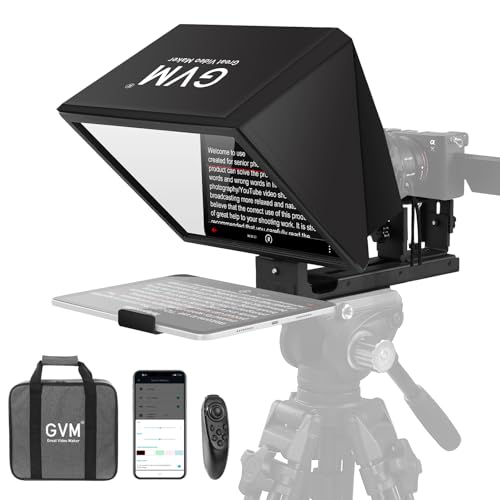
- Installation-free collapsible design
- 12-inch optical glass with 15 ft reading range
- Wireless remote plus app control
Best For: Creators wanting a portable all-in-one teleprompter kit
Built-In Screen Teleprompter – Elgato Prompter with Built-in Screen
If you want teleprompters that keep setup simple, the Elgato Prompter stands out because it has a built-in display, so you do not need to mount a separate tablet or phone. It is a practical option for streaming, video calls, and script reading when you want to stay focused on the camera and still keep text right in front of you.
Best For: Creators and professionals who want a compact, all-in-one teleprompter for streaming, Zoom, and script reading.
Pros:
- Built-in 9-inch display means no extra tablet or smartphone screen is required.
- Works for scripts, Twitch chat, Zoom, and Teams while helping maintain eye contact.
- Supports more cameras than many alternatives and includes Camera Hub customization tools.
- Desktop-controlled setup is straightforward and works with PC or Mac.
Cons:
- Mac and Android use require free DisplayLink software.
- It is a more specialized choice if you only need a basic tablet teleprompter.
Overall, this is one of the most streamlined teleprompters for users who want an integrated screen and a clean desktop workflow. It makes the most sense when convenience and camera-facing delivery matter more than portability.
Large Format Teleprompter – NEEWER X17 II 17" HD Beamsplitter
The NEEWER X17 II is one of the larger teleprompters for users who want a roomy 17-inch beamsplitter and a ready-to-use design. It is built for confident script reading during speeches, vlogging, live streams, online courses, and tutorial recording, with app and remote control to make pacing easier.
Best For: Presenters and creators who need a large teleprompter with quick setup and remote script control.
Pros:
- 17-inch HD beamsplitter offers clear script reflection with 71% light transmittance.
- No assembly required, so it is ready to use out of the box.
- Includes RT113 remote and app control for pausing, speeding up, and changing pages.
- Quick-release plate and flat-fold design help with camera switching and transport.
Cons:
- It is relatively large and heavy compared with compact teleprompters.
- Tablet or phone must fit within the 9.3-inch width limit.
This model makes sense when screen size, viewing comfort, and controlled delivery are the priority. For studio-style work or frequent presentations, the X17 II offers a practical balance of size and convenience.
Tablet-Only Camera Teleprompter – SMALLRIG iPad Teleprompter 3646
The SMALLRIG 3646 is a teleprompter built for iPad and tablet users who want a camera-facing workflow without relying on a phone. It is designed for DSLR, mirrorless, and camcorder setups, and it works best when paired with the required 15mm rail support system for proper lens protection and stability.
Best For: Tablet users who need a modular teleprompter for camera work, livestreaming, or video conferences.
Pros:
- Supports tablets up to 11 inches and is not limited to smartphone prompts.
- Works with DSLR, mirrorless, and camcorder setups using a 15mm rail system.
- Supports lenses from 49mm to 95mm and avoids vignetting at 22mm or longer.
- SmallGoGo app can extract text from PDFs, images, Word files, and TXT files.
Cons:
- Not compatible with smartphones.
- Requires a separately available 15mm LWS baseplate/rail support system.
This teleprompter is best for users who already work with tablet-based prompting and want a camera rig that is more modular. It is less plug-and-play than some options, but it offers useful flexibility for more serious setups.
Built-In Monitor Teleprompter – NEEWER X11 2-in-1 with Screen Mirroring
The NEEWER X11 is a teleprompter with a built-in monitor, which removes the need for a separate tablet or phone when you want to mirror scripts. It is designed for easy computer connection, live streaming, and video conferencing, and it also works as a second computer display when needed.
Best For: Beginners and streamers who want a teleprompter with an integrated monitor and simple mirroring.
Pros:
- Built-in 9-inch HD LCD monitor supports screen mirroring without a tablet or phone.
- Can connect to a computer via USB-C and also works as an external monitor.
- Clear 11-inch beamsplitter glass helps keep text readable with reduced ghosting.
- Adjustable holder and quick-release plate support flexible camera positioning.
Cons:
- Voice sync is not supported.
- Some connection methods require a driver and separate app downloads.
For users who want teleprompters that feel beginner-friendly and self-contained, this model is a strong fit. The built-in screen and mirroring options make it especially useful for fast setup in streaming and conferencing workflows.
Assembly-Free 14-Inch Pick – NEEWER X14 III Teleprompter with App Control
If you want teleprompters that set up fast and travel easily, the NEEWER X14 III is built around convenience. Its foldable, assembly-free design makes it a practical choice for creators who move between filming setups, while the 14-inch beamsplitter and app-based scrolling help keep delivery smooth during courses, speeches, tutorials, and broadcasts.
Best For: Creators who want a portable, no-assembly teleprompter with remote/app control for recurring video work.
Pros:
- Foldable and assembly free for quick setup and storage
- 14-inch HD beamsplitter with 71% light transmission and up to 10 ft reading range
- Includes RT113 remote plus NEEWER app support for scroll and font control
- Compatible with tablets and phones up to 8.7 inches wide
Cons:
- Maximum device width is limited to 8.7 inches
- Best suited to supported phones and tablets rather than larger tablets
- Not water resistant
Overall, this model stands out if you value speed, portability, and simple control over a more compact teleprompter workflow. The included carry case and Manfrotto 501PL-compatible mount add to its usefulness for regular on-the-go production.
Budget-Friendly All-Rounder – NEEWER X12 14-Inch Teleprompter
The NEEWER X12 is a practical option if you want teleprompters that are straightforward to assemble and easy to carry. Its 14-inch beam splitter glass, app control, and included remote make it a solid fit for online teaching, vlogging, live streaming, and general camera use.
Best For: Users who want an easy-to-set-up teleprompter for cameras, tablets, and phones with remote/app control.
Pros:
- 75% light transmittance with up to 10 ft reading distance
- Includes RT-110 remote and NEEWER app control
- Lightweight aluminum alloy build with carrying case
- Fits smartphones and tablets up to 9.84 x 8.68 inches
Cons:
- Not compatible with wide-angle lenses
- Camera lens focal length must be more than 28mm
- Not compatible with iPad Pro 12-inch
This is a strong pick for buyers who need a flexible teleprompter without a complicated setup. Just be sure your camera lens and tablet size match the compatibility limits before buying.
Multi-Device Creator Pick – Desview T5 Teleprompter for Phone, Tablet, DSLR
The Desview T5 is aimed at creators who need teleprompters that can handle a mix of smartphones, tablets, and DSLR cameras. It includes adapter rings, a Bluetooth remote, and a free app with manuscript tools, making it a practical choice for live streaming, vlogging, and video creation.
Best For: Creators who switch between mobile and DSLR shooting and want app-based manuscript control.
Pros:
- Works with smartphones, tablets under 11 inches, and DSLR cameras
- Includes 49-82mm adapter rings for broad camera compatibility
- Desview app supports txt/docx import, font settings, mirror/rotate, and timer tools
- Bluetooth remote offers play/pause, speed, and page-turn control
Cons:
- Tablet support is limited to under 11 inches
- Some mobile shooting modes require switching the holder position
- Heavier-duty feature set may be more than casual users need
Overall, the T5 is a versatile teleprompter for creators who want one setup that can move between phone and camera workflows. The coated glass, light-seal foam, and adjustable front panel add to its practical value for cleaner recording sessions.
Best Budget Pick – NEEWER Basics X12B 12" Teleprompter for Tablet DSLR Camera
If you want teleprompters with a simple setup and no extra fuss, the NEEWER Basics X12B is built around the essentials. Its installation-free, collapsible design makes it a practical choice for recording presentations, tutorials, and online courses with a tablet and camera.
Best For: Creators who want an easy-to-use 12-inch teleprompter for tablet-and-camera recording without assembly.
Pros:
- No-assembly design for quick setup and takedown
- Works with iPad, tablets, and compatible cameras
- Includes remote control and app-based scrolling adjustments
- Foldable design and carry case improve portability
Cons:
- Not for phone shooting
- Does not function as a monitor or allow direct on-screen self-viewing
- Tablet fit and camera compatibility are more specific than some larger models
Overall, the X12B is a straightforward teleprompter for users who value convenience over advanced extras. It focuses on readable script display, portability, and simple remote control in a compact package.
Best for Compact Setups – Desview T3 Teleprompter for Camera & Smartphone
The Desview T3 is a teleprompter built for smaller phones and tablets, with camera mounting support that makes it useful for YouTube, TikTok, interviews, and live streaming. It is a strong option if you want a compact unit that still handles wide-angle shooting and smartphone-based recording.
Best For: Creators using phones or compact tablets who want a teleprompter for small-camera setups and vertical content.
Pros:
- Supports smartphones and compact tablets up to 10 inches
- Includes adapter rings for DSLR and mirrorless lens mounting
- Wide-angle support helps avoid vignetting in horizontal and vertical shooting
- Bluetooth remote and free app enable script control
Cons:
- Not intended for larger 12.9-inch iPads
- Phone and tablet size limits are tighter than on bigger teleprompters
- Point-and-shoot cameras without lens filter threads are not supported
In practical terms, the T3 makes the most sense for creators who prioritize compact compatibility and flexible shooting angles. Its beam splitter glass and control options round out a focused, mobile-friendly teleprompter package.
Best All-in-One Kit – GVM 12" Teleprompter for iPad, Phone, and DSLR
The GVM 12-inch teleprompter is a versatile all-in-one kit for users who want a collapsible design with broad device compatibility. It’s aimed at video recording, live streaming, and presentations, with reflective glass, app control, and a carry bag for easier transport.
Best For: Users who want a portable 12-inch teleprompter kit with app control and broad recording use.
Pros:
- Installation-free collapsible design for simple setup
- Supports smartphones, tablets, and DSLR or mirrorless cameras
- Includes wireless remote and app-based scrolling controls
- Foldable body and carry bag improve portability
Cons:
- Phone and tablet compatibility is limited to devices up to 8.6 inches
- Heavier than some comparable teleprompters
- Not as compact as smaller smartphone-focused models
For creators who want one teleprompter that covers several workflows, the GVM stands out for convenience and flexibility. Its combination of easy setup, readable glass, and remote control makes it well suited to regular on-camera use.
How We Picked These Teleprompters
We focused on practical features that matter in real use: screen size, device compatibility, optical clarity, remote or app control, camera mounting flexibility, and overall portability. We also considered how easy each teleprompter is to set up and how well it fits common workflows for filming at home, in studios, or on the go.
Quick Comparison of Teleprompters
Some Teleprompters are built for simplicity, like tablet and smartphone mounts that work well for straightforward recordings. Others add larger beamsplitters, app-based scrolling, or integrated displays for a more polished, professional setup. If you need fast setup and travel-friendly gear, compact models are easier to manage. If you record longer scripts or work with larger cameras, a bigger glass area can improve readability and framing.
Key Buying Factors for Teleprompters
Screen Compatibility
Check the maximum device size and whether the unit supports tablets, smartphones, or a dedicated monitor. Not all Teleprompters are universal, and some are designed specifically for iPad-style tablets rather than phones.
Beam Splitter Size and Clarity
A larger beamsplitter can make text easier to read from a comfortable distance, but it may also increase the footprint. Look for coated glass or high-quality reflective surfaces to preserve image brightness and reduce ghosting.
Camera and Lens Fit
Make sure your lens can sit comfortably behind the glass without vignetting. Wide-angle lenses and larger camera bodies may require more clearance, especially in compact Teleprompters.
Control Options
Remote controls and app syncing can make scrolling smoother and more precise. That matters if you’re recording long-form content, live presentations, or frequent takes where consistency is important.
Build and Portability
Aluminum alloy frames tend to offer a good balance of durability and weight. If you travel often or need quick resets between shoots, foldable or installation-free designs can save time.
Who Should Buy Which Teleprompters?
Creators and streamers who want the simplest all-in-one option may prefer Teleprompters with built-in screens or direct screen mirroring support. Tablet-first users should look for models that handle iPads securely and offer a stable mounting platform. Smartphone users should verify support before buying, since some units exclude phones entirely.
If you shoot with a DSLR or mirrorless camera and need a more flexible presentation setup, choose a teleprompter with strong lens compatibility, a clear beamsplitter, and reliable remote control. For teams, educators, and business presenters, larger models can improve readability and make longer scripts easier to deliver naturally.