Choosing the right video switcher for church live streaming can make services look more polished, keep production simple, and help volunteers work confidently.
This guide compares the most important features, so you can match the right switcher to your camera setup, budget, and worship production needs.
Best 10 Video Switcher for Church Picks for 2026
Compact 4-Input Streaming Hub

- 4 HDMI inputs for small church camera setups
- Built-in streaming, recording, and multiview
- Includes a 6-input audio mixer
Best For: Small churches wanting an easy all-in-one streaming switcher
Simple Mobile Production Mixer

- 4 HDMI inputs with 1080p support
- USB 3.0 output works with streaming software
- Compact design with LCD preview screen
Best For: Solo church operators needing a compact live switcher
Eight-Input Worship Production Switcher
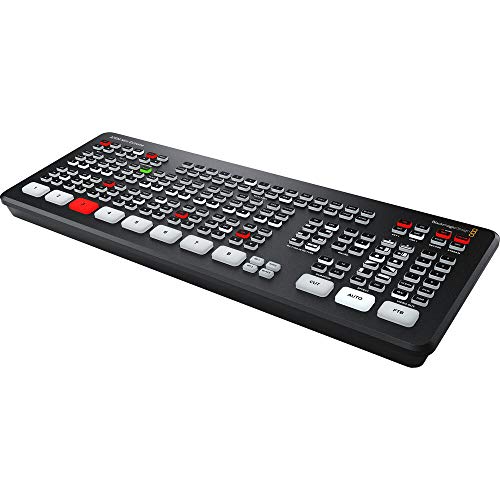
- 8 HDMI inputs for larger church setups
- Resync and format conversion on every input
- Built-in streaming, recording, and multiview
Best For: Churches needing more camera inputs and stronger production flexibility
Multi-Platform Church Streaming Deck

- Streams directly over Ethernet to up to 3 platforms
- Records to SD card while streaming via USB
- Adds a USB camera input and 8 macro buttons
Best For: Churches wanting direct streaming with local backup recording
Compact Streaming Pick
RGBlink Mini V3 4K HDMI Switcher

- 4 HDMI inputs and dual HDMI output
- 2.1" touch screen with T-bar control
- Optional TAO Cloud upgrades for PTZ and recording
Best For: Small church livestream teams that want a compact HDMI switcher with upgrade options
Pro Hybrid Workhorse

- 4 HDMI and 4 SDI hybrid inputs
- ISO records all 8 channels separately
- RTMP, SRT, and dual USB output support
Best For: Larger churches needing hybrid inputs and ISO recording for live and post-production use
Feature-Rich All-Rounder
FoMaKo M1 4K HDMI Mixer Switcher

- HDMI, USB, webcam, and SD recording support
- PTZ control and built-in web remote control
- Audio delay, ALC, AFV, and multi-effect tools
Best For: Churches wanting an all-in-one switcher with streaming, recording, PTZ, and audio control
Compact 4-Channel Portable Switcher
Ultra-Compact 4 HDMI Video Switcher

- 4 HDMI inputs with zero-latency switching
- Built-in 4-inch multiview screen
- PTZ, chroma key, PIP, and logo overlay support
Best For: small to mid-sized churches needing portable HDMI switching
Hybrid SDI/HDMI Live Streamer
NeoLIVE R5S Multi-Input Switcher

- 2 SDI, 2 HDMI, USB UVC, and NDI inputs
- Under-3-frame latency with dual HDMI outputs
- Hardware RTMP streaming, recording, and web control
Best For: churches needing hybrid SDI/HDMI streaming with network input support
All-in-One Worship Production Hub
KC601 Pro 4-Channel HDMI Switcher

- 4 HDMI inputs with a built-in 5.5-inch FHD screen
- USB3.0 UVC streaming plus USB recording
- 10 scene presets with T-bar and keying tools
Best For: worship teams wanting an all-in-one streaming and recording hub
Compact 4-Input Streaming Hub – Blackmagic ATEM Mini Pro
If you’re looking for a video switcher for church livestreams, the Blackmagic Design ATEM Mini Pro keeps the workflow simple while still giving you the core tools needed for a polished service. It supports 4 HDMI camera inputs, multiview monitoring, built-in streaming, and external recording, so a small production team can manage Sunday worship without extra gear.
Best For: Small churches that want an all-in-one HDMI switcher for streaming, recording, and multiview monitoring.
Pros:
- 4 HDMI inputs with 10-bit 4:2:2 YUV support
- Built-in multiview plus streaming and recording support
- Includes cut, mix, dip, wipe, and DVE transitions
- Built-in 6-input, 2-channel audio mixer
Cons:
- Limited to 4 HDMI inputs, which may be tight for larger setups
- Uses HDMI camera connections only
- No SDI input support listed
For a church that wants straightforward operation and strong basic production features, this model covers the essentials well. It is especially practical when you need live streaming, local recording, and live camera switching in one compact box.
Simple Mobile Production Mixer – FEELWORLD LIVEPRO L1 V1
The FEELWORLD LIVEPRO L1 V1 is a practical video switcher for church teams that want a compact live production setup. With 4 HDMI inputs, USB 3.0 webcam-style output, and a 2-inch LCD preview screen, it gives a single operator the basics for switching cameras, slides, and video sources during services.
Best For: Solo operators or small church teams that need a lightweight, easy-to-run HDMI switcher for live streaming.
Pros:
- 4 HDMI inputs with 1080p support
- USB 3.0 output works like a built-in webcam for streaming software
- 2-inch LCD screen with preview and program monitoring
- Compact design with tripod mounting support
Cons:
- Fewer inputs than larger production switchers
- Feature set is more basic than premium church production units
- Designed around HDMI sources, with no SDI input highlighted
This is a solid pick if you want a simpler operator experience and don’t need a large rack-style system. It should suit smaller worship streams where space, speed, and ease of use matter more than advanced production depth.
Eight-Input Worship Production Switcher – Blackmagic ATEM Mini Extreme
For larger church productions, this video switcher for church use offers the extra input count that growing worship teams often need. The Blackmagic Design ATEM Mini Extreme provides 8 HDMI inputs, multiview support, and built-in format conversion on all inputs, making it a stronger fit for multi-camera services with several sources in play.
Best For: Churches with multiple cameras and HDMI sources that need more switching capacity.
Pros:
- 8 HDMI inputs for bigger worship and event setups
- Resync and format conversion on all 8 inputs
- Includes streaming, recording, and multiview features
- Compatible with desktop and laptop workflows
Cons:
- Larger and heavier than compact 4-input models
- Only HDMI inputs are listed
- May be more switcher than a very small church needs
This model makes sense when a church has outgrown entry-level switchers and needs more room for cameras and computer sources. It is best viewed as a scalable production tool for services that demand a fuller control surface and more flexibility.
Multi-Platform Church Streaming Deck – Osee GoStream Deck Pro
The Osee GoStream Deck Pro is a feature-packed video switcher for church teams that want flexible streaming and recording options. It combines 4 HDMI inputs, an extra USB camera input, SD card recording, and Ethernet-based direct streaming, so it can support both simple services and more involved live productions.
Best For: Churches that want direct streaming, local backup recording, and quick scene control in one device.
Pros:
- Record to SD card while streaming through USB to OBS, Zoom, or Teams
- Built-in hardware encoder supports direct Ethernet streaming without a PC
- Can stream to up to 3 platforms simultaneously
- Includes 8 hardware Macro buttons for faster scene and overlay control
Cons:
- Only 4 HDMI sources are supported, plus one USB camera input
- More advanced controls may take time to learn
- Less compact than the simplest small-room switchers
If your church wants to reduce dependence on a computer while keeping backup recording available, this is a strong option. The combination of direct streaming, multi-platform output, and tactile macro controls makes it appealing for small to mid-size production teams.
Compact Streaming Pick – RGBlink Mini V3 4K HDMI Switcher
If you want a compact video switcher for church livestreams, the RGBlink Mini V3 gives you the core tools for small to mid-size productions without taking up much space. It combines 4 HDMI inputs, dual HDMI outputs, a touch screen, and UVC webcam mode, so it can fit neatly into a simple worship streaming setup.
Best For: Smaller church teams that want an affordable-feeling all-in-one switcher with HDMI outputs, touch control, and optional advanced features.
Pros:
- 4 HDMI inputs with dual HDMI output for program and preview workflows
- 2.1″ touch screen plus T-bar control for hands-on switching
- UVC webcam mode for quick recognition on platforms like YouTube and Facebook
- Optional TAO Cloud features for PTZ control, recording, chroma key, and logo overlay
Cons:
- Advanced functions require TAO Cloud activation and separate plans
- For stable UVC streaming on Mac or PC, the included USB 3.0 cable is recommended
- Needs a 35W+ USB-C power adapter for stable performance
For churches that need a compact HDMI switcher first and can add advanced tools later, the Mini V3 is a flexible entry-level option. Its strength is simplicity now, with room to grow through optional licensing.
Pro Hybrid Workhorse – Osee GoStream Duet 8 ISO
The Osee GoStream Duet 8 ISO is a serious video switcher for church productions that need more input flexibility and cleaner post-production workflows. With 4 HDMI and 4 SDI inputs, plus ISO recording of all eight sources, it is built for larger services, multi-camera setups, and events where reliability matters.
Best For: Churches running multi-camera worship, conferences, or events that need hybrid HDMI/SDI inputs and ISO recording.
Pros:
- 4 HDMI and 4 SDI inputs let you mix pro cameras without external converters
- ISO records all 8 channels independently to external SSDs or SD cards
- Triple streaming support with RTMP, SRT, and Ethernet-based custom protocols
- Balanced XLR and 3.5mm audio inputs for more flexible church audio integration
Cons:
- More complex than a basic entry-level switcher
- Designed for external monitor-based control rather than a simple touch interface
- Heavier and more production-focused than compact desktop models
If your church needs a robust hybrid switcher that can handle both live streaming and backup recording, this model stands out. The ISO workflow and broad connectivity make it especially useful when you need editing flexibility after the service.
Feature-Rich All-Rounder – FoMaKo M1 4K HDMI Mixer Switcher
The FoMaKo M1 is a feature-packed video switcher for church teams that want live streaming, recording, and PTZ control in one unit. It supports multiple HDMI and USB sources, offers simultaneous recording to USB and SD card, and adds effects like chroma key, logo insertion, and PIP for more polished worship productions.
Best For: Churches that want a versatile all-in-one switcher with multi-platform streaming, PTZ support, and strong audio tools.
Pros:
- Multi-signal design with HDMI, USB, webcam, and SD card recording support
- Supports PTZ controller use and remote control through a built-in web server
- Smart audio tools including delay adjustment, ALC, AFV, and mic inputs
- Effects such as luma key, chroma key, logo insertion, PIP, and multiple transitions
Cons:
- Feature set may be more than a small volunteer team needs
- NDI support is upgradeable rather than fully included by default
- Described inputs and workflow may require careful setup for first-time users
For churches that want one box to cover switching, streaming, recording, and remote control, the M1 has a lot to offer. It is especially appealing if you need more creative control over both audio and video during services.
Compact 4-Channel Portable Switcher – Ultra-Compact 4 HDMI Video Switcher
If you need a video switcher for church that stays simple, portable, and camera-ready, the Mixer Plus is built around fast multi-camera switching and on-device monitoring. Its 4-inch built-in screen gives you a real-time multiview, while the 4 HDMI inputs and zero-latency switching help keep service production smooth. It also adds useful live-production tools without making the setup feel bulky.
Best For: Small to mid-sized churches wanting a compact HDMI switcher with built-in monitoring and easy live switching.
Pros:
- Built-in 4-inch display for multiview monitoring without needing an extra screen
- 4 HDMI inputs with zero-latency switching and 30 transition effects
- Includes PTZ control, chroma key, luma key, PIP, DSK, and logo overlay
- Custom AUX HDMI output can be assigned to several source and preview options
Cons:
- HDMI-only design may not fit setups that rely on SDI sources
- More advanced features may be more than a very basic church livestream needs
For churches that want a portable, all-in-one switcher with strong monitoring and flexible output options, this model is a practical fit. It keeps the workflow focused on live camera switching, which is often what matters most on Sundays.
Hybrid SDI/HDMI Live Streamer – NeoLIVE R5S Multi-Input Switcher
The SPROLINK NeoLIVE R5S is a strong video switcher for church productions that mix broadcast gear, HDMI cameras, and network sources. With 2 SDI inputs, 2 4K HDMI inputs, USB UVC support, and NDI over Ethernet, it gives worship teams more ways to connect cameras and feeds. The sub-3-frame latency and dual HDMI outputs make it well suited for live services where timing and monitoring matter.
Best For: Churches that want a more advanced hybrid switcher for SDI, HDMI, and network-based livestreaming.
Pros:
- Hybrid input support: 2x 3G-SDI, 2x 4K HDMI, USB UVC, and NDI
- Ultra-low under-3-frame latency for real-time switching
- Dual HDMI outputs for program and multiview monitoring
- Hardware RTMP streaming, web control, recording, and playback support
Cons:
- More complex than a basic HDMI-only church switcher
- Some features may be more than smaller churches need for simple services
If your church is building a more flexible production workflow, this switcher stands out for its hybrid connectivity and no-PC streaming options. It is especially useful when you need one unit that can handle several source types and still stay easy to monitor during a service.
All-in-One Worship Production Hub – KC601 Pro 4-Channel HDMI Switcher
The FoMaKo KC601 Pro is a video switcher for church teams that want switching, monitoring, recording, and streaming in one box. It combines 4 HDMI inputs, a built-in 5.5-inch FHD screen, and USB3.0 recording with support for common streaming workflows like YouTube, Facebook, Zoom, OBS, and vMix. With presets, T-bar control, and multiple audio inputs, it is geared toward hands-on live production.
Best For: Churches needing an all-in-one HDMI switcher with recording, multistream support, and flexible audio options.
Pros:
- 4 HDMI inputs with a built-in 5.5-inch FHD monitor
- USB3.0 UVC streaming and high-bitrate USB recording
- Supports up to 10 saved scenes for quick recall
- Includes T-bar control plus chroma key, luma key, DSK, PIP, and logo overlay
Cons:
- Does not support 4K input
- May be larger and more feature-heavy than a very small church setup requires
This is a practical choice for worship teams that want a full-featured production hub without splitting tasks across multiple devices. The built-in screen, scene memory, and audio inputs make it especially appealing for churches running regular livestreams and recorded services.
How We Picked the Best Video Switcher for Church
For a Video Switcher for Church use, we focused on the features that matter most in real worship environments: input options, ease of operation, streaming and recording support, portability, and compatibility with common church camera setups. We also considered whether a unit is better suited to a small volunteer team or a more advanced multi-camera system.
Quick Comparison
In general, compact HDMI-only switchers are the easiest fit for smaller churches, while HDMI/SDI models offer more flexibility for longer cable runs and larger sanctuaries. Models with built-in screens, USB capture, or ISO recording can simplify workflow, but they may add cost and complexity. If you need rapid setup and minimal training, prioritize straightforward controls over extra features.
Key Buying Factors for Video Switcher for Church
Input Type and Camera Count
Make sure the switcher matches your existing cameras. HDMI works well for shorter runs and budget-friendly systems, while SDI is better for distance and reliability. Choose enough inputs for your current cameras plus one or two growth channels.
Ease of Use for Volunteers
Church production teams often rotate operators, so a clear layout, labeled buttons, and simple transitions can matter more than advanced effects. A switcher that is easy to learn helps reduce mistakes during live services.
Streaming, Recording, and Outputs
If your church streams online, confirm support for USB, HDMI program out, or network streaming features. Recording options are also useful for sermon archives, training, and post-service editing.
Workflow and Expansion
Consider whether you need PTZ control, NDI, ISO recording, or touch-screen monitoring. These features can improve workflow, but only if your team will actually use them.
Who Should Buy Which Video Switcher for Church?
Smaller churches with simple multi-camera needs should look at compact HDMI switchers that are easy to set up and operate. Medium-size churches may benefit from models with more inputs, a built-in display, or better recording support. Larger churches or production teams should favor HDMI/SDI switchers with stronger connectivity, room to expand, and features that support more complex live-streaming workflows.
The best choice is the one that fits your current cameras, your volunteers’ skill level, and how you plan to stream, record, and grow over time.