If you need to monitor multiple sources while switching quickly, a video switcher with multi view can make live production far easier to manage. It helps you keep an eye on every input, confirm audio and framing, and stay in control during streams, classes, events, and broadcasts.
Below, we focus on practical options with useful monitoring layouts, reliable connectivity, and features that matter most when you want a smoother multi-camera workflow.
Best 10 Video Switcher with Multi View Picks for 2026
High-Input Live Production
Blackmagic ATEM Mini Extreme 8-Input Switcher
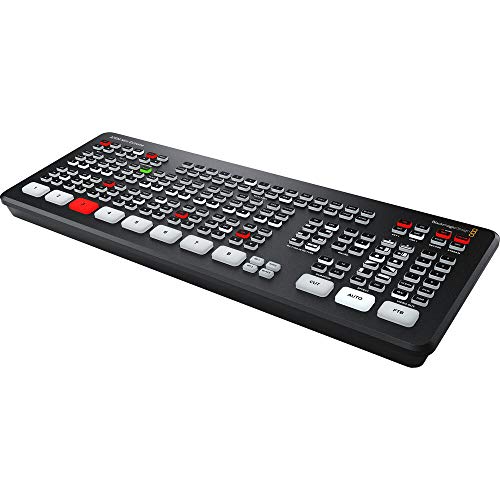
- 8 HDMI inputs with re-sync on every input
- Built-in streaming, recording, and multiview
- Format conversion on all inputs helps mixed sources
Best For: Creators who need the most HDMI inputs in a compact live switcher
Compact Event Control
Roland V-8HD HDMI Switcher with Built-In Monitor

- Up to eight HDMI sources in a compact chassis
- Built-in preview monitor with optional external display support
- Macros, presets, and AUX output add workflow flexibility
Best For: Live event teams that want compact HDMI switching with monitoring
Quad Multiview Utility
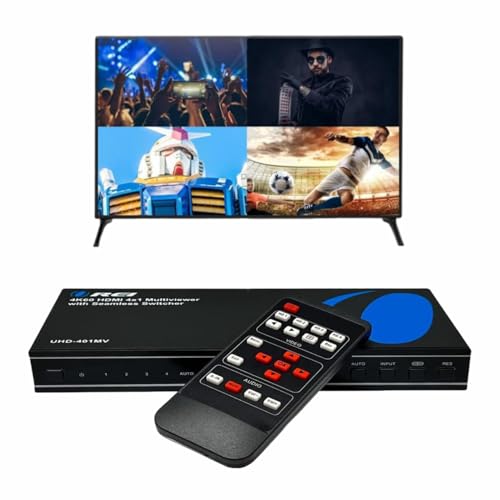
- 4-source quad multiview for HDMI setups
- Supports up to 4K@60Hz output
- Optical and L/R audio outputs add flexibility
Best For: People who want simple 4-input multiview for TVs or mixed devices
Streaming Multiview Starter
Blackmagic ATEM Mini Pro 4-Input Stream Switcher

- 4 HDMI inputs with built-in streaming and recording
- Multiview output for live camera monitoring
- Lightweight design with a 6-input audio mixer
Best For: Small streaming setups that need multiview and easy live output
Integrated 4-Channel Production Hub
CineTreak Mixer Plus with built-in multiview

- 4.5-inch built-in multiview display
- 4 HDMI inputs with 30 transition effects
- USB 3.0 UVC streaming for OBS and more
Best For: Small productions that want switcher and multiview in one device
Quad View Seamless Switcher
J-Tech Digital 4x1 multi-viewer switcher

- 4-in-1 multi-viewer with zero-latency switching
- 8 display modes including PiP, PBP, and Quad-View
- Supports up to 4K 60Hz with audio extraction
Best For: Users who want flexible multi-source viewing on one display
Streaming Mixer with Direct Output
Osee GoStream Deck Pro live streaming mixer

- 4 HDMI inputs plus USB camera input
- MultiSource layouts with picture-in-picture and multi-window modes
- SD card recording plus USB and Ethernet streaming
Best For: Live teams that need switching, recording, and direct streaming
Portable 4-Channel Multiview Switcher
Mixer Plus Compact HDMI Switcher

- Built-in 4-inch display with real-time multiview
- 4 HDMI inputs with zero-latency switching
- PTZ control plus chroma key, PIP, and logo overlay
Best For: Mobile creators and small teams needing onboard multiview
Pro 5-Channel Broadcast Mixer

- 4 HDMI and 4 SDI inputs plus USB and network streaming
- Customizable multi-view, PST, and PGM outputs
- USB/SD recording with PTZ and NDI|HX3 support
Best For: Professional multi-camera productions and live streaming teams
All-in-One Portable Multiview Kit

- 14-inch built-in screen for multiview monitoring
- 4 HDMI inputs and 2 HDMI outputs
- AC, DC, or USB power-bank operation
Best For: Portable live streaming rigs that need an all-in-one monitor and switcher
High-Input Live Production – Blackmagic ATEM Mini Extreme 8-Input Switcher
If you need a video switcher with multi view for a larger HDMI setup, the ATEM Mini Extreme is built for more sources than the smaller desktop models. It handles 8 HDMI inputs with re-sync and format conversion on every input, which makes mixed cameras and gear easier to manage in a live production workflow.
Best For: Multi-camera streamers, educators, and presenters who need 8 HDMI inputs plus multiview monitoring.
Pros:
- 8 HDMI inputs with switchable 10-bit HD support.
- Re-sync and frame rate/format converters on all 8 inputs.
- Built-in streaming, recording, and multiview support.
- Compact live production design for desktop use.
Cons:
- HDMI-only input workflow may limit broader studio integration.
- Larger feature set may be more than basic single-camera users need.
This is the strongest choice here when input count matters most. It gives you room to grow while keeping the monitoring and conversion tools that make live switching easier to run.
Compact Event Control – Roland V-8HD HDMI Switcher with Built-In Monitor
The Roland V-8HD is a practical video switcher with multi view support for HDMI-based productions that need monitoring and control in a compact unit. It combines up to eight HDMI sources, an integrated preview monitor, and routing features like AUX output for live events, presentations, and broadcasts.
Best For: Event producers and presenters who want built-in multiview-style monitoring, effects, and flexible routing in a lightweight switcher.
Pros:
- Supports up to eight HDMI sources in an ultra-compact design.
- Built-in preview monitor with optional external display support.
- Five-layer effects and keying engine for polished live visuals.
- AUX output and automation tools like macros and presets.
Cons:
- Only HDMI sources are supported.
- Monitoring is built in, but the overall workflow is more event-focused than studio-focused.
For users who value compact size and a strong control surface, this model is easy to justify. It balances monitoring, effects, and routing without adding much bulk to a production table.
Quad Multiview Utility – OREI 4×1 4K Multi HDMI Viewer
If you want a video switcher with multi view for four sources and a 4K display, the OREI 4×1 Multi HDMI Viewer is aimed at simple monitoring and source selection. It supports up to 4K@60Hz, offers five display modes, and includes optical plus analog audio outputs for flexible playback setups.
Best For: Users who need a straightforward 4-source multiview box for TVs, gaming, or mixed HDMI devices.
Pros:
- Quad multiview supports 4 HDMI sources in real time.
- Up to 4K@60Hz and 2K@60Hz output support.
- Includes optical output and L/R audio out.
- Remote control and front-panel button operation.
Cons:
- Limited to 4 input sources.
- Audio output selection is restricted to one source at a time.
This is more of a multiview and signal-management tool than a full live-production switcher. It fits best when you want easy source viewing and dependable HDMI compatibility without a complicated control setup.
Streaming Multiview Starter – Blackmagic ATEM Mini Pro 4-Input Stream Switcher
The ATEM Mini Pro is a compact video switcher with multi view that fits small multicamera streaming setups. It offers 4 HDMI inputs, built-in streaming and recording, and a multiview output, making it a practical option for education, business presentations, and live internet broadcasts.
Best For: Small teams and solo creators who need a 4-input HDMI switcher with streaming, recording, and multiview.
Pros:
- 4 HDMI inputs with 10-bit 4:2:2 YUV support.
- Includes multiview output for monitoring cameras.
- Built-in streaming and external drive recording support.
- Lightweight design with a built-in 6-input, 2-channel audio mixer.
Cons:
- Only four HDMI inputs, so it is less expandable than larger models.
- Camera-focused workflow may not suit every HDMI device setup.
For compact live streaming, this model hits a useful middle ground between capability and simplicity. It gives you the essentials for switching, monitoring, and sending a broadcast-ready feed without adding unnecessary complexity.
Integrated 4-Channel Production Hub – CineTreak Mixer Plus with built-in multiview
If you want a video switcher with multi view built into the unit, the CineTreak Mixer Plus keeps the basics in one compact box. Its 4.5-inch display shows all four HDMI inputs plus Program, Preview, resolution status, and audio levels, which is useful when you need fast oversight without adding a separate monitor.
Best For: Small live productions, churches, studios, and creators who want an all-in-one switcher with onboard multiview monitoring.
Pros:
- Built-in 4.5-inch multiview screen shows inputs, program/preview, resolution, and audio levels.
- Switches between 4 HDMI sources with 30 transition effects, including Mix and DIP.
- Supports landscape and portrait production modes for standard and vertical content.
- Includes USB 3.0 UVC streaming, so it can send video to OBS and similar software without a separate capture card.
Cons:
- The integrated screen is compact, so it may not replace a full-size external monitoring setup for every workflow.
- Best suited to HDMI-based productions, since the notes center on HDMI inputs and outputs.
This model makes sense if you want switching, multiview monitoring, and basic production tools in a single unit. The PTZ control, keying, and AUX output assignments add flexibility, but the standout feature is still the built-in display that keeps the workflow streamlined.
Quad View Seamless Switcher – J-Tech Digital 4×1 multi-viewer switcher
The J-Tech Digital unit is a practical pick if you need a video switcher with multi view for a single display and want clean source changes without visible delay. It supports up to 4K at 60Hz, offers 8 display modes like PiP, PBP, and Quad-View, and gives you both on-screen and PC-based control over layout details.
Best For: Home theater, monitoring, and AV setups that need flexible multi-window viewing and seamless HDMI switching.
Pros:
- Seamlessly switches between 4 HDMI sources with zero latency.
- Supports up to 4K 60Hz for sharp ultra-high-definition viewing.
- Offers 8 display modes, including PiP, PBP, and Quad-View.
- Includes RCA and optical audio outputs for external sound systems.
Cons:
- It is designed around a single-display output, so it is not an all-in-one streaming console.
- Advanced viewing changes may require using the OSD or PC software.
This is a strong fit when display flexibility matters more than broadcast-style production tools. The combination of quad viewing, audio extraction, and seamless switching makes it easy to monitor multiple HDMI sources on one screen.
Streaming Mixer with Direct Output – Osee GoStream Deck Pro live streaming mixer
If you need a video switcher with multi view features plus direct streaming tools, the Osee GoStream Deck Pro is built for a more complete live workflow. It combines four HDMI inputs, an extra USB camera input, and MultiSource layout options with SD card recording, USB streaming, and Ethernet-based streaming to multiple platforms.
Best For: Churches, schools, and event teams that want mixing, recording, and direct streaming in one box.
Pros:
- Supports up to 4 HDMI sources plus an extra USB camera input.
- MultiSource layout enables picture-in-picture and multi-window compositions.
- Records high-bitrate MP4 to SD card while streaming over USB to OBS, Zoom, or Teams.
- Built-in hardware encoder can stream via Ethernet to up to 3 platforms simultaneously.
Cons:
- It is geared toward live production workflows, so casual users may not need all of its features.
- Direct streaming and network control features may be more than a basic HDMI switcher buyer requires.
This model stands out for combining multiview-style source layouts with recording and network streaming in a compact mixer. If your priority is reducing reliance on an external computer while keeping flexible scene composition, it is an especially compelling option.
Portable 4-Channel Multiview Switcher – Mixer Plus Compact HDMI Switcher
If you want a video switcher with multi view that stays truly portable, the Mixer Plus is built around a compact 4-channel HDMI workflow with a built-in 4-inch display. It gives you real-time multiview monitoring, zero-latency switching, and enough live production tools to handle streams, classes, and small events without a separate monitor.
Best For: Mobile creators, solo streamers, and small teams that need onboard multiview in a compact HDMI switcher.
Pros:
- Built-in 4-inch screen for on-device multiview monitoring
- Supports 4 HDMI inputs with zero-latency switching
- Includes 30 transition effects and 4 user-defined scene presets
- Offers PTZ control, chroma key, PIP, DSK, and logo overlay
Cons:
- HDMI-only input design may limit mixed-format setups
- 4-inch screen is useful for monitoring, but small for detailed viewing
- Best suited to compact productions rather than large multi-source rigs
The Mixer Plus is a practical choice if you value portability and built-in multiview over rack-style expandability. It combines the core switching features most streamers need with flexible AUX output options, making it a good fit for on-the-go productions.
Pro 5-Channel Broadcast Mixer – Tenveo 4K60 HDMI/SDI Switcher
For a more advanced video switcher with multi view, the Tenveo PC500 brings HDMI, SDI, USB, and network streaming into one production unit. It is designed for live broadcasting setups that need real-time monitoring, customizable outputs, PTZ/NDI control, and reliable recording alongside switching.
Best For: Churches, studios, conferences, and production teams that need a feature-rich multi-camera switcher with broad input support.
Pros:
- Supports 4 HDMI inputs, 4 SDI inputs, and USB input for flexible source handling
- Outputs can be customized to input, PST, PGM, or multi-view
- Includes USB/SD recording and simultaneous streaming support
- Works with PTZ cameras and NDI|HX3, with web-browser control available
Cons:
- Feature set is more complex than a basic plug-and-play switcher
- Best matched to professional workflows rather than casual streaming
- Dual-format setup may be more than needed for simple single-camera use
The PC500 stands out when your production needs go beyond simple switching and into full live-event control. Its broad I/O options and customizable multiview output make it a strong fit for teams building a more serious streaming setup.
All-in-One Portable Multiview Kit – Osee GoStream Deck Kit
The Osee GoStream Deck Kit is a video switcher with multi view built into a portable all-in-one package. With a 14-inch screen, 4 HDMI inputs, dual HDMI outputs, and USB connections for streaming software, it is aimed at creators who want a self-contained setup that is easy to carry and quick to deploy.
Best For: Portable live streaming setups that need built-in monitoring, flexible power, and a compact all-in-one design.
Pros:
- Includes a 14-inch built-in monitor for easy multiview monitoring
- Offers 4 HDMI inputs and 2 HDMI outputs for flexible routing
- Has 2 USB ports for camera connectivity and streaming software use
- Can be powered by AC, DC, or USB power bank for mobile operation
Cons:
- Heavier than ultra-compact switchers at 11.9 pounds
- Designed as a full kit, so it may be more setup than minimal rigs need
- Best fit is portable production, not the smallest grab-and-go use case
This kit is a smart pick if you want monitoring and switching in one transportable package. The built-in screen and multiple power options make it especially convenient for mobile productions where setup speed and simplicity matter.
How We Picked the Best Video Switcher with Multi View
We looked for models that balance monitoring flexibility, input options, ease of use, and production-ready features. For a Video Switcher with Multi View, the most important factors are how clearly you can see all active sources, how fast you can transition between them, and whether the unit fits your setup without adding unnecessary complexity.
We also prioritized devices that suit different use cases, from compact streaming rigs to more advanced studio and event workflows. That means considering HDMI-only models, hybrid HDMI/SDI options, built-in screens, recording support, and remote control features.
Quick Comparison: What Matters Most
For simple live streaming, a smaller switcher with a built-in display may be the easiest choice. For larger productions, look for more inputs, cleaner multi-view monitoring, and stronger control options such as audio adjustment, presets, and external control support.
If you work with cameras at longer distances or in professional environments, SDI support can be a major advantage. If portability matters most, compact units with integrated screens can reduce setup time and travel bulk.
Key Buying Factors for a Video Switcher with Multi View
Input Count and Signal Types
Choose a switcher with enough inputs for your current setup plus one or two extra sources for growth. HDMI is common for cameras, laptops, and media players, while SDI is often better for longer cable runs and more rugged setups.
Multi-View Layout and Screen Quality
Not all multi-view layouts are equally useful. Look for a clear arrangement that lets you quickly identify program, preview, audio status, and source labels. A bright, readable display can save time during fast-paced productions.
Latency, Switching, and Audio Control
Fast, reliable switching matters, but so does audio management. Some units offer audio extraction, embedded audio monitoring, or mix adjustments that help keep everything synchronized and professional.
Recording, Streaming, and Control Features
Many buyers want a Video Switcher with Multi View that also supports direct streaming, USB capture, or recording. These features can simplify your workflow, especially if you produce live content regularly. External control, presets, and OSD tools can also improve speed and consistency.
Who Should Buy Which Video Switcher with Multi View?
Choose a compact HDMI switcher if you are streaming webinars, online classes, or small events and want straightforward setup. Step up to a more advanced HDMI/SDI model if you need better connectivity for multi-camera production, venues, or studio work.
If you value portability, built-in screens and all-in-one designs are especially convenient. If your priority is dependable monitoring and future expansion, favor a model with stronger multi-view options, better input flexibility, and room to grow with your production needs.