Haiway Security Monitor Review Summary
If you need a compact display that is easy to deploy for cameras, small computers, or a secondary screen, the Haiway 10.1 Inch Security Monitor makes a strong case.
This Haiway 10.1 Inch Security Monitor review shows a practical utility monitor that favors flexibility, easy setup, and space-saving design over premium image quality.
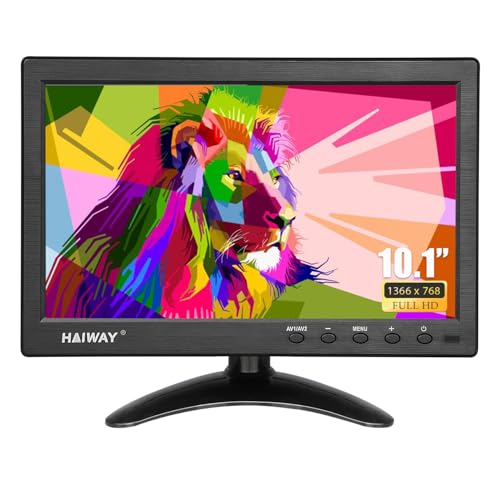
The biggest reason to buy it is simple: it gives you HDMI, VGA, BNC, AV, and USB in one tiny panel, which is exactly what many CCTV and mixed-device setups need.
If you are asking is Haiway 10.1 Inch Security Monitor worth it, the answer is yes for buyers who value compatibility, portability, and straightforward operation more than ultra-sharp resolution.
Scorecard
| Category | Score | Why it matters |
|---|---|---|
| Security monitoring compatibility | 9.0 | Dedicated BNC/AV support makes it a natural fit for CCTV and surveillance gear. |
| Connectivity versatility | 9.0 | HDMI, VGA, BNC, AV, and USB inputs cover a wide range of devices. |
| Display quality | 7.0 | 1366 x 768 resolution is fine for utility use, though not class-leading. |
| Setup convenience | 8.0 | Remote control, built-in speakers, and plug-and-play use make installation easy. |
| Space efficiency | 9.0 | The 10.1-inch footprint is ideal for counters, desks, and tight surveillance stations. |
| Power flexibility | 8.0 | AC/DC adapter support and a vehicle cable add useful deployment options. |
| Everyday usability | 7.0 | Good for light desktop tasks, Pi projects, and media, but not for serious creative work. |
Bottom line: the Haiway 10.1 Inch Security Monitor is best for buyers who want a compact, multi-purpose display that can handle security cameras and light general use without taking up much room.
Key Features and Specifications of Haiway Security Monitor
The Haiway 10.1 Inch Security Monitor is built around a 10.1-inch LCD panel with LED backlighting, a native 1366 x 768 resolution, and a 16:9 aspect ratio.
That resolution is modest by full-size monitor standards, but it is perfectly reasonable for camera feeds, simple desktop tasks, Raspberry Pi projects, and monitor duty in a workshop or vehicle.
| Specification | Detail |
|---|---|
| Brand | Haiway |
| Screen size | 10.1 inches |
| Native resolution | 1366 x 768 |
| Aspect ratio | 16:9 |
| Display type | LED |
| Display technology | LCD |
| Screen finish | Glossy |
| Viewing angle | 178 degrees |
| Brightness | 400 cd/m² |
| Contrast ratio | 400:1 |
| Refresh rate | 60 Hz |
| Pixel pitch | 0.177 |
| Power consumption | 12 watts |
| Voltage | 12 volts |
| Dimensions | 6.5 x 9.92 x 1.3 inches |
| Mount standard | VESA 75 x 75 mm |
| Color screen | Yes |
The feature list is where this monitor becomes especially appealing.
It supports HDMI, VGA, BNC, AV, and USB, which is a very broad mix for such a small screen.
That matters because many security monitors are too limited, forcing buyers to juggle adapters or replace equipment.
Here, the Haiway monitor is designed to fit into older and newer setups alike.
Other useful touches include dual built-in speakers, a remote control, landscape and portrait support, and flexible mounting via VESA 75 x 75 mm.
The stand is adjustable, and the monitor can also work in a wall-mounted position, though the mount is not included.
Those choices make it easier to place the display on a desk, counter, shelf, or security station without much hassle.
From a buyer’s perspective, this is not a flashy display; it is a function-first tool.
That is a strength if your priority is reliable compatibility and easy installation.
Pros and Cons of Haiway Security Monitor
Every good Haiway 10.1 Inch Security Monitor pros and cons discussion should separate practical value from display limitations.
This monitor offers excellent utility, but it is not trying to compete with a modern high-resolution desktop panel.
Pros
- Excellent input compatibility for CCTV, PC, consoles, TV boxes, and Raspberry Pi.
- Compact 10.1-inch size fits tight desks, shelves, and surveillance carts.
- Built-in speakers reduce the need for extra audio accessories.
- Remote control improves source switching and convenience.
- 178° viewing angles help when the monitor is viewed off-center.
- Dual power options make it useful indoors and in mobile setups.
- VESA 75 x 75 support adds flexibility for wall or arm mounting.
Cons
- 1366 x 768 resolution is adequate, but not sharp enough for detailed creative work.
- Glossy screen finish can reflect light in bright rooms.
- VESA mount not included, so wall mounting requires extra hardware.
- Best for utility use rather than color-sensitive editing or premium entertainment.
Verdict on the trade-offs: the benefits are real if you need a small surveillance or multi-device monitor, but buyers who want a polished main monitor should look elsewhere.
Who Should Buy Haiway Security Monitor?
The Haiway 10.1 Inch Security Monitor is best for buyers who care about compatibility and size more than raw display quality.
If you need a dependable screen for a camera system, a Raspberry Pi project, or a basic secondary display, this is a sensible choice.
- CCTV and security users who want a dedicated monitor with BNC/AV support.
- Raspberry Pi owners looking for a compact, easy-to-place display.
- Desk and workshop users who need a small monitor for utility tasks.
- Car or mobile setup users who benefit from dual power options.
- Buyers with limited space who still want multiple input choices.
Who should skip it?
If you need a monitor for photo editing, color work, large spreadsheets, or immersive gaming, the 10.1-inch size and 1366 x 768 resolution will feel limiting.
For those jobs, a larger HDMI monitor with full HD or better is a smarter buy.
Best Uses for CCTV, Raspberry Pi, and Desktop Setups
This is where the Haiway monitor makes the most sense.
As a small CCTV monitor, it is easy to place near a DVR or NVR and view cameras without wasting desk space.
The inclusion of BNC and AV input support is especially important because it keeps compatibility broad for security hardware.
For a Raspberry Pi monitor, the screen size is comfortable for coding dashboards, simple interfaces, and hobby projects.
The 16:9 aspect ratio and 60 Hz refresh rate are fine for general interaction, and the built-in speakers can be useful for basic multimedia or testing.
As a small desktop monitor, the Haiway 10.1 Inch Security Monitor works best as a secondary screen.
It can display system stats, surveillance feeds, chat windows, or a compact media source.
It is not designed to replace a main workstation monitor, but it is very practical when you need a second display with minimal footprint.
Buyer tip: if you already know your device uses HDMI, VGA, BNC, AV, or USB, you are in a much better position to get real value from this screen.
How the HDMI, VGA, BNC, AV, and USB Inputs Work
One of the biggest reasons buyers choose the Haiway 10.1 Inch Security Monitor is its connectivity range.
The monitor does not force you into a single ecosystem, which is a major advantage in security and electronics projects.
- HDMI is the cleanest option for modern devices like PCs, streaming boxes, and many Raspberry Pi setups.
- VGA supports older computers and legacy systems that still show up in industrial and office environments.
- BNC is the key security connection for CCTV and surveillance feeds.
- AV is useful for older video equipment and simple analog sources.
- USB adds extra flexibility depending on the device or media source.
This broad input range is a practical design choice, not just a spec-sheet bullet.
It means the monitor can serve as a replacement display in more situations, which is useful for technicians, installers, and buyers who manage mixed hardware.
Important caution: always confirm that your camera or device output matches one of the supported inputs before purchasing.
Compatibility is the whole point of this monitor, so it is worth checking the connection type first.
Screen Quality, Brightness, and Viewing Angles
The display quality is good for the category, but expectations matter.
The 1366 x 768 panel is fine for camera feeds and simple menus, while the 400 cd/m² brightness helps the screen remain visible in many indoor environments.
For a compact monitor, that brightness level is a meaningful plus.
The 178-degree viewing angle is another practical strength.
On a security desk, in a shop, or in a workshop, you often view the screen from the side rather than straight on.
Wide angles help keep the image readable when the monitor is mounted higher, lower, or slightly off-axis.
The glossy finish is the one notable compromise.
It can make the screen look a little more lively in controlled lighting, but it also means reflections may be more noticeable under bright overhead lights or near windows.
If your setup is in a glare-prone room, this is something to think about.
Overall display verdict: the panel is good for utility work, but buyers hoping for a crisp, premium desktop image should keep their expectations realistic.
Mounting Options and Desk Space Considerations
Space efficiency is one of the strongest reasons to choose this model.
At 6.5 x 9.92 x 1.3 inches, the monitor has a genuinely compact footprint that suits small desks, security stations, counters, and mobile use cases.
It is also lightweight enough to move around without feeling cumbersome.
The adjustable stand helps with everyday placement, and support for landscape and portrait orientation broadens the ways you can use it.
Portrait mode may be especially useful for status panels, narrow camera layouts, or specialized utility dashboards.
Because it supports VESA 75 x 75 mm, the monitor can also be mounted on a compatible arm or wall setup.
That is a smart design choice for surveillance stations or workspaces where desk real estate is limited.
Just remember that the mount itself is not included, so buyers planning a wall installation should budget for that accessory.
Best fit: this is a very good pick if you want a monitor that disappears into the background and does its job without taking over the room.
Remote Control, Speakers, and Everyday Convenience
The convenience features help the Haiway monitor feel complete rather than stripped down.
The remote control makes it easier to switch inputs, adjust settings, or manage the display when it is mounted out of easy reach.
That matters more than many buyers expect, especially for security setups.
The dual built-in speakers are another welcome addition.
They are unlikely to replace a proper desktop audio system, but they are useful for camera audio monitoring, basic media playback, or device testing without adding external speakers.
Combined with plug-and-play behavior, these features make the monitor easy to live with.
You do not need a complex setup process to get value from it, which is a major plus for a category where buyers often want something simple and dependable.
Practical takeaway: the convenience features are not gimmicks; they directly improve day-to-day usability.
Alternatives to Consider
If you are comparing the Haiway 10.1 Inch Security Monitor with other Amazon-friendly options, a few broad alternatives make sense.
- portable HDMI monitor — better if your main priority is a thin, travel-friendly display for laptops or compact computing.
- CCTV security monitor — worth exploring if you want more surveillance-specific models.
- small Raspberry Pi display — a good category to compare if your project is Pi-focused and you do not need BNC input.
- budget 10-inch monitor — useful if you want a similar size but may not need the security-oriented ports.
- multi-input mini monitor — the broadest alternative search if you are comparing features across brands.
If you want the widest compatibility in a tiny screen, the Haiway holds up well.
If you only need HDMI, a simpler portable monitor may be enough.
Is Haiway Security Monitor Worth It?
So, is Haiway 10.1 Inch Security Monitor worth it?
For the right buyer, absolutely.
This is a practical, compact, multi-input monitor that solves real setup problems, especially for CCTV systems and mixed-device environments.
The value comes from the combination of BNC, AV, HDMI, VGA, and USB, plus the small footprint, built-in speakers, remote, and flexible mounting support.
Those design choices make it far more versatile than a basic screen of similar size.
In other words, you are paying for utility and compatibility, not premium panel quality.
That also defines the main drawback.
If you want a monitor for visual precision, bright-room clarity, or high-detail computing, this is not the one.
But if you want a reliable secondary display for surveillance, a compact desktop station, or a Raspberry Pi project, the Haiway 10.1 Inch Security Monitor is a smart buy.
Final recommendation: buy it if you need a small, flexible, easy-to-install monitor and can live with a modest-resolution panel.
Skip it only if your priority is sharper image quality or a larger primary display.