The Vixtan 14-inch Triple Screen Laptop Monitor Extender review is all about portable productivity.
If you want three screens without hauling a full desktop setup, this one makes a strong case.
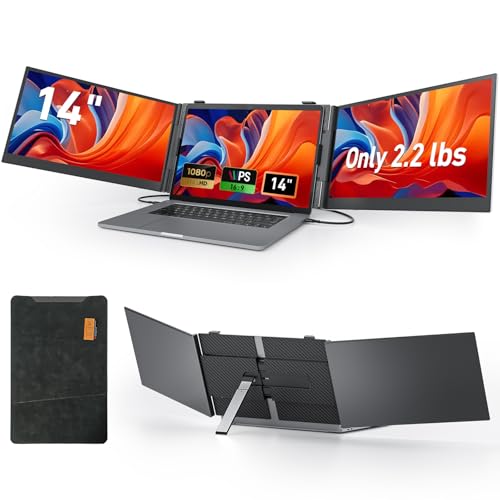
Vixtan Extender Review Summary
If you travel for work, juggle multiple apps, or need a compact mobile workstation, the Vixtan 14-inch Triple Screen Laptop Monitor Extender is built for exactly that use case.
It is especially appealing for remote workers, traders, coders, analysts, and multitaskers who want a faster way to manage windows, reference material, dashboards, and communication tools at the same time.
What stands out most is the balance of triple-screen expansion, portability, and broad compatibility.
The 14-inch IPS panels, 1080p resolution, 300-nit brightness, and 100% sRGB coverage give it a more serious display profile than many cheap laptop extenders, while the 0.18-inch thickness and 2.2 lb weight keep it travel friendly.
The main tradeoff is power: this is not a self-powered monitor, so you need to plan for USB power or an external adapter.
That makes it less carefree than a battery-based portable display, but far more capable as a true productivity tool.
Scorecard
| Category | Score | Why it matters |
|---|---|---|
| Display quality | 8.0/10 | 14-inch IPS, 1080p, 300 nits, 100% sRGB, anti-glare, wide viewing angles. |
| Multi-screen productivity | 9.0/10 | Triple-screen layout is excellent for multitasking, trading, coding, and remote work. |
| Portability | 9.0/10 | Thin, lightweight, and includes a carry bag plus drop-proof case. |
| Compatibility | 8.0/10 | Supports Windows, Mac, Chrome OS, Android, and 13-17 inch laptops. |
| Setup and connectivity | 8.0/10 | Plug-and-play in many setups with Type-C, USB-C to USB-A, HDMI, and H5-T cables. |
| Stability and adjustability | 8.0/10 | Widened aluminum stand with height adjustment and 180-degree rotation. |
| Power requirements | 6.0/10 | No internal battery, so mobile users must plan for power. |
Bottom line: the Vixtan 14-inch Triple Screen Laptop Monitor Extender is a smart buy for people who measure value in workflow speed, not just hardware specs.
It is not the simplest option, but it is one of the more compelling portable triple-screen solutions for buyers who truly need extra workspace.
Key Features and Specifications of Vixtan Extender
The Vixtan Extender is designed like a portable command center rather than a casual display accessory.
Here are the specs and features that matter most to buyers:
| Specification | Details |
|---|---|
| Brand | Vixtan |
| Display size | 14 inches |
| Screen type | IPS panel |
| Resolution | 1920 x 1080 FHD |
| Aspect ratio | 16:9 |
| Brightness | 300 nits |
| Color coverage | 100% sRGB |
| Viewing angle | 178 degrees |
| Screen surface | Glossy with anti-glare treatment |
| Thickness | 0.18 inches |
| Weight | 2.2 lbs |
| Laptop compatibility | 13-17 inch laptops |
| Supported systems | Windows, Mac, Chrome OS, Android, and more |
| Connection types | Type-C, USB-C to USB-A, HDMI, H5-T |
| Power | No internal battery; laptop USB power or external adapter |
| Recommended external adapter | 5V/2A or higher |
- Triple-screen layout for extended, mirrored, and portrait modes.
- Aerospace-grade aluminum construction for a sturdier travel-ready feel.
- Widened aluminum stand with multi-level height adjustment.
- 180-degree horizontal rotation for sharing and repositioning screens.
- Zero-wobble design intended for desk stability.
- Premium drop-proof leather case and carry bag included.
- Plug-and-play operation in many supported setups, with no driver needed in some configurations.
From a buyer’s perspective, these specs point to a product that prioritizes real productivity gains over novelty.
The 14-inch size is a thoughtful middle ground: large enough to be useful, but not so large that the extender becomes awkward on a small desk or in a backpack.
Pros and Cons of Vixtan Extender
Here are the most important Vixtan 14-inch Triple Screen Laptop Monitor Extender pros and cons to weigh before buying.
| Pros | Cons |
|---|---|
| Very portable for a triple-screen setup | Needs external power and has no built-in battery |
| Sharp FHD IPS display with strong color coverage | Mac M1/M2/M3 support may require the H5-T cable and driver steps |
| Excellent for multitasking and productivity workflows | Glossy finish can reflect light in bright rooms |
| Broad OS and laptop compatibility | Triple-screen format may be excessive for casual users |
| Includes useful cables and carry accessories | Setup depends on your laptop’s ports and power output |
| Adjustable and stable stand design | Not a standalone display for people wanting a simple plug-in monitor |
The biggest advantage is that you get a legitimate three-screen workstation in a travel-friendly form.
The biggest drawback is power management, which is common in this category but still important to acknowledge.
Who Should Buy Vixtan Extender?
The Vixtan 14-inch Triple Screen Laptop Monitor Extender is best for buyers who already know they need more screen real estate and want it in a portable format.
It makes the most sense for professionals and power users who can benefit from always-visible reference windows.
- Remote workers who want a mobile desk setup for email, docs, and meetings.
- Traders and analysts who keep charts, watchlists, and news open simultaneously.
- Coders and developers who like code, preview, and debugging tools side by side.
- Designers and content creators who need a portable multi-window workflow.
- Frequent travelers who want a lighter alternative to carrying a full external monitor.
Who should skip it?
Casual users who only check email and browse the web, buyers who want a monitor with its own battery, and anyone who prefers a single simple portable screen instead of a more complex multi-panel setup.
How the Triple-Screen Layout Changes Workflow
This is the section where the Vixtan Extender earns its keep.
A triple-screen setup changes the way you work because it reduces window switching.
Instead of bouncing between tabs, you can keep your core tasks visible at once.
For example, a remote worker can keep a video call on one panel, a document on the laptop screen, and a Slack or email feed on the other side.
A trader can watch charts, positions, and market news together.
A coder can keep code, documentation, and terminal output open without constantly rearranging windows.
That kind of setup is where the Vixtan Extender feels less like an accessory and more like a workflow upgrade.
The product’s support for extended, mirrored, and portrait modes also matters.
Extended mode is the obvious productivity choice, mirrored mode helps with presentations or sharing, and portrait orientation can be useful for long documents, chat tools, or coding.
That flexibility gives it an edge over basic portable monitors that only act as one extra panel.
Decision factor: if your workday is driven by multitasking, this design choice has real value.
If you only need a second screen occasionally, the triple-screen layout may be more than you need.
Portability and Travel Use
The portability story is one of the main reasons the Vixtan 14-inch Triple Screen Laptop Monitor Extender stands out.
At 0.18 inches thin and 2.2 lbs, it is clearly meant to travel, especially compared with a full-size monitor and stand.
The included carry bag and drop-proof leather case improve its practical value, because a multi-screen accessory is only useful if you can safely move it.
The aluminum build also helps it feel more premium and less fragile than some plastic-based alternatives.
That said, portability does not mean friction-free.
Since it has no internal battery, you may still need to manage a power adapter or find enough laptop power output.
For airport lounges, hotel rooms, coworking spaces, and client visits, that extra planning is manageable.
For true grab-and-go use, a battery-powered portable monitor can be simpler.
Best fit: buyers who want a mobile workstation and do not mind carrying cables.
Less ideal: users who want a single-lightweight screen with minimal setup.
Mac, Windows, and Chromebook Compatibility
Compatibility is a major buying factor for monitor extenders, and the Vixtan Extender does well here.
It supports Windows, Mac, Chrome OS, Android, and more, and it is designed for laptops in the 13 to 17 inch range.
That broad support makes it attractive for people who switch between business laptops, home machines, and personal devices.
The included Type-C, USB-C to USB-A, HDMI, and H5-T cables also help reduce the chance that you will need to buy extra wiring just to get started.
Mac users should pay close attention, though.
The brief notes support for M1, M2, and M3 machines via the included H5-T cable, but that path requires a driver.
That is not unusual in the portable display category, but it does mean Mac buyers should be comfortable with a slightly more involved setup than pure plug-and-play.
Buying advice: if you use multiple operating systems, this product is appealing.
If you want dead-simple Apple setup with no driver friction, you may prefer a different class of monitor.
Brightness, Color, and Viewing Angles
Display quality is a key reason to consider the Vixtan Extender over cheaper attachments.
The 14-inch IPS panel with 1920 x 1080 resolution should look sharp at normal working distance, and the 300-nit brightness is adequate for indoor productivity environments.
The 100% sRGB color gamut is especially useful for buyers who care about more consistent color than a basic office display can offer.
It will not replace a pro-grade reference monitor, but it is more than enough for general creative work, content review, UI tasks, and media consumption while traveling.
The 178-degree viewing angle is another practical advantage, particularly in a shared workspace or when the screen is slightly offset from your seating position.
The anti-glare treatment helps too, though the glossy surface can still catch reflections in bright rooms or near windows.
Good for: indoor offices, hotels, coworking spaces, and home desks.
Potential drawback: if you often work outdoors or under harsh lighting, a matte display may be easier to live with.
What’s Included in the Box
Accessories matter in this category because they determine how quickly you can start using the extender.
The Vixtan package is strong on practical extras.
- Vixtan 14-inch Triple Screen Laptop Monitor Extender
- Type-C cables
- USB-C to USB-A cable
- HDMI cable
- H5-T cable
- Carry bag
- Premium drop-proof leather case
This is a helpful bundle because it reduces accessory shopping after purchase.
For many buyers, the value is not just the monitor extender itself, but the fact that the complete kit is ready for travel and storage.
Alternatives to Consider Before You Buy
The Vixtan 14-inch Triple Screen Laptop Monitor Extender is compelling, but it is not the only route to extra productivity.
Depending on your workflow, one of these alternatives may fit better:
- single portable USB-C monitor — better if you want simpler setup and lighter carry weight.
- dual-screen laptop extender — a middle ground if triple screens feel like too much.
- travel monitor with built-in battery — better for users who need standalone portability.
- higher-brightness portable IPS monitor — useful if visibility in bright spaces is your priority.
- docking station plus external monitor — best for desk-first users who do not travel much.
Compared with these options, the Vixtan Extender’s biggest strength is its all-in-one mobile triple-screen workflow.
Its biggest weakness is that it requires more power planning than a battery-powered portable monitor.
Vixtan Extender Review: Design and Everyday Usability
In day-to-day use, the design choices make a lot of sense.
The widened aluminum stand and zero-wobble design are not just marketing language; they address the practical problem of keeping multiple screens stable on a laptop-sized workspace.
If a triple-screen accessory shakes or slides, it becomes annoying fast.
Vixtan appears to have taken that problem seriously.
The 180-degree horizontal rotation adds another layer of flexibility.
That is useful when you need to share a screen with a colleague, present information, or reposition displays in a cramped environment.
The multi-level height adjustment also helps the extender adapt to different laptop sizes and desk setups.
Still, a buyer should think carefully about ergonomics.
A triple-screen attachment is naturally larger and more complex than a single portable monitor.
If you work in tight spaces or constantly move between short sessions, it may feel cumbersome.
But if your workday is long and window-heavy, the added structure is a genuine benefit rather than a burden.
Practical verdict: the design is best suited to productivity-first buyers who value function over simplicity.
Is Vixtan Extender Worth It?
Yes, for the right buyer, the Vixtan 14-inch Triple Screen Laptop Monitor Extender is worth it. It is one of those products that makes immediate sense once you know your workflow is bottlenecked by screen space.
If you travel frequently but still need a serious multi-monitor environment, this extender delivers a thoughtful mix of display quality, portability, and accessory support.
The strongest reasons to buy are clear: triple-screen productivity, lightweight travel-friendly construction, broad compatibility, and useful display specs.
The main reasons to hesitate are also clear: no built-in battery, possible Mac setup friction, and a form factor that may be too much for casual users.
That makes this a highly targeted product, not a universal one.
If you are comparing portable monitors, the Vixtan Extender is best for buyers who want a complete mobile workstation upgrade rather than just a second screen.
It is especially smart for remote professionals, traders, developers, and frequent travelers who will actually use all three panels.
Final buying advice: choose the Vixtan 14-inch Triple Screen Laptop Monitor Extender if you want maximum portable productivity and are comfortable managing power and compatibility details.
If you want the simplest possible setup, a single portable monitor or battery-powered alternative may be the better choice.